
How to Help Your Sales Team Find the Right Contacts
Most sales teams don't have a contact-finding problem.
They have a right-contact problem.
Forrester found that the average B2B purchase involves 13 people spanning at least 2 departments, according to Forrester's 2024 State of Business Buying report, which means one verified email address rarely moves a deal forward.
This guide gives you a five-step workflow to find, validate, and prioritize the contacts who actually influence a purchase, plus templates for role mapping, vendor evaluation, and pre-outreach checks.
If your team is still buying static lists, it's time to rethink your sales tech stack around signal-based discovery instead.

Skip The Research, Apollo Finds Buyers Fast
Sick of burning hours manually researching leads and chasing bad emails? Apollo hands you verified contacts instantly with 98% email accuracy, so reps sell instead of digging. Stop guessing which prospects are real.
Start Free with Apollo →Key Takeaways
- A single decision-maker isn't enough. Buying groups average 13 people across 2+ departments, so your contact search needs to cover champions, users, finance, procurement, legal, and security.
- Volume without relevance backfires. Buyers actively avoid vendors who send irrelevant outreach, so validate and prioritize contacts before you reach out.
- Multi-threading correlates with better win rates. Reaching two or more additional personas per account is linked to notably stronger quota attainment.
- Data quality is the bottleneck, not tool count. Sales reps spend the bulk of their week on non-selling tasks, and most don't fully trust their own contact data.
- Privacy operations now matter as much as data accuracy. New state deletion requirements mean your contact source needs suppression and opt-out handling built in.
What Does It Mean To Help A Sales Team Find Contacts?
Helping a sales team find contacts means giving reps a repeatable way to identify every relevant person in a buying group, verify their role and reachability, and route that information into the CRM they already use. It is not the same as buying a list of emails.
A contact list gives you names; a contact-finding system gives you the right names, at the right company, at the right time, with enough context to personalize outreach.
This distinction matters because Gartner's 2024 survey of 632 B2B buyers found that 73% actively avoid suppliers that send irrelevant outreach. Volume alone no longer works. Sales, RevOps, and marketing all need the same underlying data to avoid duplicate, conflicting, or outdated contact records.
How Do You Build A Five-Step Contact-Finding Workflow?
You build a contact-finding workflow by defining roles, discovering candidates, validating their data, prioritizing by relevance, and activating them inside your CRM. Each step reduces wasted outreach and improves the odds that your message reaches someone who can actually act on it.
- Define roles. Map the buying committee before you search: economic buyer, champion, end user, technical evaluator, procurement, legal, and security.
- Discover candidates. Search by title, department, and seniority using firmographic and org-chart filters rather than a single job title.
- Validate. Confirm email deliverability, current employer, and phone accuracy before the contact enters a sequence.
- Prioritize. Rank contacts by intent signals, job changes, hiring activity, and account fit, not alphabetically.
- Activate in CRM. Push validated, enriched records directly into your CRM and sequencing tool so reps work from one clean source of truth.
Struggling to find qualified leads across an entire buying group? Search Apollo's 240M+ contacts with 65+ filters to build a complete role map in minutes instead of days.
How Do You Map A Buying Committee By Role?
You map a buying committee by identifying the people who fill seven recurring roles in most B2B deals: champion, end user, economic buyer, finance, procurement, legal, and security or IT. Missing any one of these roles is a common reason deals stall in late-stage review.
| Role | What They Care About | Common Blocker If Missed |
|---|---|---|
| Champion | Internal credibility, solving a visible problem | No internal advocate to push the deal |
| End User | Daily usability, adoption friction | Poor adoption after signing |
| Economic Buyer | Budget, ROI, business case | Deal stalls at approval |
| Finance | Cost justification, contract terms | Delayed or rejected budget approval |
| Procurement | Vendor terms, pricing negotiation | Contract renegotiation loops |
| Legal | Data terms, liability, compliance | Redlines that stall signature |
| Security/IT | Data handling, integration risk | Security review kills the deal |
According to 6sense's 2026 State of the BDR report, reaching two additional personas beyond the primary contact is associated with roughly 11 points higher quota attainment. This is why role mapping, not just email finding, should be the first step in your workflow.

How Do SDRs And AEs Prioritize Which Contacts To Reach First?
SDRs and AEs prioritize contacts by combining role relevance with timing signals like job changes, hiring surges, funding events, and website or product activity.
A validated email for the wrong person at the wrong time is still a wasted touch.
For SDRs booking meetings, this means checking intent signals before sending a first message rather than working a list top to bottom.
For Account Executives managing multi-stakeholder deals, this means tracking which roles from the table above are still unaccounted for in an open opportunity, then targeting discovery specifically toward those gaps.
A simple pre-outreach relevance checklist helps here:
- Does this contact hold a role tied to an open gap in the buying committee?
- Is there a recent trigger (role change, hiring, funding, product signal) in the last 90 days?
- Has this contact's email and phone been validated in the past quarter?
- Does the message reference something specific to their role or company, not a generic template?
Spending hours on manual outreach sequencing across a dozen stakeholders? Automate multi-channel sequences with Apollo's sales engagement platform so reps spend more time selling and less time researching.
Spot Sales-Ready Buyers Before Rivals
Marketing leads going cold before sales ever calls? Apollo surfaces buying signals so reps engage prospects at the exact moment they're ready to talk. Built-In saw a 10% win rate lift using Apollo's scoring.
Start Free with Apollo →How Do You Validate Contact Data Before Outreach?
You validate contact data by checking three things before a record enters a sequence: current employer, deliverable email status, and phone accuracy. Skipping validation is one of the biggest reasons outreach underperforms even when volume is high.
According to RevOps Coop's 2025 State of RevOps Survey, 71% of RevOps professionals say poor data quality negatively impacts their team's ability to execute go-to-market strategies. That's not a sales problem alone. It's a shared data hygiene problem across sales, marketing, and RevOps.
Practical validation steps:
- Verify email deliverability at the point of enrichment, not after a bounce.
- Cross-check job title and employer against a recent data refresh, not a static list purchased months ago.
- Route validated records automatically into your CRM to prevent reps from working stale copies.
Tired of dirty data slowing down your pipeline? Start free with Apollo's data enrichment tools to keep contact records current without manual cleanup.
How Do You Evaluate A Sales Contact Database Vendor?
You evaluate a contact database vendor by scoring it on more than raw record count: accuracy, recency, sourcing transparency, opt-out handling, CRM fit, and cost per verified conversation. Database size is the easiest metric to market and the least useful one for predicting outreach performance.
| Evaluation Criteria | Question To Ask The Vendor |
|---|---|
| Accuracy | How is email and phone accuracy measured and reported? |
| Recency | How often are records refreshed or re-verified? |
| Sourcing | Can the vendor explain where contact data originates? |
| Opt-outs | How are suppression and deletion requests processed? |
| CRM Fit | Does enrichment sync natively or require middleware? |
| Cost Per Conversation | What's the effective cost per validated, reachable contact? |
Salesforce reported that sales reps spend 70% of their time on non-selling tasks, and only 35% of sales professionals fully trust their organization's data. A vendor scorecard like this prevents you from trading one data quality problem for another. Consolidating discovery, enrichment, and outreach into one contact enrichment workflow also cuts the number of tools your RevOps team has to maintain.
What Privacy Operations Should You Handle When Sourcing Contacts?
You should handle four privacy operations tasks when sourcing contacts: documenting where data comes from, processing opt-out requests, suppressing deleted records across every connected system, and keeping an audit trail. This isn't optional anymore; it's an operational requirement.
State-level deletion frameworks are expanding fast. By mid-2025, 19 U.S. states had comprehensive privacy laws in effect, up from just 5 entering 2024. Practical steps for sales and RevOps teams:
- Confirm your data provider documents data provenance, not just accuracy claims.
- Ask how deletion requests propagate to your CRM and sequencing tool, not just the vendor's database.
- Maintain suppression lists that sync automatically so a deleted contact doesn't resurface in a future import.
- Log outreach and consent activity so you can respond to a request quickly if one comes in.
What Are The Most Common FAQs About Finding Sales Contacts?
How Do You Find Someone's Work Email?
You find a work email by combining name and company domain with a verified enrichment tool rather than guessing common formats. Guessed emails (like first.last@company.com) fail validation checks and hurt sender reputation when they bounce.
How Do You Map A Buying Committee For A Complex Deal?
You map a buying committee by identifying who fills each of the seven roles covered above, then filling gaps through targeted searches by title and department at the target account, cross-referenced with org-chart or reporting-line data where available.
How Do You Validate B2B Contact Data At Scale?
You validate B2B contact data at scale by automating email and phone verification at the point of enrichment, then re-checking records on a regular cadence rather than relying on a one-time list purchase.
How Does CRM Enrichment Reduce Manual Research?
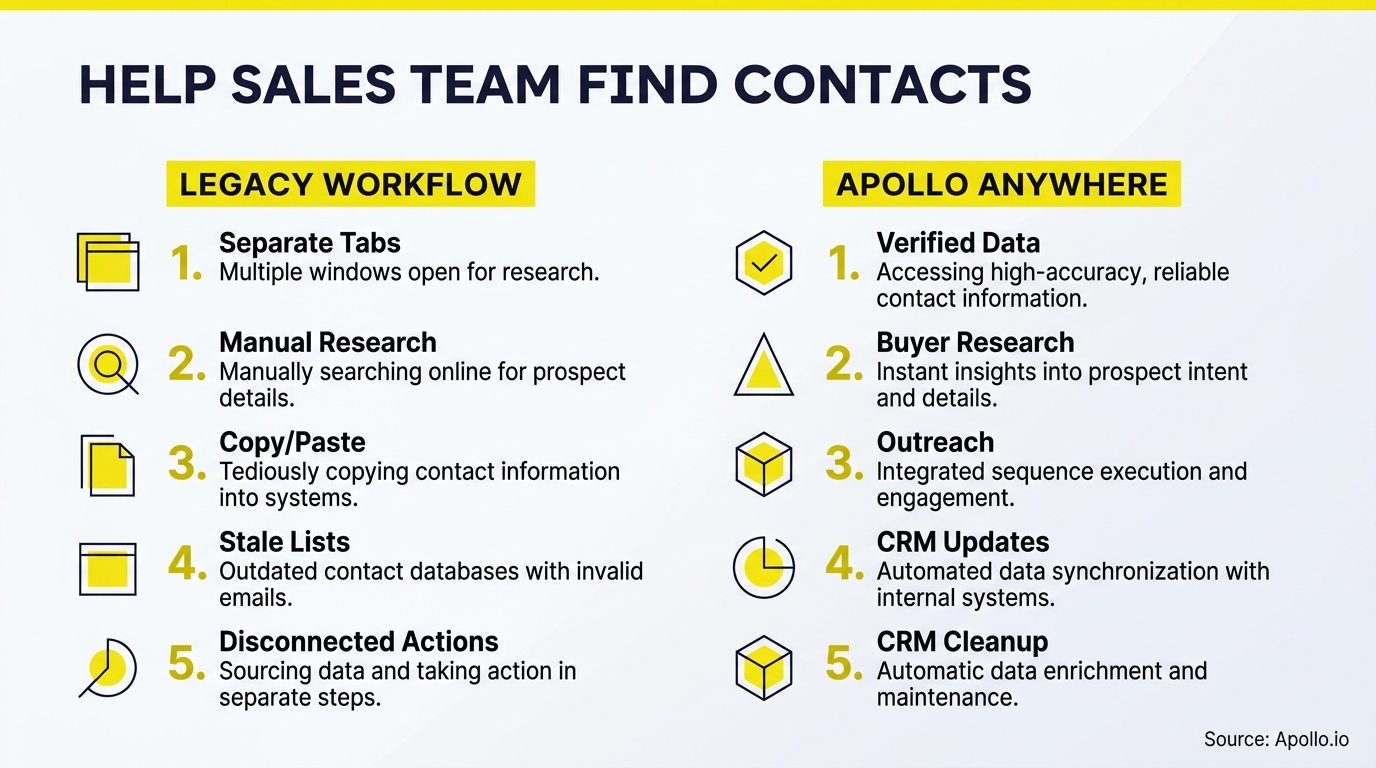
CRM enrichment reduces manual research by automatically appending verified contact and firmographic data directly to existing CRM records, so reps don't have to manually search, copy, and paste information between tools. Pairing enrichment with a sales analytics view also helps RevOps track which enriched contacts actually convert.

Conclusion: Build A Contact-Finding System, Not A Bigger List
The teams winning more deals in 2026 aren't the ones with the biggest contact database. They're the ones with a repeatable process for mapping buying committees, validating data before outreach, and prioritizing the contacts most likely to move a deal forward. Filipe Brigas' team at SafetyWing used this kind of consolidated approach to scale outbound past $7M, combining cold calling and automation instead of juggling separate point tools.
Apollo brings contact discovery, validation, enrichment, and multi-channel outreach into one workspace, so your sales and RevOps teams stop stitching together separate tools for research and execution. As Predictable Revenue put it: "We reduced the complexity of three tools into one."
Start Your Free Trial and give your team one system to find, validate, and act on the contacts who actually move deals forward.
Prove ROI Fast, Scale Without New Hires
Struggling to justify tool spend before the next budget review? Apollo replaces manual outreach with automated workflows your whole team can run at scale. Leadium tripled annual revenue after automating outbound and follow-up.
Start Free with Apollo →Don't miss these
Sales
Inbound vs Outbound Marketing: Which Strategy Wins?
Sales
What Is a Sales Funnel? The Non-Linear Revenue Framework for 2026
Sales
What Is a Go-to-Market Strategy? The 2026 GTM Playbook
See Apollo in action
We'd love to show how Apollo can help you sell better.
By submitting this form, you will receive information, tips, and promotions from Apollo. To learn more, see our Privacy Statement.
4.7/5 based on 9,690 reviews
