How to Use the Apollo Agent: 5 Prompts to Go From ICP to Pipeline

Finding leads with AI is easy. Getting a list you can actually trust, prioritize, and act on is another story.
General-purpose agents can make assumptions about your ideal customer, miss prospects that aren't in traditional sales databases, and return contacts with unverified information. And even when the list looks promising, there's still work to do before you can start reaching out.
Apollo's agent now handles that whole job from inside Claude, ChatGPT, or whatever agent you use. Below are the five prompts we use to go from building a list to scheduling emails to an automated workflow that refills the pipeline every Monday. Copy each one into your agent and try them yourself!
But first...
How Apollo's agent works
When you ask your agent for leads, it can now hand the whole job to Apollo's agent. Apollo's agent knows Apollo's filters and data better than any general-purpose agent, so it builds the search, tries more than one approach, and checks the results before handing them back.
If the database doesn't have the answer, it looks further on its own: Google Maps for local businesses (like car dealerships in Detroit), online directories when you name a specific list (like fintechs in Saudi Arabia's CMA directory), and AI research for criteria no filter covers (like whether a company offers a free trial on its website).
Apollo's agent is available on every plan, and you can explore the leads it finds for free. To save contacts or add them to sequences and workflows, you'll need a Professional or Organization plan.
Before you start
You'll need to do two quick things:
1. Connect Apollo to your AI agent. Search your agent's connector marketplace for Apollo and follow the instructions to connect. You only sign in once. Apollo is listed in most agents' connector directories, and you'll find quick links for Claude and ChatGPT below.
2. Set up your Context Center in Apollo. Your Context Center tells Apollo what you sell, who your ideal customers are, and which buyers you're trying to reach. The prompts below use that information to find prospects that fit your business.
Not sure whether your Context Center is ready? Ask your agent to help you improve it with this prompt:
Review my Apollo Context Center and tell me what's missing or too generic. Ask me a few questions to fill in the gaps, then show me the suggested updates before saving anything.Finally, run all five prompts in the same conversation, since each builds on the last. And give your agent a few minutes to complete each task. It's doing more than a typical search, so some steps may take a little longer.
Now for the prompts.
1. Find verified prospects that match your ICP
Most agent-built lists look fine at a glance. The problems show up later: companies that aren't a fit, emails that bounce, duplicates of contacts you've already saved in Apollo.
This prompt sets the rules up front: one decision maker per company, nobody already in your account, verified emails only, and a credit cap. And notice what you don't have to specify: job titles, industries, or company sizes. Apollo's agent pulls your ICP from the Context Center and builds the search itself.
What to expect: a credit estimate to approve before anything is spent, then a saved list with a reason each person fits.
Find 10 decision makers matching my saved ICP, one per company, not already in my account, who already have a verified email. Use Apollo-only verification, under 20 credits. Save them to a new list named after the ICP and today's date. If any are already in my account, replace them so the list has 10. Then read the list back and show me each person's name, company, email, and why they fit.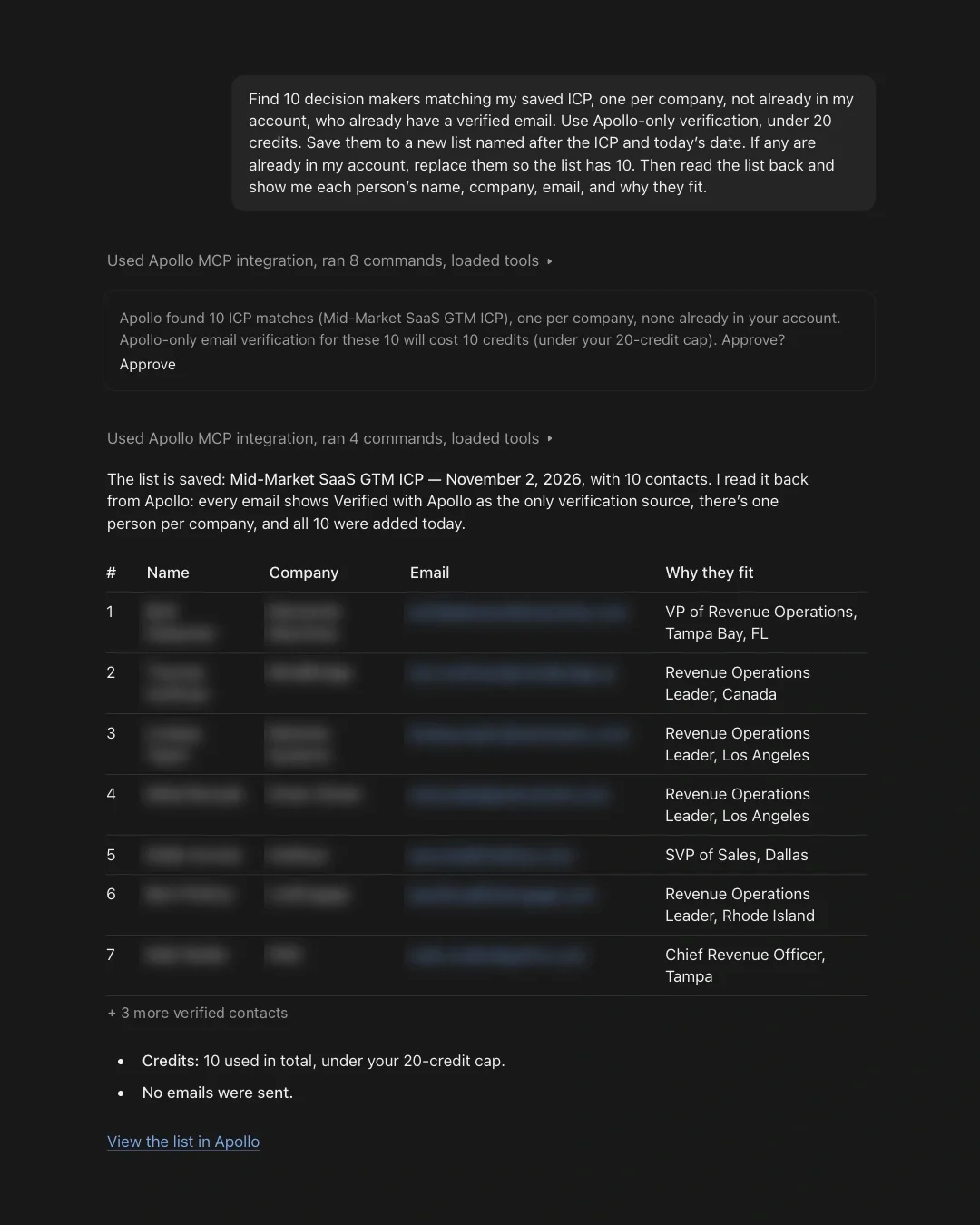
2. Rank them by who's most likely to respond
This prompt has Apollo's agent score every contact based on the buying signals in your ICP: recent funding, a new leader in the role, or growth in the team you sell to. It saves each score to the contact in Apollo, so the ranking doesn't disappear when the chat ends.
Treat these three signals as a starting point. Swap in the ones you've seen predict a great fit for your business, like roles they're hiring for, a specific tool in their stack, or expansion into a new region. Add them to your ICP in the Context Center so every future run scores on them too.
What to expect: the credit cost to approve first, then a score on every contact and the top 3 with the signal behind each.
Rank every contact on the list "[your list name]" by likelihood to respond, using ICP buying signals like recent funding, a new leader in the role, or growth in the team I'd sell to. Save each score and its signal on the contact, then read them back from the list and confirm every contact was scored. Show me the top 3 with the signal behind each, and get my OK on credits before spending.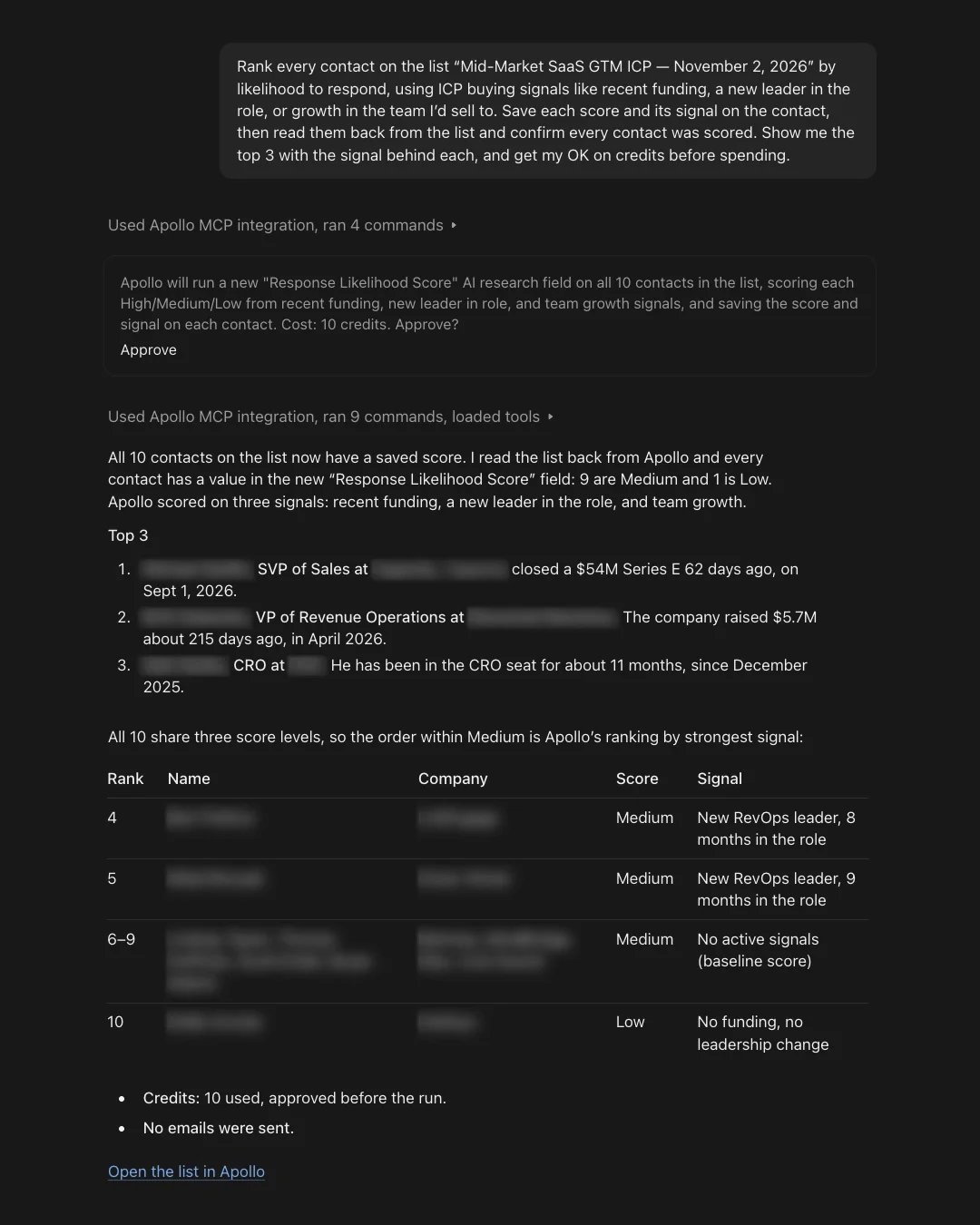
3. Write a cold email for each top prospect
Here's where AI outreach often falls short: dropping someone's name and job title into a generic template and calling it personalization. They read like every other email in the inbox, so the person has no reason to reply.
This prompt has your agent confirm each person is still in the role, then it builds each email on one public fact. It also rules out quoting Apollo's internal data and mentioning website visits, since nobody wants to hear "I noticed you were on our pricing page."
Since you're working in your own AI agent, it can use what it already knows about your business and writing style to make the emails feel more personal. And you can review and refine every draft right in the conversation before sending anything to Apollo.
What to expect: three drafts under 100 words, each with a subject line and the public fact it's built on.
Pick the 3 best prospects from that list, confirm each is still in the role, and write a cold email for each (subject line, under 100 words) built on one public fact about them or their company. Don't quote Apollo's internal data like team sizes or growth rates, and don't mention website visits. Show me the drafts. Don't save, send, or spend credits.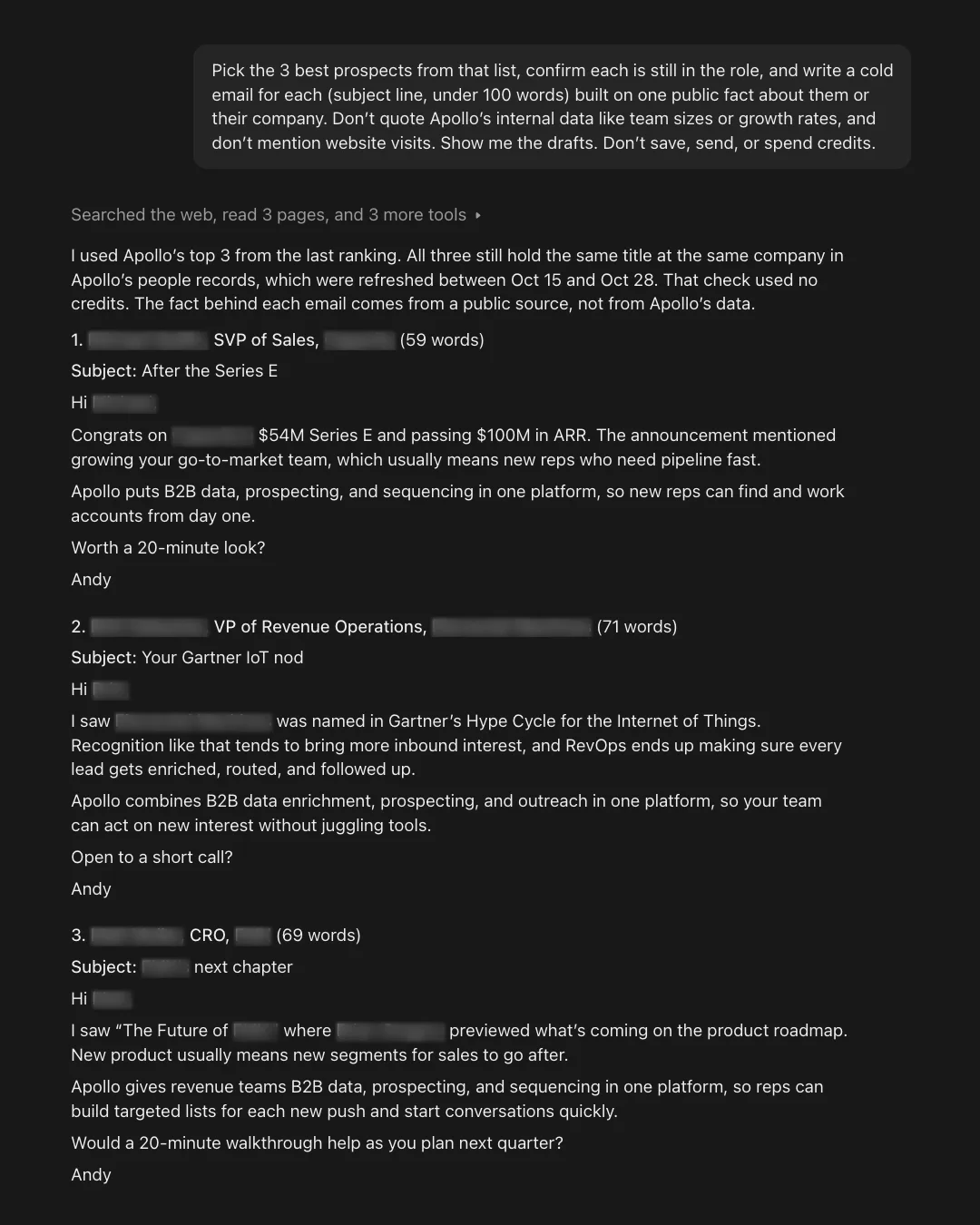
4. Send each draft through its own sequence
Writing personalized emails is one thing. Getting them into the right sequences, scheduled, and ready to send is another.
This prompt takes care of that setup for you. It saves the contacts, verifies their emails, and creates a separate sequence for each prospect using the exact draft you approved. Then it schedules the emails for tomorrow morning, so they're ready to go without you having to open Apollo.
What to expect: one approval step listing the sender, sequence names, and send window, then the time each email is scheduled to go out.
These look good. Save these 3 contacts in Apollo and check their emails. Then, for each person, create an Apollo sequence called "Agent outreach [today's date] - [their name]" with one automatic email step that sends their draft above exactly as written. Enroll each person in their own sequence, schedule the email for tomorrow morning, turn the sequences on, and tell me when each email is scheduled.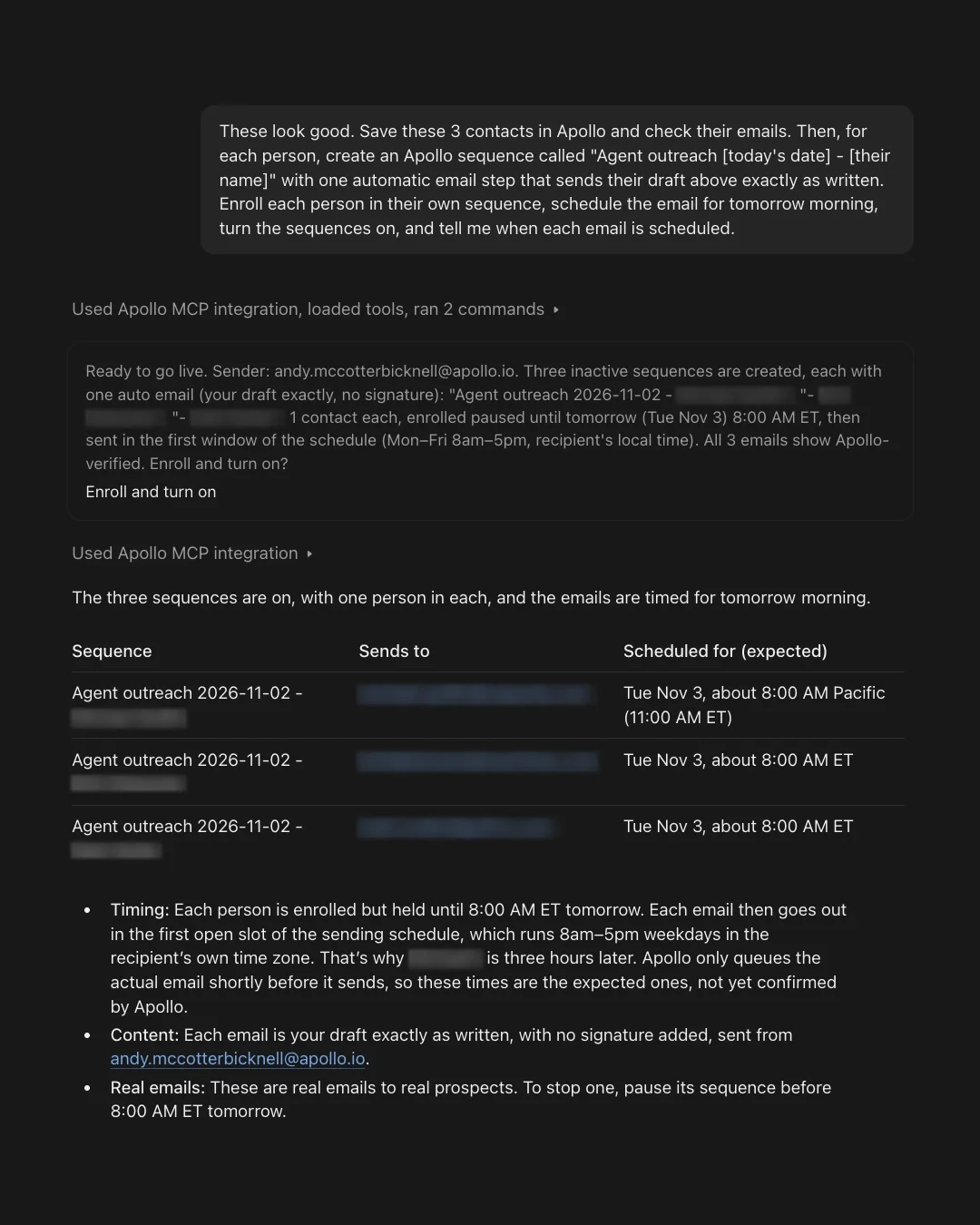
5. Automate it every Monday
You've found your best prospects, personalized your outreach, and scheduled your emails. Now imagine having Apollo do the prospecting and sequence enrollment automatically every week.
This prompt turns the process into a recurring workflow, with guardrails to keep it focused and predictable: 10 prospects max, director level or above, one per company, and a limit of 30 credits per run.
What to expect: a workflow saved (switched off), a summary of exactly what it will do, and links to edit any step in Apollo before you turn it on.
Use Apollo's agent to build a workflow that runs every Monday at 9am my time: search Apollo's database for up to 10 net-new people who match the ideal customer profile in my Apollo Context Center, including the buyer roles it lists (director level or above, one per company). Use Apollo's standard filters, not AI filters. Check their emails and add them to the sequence we just made. Skip anyone who's already been in one of my sequences. Keep each weekly run under 30 credits, and show me the workflow before you turn it on.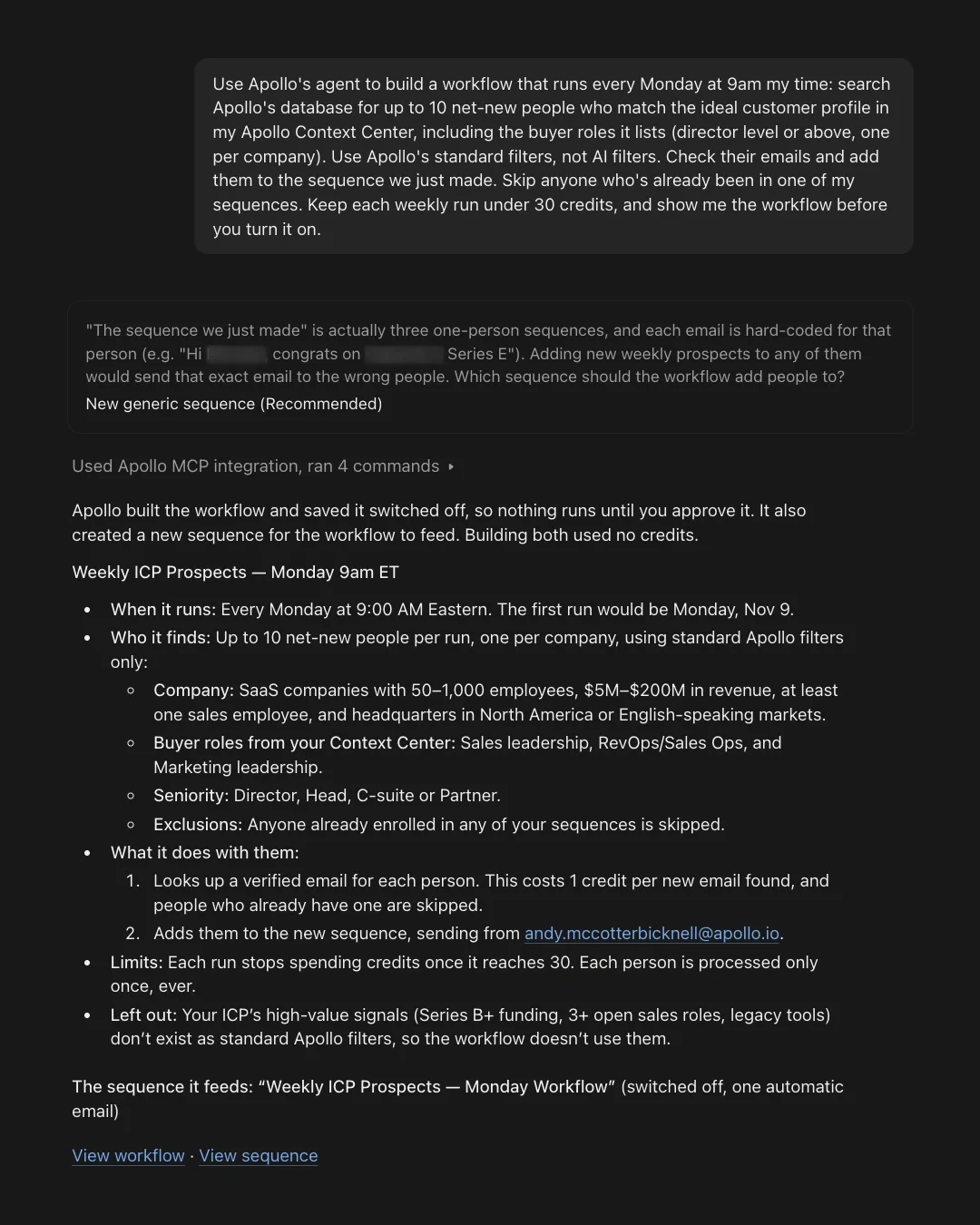
From one prompt to a pipeline that runs itself
These five prompts are just a starting point. Customize them for your business, or simply tell your agent what you want to accomplish and let Apollo help figure out the steps.
Because with Apollo, your AI agent doesn't just help you plan your GTM work. It can help get it done.
Ready to give it a try? Connect Apollo to your agent, set up your Context Center, and start with prompt 1.
Share this post
Start using Apollo today
Start your free trial with Apollo today—then use these resources to guide you through every step of the process.
Start using Apollo today
Start your free trial with Apollo today—then use these resources to guide you through every step of the process.
or
By signing up, I agree to Apollo's Terms of Service and Privacy Policy.
Continue Learning
Explore these handpicked resources to deepen your understanding of AI-powered GTM
The Top 10 Use Cases of Apollo MCP (Based on 42K Queries)
Apollo MCP is changing how GTM teams work inside AI. Based on 42,000 real queries, we've broken down the top workflows users are running in ChatGPT, Claude, and Perplexity.
Apollo is now available in ChatGPT
Search prospects, enrich contacts, add to sequences, and analyze performance — without leaving ChatGPT. The full outbound loop, now in one conversation.
From Intent Signals to Booked Meetings: A Smarter Outbound Playbook for 2026
Outbound should feel less like cold outreach and more like perfect timing. Here's how to get there with intent signals, AI-supported outreach, and deliverability all in one workflow.
How Accord Turned Stakeholder Mapping Into a Built-In Sales Motion
What if stakeholder mapping didn’t require hours of manual research? See how Accord uses Apollo to help reps multithread every deal, faster.