InsightsSalesWhat Is a Lead Gen Extension and How Do You Choose the Right One?
What Is a Lead Gen Extension and How Do You Choose the Right One?
November 26, 2026
Written by The Apollo Team
Listen to article16:17 minutes
A lead gen extension is a browser add-on that surfaces contact and company data on the pages you already visit, then pushes verified records into your CRM or outreach workflow. It supports contact discovery (finding the right people). It is not demand generation (creating market interest). Teams that treat it as a workflow tool, not a lead-volume machine, get better results. For deeper context on that split, see demand generation vs lead generation.
Sales reps already lose most of their week to admin. Salesforce's 2024 State of Sales research found that sales representatives spend 70% of their time on non-selling tasks.
A good extension earns its place by cutting research, copy-paste, and CRM-update time, not by dumping more contacts into a list.
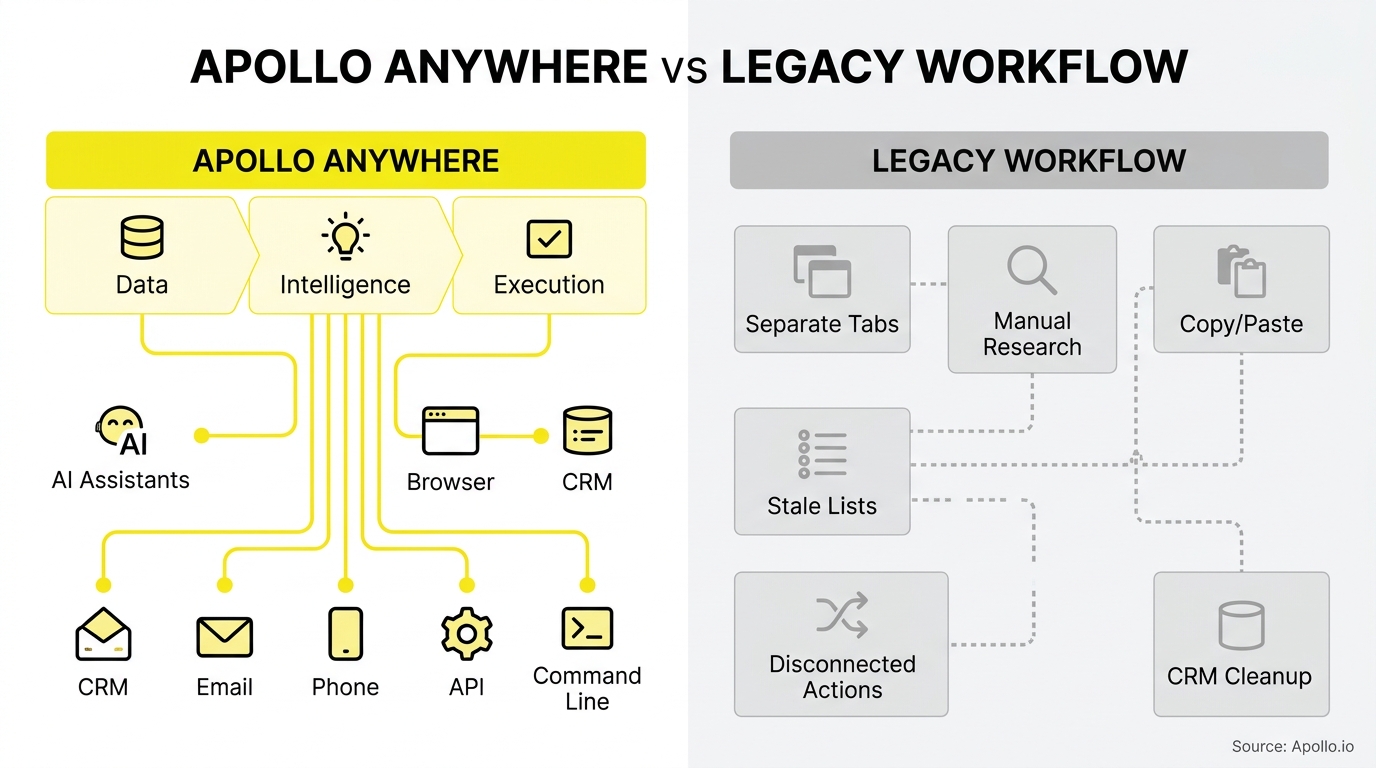
Diagram comparing a unified lead generation workflow against a fragmented, multi-step legacy process.
MANUAL RESEARCH TIME WASTE
Apollo Gives Reps Their Selling Hours Back
Tired of reps burning hours on manual lead research and data entry? Apollo finds verified business contacts in seconds, with 98% email accuracy. Spend your day on outreach and closing, not copy-pasting. Start accelerating your pipeline today.
A lead gen extension finds and captures contacts in the browser. It does not create demand.
Judge extensions on verified yield, duplicate handling, CRM sync, and time saved, not raw contact counts.
Only 35% of sales professionals completely trusted their organization's data accuracy in Salesforce's 2024 research, so verification and source transparency matter.
Privacy and suppression handling are now buying criteria, not afterthoughts.
Run a short, measured pilot before committing to any vendor.
"Having Apollo and having everything be in one system was a game changer, for BDRs specifically."
What Does a Lead Gen Extension Actually Do?
A lead gen extension reads the page you are viewing (a company site, a professional profile, a news article), matches it to a database, and returns contact details and account context without leaving the tab. The best ones also let you add the person to a list, sequence, or CRM record in one click.
According to Enginy, Chrome extensions such as Apollo, ZoomInfo, Lusha, and Surfe are used by SDRs and RevOps teams to scrape, verify, and pipe contact and account data directly into CRMs. That description captures the core job: capture, verify, route.
Contact Discovery vs. Demand Generation: What Is the Difference?
Contact discovery finds named people at target accounts. Demand generation builds awareness and buying intent across a market.
An extension helps with the first. It does not replace content, events, or paid programs.
Dimension
Contact Discovery (Extension)
Demand Generation
Primary goal
Find and reach specific buyers
Create market interest
Where it happens
Browser, CRM, sequences
Content, ads, events, SEO
Typical owner
SDRs, BDRs, AEs, RevOps
Marketing
Success measure
Verified contacts, replies, meetings
Pipeline sourced, brand reach
Which Type of Lead Gen Extension Fits Which Use Case?
The right extension depends on the job. Contact lookup tools suit quick prospecting.
Ad lead form extensions are a different category entirely.
Extension Type
Best For
Primary Users
Watch Out For
Contact finder
One-off lookups on profiles and sites
SDRs, founders
Duplicates and unverified emails
Prospecting and enrichment
Lists, CRM capture, and field updates
SDRs, AEs, RevOps
Field mapping and sync errors
Account intelligence
Prioritizing accounts by signals
AEs, sales leaders
Needs a connected platform to act on signals
Ad lead form extension
Capturing leads inside paid ads
Demand gen, paid media
Not a browser prospecting tool
Note the last row. "Lead form extension" also refers to native forms inside ad platforms. As PPC Land describes, these are native in-platform forms embedded directly into Google Ads, and YouTube ads that let prospects convert without visiting a landing page. That is a paid-media tactic. This guide focuses on browser extensions for prospecting.
How Do You Install a Lead Gen Extension?
Install from your browser's official extension store, then sign in and grant only the permissions you need. Most prospecting extensions follow the same path.
Open the official store. Use the Chrome Web Store or Microsoft Edge Add-ons page for the vendor you chose. Avoid third-party download sites.
Add the extension and pin it. Pinning keeps it one click away in your toolbar.
Sign in and review permissions. Check which sites it can read and what it can change. Limit access to what your workflow requires.
Connect your CRM and email. Authorize Salesforce, HubSpot, or your inbox so captured records can sync.
Set defaults. Choose the list, sequence, or CRM owner that new contacts should land in.
Struggling to find qualified leads without switching tabs all day? Search Apollo's database of 240M+ people and use the extension to capture contacts as you browse.
What Should You Look for When Choosing a Lead Gen Extension?
Prioritize data quality, CRM continuity, relevance, and privacy over raw contact volume. Contact volume is easy to advertise and hard to verify. Workflow fit is what you will feel every day.
Why Does Relevance Beat Volume?
More outreach can hurt you. Gartner's June 2025 publication reported that 73% of B2B buyers actively avoid suppliers sending irrelevant outreach, based on 632 buyers surveyed in August and September 2024.
An extension that helps you target the right role, account, and moment beats one that simply extracts more records.
Why Does Data Quality Come First?
Trust in data is low. In Salesforce's 2024 research, only 35% of sales professionals completely trusted their organization's data accuracy.
When evaluating any extension, ask how emails are verified, how often records refresh, and how duplicates are handled.
How Should You Score Vendors?
Criterion
What to Ask
How to Test It
Verification
How are emails and phone numbers validated?
Send a small test batch and track bounces
Freshness
When was each record last confirmed?
Spot-check titles against current profiles
Deduplication
Does it match existing CRM records?
Capture 25 known contacts and count duplicates
CRM sync
Which fields map, and how are errors surfaced?
Run a capture-to-CRM test (see below)
Source transparency
Can the vendor explain where data comes from?
Request documentation before purchase
Suppression
Do CRM opt-outs carry through to search and lists?
Suppress a test contact and try to find it
Cost and limits
What are credit, export, and seat limits?
Read the official pricing page and note limits
PIPELINE VISIBILITY
Fill Your Funnel With Leads That Convert
Tired of leads that never become real opportunities? Apollo's sales intelligence puts verified business contacts in your hands, with 98% email accuracy, so reps work deals worth chasing. Forecasts get easier when the funnel is clean. Start free today.
Email Finder vs. Verifier: What Is the Difference?
An email finder discovers a likely address for a person. A verifier checks whether an address is deliverable.
A finder alone can return guesses. A strong extension does both, or pulls from a database where addresses have already been validated.
Capability
Email Finder
Email Verifier
Purpose
Discover a contact's address
Confirm an address will accept mail
Risk if used alone
Pattern-based guesses and bounces
Verifies only what you already have
Best practice
Pair with verification before sending
Run before any sequence launch
Cognism's October 2026 changelog added email scores based on multiple validation signals, which reflects where the category is heading: buyers want a confidence signal attached to each address, not just an address.
How Does a CRM Lead Capture Extension Work, Step by Step?
A CRM lead capture extension reads a page, matches the person to your CRM, then either creates a new record or updates an existing one. The details that break teams are field mapping, deduplication, and sync errors.
What Is the Capture-to-CRM Workflow?
Capture. Click the extension on a profile or company page and confirm the contact details.
Match. The tool checks your CRM for an existing person or account, usually by email or domain.
Map fields. Name, title, company, email, phone, and source map to specific CRM fields. Confirm required fields before launch.
Deduplicate. If a match exists, update the record instead of creating a second one.
Assign and sequence. Set the owner and drop the contact into a sequence or task.
Recover from errors. If a sync fails, retry from the extension's activity log and fix the field that blocked it.
How Do You Handle Sync Errors?
Common Error
Likely Cause
Fix
Record not created
Required CRM field left blank
Add a default value or make the field optional
Duplicate contact
No match rule on email or domain
Set matching to email first, then domain
Wrong owner
Default owner not configured
Set an owner rule by territory or round robin
Field overwritten
Update rules too broad
Restrict updates to blank fields only
Salesforce's February 2026 report found that 51% of sales leaders with AI said disconnected systems slowed their initiatives, and 74% of sales professionals focused on data cleansing. That is why deduplication and sync reliability belong at the top of your checklist. For a broader view of building the system around the extension, see how to build an automated lead generation system.
"Apollo enriches everything we have: contacts, leads, accounts... And we don't really have to touch it, it just works."
Two colleagues review a document and laptop together at a modern office desk.
How Do You Run a Fair Pilot of a Lead Gen Extension?
Run the same small test on every vendor, record the results, and decide on numbers. A two-week pilot with a matched sample beats any demo.
Pick a matched sample. Use the same 50 target contacts (same titles, same industries) for each tool.
Record the test date and plan limits. Note credit caps and export limits so results are comparable.
Measure verified yield. Count how many contacts return a usable, verified email or phone.
Count duplicates. Check how many captured records already existed in your CRM.
Time the workflow. Log minutes per contact from page view to sequenced.
Calculate cost. Divide plan cost by verified, non-duplicate contacts.
Label what you did not test. If you did not test mobile numbers or suppression, say so.
What Privacy and Compliance Questions Should You Ask a Vendor?
Ask where the data comes from, how long it is kept, how opt-outs are honored, and what the vendor does when someone asks to be removed. These are practical questions, not legal formalities.
Public sentiment explains why this matters. Pew Research Center's 2023 research found that 81% of U.S. adults were concerned about companies' use of their data, and 73% felt little or no control over company-collected data.
Those are general-population findings, not statistics about B2B extension users, but they show why transparency builds trust with the people you contact.
Recent events reinforce the point. In March 2026, France's regulator CNIL closed its compliance order against KASPR after remediation that included de
tailed changes to its notices and data handling.
Treat that as a reminder to ask vendors direct questions, not as legal advice.
Use this checklist during vendor calls and trials:
Source: Does the vendor describe where its business contact information comes from?
Retention: How long are captured records stored, and can you delete them on request?
Opt-outs: Is there a documented process for removal requests, and how quickly is it applied?
Permissions: What access does the extension request in your browser and CRM?
Controls: Can admins restrict who can export or sync records?
Your team stays in control of who it contacts and how it uses the product. Have your legal or privacy counsel review the vendor's answers before rollout, since requirements vary by region and use case.
How Should SDRs and RevOps Leaders Use a Lead Gen Extension Together?
SDRs use the extension for speed at the point of research. RevOps leaders own the rules that keep captured records clean, routed, and measurable.
An SDR or BDR should capture a contact while reviewing a company site, confirm the email status, and add the person to a sequence without leaving the page. A RevOps leader should set dedupe rules, field mappings, and ownership routing before the pilot starts, then review the metrics table above weekly.
"The moment we select someone in our database, they're instantly added to a sequence and we can take action right away. We're effective and efficient with our outreach."
That handoff is where a connected system matters. Apollo's sales engagement tools sit next to the data, so captured contacts move into outreach without extra tabs or exports. The Chrome extension works across the web, and Apollo also works inside AI assistants through Apollo MCP.
Frequently Asked Questions About Lead Gen Extensions
Is a Lead Gen Extension the Same as a Scraper?
No. A lead gen extension is a browser tool that surfaces business contact information and passes it to your CRM or outreach workflow.
How a vendor sources its data varies, which is why the checklist above asks for source and opt-out details.
Does a Lead Gen Extension Replace Your CRM?
No. The extension captures and enriches records. Your CRM remains the system of record, and the extension should sync into it with clear field mappings and duplicate controls.
How Long Should a Pilot Last?
Run it long enough for each rep to capture a meaningful sample, then compare vendors on the same metrics and the same target accounts. Use the scorecard from the pilot section so results stay comparable.
Three professionals collaborate while looking at a laptop screen together at a modern open office table.
Which Lead Gen Extension Should You Pilot First?
Start with the extension that fits your workflow, produces verified business contacts, and syncs cleanly into your CRM. Judge it on relevance, data quality, and cost per verified contact, not on how many records it can pull.
Apollo brings B2B data, sales engagement, and AI-powered execution together in one connected go-to-market system, so teams don't have to stitch together separate vendors for research, outreach, and analysis. Run your pilot with the Chrome extension and measure it against the scorecard above.
Budget approval stuck on unclear metrics? Apollo gives reps verified business contacts with 98% email accuracy, so pipeline impact shows up fast. Leadium tripled annual revenue by automating follow-up. Start free and show your CFO real numbers.