
You can use Cursor as a coding workspace that connects research, qualification rules, work-email lookup, and Gmail drafts into one auditable workflow. Cursor does not generate qualified buyers on its own. It runs the steps you define, so every prospect carries evidence, a score, and a verification status before anything is sent. If you want to skip the scripting, Apollo MCP runs the same job from inside ChatGPT, Claude, Perplexity, or Codex.

Skip Manual Research With Apollo
Tired of burning hours researching leads and verifying contact info by hand? Apollo finds business contacts and delivers 98% email accuracy, so reps spend their day selling. Start free and fill your pipeline faster.
Start Free with Apollo →Key Takeaways
- Use Apollo MCP when you need to search for gamification buyers, enrich verified work emails, and queue outreach inside ChatGPT, Claude, Perplexity, or Codex without switching tabs.
- Build the Cursor workflow as separate stages: discover, score, find and verify email, draft, approve, send.
- Qualify by intended outcome (learning, employee engagement, or product adoption), not by general enthusiasm for games.
- Treat every discovered email as unverified until a verification status says otherwise.
- Keep a human approval step and a suppression list between the draft and the send.
What Is the Cursor Workflow for Gamification Prospecting?
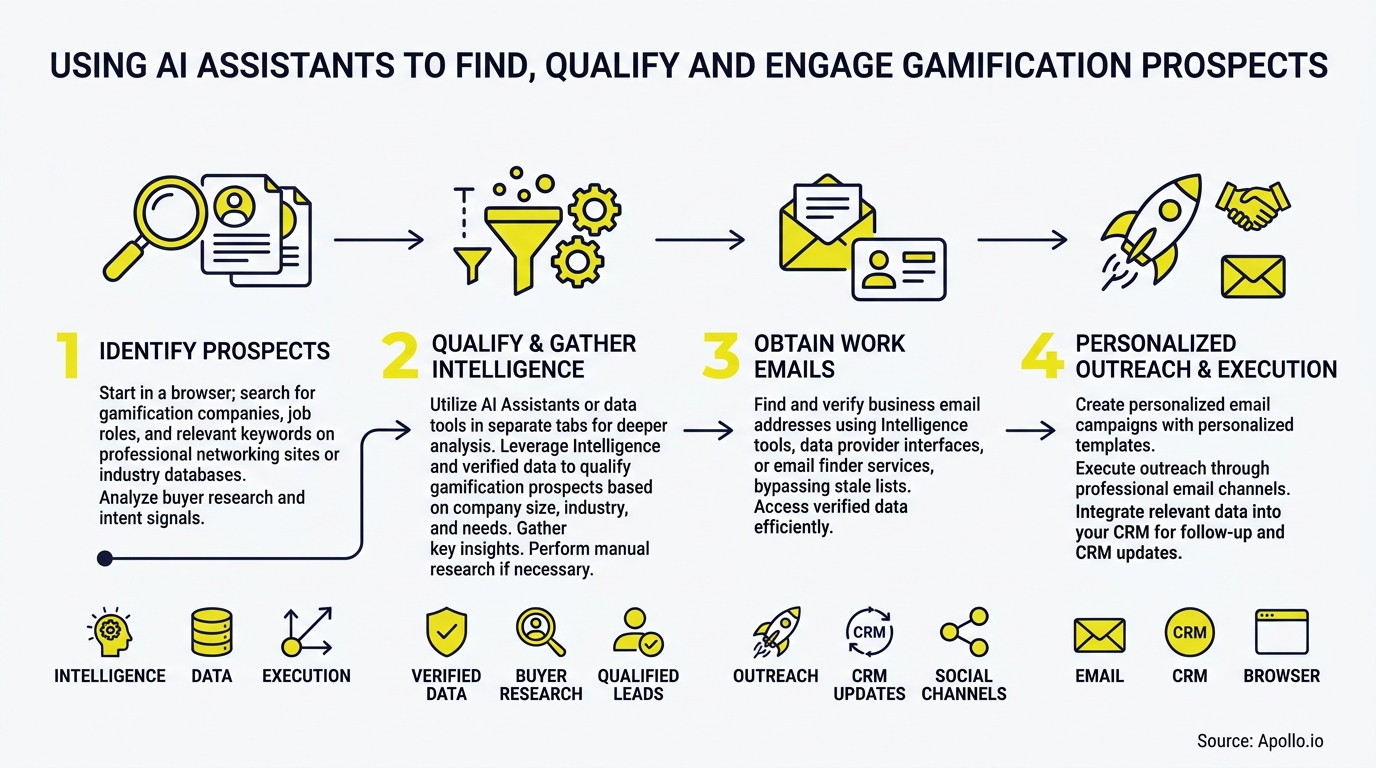
The workflow is a five-stage pipeline: discover accounts, score them against a rubric, find and verify a work email, draft evidence-based copy, then send only after approval. Cursor writes and runs the scripts, and the data and sending tools plug in through APIs or MCP connections.
Cursor's October 2026 Agent SDK makes this repeatable: you define agents as code, test them with evaluations, and attach tools and MCP connections. Cursor's productivity write-up describes the same pattern, where GTM teams use it to code automation scripts that connect research, enrichment, and email delivery.
The pipeline is not magic. It is an automation of the research and drafting work that eats selling time. The State of Sales Report 2024 notes that sales professionals spend 70% of their working time on non-selling, administrative tasks. That administrative load is what you are automating.
What Do You Need to Set Up Before You Start?
You need four things: Cursor, a permitted research source, a contact-data tool with email verification, and an authenticated Gmail connection. Set these up once, then reuse them for every campaign.
| Component | Role | Setup note |
|---|---|---|
| Cursor | Writes and runs the pipeline scripts | Store keys in environment variables, never in code |
| Research source | Account evidence with URLs and dates | Use only sources you are permitted to access |
| Contact-data tool | Work-email discovery and verification | Hunter announced direct Cursor support through MCP in September 2026 |
| Gmail API | Creates drafts, sends after approval | Request the narrowest OAuth scopes you can |
Request draft-creation scope first and add send scope only when your approval step is working. This keeps a bug from becoming a mass send.

How Do You Qualify Gamification Prospects in Cursor?
You qualify them by scoring each account against one of three use-case rubrics and rejecting any account that lacks sourced evidence. Gamification is bought for different reasons, so a single generic score hides the real fit.
- Learning and training: Look for a documented LMS rollout, onboarding program, or low course completion. A 2024 meta-analysis indexed by ERIC found a small positive effect on intrinsic motivation (Hedges' g = 0.257). That supports careful education messaging, not promised revenue gains.
- Employee engagement: Look for recognition programs, participation problems, or new people-team hires. Gallup's 2025 report found global engagement fell from 23% to 21%. That is a market hypothesis, not proof any single company has the problem.
- Product adoption and loyalty: Look for a loyalty-program launch, customer onboarding initiative, or growth-team hiring.
Have Cursor write a dossier for every account with these fields: source URL, evidence date, buyer role, rubric, score, and rejection reason. Fortune Business Insights points to buyers such as a VP of Sales, Head of People or HR, and Product Growth Leads, so score the role as well as the company.
Apollo Fills Your Funnel With Real Buyers
Struggling to fill the top of the funnel with leads that actually turn into opportunities? Apollo surfaces the right businesses and professionals, with 98% email accuracy, so reps spend their time on live conversations. Start free and see which buyers are ready now.
Start Free with Apollo →How Do SDRs Find and Verify Work Emails for These Prospects?
SDRs find work emails by calling a contact-data provider for the target role, then verifying the address before it enters a send queue. Never ask the model to guess an email pattern.
Hunter's API documents six verification statuses, including valid, invalid, accept_all, and unknown, and warns that accept-all servers can produce false-positive checks. Build three branches: send valid addresses to draft, drop invalid ones, and route accept_all and unknown to manual review.
Store the provenance and verification date with each address.
Verification matters because contact data goes stale. GTM Only reports B2B contact data decays at roughly 2.1% per month (22.5% annually) in general corporate environments. Research cited by This and That flags hard bounce rates above 2.0% as a trigger for spam filtering and reputation damage.
Struggling to find qualified leads without building every connector yourself? Search Apollo's 240M+ contacts with 65+ filters, then run the same verification branches on what comes back.
How Do You Personalize Gmail Outreach Without Sounding Automated?
You personalize by feeding each draft one sourced fact from the dossier and asking the model to reference it plainly.
The email should name the specific signal, such as the LMS rollout or the new onboarding hire, and tie it to one relevant outcome.
- Write one subject line and a body under 100 words per prospect.
- Quote only evidence in the dossier, and skip anything the model cannot cite.
- Create Gmail drafts through the API, then review them before any send.
- Include accurate sender information, a postal address, and a working opt-out.
Per Warmer.ai's study, using an LLM agent to personalize the subject line and body yields significantly higher conversion rates than blast templates.
Keep each message specific.
If you want a repeatable structure, Apollo's multi-channel sequences handle scheduling and follow-up so Cursor only needs to prepare the first draft.
What Compliance Checks Belong Before You Send?
Four checks belong before every send: opt-out handling, suppression, duplicate prevention, and sender-limit awareness. These are workflow steps, not afterthoughts.
- Opt-outs: The FTC states CAN-SPAM covers B2B email and requires honoring opt-outs within 10 business days, with the mechanism working for at least 30 days after sending.
- Suppression: Persist unsubscribes and bounces in a list the script checks before every run.
- Duplicate protection: Log each send by address and campaign so a re-run never emails someone twice.
- Gmail limits: Google's sender requirements, in effect since February 2024, keep user-reported spam rates below 0.3% and add authentication and unsubscribe rules above about 5,000 messages a day to personal Gmail accounts.
Reputation also compounds across campaigns, so read Apollo's sender reputation guide before scaling volume.
How Do You Run This Workflow Inside ChatGPT, Claude, or Codex Instead?
You connect Apollo through its MCP integration and run the whole job from one conversation, with no scripts to maintain. Setup is no-code: connect Apollo in your AI tool's connectors through OAuth, on any Apollo plan including free.
From there, ask in plain language to find VPs of Learning or Heads of People at companies with a recent onboarding initiative, enrich their verified work emails, and add the approved ones to a sequence. Data and action limits mirror your Apollo account.
Developers who want terminal access can use the Apollo CLI alongside it.
For revenue teams, this also cuts the tool stack. As Collin Stewart of Predictable Revenue put it, "We reduced the complexity of three tools into one." Your best prospecting session shouldn't require opening a new tab.
FAQs About Using Cursor for Gamification Prospecting
Can Cursor Send Gmail Outreach by Itself?
Cursor does not send Gmail natively. You connect the Gmail API through an authenticated script or integration, have Cursor create drafts, and require explicit approval before any send.
What Should You Do With Accept-All Emails?
Route accept-all addresses to manual review rather than sending automatically. These servers accept any recipient, so verification cannot confirm the mailbox exists.
Do Gmail Limits Apply to Every Recipient?
The 5,000-message-a-day threshold applies to mail sent to personal Gmail accounts, not every Google Workspace recipient. It is a recipient-side requirement, not a sending allowance.

What Is the Best Way to Start?
Start with one use-case rubric, ten accounts, and a manual review of every draft before you automate further. Measure valid-contact coverage and qualified replies, not email volume. To run the same workflow without building connectors, Try Apollo Free.
Prove Pipeline ROI Fast With Apollo
Budget review coming and no clear ROI to show? Apollo gives reps verified business contacts with 98% email accuracy, so you see pipeline impact in weeks, not quarters. Start free and bring real numbers to your next renewal.
Start Free with Apollo →Don't miss these
Sales
Inbound vs Outbound Marketing: Which Strategy Wins?
Sales
What Is a Sales Funnel? The Non-Linear Revenue Framework for 2026
Sales
What Is a Go-to-Market Strategy? The 2026 GTM Playbook
See Apollo in action
We'd love to show how Apollo can help you sell better.
By submitting this form, you will receive information, tips, and promotions from Apollo. To learn more, see our Privacy Statement.
4.7/5 based on 9,690 reviews
