
How to Validate and Enrich Contacts Before a CRM Import
Importing a stale contact list into a new CRM doesn't just create clutter. It quietly poisons every lead score, routing rule, and AI workflow that touches that data afterward.
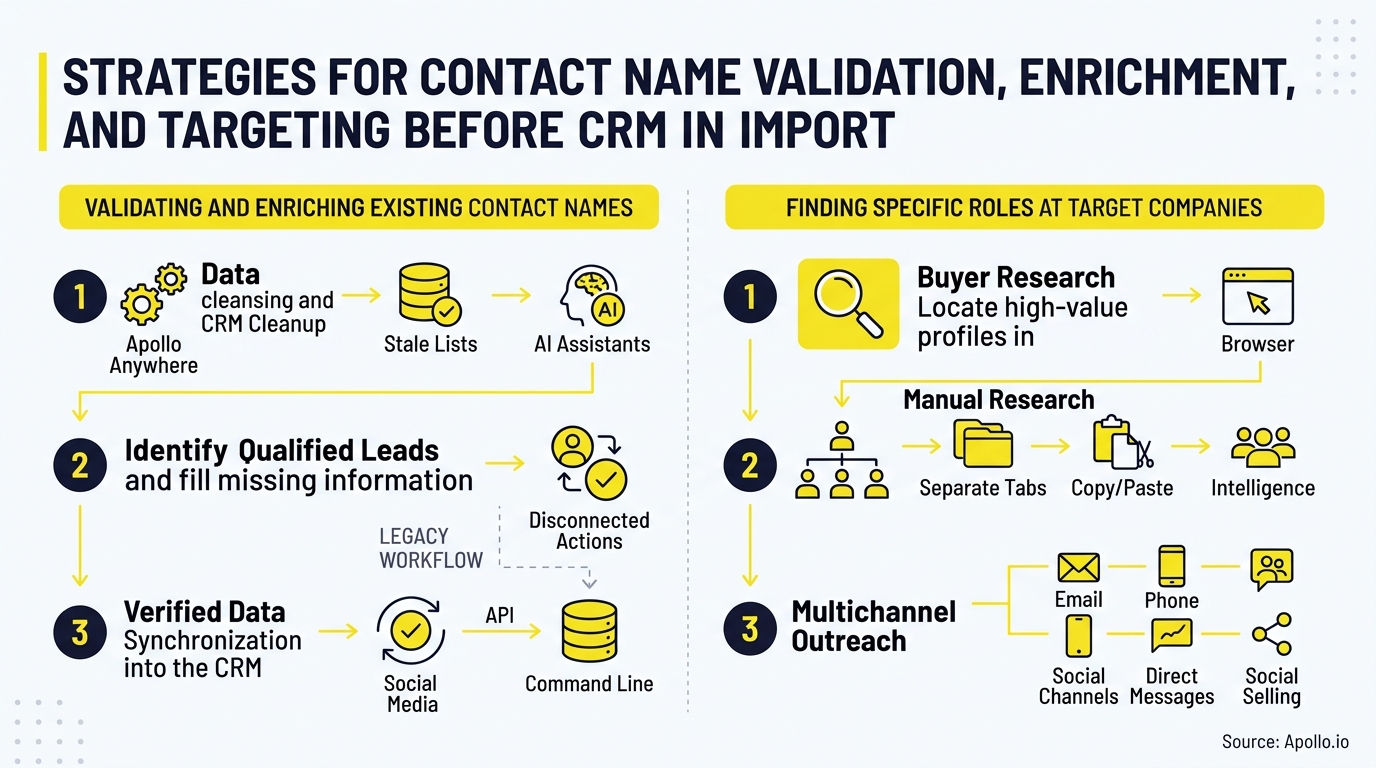
Before you migrate, you need a systematic way to validate who's still there, enrich what's missing, and map each contact to the full buying committee at their company.

Skip The Manual Hunt, Apollo Verifies Instantly
Still spending hours chasing down accurate emails and phone numbers before you can even start selling? Apollo verifies contact data instantly with 98% email accuracy, so your team stops researching and starts closing. Nearly 5M users trust Apollo to find real buyers, not dead ends.
Start Free with Apollo →Key Takeaways
- Validate contacts on four fields before import: employer, title, seniority, and email deliverability, not just name and email.
- A single contact is rarely enough. Most B2B purchases involve a full buying group, so map roles, not just names.
- Use a survivorship rule set (freshest wins, verified wins) to resolve duplicate or conflicting records automatically.
- Waterfall enrichment across multiple data sources catches gaps that a single database misses.
- Build a 30-day post-import governance cadence so your CRM doesn't decay again immediately.
What Does It Mean To Validate And Enrich Contacts Before A CRM Import?
Validating and enriching contacts before a CRM import means checking each record's accuracy against current sources, then filling in missing fields like title, seniority, phone, and company data before the record ever touches your new system. This is different from a basic duplicate check.
It's a quality gate that confirms the person still works there, holds the title on file, and has a deliverable email.
Employment data changes constantly. The pace of job movement is one reason legacy contact lists degrade so fast: research from KeepSync found that without regular upkeep, only 9% of a B2B database remains fully accurate after one year. If you import without validating, you're carrying that decay directly into your new system.
Why Does Validating Contacts Before Import Matter So Much?
Validating contacts before import matters because dirty data compounds every downstream process, from lead routing to AI-powered prospecting agents. A wrong title routes a lead to the wrong rep.
A dead email tanks your sender reputation. A departed contact wastes an SDR's entire outreach sequence.
The financial exposure is real. Research from Digna identifies the migration phase as the point of maximum risk for a company's data integrity, meaning errors introduced during import are harder and costlier to fix later than errors caught beforehand.
For RevOps leaders, this is a governance problem as much as a data problem. For Account Executives, importing bad data means pre-meeting research starts from a false premise.
For SDRs, it means burning limited outreach capacity on contacts who no longer hold the role you're targeting.

What Is A Contact Trust-Score Table And How Do You Build One?
A contact trust-score table is a field-by-field scoring framework that tells you whether a record is reliable enough to import as-is, needs enrichment, or should be quarantined. Score each field independently rather than accepting or rejecting the whole record.
| Field | Evidence Required | Freshness Window | Trust Threshold | Action If Below Threshold |
|---|---|---|---|---|
| Employer | Confirmed by 2+ sources | 90 days | High confidence match | Re-verify via enrichment |
| Job Title | Confirmed by current source | 90 days | Exact or near match | Update to current title |
| Seniority/Level | Inferred from title + org data | 180 days | Matches buying-role need | Flag for manual review |
| Deliverability-verified | 30 days | Valid, non-bounce | Re-verify or route to enrichment queue | |
| Phone | Source-confirmed | 180 days | Direct or verified mobile | Enrich via waterfall lookup |
Records that pass all five checks import automatically. Records that fail one or two go into an exception queue for enrichment.
Records that fail three or more get quarantined and re-sourced from scratch.
Spot Sales-Ready Buyers With Apollo
Marketing leads going cold before sales ever sees them? Apollo surfaces buying intent and prioritizes prospects ready to talk now, so reps stop guessing which leads are worth chasing. Built-In saw a 10% win rate lift using Apollo's scoring.
Schedule a Demo →How Do You Handle Duplicate Or Conflicting Contact Records Before Import?
You handle duplicates and conflicts with a survivorship rule set that automatically decides which version of a record wins, rather than manually reconciling thousands of rows. Build a simple decision tree:
- Freshest verified record wins when two sources disagree on title or employer.
- Most complete record wins when freshness is tied, since a record with phone, title, and seniority beats one with just a name and email.
- Manual review queue catches anything where confidence scores are within a narrow margin, or where a contact's employer changed within your freshness window.
- Suppression list check runs last, so anyone who has opted out or filed a deletion request never gets re-imported or re-enriched.
That last step matters more in 2026 than before. California's DROP platform now requires registered data brokers to process deletion requests on a rolling 45-day basis, and more than 325,000 consumers had already submitted requests within the platform's first weeks.
RevOps teams should treat suppression checks as a permanent step in every enrichment cycle, not a one-time cleanup.
How Do You Turn One Old Contact Into A Full Buying-Group Map?
You turn a single legacy contact into a buying-group map by using their company as the anchor, then searching for the specific roles typically involved in that purchase decision, not just re-validating the one name you already have. A single contact record almost never represents the full committee that decides a B2B deal.
Deal size changes the committee size. For deals exceeding $1 million, research compiled by The Starr Conspiracy found stakeholder counts can climb to 14–23 people. Conflict within these groups is also common: a Gartner survey cited by Gartner found that 74% of B2B buyer teams demonstrate unhealthy conflict during the decision process, which means mapping only your original champion leaves you blind to internal resistance.
Build a role-coverage matrix per target account:
- Champion — your original contact, re-validated
- Economic decision-maker — budget authority, often finance or VP-level
- Technical evaluator — the person who vets implementation fit
- Procurement/legal — contract and vendor-risk gatekeeper
- End user — the team that lives with the tool daily
Score each account's coverage from 0-5 based on how many roles you've identified and verified. Accounts below a 3 shouldn't move into active outbound.
Struggling to find the right roles once you're inside a target account? Search Apollo's 240M+ contacts with 65+ filters to fill every seat on your buying-group map by title, seniority, and department.
How Can SDRs And RevOps Teams Enrich Contacts Without Adding More Tools?
SDRs and RevOps teams can enrich contacts without adding tools by using a platform that combines validation, enrichment, and CRM sync in one workspace instead of stitching together a database tool, a verification tool, and a sync tool separately. Waterfall enrichment, checking multiple data sources sequentially until a field is confirmed, catches gaps that any single source misses on its own.
This matters because reps already lose enormous time to non-selling work, and manually cross-referencing five different tools to confirm one contact's current title only adds to that burden. Apollo's enrichment tools run this waterfall process automatically and sync verified fields directly to your Salesforce or HubSpot CRM, so RevOps doesn't have to maintain a separate reconciliation step.
Teams that consolidate this way see it firsthand. Collin Stewart of Predictable Revenue said, "We reduced the complexity of three tools into one." For Founders and RevOps leaders under pressure to justify every subscription, that consolidation is often the deciding factor over adding yet another point solution.
What Should A 30-Day Post-Import Governance Cadence Look Like?
A 30-day governance cadence keeps your newly imported CRM from decaying the way your old one did, by scheduling recurring checks instead of treating cleanup as a one-time project. One-time cleanups fail because employment data never stops changing.
Structure it in three recurring checkpoints:
- Weekly: Route new bounce and unsubscribe signals into your suppression list; re-score any contact whose email failed deliverability.
- Bi-weekly: Re-run job-change detection on your top target accounts and refresh title/seniority fields that fall outside the 90-day freshness window from your trust-score table.
- Monthly: Audit buying-group coverage scores across active accounts and fill gaps in champion, decision-maker, or technical-evaluator roles.
Sales and marketing alignment makes this cadence far more effective. Assign clear field-level ownership (who can overwrite a title, who can merge duplicates) so enrichment doesn't silently overwrite trusted first-party notes from an AE's last call.
Tired of manually rechecking hundreds of contacts every month? Start free with Apollo's enrichment and CRM sync tools to automate this cadence instead of running it by hand.

What Should You Do Next?
Treat your CRM migration as a data-quality checkpoint, not just a technical move. Build the trust-score table first, apply survivorship rules to resolve conflicts, map every legacy contact to its full buying group, and set a governance cadence so the work doesn't have to be repeated in another year.
Apollo brings validation, waterfall enrichment, buying-group discovery, and CRM sync together in one workspace, so your team isn't managing separate tools for each step of this process. Explore building a target account list in Apollo or read how CRM integration strategy can support a cleaner migration from day one.
Turn Rep Hours Into Revenue With Apollo
Struggling to prove tool ROI when reps still spend half their day on manual outreach? Apollo automates prospecting and follow-up so teams scale pipeline without adding headcount. Leadium tripled annual revenue running outbound through Apollo.
Start Free with Apollo →Don't miss these
Sales
Inbound vs Outbound Marketing: Which Strategy Wins?
Sales
What Is a Sales Funnel? The Non-Linear Revenue Framework for 2026
Sales
What Is a Go-to-Market Strategy? The 2026 GTM Playbook
See Apollo in action
We'd love to show how Apollo can help you sell better.
By submitting this form, you will receive information, tips, and promotions from Apollo. To learn more, see our Privacy Statement.
4.7/5 based on 9,690 reviews
