
How Apollo Works for a 4-Person Sales Team Day-to-Day
A 4-person team doesn't need four separate Apollo accounts working in isolation. It needs one shared operating system: a single admin who owns the setup, and three sellers who execute from a task queue built off that foundation.
Here's exactly what that looks like, hour by hour.

Apollo Ends Manual Lead Research For Good
Still burning hours a day hunting down contact info and triple-checking it's right? Apollo hands your reps verified emails and numbers instantly, so selling time stops going to spreadsheets. 98% email accuracy means fewer bounces and more real conversations.
Start Free with Apollo →Key Takeaways
- One admin should own Apollo's ICP filters, sequences, and permissions so the other three team members can focus on execution, not setup.
- Apollo automates email sends only; calls, social touches, and manual follow-ups still require a human to complete the task.
- Start small: roughly 50 emails per mailbox per day keeps deliverability healthy for a 4-person team.
- A Friday metrics review, not daily guesswork, is what should drive changes to targeting, copy, and volume.
- Pairing automated emails with calls, social touches, and content assets outperforms single-channel blasting.
How Does Apollo Work Day-to-Day For A 4-Person Team?
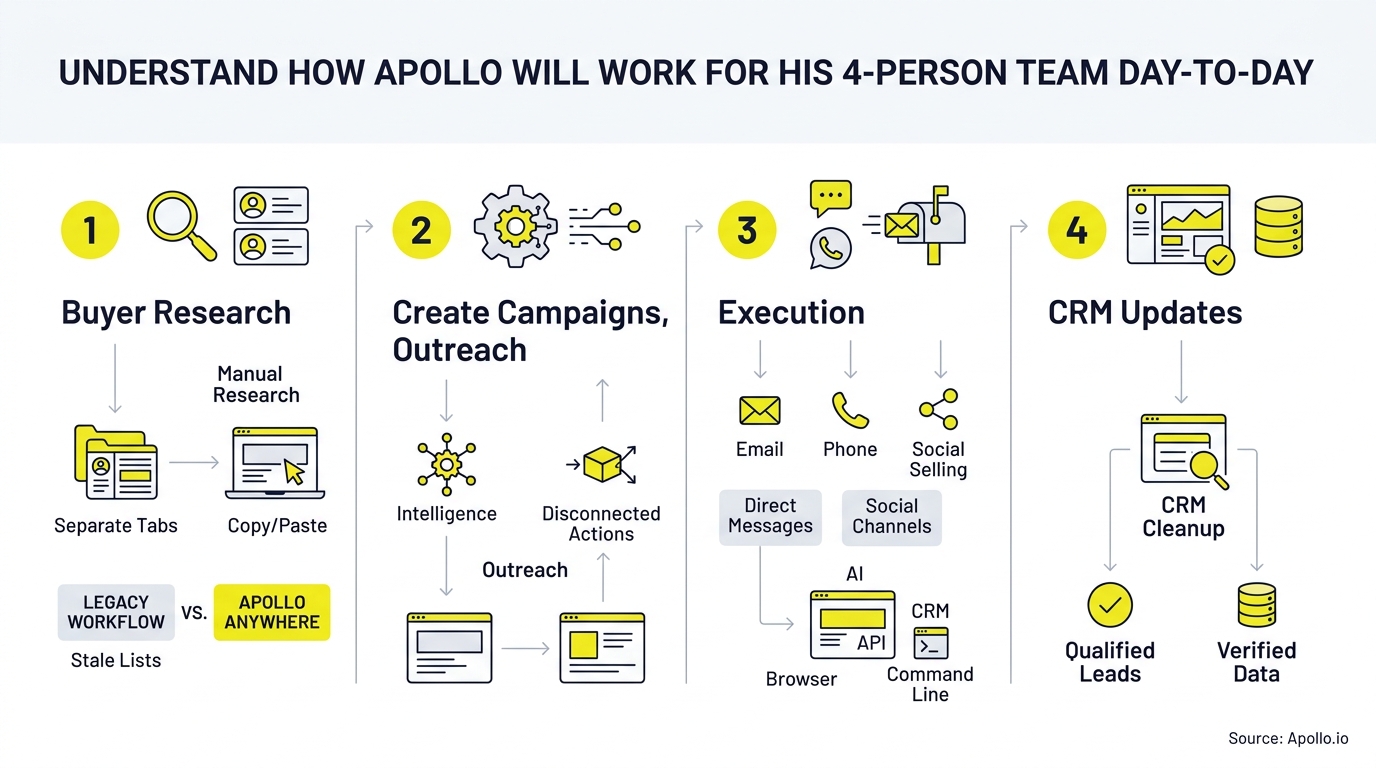
Apollo works by splitting responsibilities between one admin who configures the system and three sellers who execute daily task queues generated from that setup. The admin maintains lead lists, sequences, workflows, and reporting dashboards.
The other three log in each morning to a prioritized list of calls, emails, and social touches, plus any replies that need a human response.
This structure isn't arbitrary.
Sales teams commonly juggle several disconnected tools for prospecting, sequencing, and reporting, and Salesforce's 2026 State of Sales research found many reps feel overwhelmed by tool volume, with most teams without a unified platform planning to consolidate.
A 4-person team avoids that fragmentation by running data, sequencing, dialing, and analytics from one connected go-to-market workspace instead of stitching together separate vendors.
| Time Block | Admin (Owner) | Sellers (x3) |
|---|---|---|
| 8:00–8:30 AM | Reviews workflow health, mailbox deliverability, reply queue | Check assigned task list for calls, emails, social touches |
| 8:30–11:00 AM | Adjusts ICP filters, approves new sequence copy | Work call blocks, log manual emails, complete action items |
| 11:00 AM–1:00 PM | Monitors bounce/spam rates, handles escalated replies | Continue sequence tasks, book meetings |
| 1:00–4:00 PM | Enriches new accounts, builds next week's lists | Follow up on hot replies, prep for calls |
| 4:00–5:00 PM | Updates reporting dashboard, flags duplicate enrollments | Clear remaining tasks, hand off unresolved replies to owner |
What Does the Admin Own vs. What Do Sellers Execute?
The admin owns configuration and governance; sellers own execution and conversations.
This split prevents four people from independently building conflicting sequences, targeting overlapping accounts, or letting replies fall through the cracks.
- Admin owns: ICP filters, sequence templates, workflow automation, permissions, suppression lists, and the weekly metrics review.
- Sellers own: Completing call tasks, sending manual emails flagged by sequences, executing social touches, and responding to replies assigned to them.
Gartner has noted that sales agents require reliable data, documented processes, and validation before they can scale safely, according to Gartner.
For a 4-person team, that means the admin should lock down data hygiene rules and messaging guardrails before turning on automation, not after.
Use Apollo Workflows to encode those rules once, so every seller inherits the same qualified, de-duplicated task queue.
How Do SDRs and AEs Divide Apollo Tasks Daily?
SDRs work top-of-funnel task queues (cold calls, first-touch emails connection requests) while AEs manage warm replies, demo scheduling, and deal progression inside the same workspace. On a 4-person team, this often means 2-3 people handle outbound prospecting tasks and one person focuses on qualified conversations and closing.
SDRs report that Apollo's task queue removes the guesswork of "who do I contact next," since the admin has already filtered and prioritized the list. AEs managing live deals use Apollo's deal management tools to track pipeline stage without switching to a separate CRM tab. RevOps leaders on lean teams often insist on this single-workspace setup specifically to avoid reconciling activity data across multiple systems at the end of each week.
What Should a Sample Apollo Sequence Look Like For a Small Team?
A sample sequence should combine automated email with human-executed calls, social touches, and relevant content, not rely on email alone. McKinsey's 2024 B2B Pulse research found buyers use an average of 10 interaction channels, which is why single-channel sequences underperform for most teams.
| Day | Step | Channel | Owner |
|---|---|---|---|
| Day 1 | Personalized intro email | Automated Email | Apollo (auto-send) |
| Day 2 | Connection request + light comment | professional networks | Seller (manual task) |
| Day 4 | Cold call | Phone | Seller (manual task) |
| Day 6 | Follow-up email with case study link | Automated Email | Apollo (auto-send) |
| Day 9 | Breakup email or final call | Phone or Email | Seller (manual task) |
Sellers practicing account-level research before outreach outperform reps who skip it. Research cited by professional networks and Ipsos found top-performing sellers conduct industry research before reaching out, and reps practicing those behaviors were nearly twice as likely to exceed quota. Struggling to find qualified accounts to research? Search Apollo's database with 65+ filters to build tighter account lists before launching a sequence.

How Do You Prevent Duplicate Enrollment and Mailbox Overload?
You prevent duplicate enrollment by setting suppression rules at the workflow level, so no contact enters two sequences at once, and by capping daily send volume per mailbox. A 4-person team running four connected mailboxes should start conservatively, around 50 automated emails per mailbox per day, before scaling volume.
- Set one suppression list the admin maintains centrally, not one per seller.
- Cap sends per mailbox and stagger send times by 1-5 minutes to mimic human sending patterns.
- Authenticate every sending domain with SPF and DKIM. Google requires this for all Gmail senders and caps reported spam below 0.3%, according to Google's sender guidelines.
- Review bounce and spam-complaint rates weekly, not just open rates.
What Should the Friday Metrics Review Cover?
The Friday review should translate Apollo's activity data into concrete changes to targeting, copy, or volume, not just a scoreboard read. Pull open rate, reply rate, meetings booked, and bounce rate for the week, then decide what to adjust before Monday.
- Low open rate: Test new subject lines or check sender authentication.
- Low reply rate, healthy opens: Revisit messaging and personalization, not volume.
- High bounce rate: Pause the list and re-verify contacts before continuing. Use Apollo's email verification guidance to clean lists before re-launching.
- Strong reply rate, low meetings booked: Coach sellers on call scripts and follow-up speed.
An independent study by The Tolly Group, cited in a 2026 press release, found Apollo users in a one-month test achieved a cold-to-meeting conversion rate above typical industry benchmarks. Small teams should still validate results with their own 30-day pilot rather than assuming identical outcomes.
See Every Deal Stage Before It Stalls
Forecasting off gut feel because deal data is always a week stale? Apollo gives reps and managers one live view of every stage, so nothing slips through the cracks. Built-In used Apollo's scoring to lift win rates.
Start Free with Apollo →Where Does AI Fit Into a 4-Person Team's Apollo Workflow?
AI fits in as a research and drafting assistant, not a replacement for the humans making calls and closing deals. Apollo's own August 2026 survey found the vast majority of go-to-market leaders had adopted AI in some form, and only a small share expected it to replace team members outright, according to Apollo's newsroom.
For a lean team, that means using Apollo's AI tools to draft first-pass email copy, summarize call notes, or prioritize which accounts to research next, while sellers still approve every message before it sends and own every live conversation. Spending too much time on manual outreach drafting? Let Apollo's AI sales automation handle the first draft so sellers spend more time on calls and less on blank pages.
Frequently Asked Questions
Does Apollo Automate Calls and social touches?
No. Apollo automates email sends on schedule, but calls, social touches, and manual follow-up emails still appear as tasks that a team member must complete themselves.
How Many Emails Can a 4-Person Team Send Daily?
A conservative starting point is roughly 50 emails per connected mailbox per day, which totals around 200 emails daily across four mailboxes, scaling up gradually as deliverability holds steady.
Who Should Own Apollo Setup on a Small Team?
One designated admin should own ICP filters, sequences, workflows, and permissions, while the remaining team members execute from the task queues that setup produces.
Can a 4-Person Team Replace Multiple Tools With Apollo?
Yes. Collin Stewart of Predictable Revenue said, "We reduced the complexity of three tools into one," illustrating how consolidating prospecting, sequencing, and dialing into one workspace reduces context switching for lean teams.

Ready to Run Your 4-Person Team on One Platform?
Running a lean team on Apollo comes down to clear ownership: one admin managing the system, three people executing tasks, and a weekly rhythm for reviewing what's working. That structure, not raw send volume, is what separates teams that scale from teams that burn out their mailboxes in month one.
To see why Apollo stands alone as the only fully agentic GTM platform, combining sales intelligence, outbound execution, and enrichment in one workspace, Try Apollo Free today.
Prove ROI Fast, Scale Reps With Apollo
Struggling to justify tool spend before the next budget review? Apollo turns manual outreach into automated pipeline your leadership can measure in weeks, not quarters. Leadium tripled annual revenue after automating outbound with Apollo.
Start Free with Apollo →Don't miss these
Sales
Inbound vs Outbound Marketing: Which Strategy Wins?
Sales
What Is a Sales Funnel? The Non-Linear Revenue Framework for 2026
Sales
What Is a Go-to-Market Strategy? The 2026 GTM Playbook
See Apollo in action
We'd love to show how Apollo can help you sell better.
By submitting this form, you will receive information, tips, and promotions from Apollo. To learn more, see our Privacy Statement.
4.7/5 based on 9,690 reviews
