
How to Connect Apollo to ChatGPT, Claude, or Perplexity
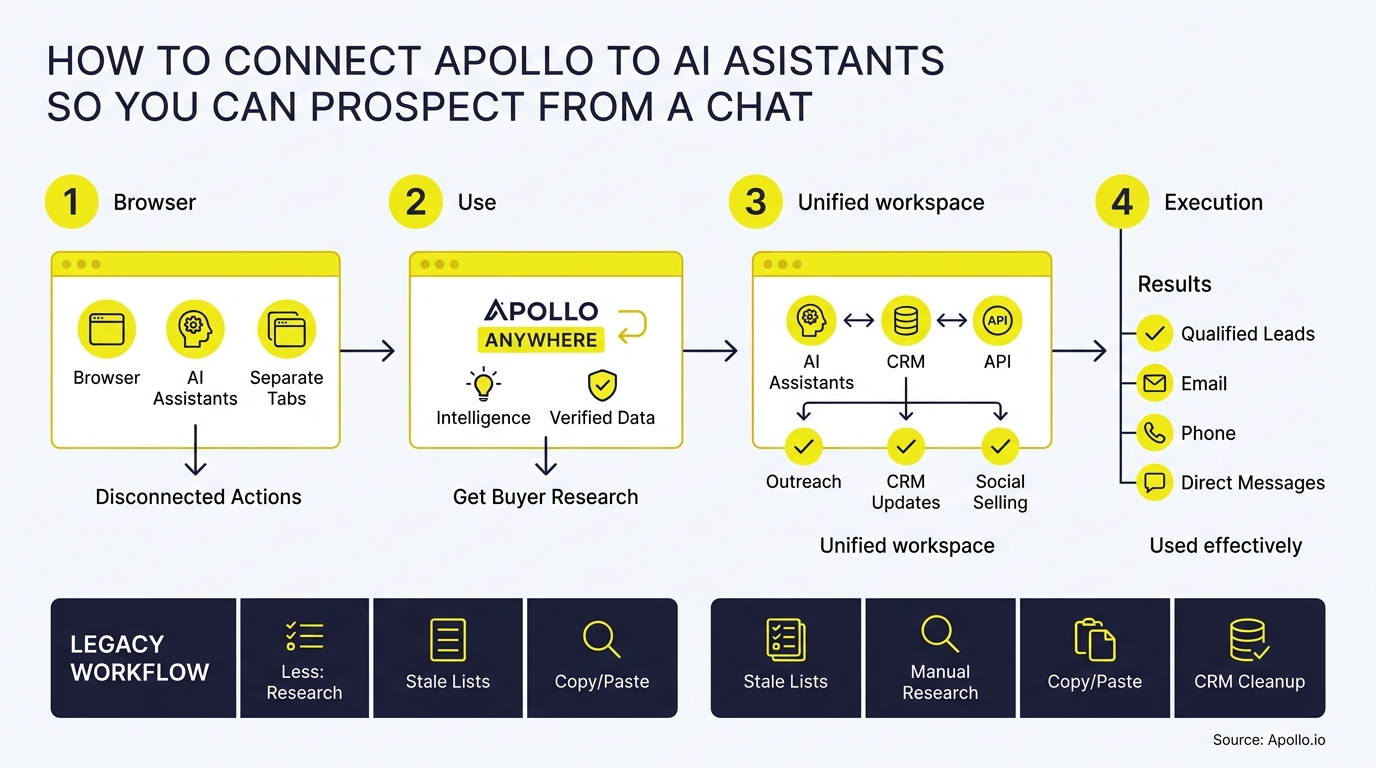
You can connect Apollo to ChatGPT, Claude, or Perplexity in under five minutes using OAuth, no API key required. Once connected, you can search for prospects, enrich contacts, and add people to sequences without leaving the chat window.
This guide walks through setup for all three platforms, plus the prompts, approval checklist, and credit-control rules you need to prospect safely from a chat interface. For a deeper look at the underlying data layer powering these connections, see Apollo's sales intelligence and lead database.

Apollo Ends Manual Research For Good
Spending hours hunting down emails and phone numbers that turn out wrong. Apollo hands you verified contact data instantly, so reps spend time selling, not searching. 98% email accuracy means fewer bounces and more real conversations.
Start Free with Apollo →Key Takeaways
- Use Apollo MCP when you need to search, enrich, and launch outreach sequences without switching between five different tabs and tools.
- ChatGPT, Claude, and Perplexity each connect to Apollo via OAuth, so no Apollo API key is required for standalone setup.
- Use Apollo MCP when your team wants one workspace for prospecting, enrichment, and sequence execution instead of stitching together separate point solutions.
- Approval settings let you control which actions run automatically versus which require a manual review, so bulk enrichment or sequence enrollment never fires without sign-off.
- Credit usage only occurs on enrichment and record actions, not on search or research queries, so TAM exploration stays free to run.
Which Chat Platform Should You Connect Apollo To First?
The right platform depends on your workflow: ChatGPT suits teams already using it for daily tasks, Claude suits technical or detail-oriented workflows, and Perplexity suits research-heavy prospecting for founders and lean teams.
| Platform | Setup Requirement | Best For | Notable Capability |
|---|---|---|---|
| ChatGPT | ChatGPT app directory + Apollo OAuth | Teams already living in ChatGPT daily | Full outbound loop: search, enrich, sequence, analyze performance |
| Claude | Claude.ai Connectors + OAuth, no API key | Technical users, granular permission control | Per-action approval settings (always allow, approval required, blocked) |
| Perplexity | Perplexity Pro or higher + Apollo connector | Founders and lean revenue teams doing research-led outreach | Combines research interface with prospecting and analytics |
According to usecarly.com, Apollo released an official app for ChatGPT in April 2026, built on the Model Context Protocol. All three integrations rely on the same underlying Apollo MCP connection, which is why setup steps look similar across platforms even though each chat tool has its own connection screen.
How Do You Connect Apollo to ChatGPT?
You connect Apollo to ChatGPT by opening ChatGPT's Settings, navigating to Apps, and authorizing Apollo through OAuth. Once authorized, Apollo appears as an available app inside any chat.
- Open ChatGPT and go to Settings > Apps, per a step-by-step walkthrough on YouTube.
- Search for "Apollo" in the app directory.
- Click connect and authorize your Apollo account via OAuth (no API key needed).
- Confirm the permissions scope matches your Apollo plan and role.
- Start a new chat and reference Apollo directly, or let ChatGPT invoke it automatically when your prompt matches a supported action.
This setup supports the complete outbound loop: search, enrichment, record creation, sequence activation, and performance analysis, all inside the same conversation.
How Do You Connect Apollo to Claude?
You connect Apollo to Claude through Claude's Connectors menu, where you authorize Apollo with OAuth and no API key. This gives you the most granular permission controls of the three platforms.
Per a thread on Reddit's r/UseApolloIo, the setup path is: go to Customize > Connectors, click the "+" icon, search for Apollo, and authorize.
- Once connected, set each Apollo action to "always allow," "approval required," or "blocked" individually.
- Company and TAM research often runs without touching your Apollo credits, according to a walkthrough on YouTube, since credits are typically consumed only when you enrich a specific contact.
- This makes Claude a strong fit for RevOps leaders who want to test list quality before spending enrichment credits.
How Do You Connect Apollo to Perplexity?
You connect Apollo to Perplexity by adding the Apollo connector inside a Perplexity Pro or higher account, then authorizing via OAuth. Apollo's Perplexity integration pairs Perplexity's research interface with Apollo's prospecting, enrichment, outreach, and analytics functions.
This combination targets founders and lean revenue teams who want to research a market and act on it in the same session, rather than exporting research findings into a separate prospecting tool. Once connected, you can ask Perplexity to identify companies matching specific criteria, then hand off directly to Apollo for enrichment and sequencing without leaving the thread.
Turn Guesswork Into Sales-Ready Pipeline
Marketing leads stalling before they ever reach a rep. Apollo surfaces buying intent and prioritizes accounts actually ready to talk, so reps chase real opportunities instead of cold names on a list. Teams using Apollo's signals report stronger lead-to-opportunity conversion.
Request a Demo →What Can You Actually Do From an Apollo-Connected Chat?
From a connected chat, you can search for people and companies matching your ICP, enrich contacts with verified emails and phone numbers, create or update CRM records, add prospects to sequences, and ask about campaign performance. According to LinkedOtter, these connections let B2B sales teams perform prospecting, data enrichment, and sequence automation directly within a chat interface using natural language.
Apollo has also expanded MCP capabilities beyond basic prospecting to include task management, custom field reads and writes, lead scoring, and sequence variant generation. Sensitive actions like bulk enrichment or sequence enrollment now show a preview before execution, so you see exactly which records and credits are affected before committing.
Struggling to find qualified leads without leaving your chat window? Search Apollo's 240M+ contacts with 65+ filters directly from ChatGPT, Claude, or Perplexity.
What Prompts Should SDRs and AEs Use to Prospect From Chat?
SDRs and AEs get the best results from prompts that specify role, company size, industry, and intended action in one line. Try these starting points:
- "Find VP of Sales contacts at Series B SaaS companies with 50-200 employees, then enrich the top 20."
- "Pull companies that recently raised funding in fintech and show me decision-makers in RevOps."
- "Add these 15 enriched contacts to my [sequence name] and tell me before it sends."
- "Summarize this week's sequence reply rate and flag which contacts need a follow-up."
For AEs managing active deals, prompts like "enrich this list of stakeholders and update their titles in my CRM" cut manual research time between calls.
What Approval and Credit-Control Rules Should RevOps Set Up?
RevOps leaders should configure approval settings before rolling out chat-based prospecting to a full team, since default permissions vary by platform. A basic checklist:
- Set bulk enrichment and sequence enrollment to "approval required," not "always allow."
- Confirm which chat platform ties to which Apollo seat, so credit usage maps to the right budget owner.
- Review the preview screen before every bulk action to confirm record counts match expectations.
- Track credit consumption weekly during rollout, since enrichment (not search) is what draws down your plan.
Spending too much time on manual list-building before every campaign? Automate your sequences with Apollo's multi-channel engagement platform and let approvals run in the background.

Why Are GTM Teams Moving Prospecting Into Chat Interfaces?
GTM teams are moving prospecting into chat interfaces because AI-assisted workflows have become a daily habit, not an experiment. Research from Optif.ai cites a Gartner 2025 report finding 89% of revenue organizations now use AI-powered tools, up from 34% in 2023.
Apollo's own MCP usage data backs this shift: in a recent 30-day window, Apollo recorded 42,000 MCP tool calls, and roughly one-third of those users never opened the Apollo application directly. Bulk contact enrichment was the highest-volume workflow, suggesting many sellers now treat Apollo as infrastructure behind whichever chat interface they already prefer.
Founders building outbound motions with lean teams benefit most from this shift: instead of juggling separate tools for research, enrichment, and outreach, one connected chat session handles the full loop. Predictable Revenue's team put it simply: "We reduced the complexity of three tools into one." That kind of consolidation matters more as GTM stacks sprawl. Explore outbound prospecting strategy for a broader framework on building pipeline with fewer tools.
How Do You Measure Success After Connecting Apollo to a Chat Tool?
You measure success by tracking a small set of baseline metrics before and after rollout: time spent on manual research, sequence reply rate, and meetings booked per rep. Set a two-week baseline before full adoption so you can isolate the effect of chat-based prospecting from other variables.
| Metric | How to Track It | Why It Matters |
|---|---|---|
| Research time per prospect list | Self-reported or time-tracked over 2 weeks | Shows whether chat prospecting actually reduces manual work |
| Sequence reply rate | Apollo sequence analytics | Confirms enrichment quality is translating to response |
| Meetings booked per rep | Apollo or CRM reporting | Ties chat-based prospecting to pipeline outcomes |
| Credit spend vs. plan allotment | Apollo admin dashboard | Prevents overage surprises during team rollout |
Revenue leaders report that end-to-end automation is now a top AI priority, yet most teams still operate across several GTM platforms. Consolidating research, enrichment, and execution into one connected workflow is one practical way to close that gap without adding headcount or new subscriptions.

Frequently Asked Questions
Do I Need an Apollo API Key to Connect to ChatGPT, Claude, or Perplexity?
No, standalone MCP connections to ChatGPT, Claude, and Perplexity use OAuth 2.0 and do not require an Apollo API key.
Does Search Consume Apollo Credits?
Search and company research typically do not consume credits; credits are drawn down when you enrich a specific contact with verified email or phone data.
Which Apollo Plan Do I Need for MCP Access?
MCP connections work on any Apollo plan, including the free tier, though action and data limits mirror your existing Apollo account permissions.
Can I Block Certain Actions Like Bulk Enrollment?
Yes, Claude lets you set individual Apollo actions to "always allow," "approval required," or "blocked," and other platforms show a preview before high-impact actions like bulk enrichment or sequence enrollment.
Is the Perplexity Integration Available on the Free Plan?
No, Apollo's Perplexity connector currently requires Perplexity Pro or higher.
Ready to Prospect Without Leaving Your Chat?
Connecting Apollo to ChatGPT, Claude, or Perplexity turns your chat window into a working prospecting desk: search, enrich, sequence, and report without tab-switching. Whether you're an SDR building a target list or a RevOps leader consolidating your stack, the setup takes minutes and runs on the permissions you already control.
Request a demo to see how Apollo connects your data, intelligence, and execution into one workspace that meets you inside the AI tools you already use.
Prove ROI While New Reps Ramp Faster
Slow ramp time eating into your projected pipeline gains. Apollo gives new reps one platform with built-in playbooks, so productivity starts week one, not month three. Leadium tripled revenue after automating outbound with Apollo.
Start Free with Apollo →Don't miss these
Sales
Inbound vs Outbound Marketing: Which Strategy Wins?
Sales
What Is a Sales Funnel? The Non-Linear Revenue Framework for 2026
Sales
What Is a Go-to-Market Strategy? The 2026 GTM Playbook
See Apollo in action
We'd love to show how Apollo can help you sell better.
By submitting this form, you will receive information, tips, and promotions from Apollo. To learn more, see our Privacy Statement.
4.7/5 based on 9,690 reviews
