
To find local businesses and contact people in a specific role, define your area and industry, build a business list, match each company to the right location, verify who holds the role, and pick a contact route that fits. Most failures happen at the verification step, not the search step.
This workflow works manually and works faster with the right tools. For a deeper look at how to find verified business contacts, start there once you have your target list.

Skip Manual Research - Apollo Finds Contacts
Tired of burning hours researching leads and verifying contact info by hand? Apollo puts 240M+ business contacts and 98% email accuracy at your fingertips, so reps spend their day selling. Start accelerating your outreach today.
Start Free with Apollo →Key Takeaways
- Treat "local" as a defined filter (business location, headquarters, or the person's location) before you search, because these are not interchangeable.
- A role match is only useful once it is verified against a current source, since contact records go stale quickly.
- Use Apollo MCP when you need to search local businesses, enrich a specific role, and queue outreach from inside ChatGPT, Claude, Perplexity, or Codex without switching tabs.
- Relevance beats volume: buyers tune out generic outreach, so tie each message to a real business need.
- Always keep a no-contact fallback so unverified roles never turn into guesswork emails.
What Is the Fastest Way to Find Local Businesses and the Right Contact?
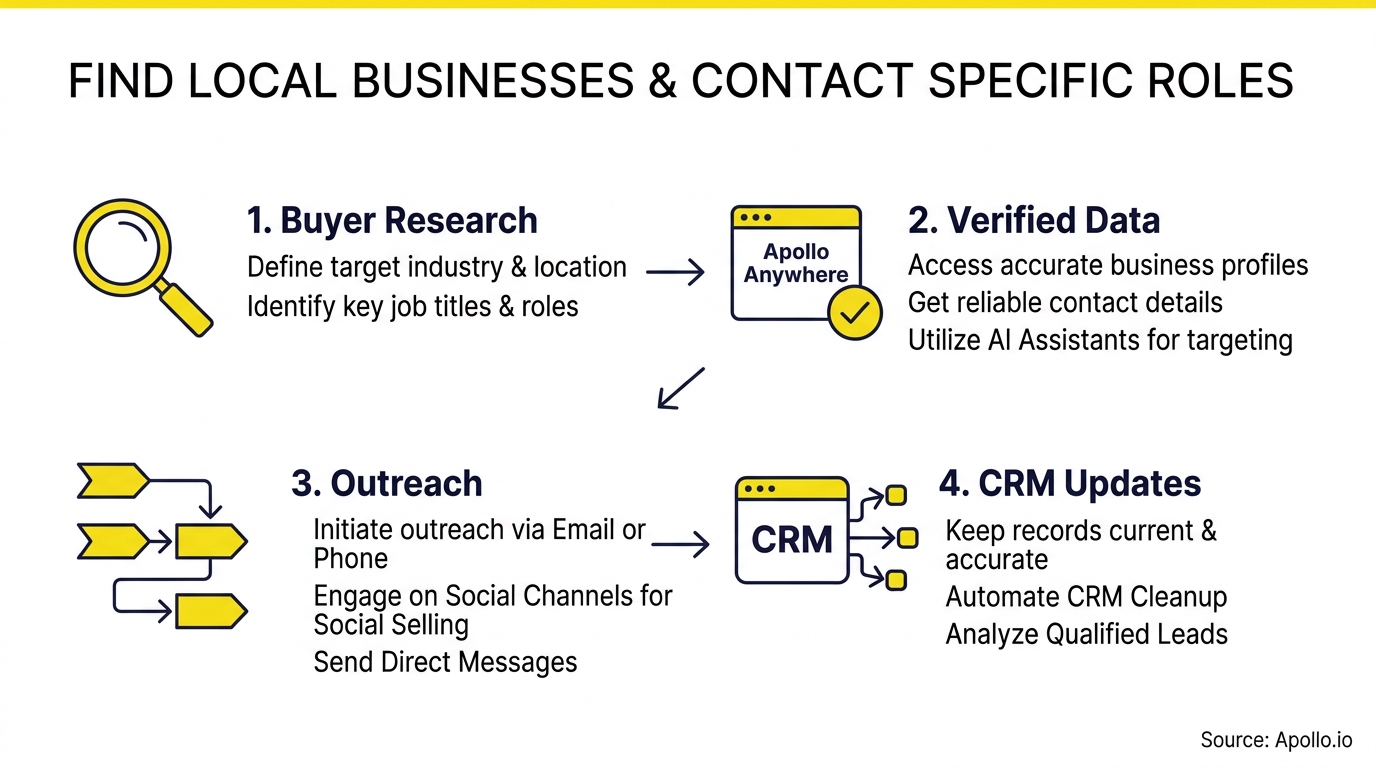
The fastest way is a five-step loop: define the area and industry, find the businesses, match the right company or branch, verify the role, then choose a contact route. Each step narrows the list so you spend verification time only on accounts that fit.
- Define area and industry. Pick a radius, city, or ZIP set plus one industry.
- Find the businesses. Pull candidates from map listings and directories.
- Match company and branch. Confirm the location you serve, not just the headquarters.
- Verify the role. Check a current source for who owns the responsibility.
- Choose a contact route. Email, phone, social message, or a warm path.
How Do You Define "Local" Before You Search?
"Local" means the specific geography you can actually serve, and you must pick whether that refers to the business location, the company headquarters, or the person's own location. These filters return different results, so mixing them produces messy lists.
To size your market, the Census Bureau's County Business Patterns data covers employer establishments at county and ZIP-code level by NAICS industry code. Use it to see how many businesses of a type exist in your area.
It is a market-sizing tool, not a directory of named people.
Also segment by employer size. The SBA counted 34,752,434 U.S. small businesses in its July 2024 publication, so "small business" alone is too broad to target well.
How Do You Find Businesses in Your Local Area?
Start with map and directory searches, then export or record each business with its address, website, and phone number. Map results are a strong starting point because that is where buyers look first.
According to BrightLocal, 42% of local searches click directly on Google Map pack results, which is why map listings are the most complete starting inventory of local businesses.
- Map search: Search "[industry] in [city]" and capture each listing.
- Industry directories: Chambers of commerce and trade associations list member businesses.
- Company websites: Team, About, and Contact pages often show names and roles.
Short on time? Search Apollo's 240M+ contacts with 65+ filters to combine location, industry, and title in one query.

How Do You Verify Someone Holds a Specific Role?
You verify a role by finding at least two current, independent signs that a named person holds it, such as the company's own team page, a recent professional profile, or a recent press mention. A single old listing is not enough.
Verification matters because the data degrades fast. ScaleList identifies the speed at which contact records such as direct dials, corporate emails, and job titles degrade as the primary hurdle in sourcing contacts.
Record your evidence as you go:
| Check | What to Record | Pass If |
|---|---|---|
| Company team page | Name, title, date seen | Title matches the role you need |
| Professional profile | Current employer and title | Employer and title are current |
| Recent mention | Press, event, or post | Dated within the last year |
How Does a Local Example Work in Practice?
A worked example shows the loop end to end. Say you sell scheduling software to dental practices in one metro area and need the practice manager at each location.
- Search: Run "dental practice in [city]" and list 30 results with address and website.
- Branch check: Mark which results are single practices versus branches of a larger group, since a group's manager may sit at headquarters.
- Role evidence: Open each team page and note the practice manager's name and the date seen.
- Contact route: Use the verified work email or the main line, asking for the practice manager by name.
- No-contact fallback: If no name is found, call the front desk and ask who handles scheduling, then log the answer with the date.
Do not guess an email pattern when you have no confirmed name. A logged fallback keeps your list honest and your sender reputation intact.
Apollo Turns Forecast Guesswork Into Pipeline Clarity
Forecasts feel like a coin flip because your lead data is stale? Apollo helps you fill the funnel with business contacts at 98% email accuracy, so more leads turn into real opportunities. See where every deal stands. Accelerate your pipeline today.
Start Free with Apollo →How Can SDRs and Founders Contact the Right Person Without Spamming?
SDRs and founders contact the right person by sending a short, role-specific message that references a real business need and offers something useful. Relevance matters more than reach.
Research from Salesforce shows that 73% of B2B buyers actively avoid salespeople who send generic, irrelevant outreach lacking persona-specific context.
Adapt the same opener by role:
- Owner: Lead with revenue or cost impact.
- Operations manager: Lead with time saved on a daily task.
- Procurement: Lead with clear terms and fit.
Keep the first message to three or four sentences, name one specific observation about their business, and ask one easy question.
How Do You Find the Whole Buying Group, Not Just One Title?
You find the whole buying group by mapping the operational contact, the budget approver, and any other stakeholders, rather than relying on one job title. A single title rarely represents everyone involved in a decision.
Gartner reported in May 2025 that B2B buying groups span 5 to 16 people across as many as four functions. That finding covers B2B buying broadly, and a local microbusiness may decide with just one or two people.
For Account Executives, this means identifying a champion and a decision-maker early. RevOps leaders can add both as fields in the CRM so deals do not stall waiting on an unnamed approver.
How Can You Do This Inside Your AI Tool With Apollo MCP?
You can run the whole workflow from one conversation by connecting Apollo MCP to ChatGPT, Claude, Perplexity, or Codex. Ask for local businesses in an industry, filter to the role you need, enrich contacts with verified emails and phone numbers, and add them to a sequence without opening a new tab.
Setup is no-code: connect Apollo through the AI tool's connectors with OAuth on any Apollo plan, including free. Data limits match your Apollo account.
Your best prospecting session should not require opening a new tab, and Apollo brings data, intelligence, and execution together in the tools you already use.
Prefer to work in the browser? The Apollo Chrome extension lets you pull a business phone number and email while viewing a company website.
Spending hours stitching exports together? Automate your sequences with Apollo so verified contacts move straight into outreach.
How Do You Stay Compliant and Reach the Inbox?
You stay compliant by honoring opt-outs, identifying yourself clearly, using accurate sender information, and keeping a suppression list of anyone who declined. Finding an email address does not guarantee delivery or permission to keep sending.
Deliverability also depends on authentication. Microsoft announced that, starting May 5, 2025, domains sending more than 5,000 messages daily to Outlook.com consumer services must use SPF, DKIM, and DMARC.
That rule targets consumer Outlook.com, Hotmail, and Live addresses, not every business mailbox, but authenticating your domain is good practice everywhere.
- Keep a suppression list and check it before every send.
- Include a clear opt-out in every email.
- Log the source and date for every contact you collect.
FAQ
What If I Cannot Find the Person's Name?
If you cannot find a name, call the main line and ask who handles the responsibility, then log the answer with the date. Do not guess an email address. A confirmed route beats a guessed one.
How Do I Handle Outdated Titles?
Treat any title without a recent date as unverified until a second source confirms it. Check the company team page and a current professional profile before you send.
Should I Contact Branch or Headquarters?
Contact the location you serve first, since local managers often control local decisions. Escalate to headquarters only when the branch confirms that purchasing is centralized.
Can I Find Local Business Contacts Without Paid Tools?
Yes. Map search, directories, and company websites cover discovery and most verification, though it takes longer. Paid tools mainly save time on enrichment and bulk lists.

What Should You Do Next?
Pick one industry and one area, run the five-step loop on 30 businesses, and log your role evidence and dates as you go. That sample shows you where your process loses time, whether in discovery, verification, or contact choice.
Teams that want the full workflow, from local discovery to verified roles to sequenced outreach, in one workspace can consolidate several tools into one platform. As one customer put it, Predictable Revenue described reducing the complexity of three tools into one. Start Free with Apollo.
Prove Pipeline ROI Fast With Apollo
Budget review coming and no clear numbers to show for your sales tools? Apollo puts prospecting, outreach, and tracking in one workspace, so teams can show pipeline impact in weeks. Leadium tripled annual revenue with Apollo. Start free today.
Start Free with Apollo →Don't miss these
Sales
Inbound vs Outbound Marketing: Which Strategy Wins?
Sales
What Is a Sales Funnel? The Non-Linear Revenue Framework for 2026
Sales
What Is a Go-to-Market Strategy? The 2026 GTM Playbook
See Apollo in action
We'd love to show how Apollo can help you sell better.
By submitting this form, you will receive information, tips, and promotions from Apollo. To learn more, see our Privacy Statement.
4.7/5 based on 9,690 reviews
