
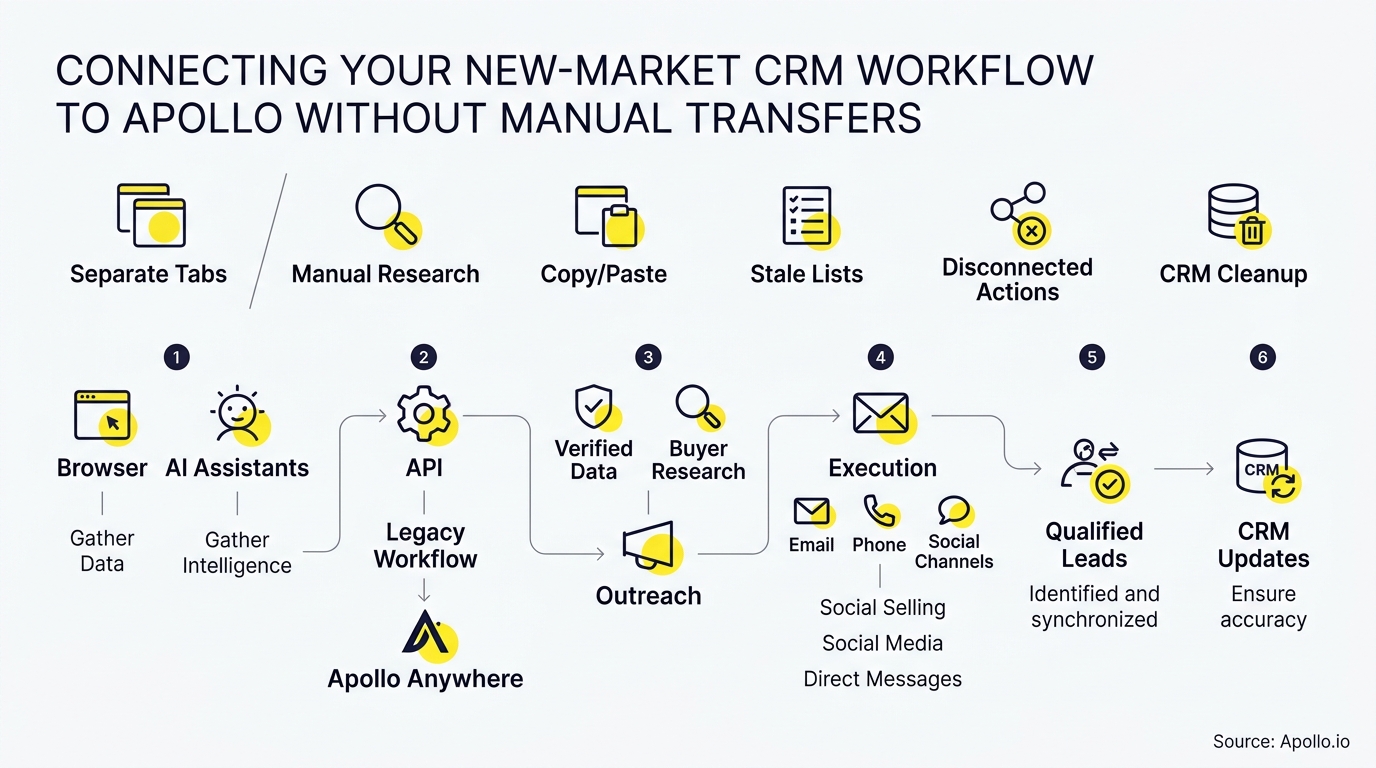
You connect a new-market CRM workflow to Apollo by using a native CRM sync for contacts and accounts, then adding workflow actions for everything the sync doesn't cover. Done right, records flow both ways automatically, and nobody exports a CSV again. This walkthrough covers prerequisites, a decision matrix, and a tested setup. For the basics, see Apollo's CRM integration walkthrough.
One note on terms: "new-market CRM" isn't a specific CRM product. This guide treats it as the CRM you're using to open a new region, segment, or territory.

Skip Manual Lead Research With Apollo
Tired of burning hours researching leads and verifying contact info instead of selling? Apollo puts business info at your fingertips, backed by 98% email accuracy. Get your selling time back and start filling pipeline today.
Start Free with Apollo →Key Takeaways
- Native sync, workflow actions, and custom integration solve different problems. Pick based on which objects and directions you need.
- Decide early whether you run one shared CRM or separate regional CRMs, because Apollo connects to one CRM at a time.
- Duplicate prevention and field ownership rules matter more than the connection itself.
- Use Apollo MCP when you need to enrich and route new-market prospects from inside ChatGPT, Claude, Perplexity, or Codex without switching tabs.
- Test creation, updates, duplicates, conflicts, and failures before you scale outreach.
What Do You Need Before Connecting a CRM to Apollo?
You need four things: an admin login for your CRM, a plan that supports the sync you want, one agreed CRM, and a written field map. Gather these first.
- Admin access: Your CRM admin must authorize the connection.
- Plan check: Bidirectional sync is plan-dependent, so confirm your tier on Apollo's pricing page.
- One CRM: Apollo's bidirectional sync overview lists HubSpot, Salesforce, and Pipedrive and allows one connected CRM at a time.
- Field map: List which system owns each field, such as owner, lifecycle stage, and territory.
Teams running separate regional CRMs must pick one as the sync target or use middleware for the rest. Newer native options also cover Zoho and Microsoft Dynamics, per Apollo's 2026 release notes.
Why Does Manual Record Transfer Cost So Much?
Manual transfers eat selling time and create stale, duplicated data. Pixelwand reports that reps spend 60% to 70% of their working hours on non-selling tasks such as manual data entry, tool-switching, and lead research.
Automatic sync only removes the administrative slice of that time, not all of it. The bigger risk is data drift. When regional teams edit the same contact in two places, nobody trusts the record.
Which Method Should You Use: Native Sync, Workflows, or Custom Integration?
Use native sync for contacts and accounts, workflows for trigger-based pushes, and custom integration only when neither covers your objects. Here is how they compare.
| Method | Direction | Best for | Maintenance |
|---|---|---|---|
| Native bidirectional sync | Two-way | Contacts, accounts, field updates | Low |
| Apollo Workflows | Event-based push | Routing, record creation, handoffs to 200+ apps | Medium |
| Webhooks or middleware | Directional | CRMs without native support | Medium to high |
| Custom API build | Any | Unusual objects or logic | High |
A workflow action is not a full two-way sync. For CRMs without native support, SmartBug Media describes using Apollo webhooks or Plays to trigger HTTP POST events into a CRM endpoint whenever a prospect is saved or updated.
See Which Deals Are Real With Apollo
Forecasts feel like a coin flip because the data is stale? Apollo gives your team live buyer signals and a clean view of every deal's stage. Start filling the funnel with leads that convert, backed by 98% email accuracy.
Start Free with Apollo →How Do You Set Up the Connection Step by Step?
Authorize the CRM in Apollo, map fields, set sync rules, then test with a small batch. Follow this order.
- In Apollo, open the integrations settings and authorize your CRM with an admin account.
- Map Apollo fields to CRM fields, including your territory or market field.
- Set the sync direction and conflict rule per field. For example, the CRM owns lifecycle stage, and Apollo owns enriched job title.
- Turn on duplicate matching by email and company domain.
- Sync 25 to 50 test records before enabling the full database.
For HubSpot and Salesforce specifics, see Apollo's CRM integration guide for HubSpot and Salesforce users.

How Do You Keep Records Clean Across Markets?
Keep them clean with explicit field ownership, standardized territory values, and duplicate rules. Salesforce's 2026 research, covered in its State of Sales announcement, found that 74% of sales professionals were focusing on data cleansing.
- Territory field: Use one picklist, not free text.
- Owner rules: Assign owners in the CRM, then let the sync carry the value.
- Enrichment: Run Apollo Data Enrichment on incoming records so new-market contacts arrive complete.
Still copying records by hand? Enrich and sync verified business contacts with Apollo so your CRM updates itself.
How Can RevOps and SDRs Use Apollo MCP in This Workflow?
RevOps and SDRs can run prospecting and enrichment from an AI chat while the CRM sync handles the records behind it. Apollo MCP brings Apollo into ChatGPT, Claude, Perplexity, and Codex, so you can search a new market, enrich contacts, and add prospects to sequences in one conversation. Setup is no-code and uses OAuth. See Apollo MCP for details.
An AI interface doesn't replace the CRM connection. It sits on top of it. Technical teams can also use the Apollo CLI for terminal access.
The old way bounced a hot lead through export, cleanup, import, and dedupe. Your best prospecting session shouldn't require opening a new tab.
How Do You Test That the Sync Works?
Test five scenarios before scaling: creation, update, duplicate, conflict, and failure. Pass all five on your sample batch.
| Test | Action | Expected result |
|---|---|---|
| Creation | Add a new Apollo contact | One CRM record appears |
| Update | Edit a title in the CRM | Apollo reflects the change |
| Duplicate | Re-add the same email | No second record |
| Conflict | Edit one field in both systems | Your ownership rule wins |
| Failure | Revoke the token briefly | An error is logged, then recovers |
Want automated outreach to follow synced records? Automate sequences with Apollo's multi-channel platform.

Conclusion: What Is the Fastest Path to a Hands-Off CRM Workflow?
The fastest path is native sync for contacts and accounts, workflows for handoffs, and a short test plan. Connect one CRM, agree on field ownership, and validate with a small batch.
That's how a new-market team stops moving records by hand.
Fewer exports also means fewer tools to maintain. As Collin Stewart of Predictable Revenue put it, "We reduced the complexity of three tools into one."
Start Free with Apollo and connect your CRM today.
Apollo Gets New Reps Selling In Days
Onboarding new reps taking too long, with ROI still impossible to prove? Apollo gives every rep one workspace to prospect, engage, and track results from day one. Back your budget case with real pipeline impact, backed by 98% email accuracy.
Start Free with Apollo →Don't miss these
Sales
Inbound vs Outbound Marketing: Which Strategy Wins?
Sales
What Is a Sales Funnel? The Non-Linear Revenue Framework for 2026
Sales
What Is a Go-to-Market Strategy? The 2026 GTM Playbook
See Apollo in action
We'd love to show how Apollo can help you sell better.
By submitting this form, you will receive information, tips, and promotions from Apollo. To learn more, see our Privacy Statement.
4.7/5 based on 9,690 reviews
