You can automate lead nurturing and email with simple AI commands by connecting your CRM and email tools to an AI assistant, telling it who to target and what to send, and setting approval and stop rules so a human stays in control. Most teams stall because they stop at AI-written copy. The real gain comes when plain-English commands turn into repeatable workflows, like the prospect nurturing strategies your best reps already run by hand.

Skip Manual Research. Apollo Finds Contacts.
Tired of burning hours researching leads and verifying contact info instead of selling? Apollo puts 240M+ contacts and 98% email accuracy at your fingertips, so reps spend their day in conversations, not spreadsheets. Start filling your pipeline today.
Start Free with Apollo →Key Takeaways
- A command only counts as automation if it executes a workflow. Drafting an email is not nurturing.
- Clean CRM context matters more than clever prompt wording.
- Use Apollo MCP when you need to find, enrich, and sequence prospects from inside ChatGPT, Claude, Perplexity, or Codex without switching tabs.
- Approval gates, suppression checks, and duplicate-enrollment rules decide whether automation helps or hurts your sender reputation.
- Measure qualified replies and meetings, not emails sent.
Can AI Commands Actually Send Nurturing Emails?
Yes, but only when the AI tool is connected to a system that can send and track email. A bare chatbot writes copy and stops there.
Vendors are moving past drafting. HubSpot's Fall 2026 Spotlight described an assistant that delegates campaign planning and personalized nurturing to specialized agents.
Salesforce announced a prospecting agent that runs email nurture sequences. Ask what a command executes versus what it only recommends.
What Do You Need Before You Automate Nurturing?
You need four things in place: usable CRM fields, email access, permissions, and a list of contacts you are allowed to email.
- CRM fields: lifecycle stage, lead source, last activity, owner, and an opt-out flag.
- Email access: a connected, warmed mailbox with sending limits set.
- Permissions: define which records the AI can read, edit, and enroll.
- Eligibility: exclude unsubscribed, bounced, and existing-customer records.
Salesforce's 2026 State of Marketing findings point the same way. Teams satisfied with their unified data were more likely to use AI agents, which suggests the prompt matters less than the data behind it. Missing data is also why finding and closing the right leads starts with enrichment, not copywriting.
How Do You Turn a Simple Command Into a Nurture Workflow?
You write one clear command that names the audience, trigger, message goal, timing, and stop condition, then review the workflow the AI builds before it goes live.
Here is an illustrative command for webinar leads:
- Command: "Find webinar attendees from the last 7 days with no open opportunity. Draft a three-email follow-up over 10 days. Stop if they reply, book, or unsubscribe. Hold all sends for my approval."
- Check the output: audience filter, field mappings, send timing, branches, and approval step.
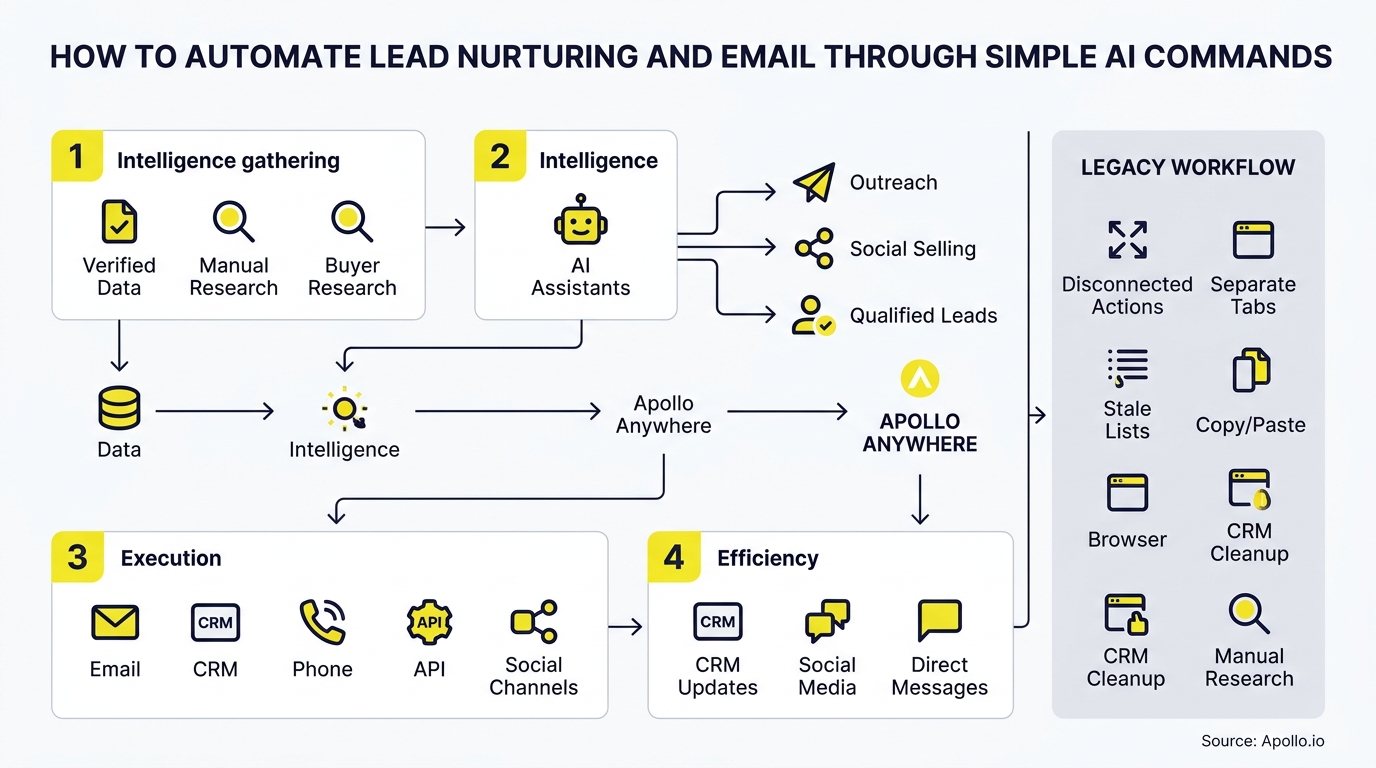
These commands are examples, not verified results for any single platform. Test them in your own stack first. For Use Apollo MCP users, the same instruction runs inside your AI tool: Apollo MCP searches matching contacts, enriches emails, and adds them to a sequence from one conversation. Setup is no-code through your AI tool's connectors using OAuth, and it works on any Apollo plan.

How Do SDRs Automate Email Follow-Ups With AI?
SDRs automate follow-ups by giving the AI a segment, a cadence, and reply rules, then reviewing drafts in batches instead of writing each email.
Spending hours on manual outreach? Automate your sequences with Apollo. According to SalesHive, reps spend only 25% to 40% of their week actively selling, with the rest lost to research, CRM logging, and drafting follow-ups. Those are the tasks plain-language commands handle best.
For Account Executives, the same pattern works after a demo. Command the AI to draft a recap, attach the right asset, and nudge the buyer if nothing happens in three days.
Fill Your Funnel With Buyers Who Convert
Struggling with leads that never become real opportunities? Apollo surfaces in-market prospects and business contacts with 98% email accuracy, so reps work deals that actually move. Start free and see which accounts are ready to talk.
Start Free with Apollo →What Controls Should You Add Before Letting AI Email Leads?
Add approval gates, suppression checks, send limits, and duplicate-enrollment rules before any message leaves your domain.
- Approval: require human review for first-touch emails and any claim about a prospect.
- Suppression: the FTC's CAN-SPAM guidance requires honoring opt-outs within 10 business days, and B2B email is not exempt.
- Limits: cap daily sends per mailbox.
- Deduplication: block a contact from entering two sequences at once.
Review matters. McKinsey's 2025 report found only 27% of respondents at organizations using generative AI said employees reviewed all AI-generated content before use. Salesforce's engineering team also described early failure rates of 50-60% from overload and duplicate engagement before it added queue management. Simple commands should sit on top of these controls, not replace them. Poor sender hygiene hurts replies, so also review email deliverability basics.
How Should RevOps Troubleshoot AI Nurture Workflows?
RevOps leaders should run a short test suite before launch and re-run it after any change to fields, prompts, or sequences.
| Test Case | Expected Result | If It Fails |
|---|---|---|
| Contact unsubscribes | Removed from all sequences | Check suppression sync |
| Contact replies | Sequence stops, rep notified | Fix reply detection |
| Contact books meeting | Nurture ends, handoff fires | Review booking trigger |
| Missing email or name | Record skipped, flagged | Add enrichment step |
| Already in a sequence | Not enrolled again | Add enrollment rule |
Tired of dirty data breaking these tests? Start free with Apollo's 240M+ verified business contacts and fill missing fields before the workflow runs.
How Do You Measure Whether AI Nurturing Works?
Measure qualified replies, meetings booked, opportunities created, and unsubscribe rate against a control group, not email volume.
Vendor claims need a careful read. HubSpot reported that Prospecting Agent customers booked 80% more meetings, but that comparison was observational and does not prove AI alone caused it.
Run a pilot: send half your leads through the AI workflow and half through your current process for 30 days. Sales and revenue leaders can then judge results on pipeline, not enthusiasm.
Also track unsubscribe rate, since a spike signals over-sending.

Where Should You Start With AI Lead Nurturing?
Start with one narrow workflow, such as post-webinar follow-up, and keep a human approval step until the test suite passes cleanly.
Expand only after you have clean data, working suppression, and a baseline to compare against. Consolidating prospecting, enrichment, and outreach in one place also keeps the stack lean. As Collin Stewart of Predictable Revenue put it: "We reduced the complexity of three tools into one." Your best prospecting session shouldn't require opening a new tab.
Ready to run nurturing from simple commands? Get Leads Now.
Prove Pipeline ROI Fast With Apollo
Budget review coming and no clear ROI story? Apollo puts prospecting, engagement, and AI-powered execution in one workspace, so you can show where pipeline comes from. Teams actively using Apollo's AI Assistant are up 2,156% since December 2025.
Start Free with Apollo →Don't miss these
Sales
Inbound vs Outbound Marketing: Which Strategy Wins?
Sales
What Is a Sales Funnel? The Non-Linear Revenue Framework for 2026
Sales
What Is a Go-to-Market Strategy? The 2026 GTM Playbook
See Apollo in action
We'd love to show how Apollo can help you sell better.
By submitting this form, you will receive information, tips, and promotions from Apollo. To learn more, see our Privacy Statement.
4.7/5 based on 9,690 reviews
