
Your AI assistant is about to send a follow-up. Did the prospect already reply? Bounce? Opt out? Without checking, the answer is a guess. Before any update goes out, a well-built assistant should check Apollo's email records, compare them with sequence state, and decide whether to send, hold, or escalate. Apollo's AI Assistant already sits close to that data, so the check belongs in the workflow itself.

Skip Manual Research With Apollo's Verified Data
Tired of spending hours researching leads and verifying contact info? Apollo puts business contact info for 240M+ people at your fingertips, with 98% email accuracy. Start selling instead of searching.
Start Free with Apollo →Key Takeaways
- Delivered does not mean replied. A safe pre-send check reads delivery outcome, reply status, opt-out signals, and sequence state together.
- Use Apollo MCP when you need to check a prospect's correspondence history and draft the next update from inside ChatGPT, Claude, Perplexity, or Codex, without switching tabs.
- Use an assistant when you need consistent pre-send rules across a team. Keep humans in the loop for ambiguous replies and conflicting statuses.
- Log the evidence behind every send, hold, or escalate decision so RevOps can audit it later.
How Can an AI Assistant Check Previous Correspondence in Apollo Before Sending Updates?
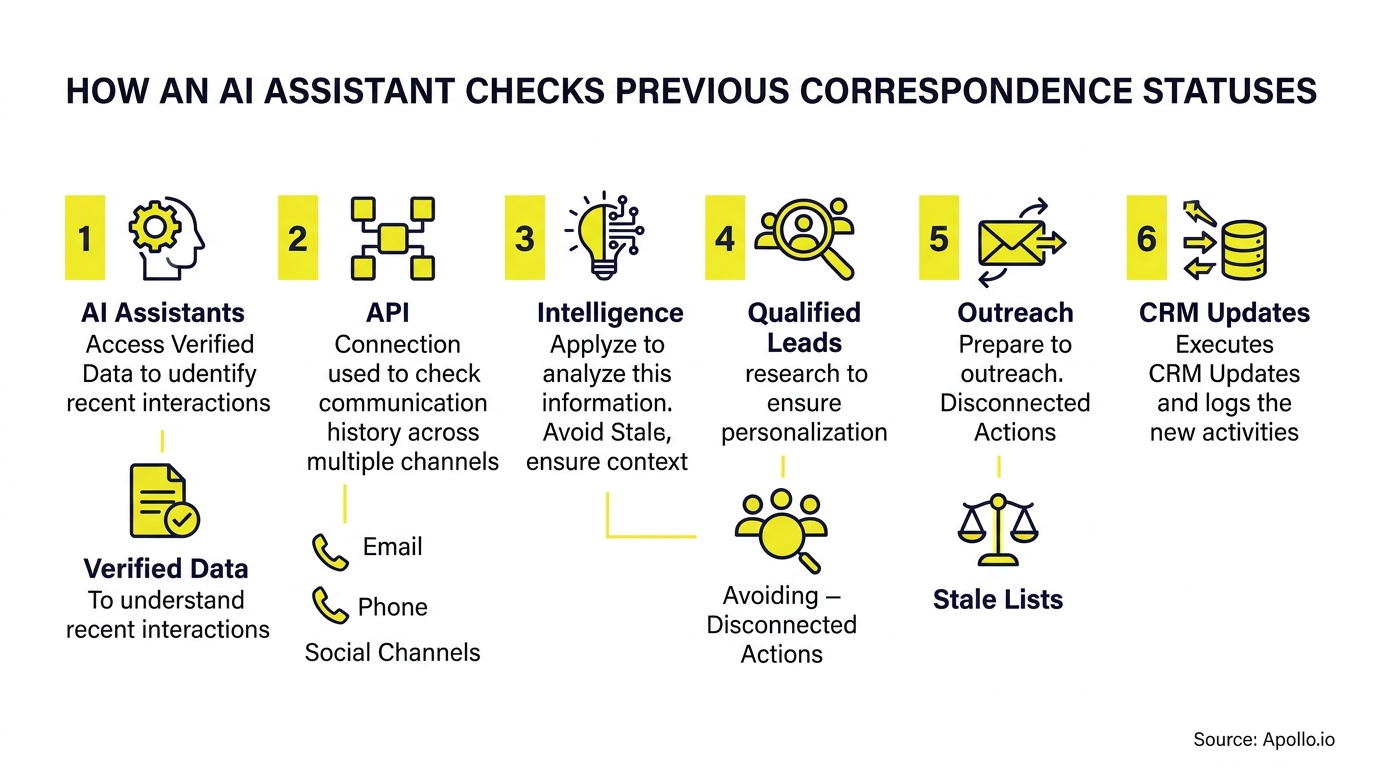
An AI assistant checks previous correspondence by running a fixed sequence of steps: identify the contact, retrieve their email history, inspect statuses, reconcile conflicts, decide, then revalidate immediately before sending.
Think of it as a six-step loop:
- Identify: match the exact contact and email address.
- Retrieve: pull sent emails and sequence messages for that contact.
- Inspect: read delivery outcome, replies, and opt-out signals.
- Reconcile: compare email status against sequence state.
- Decide: send, hold, suppress, or escalate.
- Revalidate: re-check just before sending, since statuses change.
This is an evidence-first design, not unrestricted autonomous outreach. It matters because only 35% of sales professionals completely trusted their organization's data, according to Salesforce's 2024 State of Sales survey. An assistant that reads real correspondence records is safer than one that trusts a single CRM field.
What Statuses Should the Assistant Inspect?
The assistant should inspect delivery status, reply status, opt-out signals, and sequence state, because no single flag tells the full story.
Apollo distinguishes delivered, replied, and bounced emails from active, paused, and finished sequence states. By default, a reply finishes the contact's sequence, though rules can change that behavior. Review those settings before assuming a follow-up is appropriate, as covered in Apollo's guide to viewing and responding to emails.
- Delivery disposition: delivered, opened, clicked, or bounced.
- Reply status: any inbound message, plus its intent.
- Opt-out signals: unsubscribe requests or "please stop" language.
- Sequence state: active, paused, or finished.
According to Metabase's Apollo integration documentation, a check should confirm whether the prospect is currently marked as bounced, unsubscribed, or replied. Delivery data alone is not enough, which is why the June 2026 delivery-status tool in Apollo's MCP release notes is a starting point, not a complete answer.

How Does the Retrieval Workflow Run in Practice?
The retrieval workflow uses Apollo's Search for Outreach Emails to locate messages, then Check Email Stats to read a specific message's content, engagement, and recipient details.
Search supports up to 100 records per page and 500 pages, with a 50,000-record display limit, per Apollo's API reference. A reliable implementation handles pagination and verifies the recipient before trusting any result.
Pseudocode for the check:
contact = resolve(email, contact_id)page = 1; results = []while has_more(page) and page <= 500: results += search_outreach_emails(contact, page); page += 1latest = most_recent(results); stats = check_email_stats(latest)if search_incomplete: escalate_to_human
Keep API credentials server-side, never in the assistant's visible prompt. According to apis.io's catalog of Apollo's emailer messages API, the relevant endpoints include POST /v1/emailer_messages/email_send_status and GET /emailer_messages/{id}/activities. Treat that listing as a pointer and confirm endpoint details against Apollo's official docs before building.
Fill Your Funnel With Leads That Convert
Struggling to fill the top of your funnel with leads that actually turn into opportunities? Apollo helps you find the right business contacts and see where every deal stands, so your forecast stops feeling like a guess. Build pipeline you can trust, starting today.
Start Free with Apollo →When Should the Assistant Send, Hold, or Escalate?
The assistant should send only when statuses are clean and complete; it should hold or suppress on bounces, replies, and opt-outs, and escalate when evidence conflicts or is incomplete.
| Evidence found | Action | Why |
|---|---|---|
| Hard bounce on address | Suppress | Sending again damages deliverability. |
| Unsubscribe or stop request | Suppress | Respect the opt-out. |
| Positive or question reply | Hold and notify rep | A human should answer. |
| Out-of-office reply | Hold until return date | Timing, not intent, changed. |
| Referral to a colleague | Escalate | Route to the right contact. |
| Search incomplete or statuses conflict | Escalate | Insufficient evidence to send. |
| Delivered, no reply, sequence active | Send | No blocking signal found. |
Reply intent matters as much as reply existence. According to Missive's productivity blog, the assistant should inspect the raw thread body and timestamp of the last touchpoint to verify whether the prospect replied directly, asked to pause communications, or referred the rep to a colleague.
How Should SDRs and Account Executives Use This Workflow?
SDRs and Account Executives should let the assistant run the check, then approve the send, so research time drops without giving up control.
For SDRs working large sequences, the check prevents the awkward double-touch: a pitch landing after a prospect already said no. For AEs managing active deals, it surfaces the latest thread before a status update goes out.
RevOps leaders benefit from the evidence log, which shows why each message was sent, held, or escalated.
Apollo's own tooling points the same way: it separates email drafting from sending and requires approval for assistant-driven sequence optimization changes. Automate evidence gathering; reserve final judgment for people. Using Apollo MCP, a rep can ask for the correspondence check and a drafted update in one conversation inside ChatGPT, Claude, Perplexity, or Codex, since Apollo MCP brings Apollo into the tools reps already use. Spending hours on manual outreach? Automate your sequences with Apollo.
What Should an Evidence Log Look Like?
An evidence log should record who was checked, what was found, which rule fired, and who approved, with personal details redacted.
contact_id: c_8841 (email redacted)checked_at: 2026-10-02T14:05Zlast_email: delivered, no reply, 6 days agosequence_state: activesearch_complete: truedecision: send; approved_by: rep
Reliability deserves the same attention as speed. Stanford's 2025 AI Index reported 233 documented AI-related incidents in 2024, up 56.4% from 2023. That is a broad count, not an email error rate, but it supports explicit stop conditions and human review for uncertain states.
How Do You Measure Whether the Check Works?
Measure it with a short pilot scorecard focused on outcomes the check is meant to change.
- Inappropriate follow-ups blocked: messages held after a reply, bounce, or opt-out.
- Review time per update: minutes a rep spends confirming status.
- Escalation accuracy: how often escalated cases truly needed a human.
- Qualified replies: replies from messages that passed the check.
Test cases should cover replies, bounces, unsubscribe requests, out-of-office responses, and incomplete searches. Keep the implementation guide versioned and publish your own results. Measurement matters because Gartner forecast in June 2025 that over 40% of agentic AI projects would be canceled by the end of 2027 due to cost, unclear value, or weak risk controls.

Ready to Make Outreach Status-Aware?
The takeaway: better memory of the customer beats better copy. Check what already happened, then write the update. Apollo connects data, engagement, and AI in one workspace, which cuts the number of tools your team has to stitch together. Predictable Revenue's Collin Stewart put it this way: "We reduced the complexity of three tools into one." Tired of switching between systems to verify a contact's history? Schedule a Demo and see status-aware outreach in Apollo.
Get Reps Productive Faster With Apollo
Onboarding new reps taking too long, with ROI still impossible to prove? Apollo gives every rep one connected workspace to prospect, sequence, and track results from day one. Leadium tripled annual revenue by automating follow-up, and GTM Ops booked 4× more meetings.
Start Free with Apollo →Don't miss these
Sales
Inbound vs Outbound Marketing: Which Strategy Wins?
Sales
What Is a Sales Funnel? The Non-Linear Revenue Framework for 2026
Sales
What Is a Go-to-Market Strategy? The 2026 GTM Playbook
See Apollo in action
We'd love to show how Apollo can help you sell better.
By submitting this form, you will receive information, tips, and promotions from Apollo. To learn more, see our Privacy Statement.
4.7/5 based on 9,690 reviews
