
Apollo Sales Engagement and Calling Workflows: A Salesforce Integration Demo
Most Salesforce integration demos show you a settings screen and a sync toggle. That's not proof, that's a slide.
This walkthrough traces one real prospect from sequence enrollment through a logged call to a verified Salesforce record, with timestamps, so you can see exactly what syncs, when, and where it lands.

Skip Manual Research, Get Verified Contacts
Still burning hours verifying emails and phone numbers by hand? Apollo delivers 98% email accuracy so your team spends time selling, not searching. Start finding real contacts today.
Start Free with Apollo →Key Takeaways
- A single prospect can move from Apollo sequence to a verified Salesforce activity record in under 10 minutes when push settings are configured correctly.
- Most contact and company syncs complete in 15–30 minutes, but initial and bulk syncs take longer, so plan your first sync outside a live demo window.
- SDRs, AEs, and RevOps leaders each need a different verification point: enrollment logs, call disposition, and duplicate/field-mapping accuracy respectively.
- Salesforce's own outbound agent, Hunter, now uses Apollo's data network, shifting the integration story from record syncing to shared prospecting intelligence.
- A pass/fail scorecard turns a subjective demo into an auditable test RevOps can repeat before rollout.
What Is An Apollo Salesforce Integration Demo?
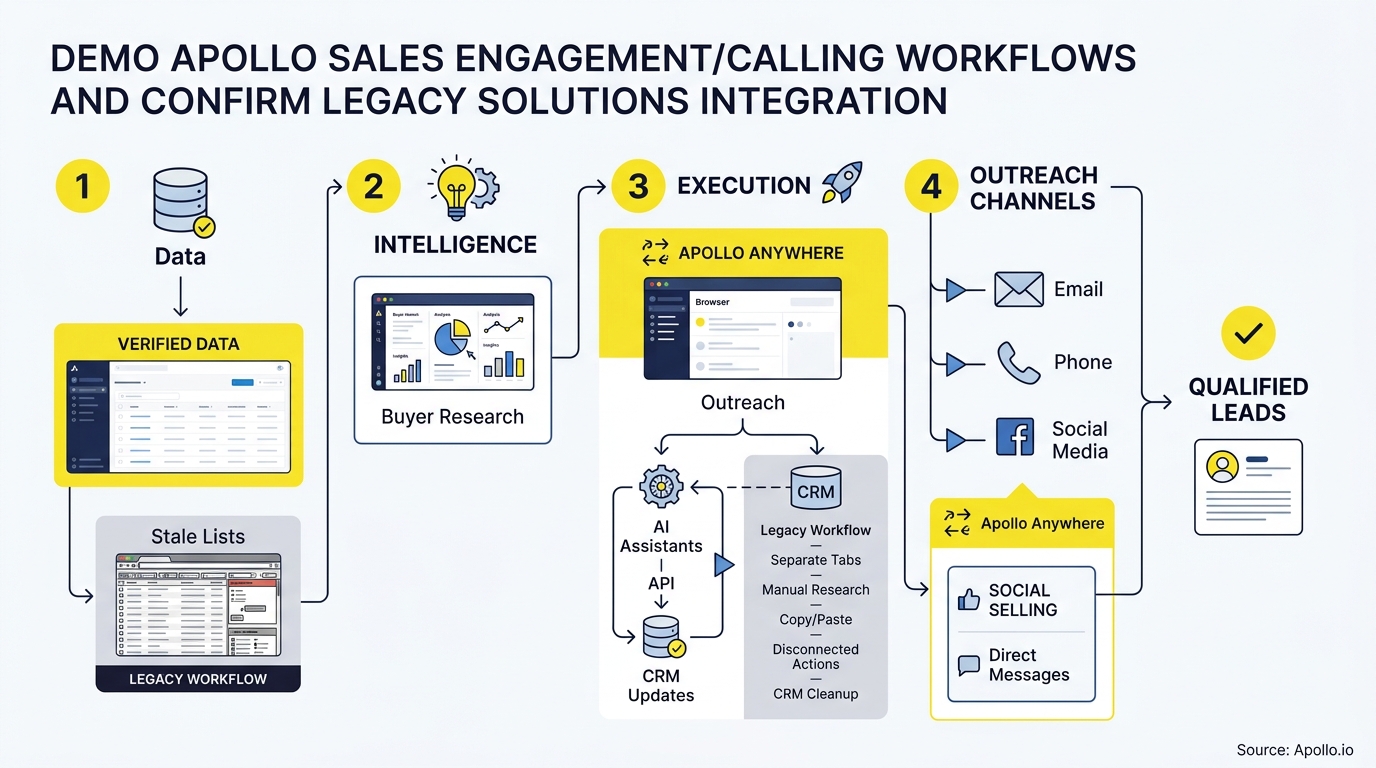
An Apollo Salesforce integration demo is a live, timestamped test that enrolls one prospect in an Apollo sequence, places a logged call, and confirms the resulting activity appears correctly in Salesforce. It is not a feature tour.
It's a verification exercise: enroll, dial, disposition, sync, check.
Apollo's Salesforce integration supports bidirectional movement of leads, contacts, accounts, and opportunities/deals, plus six activity categories: emails, notes, tasks, calls, meetings, and conversation summaries, according to Apollo's official Salesforce configuration documentation. A proper demo tests each of those categories against your own Salesforce org, not a generic sandbox.
Why Does A Timestamped Test Matter More Than A Feature Walkthrough?
A timestamped test matters more because it proves sync timing, field mapping, and activity association under real conditions instead of assumptions. RevOps teams inherit the mess when a demo looks clean but production syncs lag or duplicate records.
Recording exact timestamps at enrollment, call completion, and Salesforce confirmation gives you a baseline to compare against your own environment.
How Do You Run A 10-Minute Apollo Sales Engagement Demo?
You run a 10-minute demo by enrolling a test prospect in a sequence, completing a dial with disposition, and confirming the Salesforce record within the same session. Here's the sequence:
| Step | Action | Elapsed Time | What To Verify |
|---|---|---|---|
| 1 | Enroll test contact in Apollo sequence | 0:00 | Contact status changes to "Active" |
| 2 | Trigger first sequence step (call task) | 0:01 | Task appears in Apollo call queue |
| 3 | Place call via Apollo dialer | 2:00 | Call connects, recording starts |
| 4 | Log call disposition and notes | 4:30 | Disposition triggers next sequence step |
| 5 | Check Salesforce for activity record | 15:00–30:00 | Call, notes, and task logged on the correct Contact/Lead record |
For Account Executives managing live deals, this same flow confirms that a discovery call logged in Apollo shows up against the right Opportunity, not just the Contact. That distinction matters when a deal moves through Salesforce stages tied to activity history.
Struggling to prove your outreach actually reaches the CRM? Test Apollo's sales engagement platform against your own Salesforce org before you commit.
What Setup Checklist Confirms Salesforce Sync Is Working?
The setup checklist confirms sync health by validating field mappings, push settings, and object permissions before you rely on production data. Run through this before any live demo or rollout:
- Push settings enabled for Leads, Contacts, Accounts, and Opportunities
- Field mappings verified between Apollo custom fields and Salesforce fields (especially custom objects)
- Activity sync confirmed for all six categories: emails, notes, tasks, calls, meetings, conversation summaries
- Duplicate matching rules reviewed to prevent record collisions on re-sync
- One-org connection confirmed (Apollo connects to a single Salesforce org at a time; sandbox and production require separate authentication)
- User permissions checked so reps can push and pull without admin intervention
Most contact and company syncs complete within 15–30 minutes once configured, though initial and bulk syncs take longer, per Apollo's Salesforce push settings documentation. Budget a separate window for your first bulk sync rather than running it live in front of stakeholders.
How Can SDRs Book More Meetings With Fewer Manual Steps?
SDRs book more meetings by automating the administrative steps between a call and a logged CRM record, freeing time for actual conversations. A Salesforce survey of 5,500 sales professionals found reps spend 70% of their workweek on nonselling activities, including 9% on manual data entry, according to the Salesforce State of Sales report. When call disposition automatically logs to Salesforce and triggers the next sequence step, that manual entry time disappears from the workflow.
Apollo's Workflow Engine connects sequence steps, call outcomes, and CRM writeback into one motion, so an SDR working a call queue never leaves the interface to update Salesforce manually. RevOps leaders find this consolidation reduces the need for separate dialer and CRM logging tools. As one Predictable Revenue rep put it: "We reduced the complexity of three tools into one."
Turn Forecast Guesswork Into Real Signal
Still watching good leads stall before they ever become real opportunities? Apollo shows exactly where every deal sits and which prospects are actually sales-ready, so forecasts reflect reality. Built-In improved win rates using Apollo's scoring.
Schedule a Demo →What Exception Tests Should You Run Before Rollout?
Exception tests confirm your integration handles edge cases, not just the happy path. Before rolling out to your full team, test:
| Exception Scenario | Expected Behavior | Risk If Untested |
|---|---|---|
| Duplicate contact already in Salesforce | Apollo matches existing record, doesn't create duplicate | Fragmented activity history across two records |
| Call made to a number not in Salesforce | New Lead/Contact created with call logged | Orphaned activity with no CRM record |
| Opportunity stage change mid-sequence | Sequence pauses or reps get notified | Reps calling on a closed-won deal |
| Sandbox vs. production org confusion | Clear indicator of which org is connected | Test data polluting production Salesforce |
RevOps leaders should run each scenario once in a sandbox before connecting production. Apollo's CRM integration guide covers connection steps in more detail.

How Do You Score A Pass/Fail Scorecard For The Demo?
You score the demo by checking each workflow stage against a binary pass/fail standard, not a subjective impression. Use this scorecard after your 10-minute test:
| Checkpoint | Pass Criteria | Result |
|---|---|---|
| Enrollment | Contact enrolled and visible in sequence within 60 seconds | Pass/Fail |
| Call logging | Call recording and disposition saved in Apollo | Pass/Fail |
| Salesforce writeback | Activity appears on correct record within 30 minutes | Pass/Fail |
| Field accuracy | Notes, disposition, and timestamp match source data | Pass/Fail |
| No duplicates | Zero duplicate Contact/Lead records created | Pass/Fail |
A study by Integrate.io found enterprise organizations achieve an average 299% ROI over three years through Salesforce data integration. That return depends on integrations that actually pass these checkpoints, not ones that merely demo well once.
What KPIs Should You Track After Integration?
Track sync success rate, time-to-enroll, duplicate rate, and follow-up completion to measure whether the integration performs in production, not just in a demo. These four numbers tell RevOps leaders whether the workflow is actually saving time or quietly creating cleanup work:
- Sync success rate: Percentage of activities that write back to Salesforce without manual intervention
- Time-to-enroll: Minutes between prospect identification and sequence enrollment
- Duplicate rate: Number of duplicate records created per 100 syncs
- Follow-up completion: Percentage of triggered next-steps actually completed by reps
Sales & Revenue Leaders should review these weekly during rollout, then monthly once the integration stabilizes. Apollo's sales leader resources cover team-level reporting setups in more depth.
How Is Apollo's Salesforce Relationship Changing In 2026?
Apollo's Salesforce relationship is shifting from record syncing toward shared prospecting intelligence. In September 2026, Apollo became a launch data partner for Salesforce's new outbound agent, Hunter, which can use Apollo's contact network to research accounts, enrich prospects, and surface hiring signals directly inside Salesforce.
Hunter is in pilot with general availability planned for November 2026.
This matters for RevOps leaders evaluating long-term CRM strategy: the integration is no longer just about moving activity records between systems. It's about whether your data provider can also power native Salesforce agents.
Apollo also shipped a read-only Salesforce Custom Objects sync in August 2026, letting teams segment prospects using signals like webinar attendance, refreshed roughly every 15 minutes.
What Does A Full Consolidation Look Like For RevOps Teams?
Full consolidation looks like replacing separate dialer, sequencing, and enrichment tools with one platform that writes directly to Salesforce. Cyera's team described the shift this way: "Having everything in one system was a game changer." Census reported a more direct financial outcome: "We cut our costs in half."
For Founders and RevOps leaders auditing their stack, the question isn't whether Apollo integrates with Salesforce; it's whether that integration replaces three or four point tools with one. Tired of stitching together a dialer, a sequencer, and a data provider that don't talk to each other cleanly? See how Apollo's AI sales automation consolidates that workflow into a single connected system.
Frequently Asked Questions
How Long Does Apollo's Salesforce Sync Take?
Most contact and company syncs complete within 15–30 minutes. Initial connection and bulk historical syncs take longer, so schedule your first sync outside a live demo or business-critical window.
What Activities Does Apollo Sync To Salesforce?
Apollo syncs six activity categories: emails, notes, tasks, calls, meetings, and conversation summaries, alongside standard object records like Leads, Contacts, Accounts, and Opportunities.
Can Apollo Connect To A Salesforce Sandbox?
Yes, but Apollo connects to one Salesforce org at a time. Sandbox and production each require separate authentication, so confirm which org is active before testing to avoid mixing test and live data.
Does Apollo Sync Deals Or Only Contacts?
Apollo syncs Opportunities/deals bidirectionally along with Leads, Contacts, and Accounts, so activity logged against a deal in Apollo reflects on the corresponding Salesforce Opportunity.
How Are Calls Associated With The Correct Salesforce Record?
Calls are matched to existing Contact, Lead, or Opportunity records using Apollo's field mapping and duplicate matching rules configured during setup, which is why testing duplicate scenarios before rollout matters.

Ready To See It Work On Your Own Data?
A demo only proves something if it holds up against your real Salesforce org, your real field mappings, and your real call volume. Run the 10-minute test above, score it against the checklist, and you'll know within one sales cycle whether the integration reduces admin work or just relocates it.
Want to see the full workflow, from enrollment to verified Salesforce writeback, on your own instance? Try Apollo Free and confirm the integration yourself before you roll it out to your team.
Scale Outreach Without Adding Headcount
Can't justify tool spend when results take months to show up? Apollo automates outreach at scale so your team hits quota with the reps you already have. GTM Ops Agency drove 4x more meetings without hiring a single SDR.
Start Free with Apollo →Don't miss these
Sales
Inbound vs Outbound Marketing: Which Strategy Wins?
Sales
What Is a Sales Funnel? The Non-Linear Revenue Framework for 2026
Sales
What Is a Go-to-Market Strategy? The 2026 GTM Playbook
See Apollo in action
We'd love to show how Apollo can help you sell better.
By submitting this form, you will receive information, tips, and promotions from Apollo. To learn more, see our Privacy Statement.
4.7/5 based on 9,690 reviews
