The Clari Salesforce integration connects Clari's forecasting and revenue workflows to the opportunity, account, and activity data that already lives in your CRM. Salesforce stays the system of record, and Clari reads from it to build forecast views and flag deal risk. Whether Clari is worth adding on top of Salesforce is a separate question from how the integration works. This guide answers both, with one path for administrators and one for revenue leaders. If you are mapping your wider CRM data flows first, start with Apollo's CRM integration strategy guide.
Terminology is also shifting. In September 2026, Clari and Salesloft announced they now operate under one company and brand, and Clari Forecast keeps its product name.
Product integration across the combined company is described as ongoing, so date-stamp any technical claim and confirm product names before you buy or configure anything.

Skip Manual Research - Apollo Finds Buyers
Tired of burning hours researching leads and verifying contact info before you can even start selling? Apollo puts business info in front of you with 98% email accuracy, so your reps spend their day in conversations, not spreadsheets.
Start Free with Apollo →Key Takeaways
- The integration is a data connection between Salesforce (system of record) and Clari (forecasting layer). It is not a replacement for your CRM.
- Audit objects, sync direction, timing, permissions, and recovery steps in a sandbox before trusting any forecast number.
- Sync settings in vendor documentation are product-specific and change over time. Verify them against current admin docs.
- Judge value by forecast error and admin time against a baseline, not by dashboard count.
- Clean upstream data does more for forecast quality than another reporting layer.
What Data Moves Between Clari and Salesforce, and How Often?
Clari reads core Salesforce records, such as opportunities, accounts, users, and activity data, and uses them to build forecast and pipeline views. Exact object mappings, field-level behavior, and write-back rules depend on your edition and configuration.
Treat the table below as an audit worksheet to validate in a sandbox, not as confirmed vendor specs.
| Salesforce Area | What to Confirm | Direction to Verify | Owner |
|---|---|---|---|
| Opportunities | Stage, amount, close date, forecast category mapping | Read, plus any write-back you enable | RevOps |
| Accounts | Hierarchy, owner, segment fields | Read | Salesforce Admin |
| Users and roles | Role hierarchy matches forecast roll-ups | Read | Salesforce Admin |
| Activities (Events and Tasks) | Capture scope, field visibility, batch behavior | Read, and write if activity capture is on | RevOps |
| Custom fields | Field-level security for the integration user | Per field | Security or Admin |
Prerequisite checklist:
- Build a dedicated integration user with least-privilege permissions.
- Test in a full or partial sandbox before production.
- Document your opportunity stage definitions and forecast categories.
- Name an owner for forecast data quality.
Timing varies by feature. Clari's February 2025 documentation for its Capture feature suggested a 24-hour run frequency, a 50,000-call daily API cap, and batches of 1,000 events or tasks.
Those are settings for that feature, not universal Salesforce limits or a promise that every sync runs on that schedule. Confirm current values with your admin team.
How Do You Troubleshoot Stale Data, Failed Writes, and API Limits?
Start by isolating where the break occurs: Salesforce data, the integration user, or the API budget. Work through the decision path below in a sandbox first.
| Symptom | Check First | Next Step |
|---|---|---|
| Forecast numbers look stale | Last successful sync time and run frequency | Compare the Salesforce record timestamp with what the forecast view shows |
| Fields not updating | Field-level security and profile or permission set for the integration user | Re-test with an admin-level user to isolate permissions |
| Write-backs failing | Validation rules, required fields, and flows firing on the object | Review error logs and reproduce the failure in a sandbox |
| Activity data missing | Capture scope and batch settings | Check for batching delays before assuming data is lost |
| Intermittent failures near end of day | Daily API consumption across all connected apps | Inventory every integration drawing on your API allocation |
That last row matters beyond performance. Every app connected to Salesforce is also an access path to your data.
Keep a current inventory of connected apps and their permissions, and review it with your security team as part of any rollout.
Does Clari Replace Salesforce for Forecasting?
No. Clari is generally positioned as a forecasting and revenue-intelligence layer that works from CRM data, so Salesforce remains the place where opportunities are created and maintained.
The real question is whether an added layer changes forecast decisions, because analytics alone do not guarantee outcomes.
| Question | Salesforce Forecasting Alone | Salesforce Plus a Forecasting Layer |
|---|---|---|
| Single system of record | Yes | Yes, Salesforce remains the record |
| Added administration | Existing admin load | Additional configuration, permissions, and training |
| Overlap with existing tools | Low | Needs review against current reports and dashboards |
| Value depends on | Data hygiene | Data hygiene plus whether managers change behavior from the new views |
Time is the strongest case for tooling. Apollo's deal management is one option for teams that want deal tracking in the same workspace as prospecting and outreach. Before buying any forecasting layer, estimate how many manager hours go into weekly roll-ups, spreadsheet reconciliation, and deal-inspection meetings. If those hours are low and your Salesforce data is clean, an added layer may not pay for itself.
If hours are high and reps update records inconsistently, the gap is usually process, not tooling. Fix field definitions, stage criteria, and update cadence first.
Then evaluate whether a forecasting layer adds visibility your Salesforce reports cannot.

Where Does Apollo Fit Next to a Salesforce Forecasting Stack?
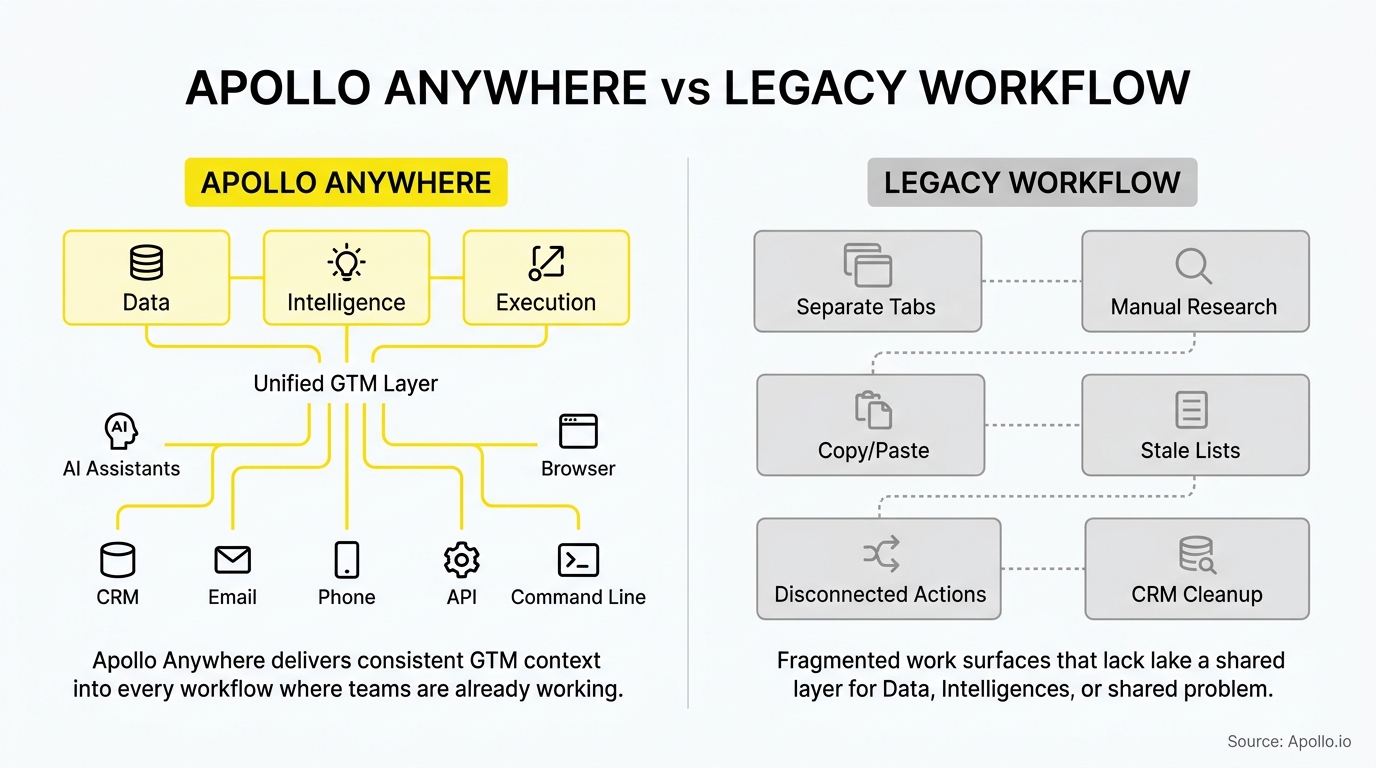
Apollo is an AI GTM system that unifies B2B data, sales intelligence, and execution in one connected go-to-market system. It does not replace Salesforce as the system of record.
It feeds Salesforce with enriched business contact information and the engagement activity behind your pipeline.
Forecast quality depends on what enters the CRM upstream. Better account and contact records, and consistent outreach activity tied to opportunities, give any forecasting view stronger inputs.
- Enrichment: Apollo data enrichment keeps contact, lead, and account fields populated so reps are not typing them by hand.
- Engagement: Apollo sales engagement runs email, phone, and social outreach from the same records you prospect from.
- Connectivity: Apollo integrations include Salesforce, and Apollo MCP brings Apollo data into AI assistants such as Claude, ChatGPT, and Perplexity.
"Apollo enriches everything we have: contacts, leads, accounts... And we don't really have to touch it, it just works."
According to Ramp's vendor data, as of November 2026, Apollo holds a 39% adoption rate in the Sales Data Providers category, ranking #2 and up 6 percentage points from last year.
Fill Your Funnel With Buyers Who Convert
Struggling to fill the top of the funnel with leads that actually become opportunities? Apollo helps you find the right companies and people, with 98% email accuracy, so reps spend time on real conversations instead of cold, unqualified names.
Start Free with Apollo →How Should RevOps Leaders and Sales Managers Evaluate This Setup?
Each role should test the integration against a different question. A shared pilot scorecard keeps the evaluation from turning into a feature debate.
| Role | Primary Question | What to Test |
|---|---|---|
| RevOps Leader | Is the sync reliable and auditable? | Field mappings, write-back failures, API consumption, connected-app permissions |
| Sales Manager or CRO | Does the forecast view change decisions? | Whether commit calls and deal reviews shift after two or three forecast cycles |
| Account Executive | Does it reduce admin work? | Time spent updating opportunities versus selling |
| SDR or BDR | Do records arrive complete and ready to work? | Contact data completeness and how quickly activity reaches the CRM |
"We reduced the complexity of three tools into one. We're getting higher reply rates, open rates are doubled, meetings are up, and speed to booking a meeting is cut in half."
What Are the Most Common Questions About Clari and Salesforce?
Does Clari Require Salesforce?
Clari is generally deployed on top of a CRM, and Salesforce is a commonly supported option. Confirm supported CRMs and edition requirements with Clari directly before planning a rollout.
How Often Does Data Sync Between Clari and Salesforce?
Sync timing depends on configuration, object scope, and batching. Check your own settings and test with a known record before assuming data is current.
Can Apollo Work Alongside Salesforce?
Yes. Apollo integrates with Salesforce so enriched business contact information and engagement activity can sit alongside your opportunity records.
Review field mappings with your admin before enabling write-back.

Should You Add a Forecasting Layer to Salesforce?
Add one only after your Salesforce data is clean, your sync is monitored, and you can name the forecast decision it will change. Audit field mappings, API consumption, and connected-app access first, then run a pilot with a clear scorecard.
Upstream data quality drives every forecast view. To enrich your Salesforce records, run outreach from one workspace, and cut tool sprawl, start with Apollo.
Prove ROI Fast With Apollo's Unified Platform
Onboarding new reps taking too long while leadership wants proof of ROI? Apollo puts data, outreach, and AI in one workspace, so reps ramp fast and value shows up quickly. Leadium tripled annual revenue by automating follow-up.
Start Free with Apollo →Don't miss these
Sales
Inbound vs Outbound Marketing: Which Strategy Wins?
Sales
What Is a Sales Funnel? The Non-Linear Revenue Framework for 2026
Sales
What Is a Go-to-Market Strategy? The 2026 GTM Playbook
See Apollo in action
We'd love to show how Apollo can help you sell better.
By submitting this form, you will receive information, tips, and promotions from Apollo. To learn more, see our Privacy Statement.
4.7/5 based on 9,690 reviews
