
Using Apollo from the Command Line or Inside Codex
Yes. Developers can use Apollo.io from the command line through the official Apollo CLI, and directly inside OpenAI Codex through Apollo's remote MCP server.
Both connect to the same underlying data and actions, so a RevOps engineer scripting a nightly enrichment job and a founder chatting with Codex about pipeline coverage are pulling from one system of record, not two.
This matters now because Apollo's 2026 release notes introduced both the CLI and native Codex support in the same update, formally opening Apollo's prospecting and enrichment engine to terminal-native and agentic workflows. Here's how each path works, when to use which, and how to keep AI-driven sales actions reviewable instead of autonomous.

Skip The Research, Apollo Verifies Instantly
Burning hours every day chasing down emails and phone numbers that turn out to be wrong. Apollo hands your reps verified contact data upfront, with 98% email accuracy built right in. Spend that time selling instead of searching.
Start Free with Apollo →Key Takeaways
- Use Apollo MCP when you need to research prospects, enrich contacts, or launch sequences conversationally inside ChatGPT, Claude, Perplexity, or Codex without switching tabs.
- Use the Apollo CLI when you need to search, enrich, or export records inside a script, scheduled job, or CI pipeline.
- Apollo MCP uses OAuth 2.0, so developers authenticate once and never paste an API key into Codex.
- Guided MCP workflows preview sensitive actions (sequence enrollment, bulk enrichment) before they run, so nothing fires without a human glance.
- The CLI outputs JSON, JSONL, CSV, YAML, or tables, so results pipe cleanly into
jq, scripts, or downstream AI agents.
Can Developers Use Apollo From The Command Line Or Inside Codex?
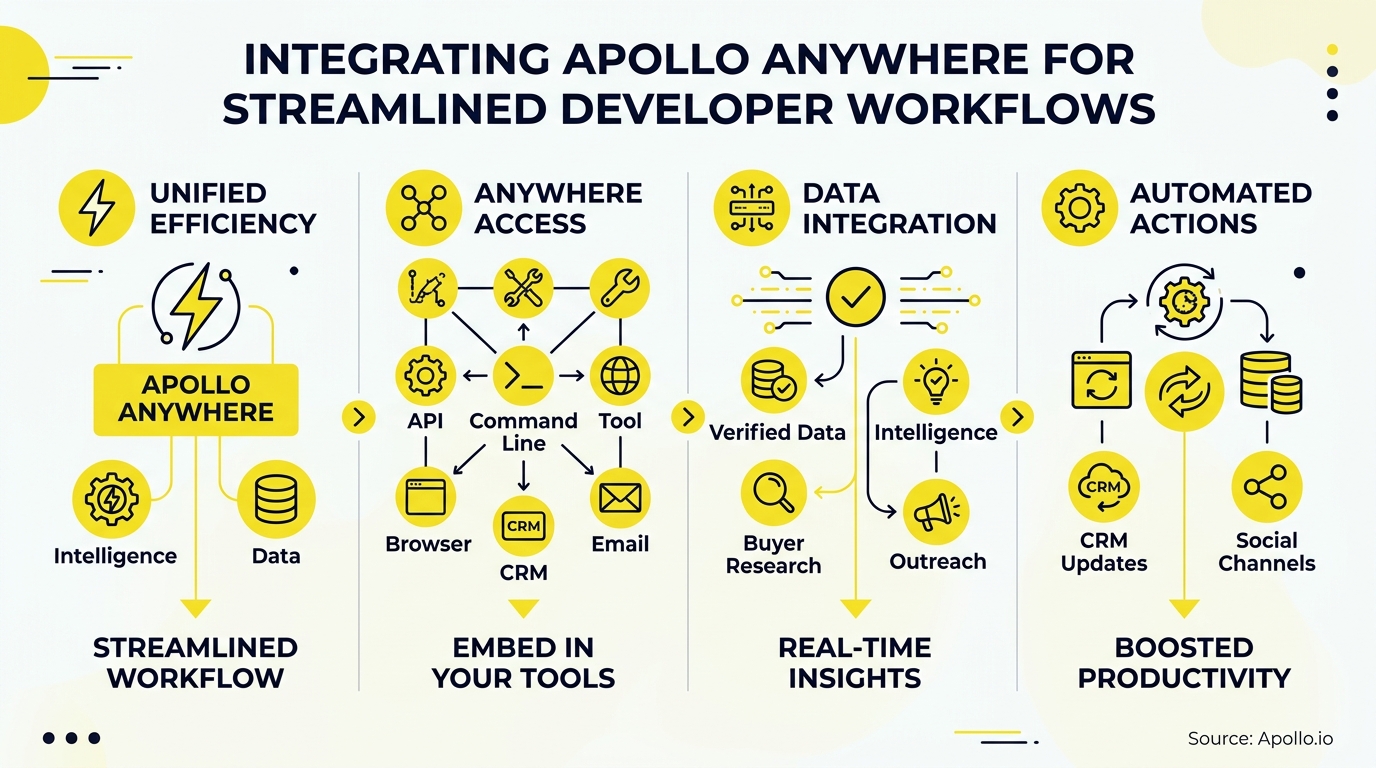
Yes, through two distinct but complementary integrations: the Apollo CLI for shell-native scripting, and Apollo MCP for conversational use inside Codex. Both were introduced together in Apollo's 2026 release, reflecting a broader shift toward code- and terminal-native GTM tooling.
| Integration | Best For | Auth Method | Repeatability | Write Risk |
|---|---|---|---|---|
| Apollo CLI | Scripts, cron jobs, CI pipelines, structured exports | API key | Deterministic, version-controllable | Low (explicit commands only) |
| Apollo MCP (Codex) | Conversational research, ad hoc enrichment, sequence prep | OAuth 2.0 | Context-aware, varies by prompt | Mitigated by action previews |
| Apollo API | Custom app builds, embedded workflows | API key | Fully custom | Depends on implementation |
Composio confirms developers use the Model Context Protocol to connect AI agents, including Codex and Claude, directly to Apollo accounts, which is why the same MCP connection works across multiple AI tools rather than locking you into one.
How Does The Apollo CLI Work For Developers?
The Apollo CLI works by giving developers shell-native access to Apollo's search, enrichment, sequence, and analytics functions without opening a browser. It's built for repeatable, scriptable workflows: RevOps engineers can schedule nightly enrichment jobs, and developers can pipe results straight into existing data infrastructure.
- Search and enrich records against Apollo's database of 240M+ contacts
- Manage sequences and contacts from the terminal instead of the UI
- Pull analytics on campaign or team performance for reporting scripts
- Export in 5 formats: JSON, JSONL, CSV, YAML, or tables
According to the Apollo CLI GitHub repository, data can be piped using jq or exported to CSV, JSONL, or YAML formats, making it straightforward to feed structured Apollo data into existing scripts, dashboards, or downstream AI agents.
What Can RevOps Teams Automate With The CLI?
RevOps teams can automate recurring data hygiene and reporting tasks that used to require manual exports from the Apollo UI. A scheduled cron job can pull fresh contact enrichment every night, flag records with stale job titles using job change signals, and drop the results into a shared warehouse table, all without a human touching a spreadsheet.
How Do You Connect Apollo To Codex?
You connect Apollo to Codex by adding Apollo's remote MCP server to your Codex configuration file and running one OAuth login command. According to Apollo's documentation, setup requires adding a single MCP server entry to ~/.codex/config.toml and authenticating with codex mcp login apollo, using OAuth 2.0 so no API key ever touches Codex's configuration files.
- Add the Apollo MCP server entry to your Codex config file
- Run the OAuth login command in your terminal
- Authorize the connection in your browser (uses your existing Apollo permissions)
- Start prompting Codex to search, enrich, or manage Apollo records directly
No local Apollo server is required. Data and action limits mirror whatever your Apollo plan already allows, so a free-tier user and an Organization-tier user see different ceilings on the same connection.
See Deal Stages Before They Stall
Forecasting off gut feel because deal stages change without warning. Apollo surfaces buyer intent and engagement signals so you know which deals are actually moving. Built-In grew win rates 10% with clearer prospect scoring.
Schedule a Demo →What Can You Actually Do With Apollo MCP Inside Codex?
Apollo MCP inside Codex lets you research, enrich, and activate GTM workflows in a single conversation, spanning 52 documented actions across prospecting, contacts, deals, lists, sequences, email, tasks, website visitors, and analytics. That range turns Codex from a coding assistant into something closer to a revenue operations copilot for the duration of the session.
- Search for people and companies matching an ICP definition
- Enrich contacts with verified emails and phone numbers via waterfall enrichment
- Create or update CRM records without leaving the terminal
- Add qualified prospects to outreach sequences
- Ask natural-language questions about campaign or team performance
For a deeper look at how this connection works across AI tools beyond Codex, see Apollo MCP, which uses the same remote endpoint whether you're working in Codex, Claude, or ChatGPT.

How Do SDRs And AEs Use This Without Losing Control?
SDRs and AEs stay in control because Apollo's guided MCP workflows preview sensitive actions before they execute. Since May 2026, according to Apollo's release notes, operations like sequence enrollment, bulk enrichment, and list updates now show the sender, sequence, record count, and estimated credit use before anything fires.
For SDRs, this means asking Codex or Claude to "find 50 VP of Sales contacts at Series B SaaS companies and draft outreach" returns a reviewable batch, not a blast. AEs preparing for a call can ask an AI tool to pull firmographic and buying intent signals on a target account mid-conversation, without opening a new browser tab.
Tired of jumping between five tabs to prep for one call? Automate sequence building with Apollo's engagement platform and let the AI surface, you review.
Why Does This Matter For Trust And Adoption?
This matters because developer enthusiasm for AI tools has consistently outpaced trust in their accuracy. Stack Overflow's 2025 Developer Survey found that 70% of AI-agent users saved time on specific development tasks, yet 87% remained concerned about accuracy and 81% about security or privacy.
Apollo's approval-step design directly answers that gap: agents can research and draft, but bulk or customer-facing actions require a visible preview first. Adoption of the surface itself is accelerating in parallel. Gradually.ai reports Codex reached 5 million weekly active users by June 2026, an 8x increase from early 2026, meaning more developers now have a live surface where Apollo MCP is already available.
How Do You Measure ROI On Apollo CLI And MCP Workflows?
You measure ROI by tracking three variables before and after adoption: time spent on manual research, Apollo credit consumption, and correction rate on AI-suggested actions. Set a baseline for each before rolling this out broadly.
| Metric | What To Track | Why It Matters |
|---|---|---|
| Research time | Minutes spent per prospect list before vs. after CLI/MCP adoption | Shows time reclaimed for selling or building |
| Credit usage | Enrichment and search credits consumed per week | Prevents runaway automation costs |
| Correction rate | % of AI-suggested enrollments or edits a human reverses | Signals whether guardrails need tightening |
For context on the scale of the opportunity, Thunderbit points to research showing AI-assisted GTM workflows can shift manual research from a large share of a rep's day to a much smaller one, which is the kind of shift this measurement template is designed to capture for your own team.
Frequently Asked Questions
Is Apollo CLI Different From Apollo MCP?
Yes. The Apollo CLI is a scriptable, deterministic tool for terminal commands and automation pipelines.
Apollo MCP is a conversational connection that lets AI tools like Codex, Claude, or ChatGPT call Apollo actions based on natural-language prompts. Many teams use both: CLI for scheduled jobs, MCP for ad hoc research.
Do I Need An Apollo API Key To Use Codex?
No. Apollo MCP uses OAuth 2.0 authentication, so you log in once through your browser and never copy an API key into Codex's configuration files.
Can Non-Developers Use Apollo Inside AI Tools Too?
Yes. While the CLI is built for developers, Apollo MCP setup is no-code: any Apollo user, including free-tier accounts, can connect it inside ChatGPT, Claude, or Perplexity through the tool's connectors settings.

Start Building With Apollo Today
Whether you're scripting nightly enrichment jobs from the terminal or asking Codex to draft an outreach sequence between commits, Apollo brings verified B2B contact data and execution into the tools you already have open. No new tab, no separate login, no stitching together a CLI tool, an enrichment vendor, and a sequencing platform separately.
As Collin Stewart of Predictable Revenue put it, "We reduced the complexity of three tools into one." That's the same principle now extending into developer and AI-agent workflows: one Apollo connection, multiple surfaces, one source of truth.
Apollo Turns Pipeline Math Into Hard Numbers
Struggling to justify tool spend with vague results? Apollo replaces guesswork with tracked outreach, verified contacts, and pipeline you can actually report on. See measurable impact before your next budget review.
Start Free with Apollo →Don't miss these
Sales
Inbound vs Outbound Marketing: Which Strategy Wins?
Sales
What Is a Sales Funnel? The Non-Linear Revenue Framework for 2026
Sales
What Is a Go-to-Market Strategy? The 2026 GTM Playbook
See Apollo in action
We'd love to show how Apollo can help you sell better.
By submitting this form, you will receive information, tips, and promotions from Apollo. To learn more, see our Privacy Statement.
4.7/5 based on 9,690 reviews
