
How to Find Contacts Not Yet Synced to Your CRM
You just imported 200 leads from a trade show, but your CRM shows only 187. The missing 13 aren't errors on a screen, they're 13 people who won't get a follow-up email, won't get scored, and won't get called.
Finding which of your newly created contacts haven't been synced to your CRM yet is a five-minute audit if you know which fields to compare.
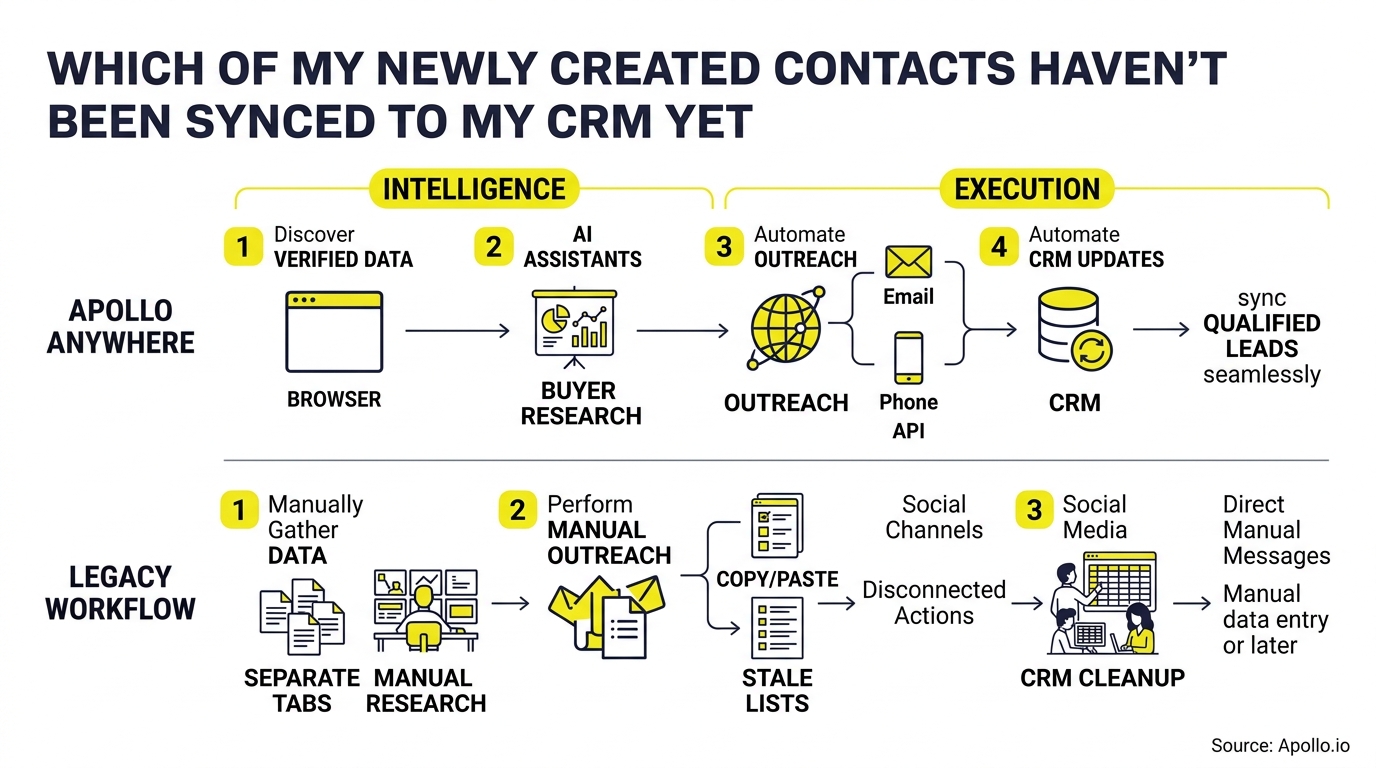

Skip Manual Research, Apollo Verifies Contacts
Spending hours manually researching leads and chasing bad phone numbers. Apollo hands your team verified business contacts instantly, so reps spend time selling instead of searching. 98% email accuracy means fewer bounces and more real conversations.
Start Free with Apollo →Key Takeaways
- Compare source-system record IDs and timestamps against your CRM export to build a simple anti-join that surfaces every missing contact in minutes.
- Use Apollo MCP when you need to ask ChatGPT, Claude, or Perplexity which contacts are missing from your CRM and enrich or sequence them without leaving the chat.
- Most sync failures trace back to five root causes: duplicate matching, permission scopes, field mapping mismatches, validation rules, and picklist conflicts.
- An unsynced contact isn't just a reporting gap: it's a prospect an AI agent can't score, route, or follow up with.
- Turning a one-time audit into a weekly cadence with owners and SLAs prevents backlog from becoming a recurring pipeline leak.
How Do I Find Which Newly Created Contacts Haven't Synced to My CRM?
Run an anti-join: export your source system's new-contact list and your CRM's new-contact list over the same date range, then match on a unique key (email address or external record ID) to isolate rows that exist in the source but not the destination.
Here's the fastest path:
- Pull two exports covering the same window (last 24-72 hours works well for daily checks) from your source tool and your CRM.
- Required columns: unique email, source record ID, CRM record ID (if matched), created timestamp, last sync attempt timestamp, and sync status flag.
- Match on email or ID using a VLOOKUP, spreadsheet anti-join, or a SQL
LEFT JOIN ... WHERE crm_id IS NULLquery. - Flag the leftovers. Any source row without a matching CRM ID is an unsynced contact.
This same logic works regardless of platform. For a deeper breakdown of connecting systems so this gap shrinks over time, see this CRM integration strategy guide.
What Are the Most Common Reasons Contacts Fail to Sync?
Contacts fail to sync for six recurring reasons: duplicate detection, permission restrictions, field mapping errors, validation rule violations, missing parent records, and picklist mismatches. Each leaves a different fingerprint in your error logs.
| Root Cause | What It Looks Like | Where to Check |
|---|---|---|
| Duplicate matching | Contact silently merges into an existing record instead of creating new | Dedupe rules, matching logic settings |
| Permissions | Sync job runs but skips records the integration user can't write to | API user role, field-level security |
| Field mapping | Required destination field has no source equivalent, so record errors out | Integration mapping config |
| Validation rules | CRM rejects records missing a required value (e.g., industry, region) | CRM validation rule logs |
| Missing parent record | Contact can't sync because its associated company/account doesn't exist yet | Account-contact dependency order |
| Picklist mismatch | Source sends a value the CRM picklist doesn't recognize | Picklist value mapping |
The 2025-2026 Salesloft-Drift incident is a useful reminder that sync failures aren't always about mapping. Salesforce temporarily disabled affected integrations after compromised OAuth tokens were discovered, per Google Cloud's threat intelligence team. Authentication failures can halt syncing entirely with no mapping error at all, so your diagnostic checklist needs an "is the connection even authenticated?" step before you troubleshoot field-level issues.
Why Do Unsynced Contacts Matter More With AI Agents in the Loop?
Unsynced contacts break AI-driven workflows because an agent can't score, route, or enrich a record it never receives. In Salesforce's 2026 State of Sales research, 46% of sales professionals using AI agents said data-quality issues were already hurting sales performance.
This changes the stakes for RevOps leaders. A missing contact used to mean a reporting discrepancy discovered at quarter-end.
Now it means an AI research agent skips that prospect, a scoring model never sees the record, and a sequence tool has nothing to enroll.
Research from Pixelwand found that 27% of leads never receive any response, often because they're lost in the plumbing of disconnected tools before they can be logged. For SDRs and BDRs working speed-to-lead targets, a contact stuck outside the CRM for even a few hours is a contact a competitor may reach first.
Struggling to find qualified leads in the first place? Search Apollo's 240M+ contacts with 65+ filters to build lists that sync clean the first time.
Know Which Deals Are Actually Sales-Ready
Marketing leads pile up but never turn into real opportunities. Apollo scores and surfaces in-market buyers so reps chase deals that close, not dead-end names. Built-In saw a 10% win rate lift using Apollo's signals.
Start Free with Apollo →How Do I Build an Exception Report for Unsynced Contacts?
An exception report is a standing view that lists every contact created in your source system but missing from your CRM, along with the fields your team needs to triage and fix it fast.
Minimum required fields:
- Contact email and name
- Source system and source record ID
- Created timestamp and last sync attempt timestamp
- Sync status (pending, failed, retrying)
- Error category (duplicate, permission, mapping, validation, missing parent, picklist)
- Assigned owner
- Age in hours since creation
Bucket records by age so nothing sits untouched: 0-4 hours (auto-retry), 4-24 hours (owner review), 24-72 hours (escalation to RevOps), 72+ hours (weekly cleanup review). This mirrors what McKinsey's Master Data Management research found: 82% of organizations spend at least one day a week resolving data-quality issues, and most still rely on manual review rather than structured escalation tiers.

Which Platform-Specific Checks Should I Run First?
Each major platform has a fastest first-check before you dig into full diagnostics.
- HubSpot: Check the sync error log inside your integration settings first; most gaps trace to property mapping or contact ownership restrictions. See this guide to connecting HubSpot, Salesforce, and Apollo for setup specifics.
- Salesforce: Confirm the integration user's field-level security and object permissions, then check validation rules on the Contact object.
- Outreach or sequence tools: Verify the contact exists as a lead or contact record before checking if it enrolled in a sequence; enrollment failures often mask an upstream sync gap.
- CSV/API imports: Compare row counts pre- and post-import, and check for silent skips on duplicate email matches.
For a full walkthrough of connecting these systems so fewer manual checks are needed going forward, see Apollo's CRM integration guide.
How Can I Ask My AI Tools Which Contacts Are Missing From My CRM?
You can ask directly: connect Apollo MCP inside ChatGPT, Claude, Perplexity, or Codex and type a prompt like "which contacts I created this week haven't synced to my CRM yet?"
Apollo MCP (Model Context Protocol) brings Apollo's data and actions into the AI tools GTM teams already have open all day. Setup is no-code: connect Apollo through the AI tool's connector settings via OAuth, on any Apollo plan including free.
From that single conversation, you can search for contacts matching your ICP, enrich records with verified emails and phone numbers, create or update CRM records, and add prospects to sequences, all without switching tabs.
For Account Executives juggling pre-meeting research and RevOps leaders auditing pipeline data, this means the "which contacts are missing" question gets answered in the same window where the next action happens. Developers automating this check on a schedule can use the Apollo CLI for terminal-native access instead of a chat interface.
How Do I Calculate the Revenue Risk of Unsynced Contacts?
Multiply your weekly new-contact volume by your sync failure rate, then multiply that number by your average lead-to-opportunity conversion rate and average deal value to estimate exposure.
Formula: (New contacts/week × failure rate %) × conversion rate % × average deal value = weekly revenue at risk.
Example: 500 new contacts/week, a 5% failure rate, a 10% conversion rate, and a $8,000 average deal value works out to 25 lost contacts/week, 2.5 lost opportunities, and $20,000 in weekly exposure. Run this monthly to justify investment in monitoring tools to leadership.
According to Validity's 2025 State of CRM Data Management report, 76% of organizations say less than half of their CRM data is accurate and complete, a baseline worth benchmarking your own team against.
What Weekly Cadence Keeps Sync Backlog From Building Up?
A weekly cadence with named owners, SLA tiers, and alert thresholds prevents small sync gaps from becoming a quarter-end data cleanup crisis.
Checklist for a repeatable weekly review:
- Monday: Pull the exception report and triage anything in the 24-72 hour age bucket.
- Assign owners: RevOps owns permission and mapping errors; sales ops owns duplicate resolution; marketing ops owns validation rule gaps from form submissions.
- Set alert thresholds: Trigger a Slack or email alert when failed-sync volume exceeds a defined percentage of new contacts in a 24-hour window.
- Review authentication health: Confirm API tokens and OAuth connections are active before assuming a mapping issue.
- Log root causes: Track which of the six failure categories recurs most, and fix the systemic issue rather than the individual record.
Teams consolidating tools to reduce integration points entirely find this easier to manage. Collin Stewart of Predictable Revenue put it simply: "We reduced the complexity of three tools into one." Fewer handoff points mean fewer places for a contact to get lost.
Tired of dirty data creating this cleanup work every week? Start free with Apollo's data enrichment tools to keep records accurate before they ever hit your CRM.
Frequently Asked Questions
How do I find newly created contacts not synced to my CRM?
Export new-contact lists from both your source system and CRM over the same date range, match on email or record ID, and flag any source row with no CRM match.
What causes contact sync errors?
The most common causes are duplicate detection, permission restrictions, field mapping mismatches, validation rule violations, missing parent records, and picklist conflicts.
How often should I audit CRM sync status?
Weekly at minimum, with automated exception reporting checked daily for high-volume teams to prevent backlog buildup.
Can I retry a failed contact sync safely?
Yes, if you first confirm the record doesn't already exist as a duplicate under a different match key, to avoid creating a second record instead of updating the original.
Does AI make unsynced contacts a bigger problem?
Yes. AI agents that score, route, or research prospects can only act on records they can see, so a sync gap now blocks automated follow-up, not just reporting accuracy.

Ready to Stop Losing Contacts Between Systems?
Every unsynced contact is a prospect your team already worked to find, and losing it to a mapping error or permission gap wastes that effort twice. Building a simple anti-join audit, tagging root causes, and setting a weekly cadence turns a recurring fire drill into a five-minute check.
Apollo brings B2B data, sales engagement, and AI-powered execution together in one connected go-to-market system, so teams don't have to stitch together separate vendors for research, outreach, and analysis. Ready to see it in action?
Start free with Apollo today.
Prove ROI Fast With Apollo At Scale
Struggling to justify tool spend before the next budget review? Apollo's reps skip manual busywork and book more meetings per rep, so leaders see measurable pipeline impact fast. 100K+ paying customers already trust Apollo to make the numbers case for them.
Start Free with Apollo →Don't miss these
Sales
Inbound vs Outbound Marketing: Which Strategy Wins?
Sales
What Is a Sales Funnel? The Non-Linear Revenue Framework for 2026
Sales
What Is a Go-to-Market Strategy? The 2026 GTM Playbook
See Apollo in action
We'd love to show how Apollo can help you sell better.
By submitting this form, you will receive information, tips, and promotions from Apollo. To learn more, see our Privacy Statement.
4.7/5 based on 9,690 reviews
