
The best affordable ZoomInfo alternatives for contact enrichment are Apollo, Hunter, and Lusha, and the right pick depends on which fields you need, how you plan to load data, and what each usable record costs. Entry prices are only part of the picture. Data enrichment tools differ sharply in credit rules, feature gates, and verification, so compare total cost per usable contact instead of the headline price.

Skip Manual Research. Apollo Finds Contacts.
Tired of spending hours researching leads and double-checking contact info? Apollo puts business emails and phone numbers right where you work, with 98% email accuracy. Spend your day selling, not digging. Start free today.
Start Free with Apollo →Key Takeaways
- Match the tool to your required fields first: email-only enrichment is cheap almost everywhere, while verified phone numbers are where costs diverge.
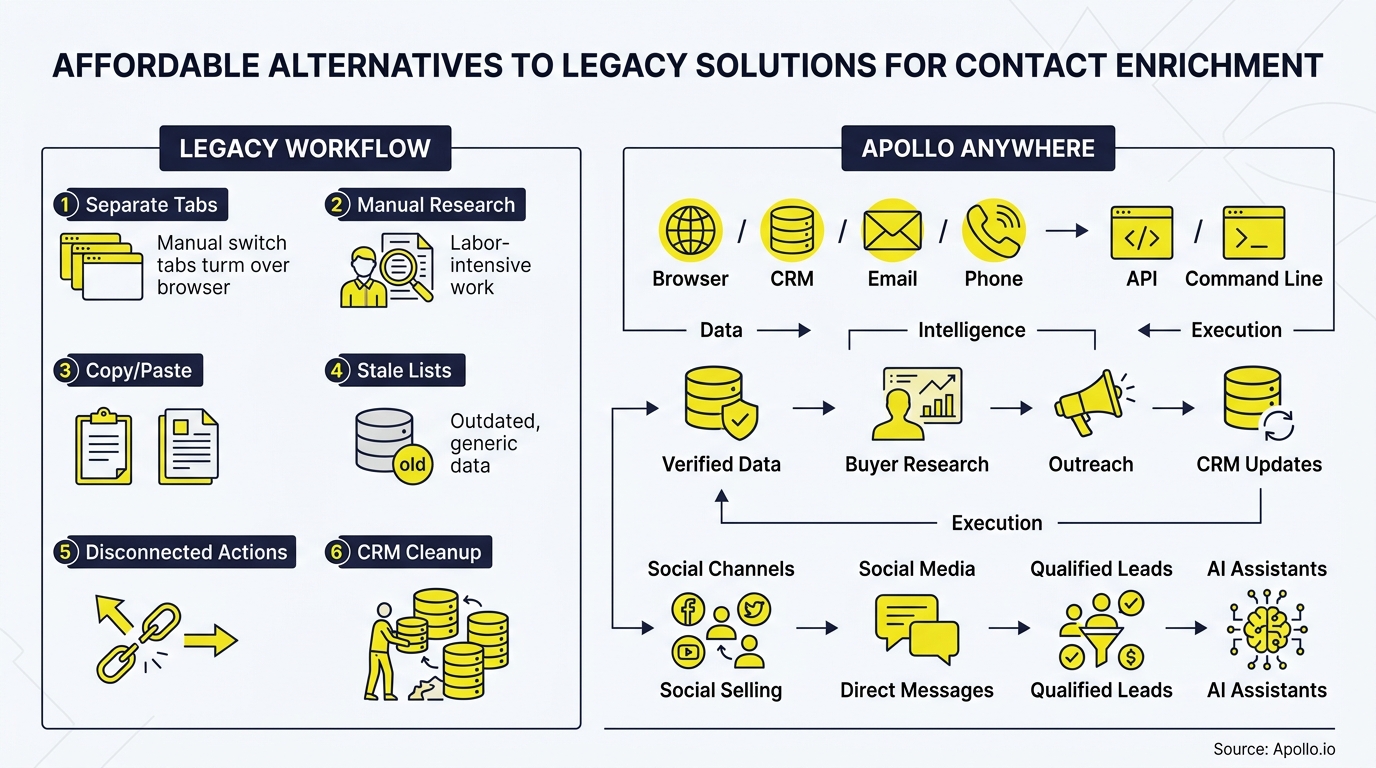
- Use Apollo MCP when you need to enrich a list of target accounts and add the best-fit contacts to a sequence without leaving ChatGPT, Claude, Perplexity, or Codex.
- Credits are not comparable across vendors, so price a defined workload such as 1,000 records with verified email and phone.
- Run a small shared-sample test before committing, because vendor coverage claims rarely match your actual target market.
- Audit what your CRM already includes before you buy anything new.
Which Affordable ZoomInfo Alternatives Work Best for Contact Enrichment?
Apollo, Hunter, and Lusha are the strongest low-cost starting points, each suited to a different workflow. The table below sorts them by fit, billing, and limits.
| Tool | Best Fit | Entry Pricing | Seats | Limitations |
|---|---|---|---|---|
| Apollo | Teams that want data, enrichment, and outreach in one workspace | Free plan; paid plans from $49/user/month on annual billing | Per user | Waterfall sources and validation can use extra credits |
| Hunter | Email-first enrichment and verification | Starter at $34/month billed annually | Unlimited team members | Email-focused; confirm phone coverage on the pricing page |
| Lusha | Quick phone and email lookups | Starter at $37.45/month billed annually | One seat on Starter | Waterfall requires Pro or above |
These figures come from each vendor's published pricing page and should be confirmed before purchase. For Apollo specifics, see Apollo's official pricing page. Annual contract floors for ZoomInfo are far higher, with Book Your Data citing starting prices of $14,995 to $19,500 per year for its base Professional tier.
How Much Does Contact Enrichment Cost Per 1,000 Usable Contacts?
Cost per 1,000 usable contacts equals total credits spent divided by the share of records that return verified, deliverable fields. Headline plan prices hide this, so model it yourself.
- Email-only scenario: Enrich 1,000 records, then subtract bounces and misses. Divide plan cost by the verified emails you keep.
- Email plus phone scenario: Phone credits usually cost more. Lusha's supplemental waterfall matches, for example, cost 2 credits per email and 8 per phone, with no charge for misses.
- Hidden add-ons: Add validation, CRM delivery, and any waterfall credits to reach an all-in number.
Build a simple calculator in a spreadsheet: credits per field, expected match rate, and monthly volume. Label results as modeled, not measured, until you test them on your own list.
How Do CSV Enrichment and API Access Differ Across Budget Tools?
CSV enrichment suits one-time cleanups, while API access suits ongoing CRM maintenance, and not every entry tier includes both. Check eligibility before you buy.
- CSV upload: Best for RevOps teams cleaning an exported list once or quarterly.
- API or native CRM sync: Best for keeping records fresh automatically, but often gated to higher plans.
- Waterfall enrichment: Apollo's December 2025 release notes say it checks Apollo's own database first, then selected external sources. Apollo reports roughly 5% more emails, 7% more phone numbers, and 45% fewer bounces.
Struggling to clean messy lists? Start free with Apollo's verified business contact data, and read how contact data enrichment drives ROI.
Apollo Shows You Which Leads Are Worth Chasing
Forecasts feel like guesswork because deal data is always a week behind? Apollo puts business contacts, buying signals, and engagement in one workspace, so you see what's moving before it stalls. Nearly 5M users already work this way.
Start Free with Apollo →How Can SDRs Run Contact Enrichment Inside ChatGPT or Claude?
SDRs can enrich contacts directly in their AI tool by connecting Apollo through Apollo MCP. Setup is no-code: connect Apollo through the connectors or integrations menu in ChatGPT, Claude, Perplexity, or Codex using OAuth, on any Apollo plan including free.
From one conversation, you can search for people and companies that match your ICP, enrich contacts with verified emails and phone numbers, update records, and add prospects to sequences. Your best prospecting session shouldn't require opening a new tab.
Data and action limits mirror your Apollo account, so budget-conscious teams control spend the same way they do inside the platform.

Should You Check Your CRM Before Replacing ZoomInfo?
Yes, audit your CRM first, because some platforms now include basic enrichment at no extra credit cost. HubSpot confirmed in a community clarification that basic company and contact enrichment is included in Starter+ Core Seats without consuming HubSpot Credits, while advanced Breeze capabilities remain separate.
RevOps leaders should list which fields their CRM already fills, then buy supplemental data only for the gaps. Basic CRM enrichment does not replace full contact discovery, so treat it as a starting point, not a substitute.
Why Does Data Freshness Matter When Choosing an Enrichment Tool?
Freshness matters because B2B contact data decays quickly as people change jobs. Cleanlist reports average annual CRM data decay of 22.5% to 30% per year, compounding at 2.1% to 2.5% per month.
That means a one-time cleanup loses value within months. Prefer tools that support scheduled re-enrichment and job-change detection, and weigh verified accuracy above raw database size.
Account Executives and Sales Leaders depend on current data to avoid wasted outreach.
How Should You Test Alternatives Before You Commit?
Run a shared-sample trial: upload the same 1,000 records to each shortlisted vendor and compare results side by side. This beats relying on vendor coverage claims.
- Pull a representative sample from your real target market, including your key geographies.
- Enrich the identical list in each tool.
- Measure verified coverage, bounce rate, duplicates, and field completeness.
- Divide total spend by usable records to get cost per usable contact.
- Note sample size and geography limits so results are not over-generalized.
Need to consolidate tools after testing? Predictable Revenue's Collin Stewart put it this way: "We reduced the complexity of three tools into one." See the Predictable Revenue customer story. To go further, review how to build a data enrichment strategy.
What Should You Do Before Migrating Enrichment to Your CRM?
Follow a short checklist so enriched data lands cleanly and stays accurate:
- Back up existing CRM records and document field mappings.
- Deduplicate before importing enriched data.
- Decide which source wins when fields conflict.
- Set a re-enrichment schedule for decaying fields like email and title.
- Confirm CRM sync eligibility on your plan, then test with a small batch.
Teams on HubSpot or Salesforce can follow Apollo's CRM integration walkthrough to connect data fast.

Which Affordable Alternative Should You Choose?
Choose the tool that fits your required fields and workflow, then confirm it with your own test. Hunter suits email-first teams, Lusha suits quick phone lookups, and Apollo suits teams that want enrichment, prospecting, and outreach in one place, which reduces the number of tools to pay for and maintain.
Whatever you pick, measure cost per usable contact, not sticker price, and revisit pricing as vendors update plans.
Ready to enrich contacts without the enterprise price tag? Schedule a Demo and see how Apollo brings data, enrichment, and outreach into one workspace.
Prove Apollo's ROI Before Budget Season Hits
Budget approval stuck on unclear metrics? Apollo brings business contacts, sequences, and pipeline reporting into one workspace, so you can show leadership what's driving meetings. Nearly 5M users already work this way. Start free and see results fast.
Start Free with Apollo →Don't miss these
Sales
Inbound vs Outbound Marketing: Which Strategy Wins?
Sales
What Is a Sales Funnel? The Non-Linear Revenue Framework for 2026
Sales
What Is a Go-to-Market Strategy? The 2026 GTM Playbook
See Apollo in action
We'd love to show how Apollo can help you sell better.
By submitting this form, you will receive information, tips, and promotions from Apollo. To learn more, see our Privacy Statement.
4.7/5 based on 9,690 reviews
