
Replace ZoomInfo: Find Leads and Sync Them to Any CRM
Uploading a target-account list should take minutes, not a week of manual CRM cleanup. Yet most teams replacing ZoomInfo discover the hard part isn't finding contacts, it's matching those contacts to the right accounts, deduplicating against existing CRM records, and syncing clean data without breaking field mappings.
If your evaluation still centers on database size alone, you're testing the wrong thing.

Skip The Manual Hunt For Contact Info
Spending hours chasing down emails and phone numbers that bounce anyway? Apollo verifies contact data instantly with 98% email accuracy, so reps spend time selling instead of searching. Start finding real buyers today.
Start Free with Apollo →Key Takeaways
- The real ZoomInfo replacement test isn't contact volume, it's how a tool matches account lists to full buying groups and writes clean records back into your CRM.
- Data trust is a bigger blocker than data access: sales teams don't fully trust the accuracy of the data already sitting in their systems.
- CRM sync failures (duplicates, broken field mapping, stale overwrite rules) cost more time than prospecting ever saves.
- A modular stack (enrichment provider + CRM sync layer) and a unified platform both work, but they solve different problems at different team sizes.
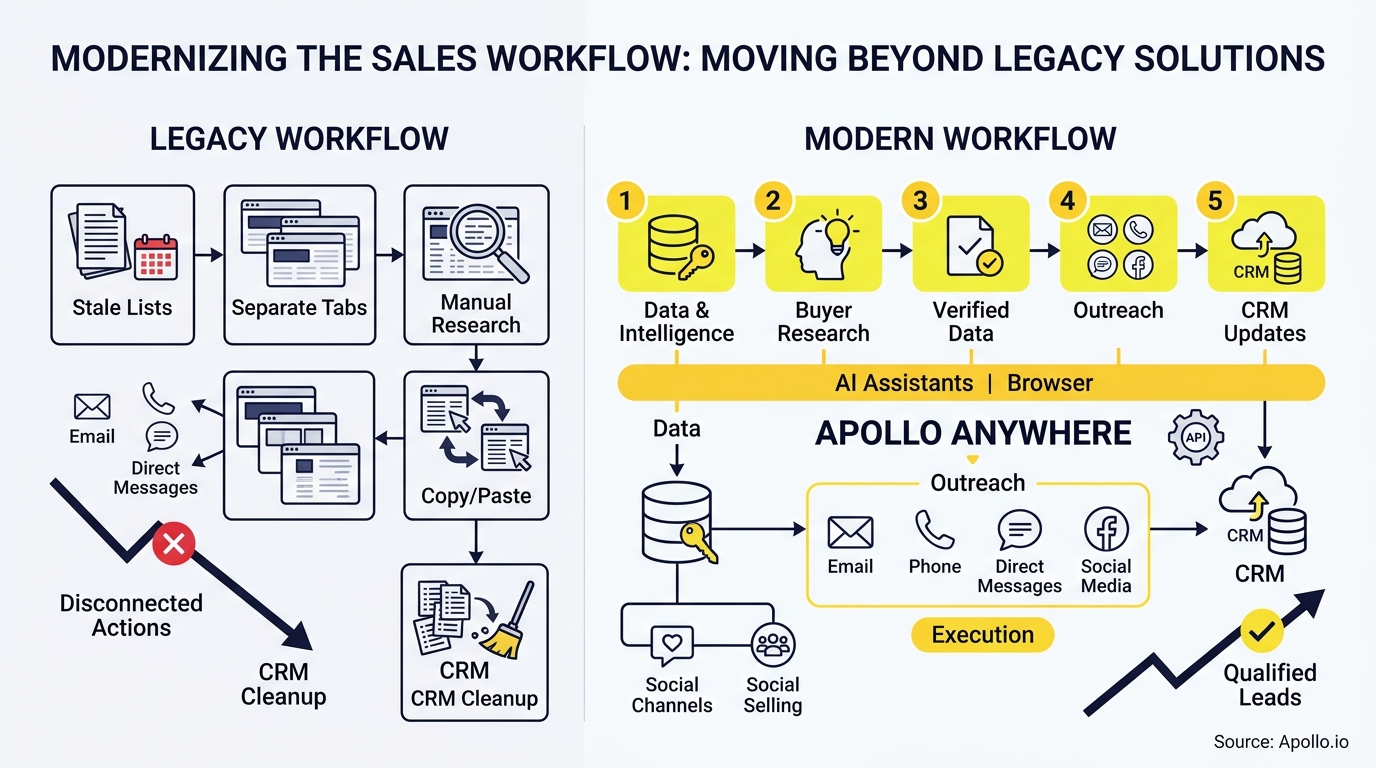
- Apollo combines list upload, buying-group discovery, enrichment, and CRM sync in one workspace, reducing the vendor-stitching RevOps teams usually inherit.
What Does It Mean To Replace ZoomInfo?
Replacing ZoomInfo means swapping a standalone contact database for a system that finds leads from your own lists, verifies them, and syncs clean records into your CRM without manual cleanup. It's not just a cheaper data source, it's a workflow change. Sales reps spend only 30% of their time actually selling, according to SpeakWise, and disconnected prospecting tools are a major reason why.
A true replacement needs three capabilities working together: list ingestion and matching, buying-group enrichment (not just one contact per account), and reliable two-way CRM sync. Most teams evaluating alternatives only test the first one.
That's why so many replacements fail six months in, when duplicate records and stale fields pile up.
Struggling to find qualified leads from your own account lists? Search Apollo's 240M+ contacts with 65+ filters to match lists to full buying committees instead of single contacts.
How Do You Test A ZoomInfo Alternative Before Switching?
You test a ZoomInfo alternative by running one identical account list through each candidate tool and scoring the same five outcomes: match rate, buying-group completeness, duplicate creation, sync latency, and field overwrite behavior. Most vendor comparisons skip this because it takes real setup time, but it's the only test that predicts what happens after go-live.
| Test Criterion | What To Measure | Why It Matters |
|---|---|---|
| Match rate | % of uploaded accounts matched to verified company records | Low match rate means wasted list-building time |
| Buying-group completeness | Average contacts surfaced per matched account | Forrester found an average of 13 people participate in a B2B purchase; a tool returning 1-2 contacts per account misses most of the committee |
| Duplicate creation | New duplicate records created in CRM post-sync | Duplicates break routing, reporting, and attribution |
| Sync latency | Time from enrichment to CRM-visible record | Slow sync delays outreach and creates stale-data risk |
| Overwrite behavior | What fields get replaced vs. preserved | Uncontrolled overwrites erase manually corrected CRM data |
Run this test with a 200-500 account sample before committing to any full rollout.

Why Does Buying-Group Discovery Matter More Than Contact Count?
Buying-group discovery matters more than contact count because B2B deals rarely close with one champion. A tool that returns one contact per company forces reps to manually hunt for the other decision-makers, defeating the point of automation. This is especially relevant for buyer leads research, where incomplete committees stall deals before they start.
For Account Executives managing complex deals, incomplete buying groups mean multithreading happens too late, often after a champion has already gone quiet. RevOps leaders find that fixing this at the data layer (surfacing full committees at list-upload time) prevents the scramble that happens mid-pipeline. Build stronger account lists with these B2B list-building tactics.
Know Deal Status Before Forecasts Miss
Guessing where deals actually stand until forecasts blow up in the pipeline review? Apollo gives reps and leaders one live view of every deal stage, so nothing slips through unqualified. Built-In improved win rates using Apollo's deal signals.
Schedule a Demo →How Do RevOps Teams Fix CRM Sync Problems When Switching Vendors?
RevOps teams fix CRM sync problems by defining match rules, field-level overwrite policies, and routing logic before the first record ever syncs, not after. MuleSoft's 2025 survey found that integration challenges slow progress for the vast majority of IT leaders, and most CRM connectivity failures trace back to skipped planning, not bad software.
A working migration checklist looks like this:
- Export and audit: Pull existing CRM records and flag stale, duplicate, or incomplete fields before importing anything new.
- Field mapping: Confirm every enrichment field maps to the correct CRM property, especially custom fields.
- Match rules: Define what counts as a duplicate (domain match, name + company, or fuzzy match) before sync starts.
- Overwrite policy: Decide which fields get refreshed automatically and which stay locked once a rep edits them.
- Routing: Set territory and ownership rules so new records land with the right rep, not a shared queue.
- Monitoring and rollback: Build in a way to reverse a bad sync batch before it touches your whole pipeline.
Tired of dirty data breaking your CRM every time you sync a new list? Start free with Apollo's data enrichment and route clean, matched records directly into your CRM.
How Do SDRs Book More Meetings With A Cleaner Lead Workflow?
SDRs book more meetings when list-to-CRM friction disappears, freeing time for actual outreach instead of manual research and data cleanup. Since reps already lose most of their day to non-selling tasks, according to the SpeakWise data cited above, any tool that collapses list upload, enrichment, and sequencing into one motion directly returns selling hours.
SDRs report that the biggest time drain isn't writing emails, it's verifying who to email and confirming the CRM record is accurate before hitting send. Coffee.ai found that manual CRM data entry alone consumes 8-12 hours per week for reps stuck doing it by hand. Automating that step through enrichment and sync gives SDRs back meaningful selling time each week.
Explore practical tactics in this guide to finding and closing the right leads faster.
Should You Choose A Modular Stack Or An All-In-One Platform?
Choose a modular stack if your team has dedicated RevOps capacity to maintain multiple integrations; choose an all-in-one platform if you want fewer moving parts and faster time-to-value. Both architectures are common in 2026: Clay's Bulk Enrichment approach lets teams import millions of CRM records and enrich them through more than 150 data providers, writing results back into Salesforce, HubSpot, and Snowflake, while Apollo's agentic GTM platform combines prospecting, enrichment, and CRM sync in a single workspace using Waterfall Enrichment to check multiple providers automatically.
The tradeoff is maintenance burden versus flexibility. A modular stack (enrichment provider plus a separate CRM sync layer) gives more control over individual data sources but multiplies the number of vendors your RevOps team has to monitor for breakage.
An all-in-one platform reduces that overhead but concentrates more of the workflow into one vendor relationship.
Collin Stewart of Predictable Revenue said, "We reduced the complexity of three tools into one." That kind of consolidation matters most for teams without a dedicated integration engineer keeping multiple sync jobs alive.
What Should Founders And Revenue Leaders Watch For During Migration?
Founders and Revenue Leaders should watch for hidden compliance and governance gaps that don't show up until a data audit or a state privacy inquiry forces the issue. Lead-data providers increasingly need auditable sourcing, suppression, and deletion controls as state privacy laws expand, so a replacement decision isn't just about data quality, it's about whether the vendor can support suppression lists and deletion requests at scale.
For growing companies under ROI pressure, the calculation isn't just tool cost, it's total time-to-productive-pipeline. A vendor that requires weeks of custom integration work to get CRM sync working reliably delays the payback period, no matter how attractive its per-seat price looks on a spreadsheet.
Ask any finalist vendor directly how they handle suppression and record deletion before signing.
Frequently Asked Questions
What Is The Fastest Way To Migrate Lead Lists Into A New CRM?
The fastest way is to export existing records, run them through a single matching pass against your new provider's database, and sync only verified matches first, holding unmatched records for manual review rather than bulk-importing everything at once.
Can You Sync Enriched Leads Into Multiple CRMs At The Same Time?
Yes, most modern enrichment platforms support routing enriched records into more than one CRM destination, but each destination needs its own field mapping and overwrite rules configured separately to avoid conflicting updates.
How Do You Prevent Duplicate Records When Switching Data Providers?
Prevent duplicates by defining a consistent match key (typically domain plus contact name) before the first sync, and run a dry-run batch to check for duplicate creation before enabling full automated sync.

Ready To Replace Your Lead-To-CRM Workflow?
Replacing ZoomInfo isn't about finding a cheaper database, it's about fixing the entire path from list upload to CRM-ready record. The teams that get this right treat enrichment, buying-group discovery, and sync governance as one connected workflow, not three separate vendor problems.
Apollo brings B2B data, sales engagement, and AI-powered execution together in one connected go-to-market system, so teams don't have to stitch together separate vendors for research, outreach, and analysis. Explore finding B2B leads by title, industry, or company to see how list-to-CRM matching works in practice.
The article is already complete. The final section ("Ready To Replace Your Lead-To-CRM Workflow?") includes a full conclusion with Apollo positioning, an internal link, and the required "Get Leads Now" CTA linking to the sign-up page. All HTML tags in the provided excerpt are properly closed, and no additional sections are needed.Prove Pipeline ROI Fast With Apollo
Struggling to justify tool spend before the next budget review? Apollo replaces scattered point solutions with one platform, so reps scale outreach without new headcount. Leadium tripled annual revenue after consolidating on Apollo.
Start Free with Apollo →Don't miss these
Sales
Inbound vs Outbound Marketing: Which Strategy Wins?
Sales
What Is a Sales Funnel? The Non-Linear Revenue Framework for 2026
Sales
What Is a Go-to-Market Strategy? The 2026 GTM Playbook
See Apollo in action
We'd love to show how Apollo can help you sell better.
By submitting this form, you will receive information, tips, and promotions from Apollo. To learn more, see our Privacy Statement.
4.7/5 based on 9,690 reviews
