
How to Find Missing Work Emails Without Wasting Phone Credits
You've got a spreadsheet full of names, companies, and job titles, but the work_email column is full of blank cells. You need those emails to launch a campaign, and you need them fast.
But one wrong toggle in your enrichment tool, and you're burning phone-number credits at 8-10x the cost of an email lookup for data you don't even need.
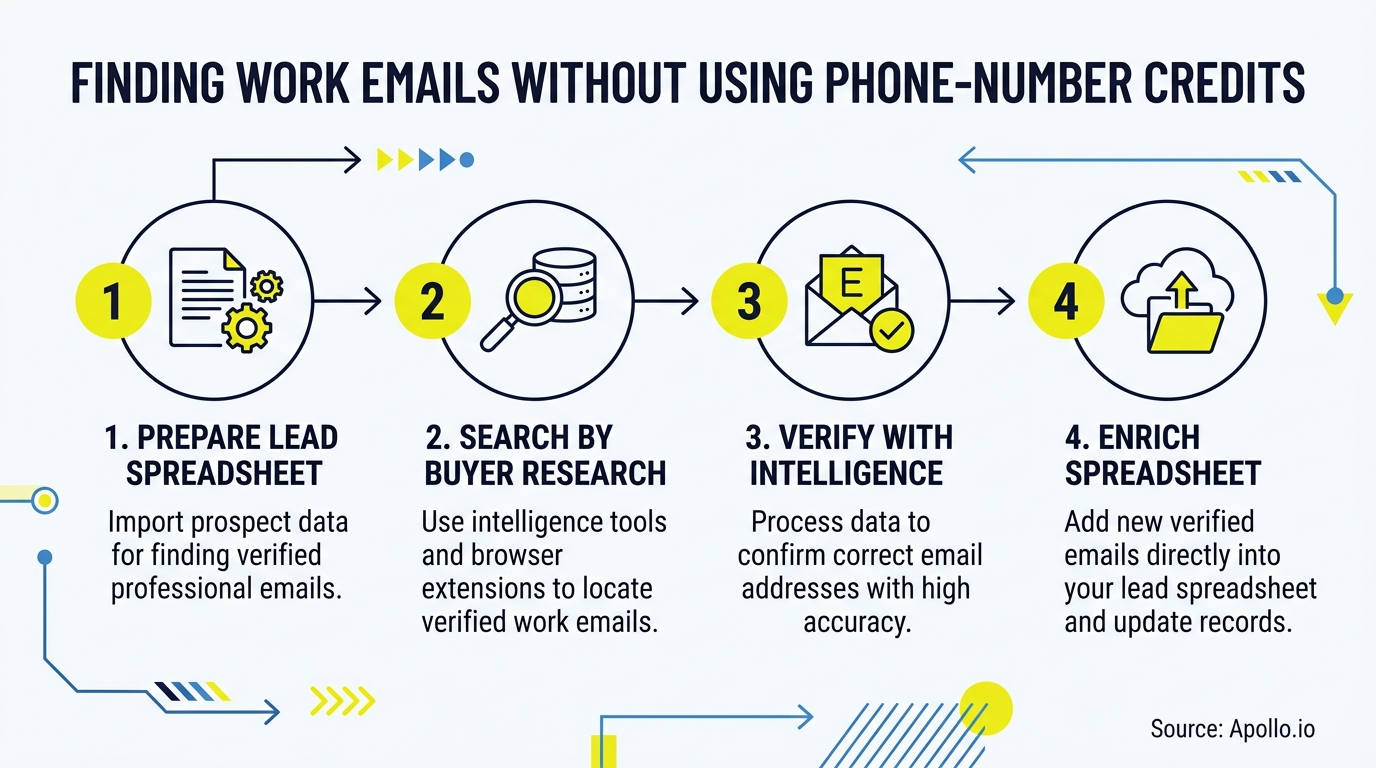
This guide gives you a cost-controlled workflow to enrich only the blank email cells in your spreadsheet while keeping phone lookups completely off. You'll get a pre-flight checklist, a credit calculator, and a QA process so you never pay for a phone number you didn't ask for.

Skip The Research, Apollo Verifies Contacts
Spending hours hunting down emails and phone numbers that turn out wrong. Apollo hands your reps verified contact data instantly with 98% email accuracy. Less digging, more selling.
Start Free with Apollo →Key Takeaways
- Email and phone credits are priced differently across most enrichment vendors, so leaving phone lookup enabled by default can multiply your enrichment bill for data you never use.
- Use Apollo MCP when you need to enrich a spreadsheet's missing work emails directly inside ChatGPT, Claude, or Perplexity without exporting to a separate tool.
- A waterfall approach (pattern-match first, then paid providers) resolves a meaningful share of missing emails before you spend a single credit.
- Filtering your CSV to only blank work_email rows before enrichment prevents wasted spend on contacts you've already resolved.
- Use Apollo MCP when you need programmatic, phone-off email enrichment inside a workflow or script rather than a manual upload.
What Is Email-Only Spreadsheet Enrichment?
Email-only spreadsheet enrichment is the process of filling in missing work_email values in a contact list while explicitly disabling phone number lookups, so you only pay for the data field you actually need. It is not the same as full contact enrichment, which returns email, phone, title, and company data together and typically charges more credits per row.
The distinction matters because most enrichment platforms price email and phone data separately. Apollo's API documentation shows a request returns for 1 credit when it finds an email or demographic match, but returns for 8 additional credits when a mobile number is included, per Apollo's API reference. If your enrichment settings default to "find everything," you're paying that premium on every row, even when you only need an email address for a sequence.
How Do You Prep a CSV for Email-Only Enrichment in 10 Minutes?
You prep a CSV for email-only enrichment by isolating the rows with blank emails, confirming you have enough identifying data per contact, and turning off phone lookup before you run anything. This pre-flight checklist takes about 10 minutes and prevents the most common source of wasted credits: re-enriching rows that already have valid data.
- Required columns: first_name, last_name, company (or domain), and job_title. The more of these you have, the higher your match rate before any paid lookup runs.
- Filter to blank cells: Add a formula column (e.g.,
=IF(ISBLANK(F2),"needs_enrich","skip")) so your enrichment tool only processes rows without an existing work_email. - Turn off phone lookup: In your enrichment tool's settings or API request, explicitly disable phone/mobile fields before you upload. Don't rely on defaults.
- Set output fields: Request email, verification status, and source/provider name back in your export. Skip phone, personal email, and any field you're not using.
Struggling to find qualified contacts before you even start enriching? Search Apollo's 240M+ contacts with 65+ filters to build your list correctly the first time.
How Does Waterfall Enrichment Reduce Credit Spend?
Waterfall enrichment reduces credit spend by checking free or low-cost methods first and only calling paid providers when earlier steps fail to find a match. According to Datablist, modern strategies for resolving missing emails without consuming expensive phone credits center on waterfall enrichment, which cascades through multiple providers to find verified emails at a fraction of the cost of phone lookups.
A typical waterfall for a blank work_email cell looks like this:
- Pattern inference (free): Try common formats like first.last@domain.com against the company's known email pattern.
- Primary database match: Query your main enrichment source for a verified email tied to the contact's name and domain.
- Secondary provider fallback: If step 2 returns nothing, cascade to a second data source rather than giving up or defaulting to phone lookup.
- Verification pass: Confirm deliverability (valid, catch-all, or invalid) before the email ever reaches your sequence tool.
Research from SyncGTM shows single-source tools like Hunter or Dropcontact typically top out at a 55% to 65% hit rate when used alone, which is why cascading through multiple sources before falling back to any paid phone lookup matters for both cost and coverage.
Turn Cold Leads Into Sales-Ready Opportunities
Weak lead-to-opportunity conversion killing your funnel. Apollo surfaces buying signals so reps engage prospects the moment they're ready, not after they've gone cold. Built-In saw a 10% win rate lift using Apollo's scoring.
Start Free with Apollo →How Much Do Email Credits Cost Compared to Phone Credits?
Email credits generally cost far less than phone credits across enrichment vendors, often by a ratio of 1:8 or higher, per Apollo's API documentation. According to Smarte, specialized waterfall tools typically charge 1 credit per verified email but 10 credits per phone number, a pattern echoed across the category.
Here's a simplified calculator to estimate your spend on a 1,000-row spreadsheet:
| Scenario | Rows Needing Enrichment | Fields Requested | Estimated Credit Multiplier |
|---|---|---|---|
| Email-only (phone off) | 1,000 | Email + verification | ~1x baseline |
| Email + phone (phone left on) | 1,000 | Email + phone + verification | ~8-9x baseline |
| Full contact enrichment | 1,000 | Email + phone + title + company | ~9-10x baseline |
If you're only trying to fill missing work emails, leaving phone lookup enabled on a 1,000-row list can multiply your credit spend for data that never gets used. Tired of guessing what a bulk enrichment run will cost before you commit? Preview credit estimates with Apollo's enrichment tools before you upload.

How Do RevOps Teams Enrich Spreadsheets Without Overspending?
RevOps teams enrich spreadsheets without overspending by standardizing enrichment settings at the account level so individual reps can't accidentally toggle on phone lookup. Because access to enrichment credits is often shared across a team, one rep enriching a list with phone data turned on can drain a shared pool that was budgeted for email-only campaigns.
For RevOps leaders managing enrichment as shared infrastructure, the fix is a single source of truth: one connected tool where enrichment rules, credit usage, and CRM sync all live together, instead of a patchwork of exports and re-imports across separate point tools. Collin Stewart at Predictable Revenue put it simply: "We reduced the complexity of three tools into one."
This consolidation also solves the sync problem RevOps teams know well, where enriched data in one tool doesn't reflect changes made in the CRM. If your enrichment and outreach tools live in different systems, you're also managing data synchronization headaches across multiple business systems on top of the enrichment cost itself.
How Can SDRs Enrich a Spreadsheet Directly Inside ChatGPT or Claude?
SDRs can enrich a spreadsheet directly inside ChatGPT, Claude, or Perplexity by connecting Apollo MCP, which brings Apollo's search and enrichment functions into the AI tool you're already using instead of requiring a separate upload workflow. Setup is no-code: connect Apollo inside your AI tool's connectors or integrations menu via OAuth, on any Apollo plan including free.
Once connected, an SDR can paste a list of names and companies into the chat, ask Apollo MCP to find verified work emails only (skipping phone), and get results back in the same conversation, no CSV export, no separate login, no re-import into the CRM. For developer-oriented teams, the Apollo CLI offers the same enrichment logic from the terminal.
Your best prospecting session shouldn't require opening a new tab. Apollo MCP works across ChatGPT, Claude, Perplexity, and Codex, so the enrichment step happens where you're already planning outreach, not in a fifth browser tab you have to remember to check.
How Do You QA Enriched Emails Before You Send?
You QA enriched emails before you send by checking each result's verification status, flagging catch-all domains for manual review, and re-testing your list on a recurring schedule as contacts change roles. A returned email isn't automatically safe to send to; deliverability data changes fast enough that stale results actively hurt your sender reputation.
| Verification Status | What It Means | Recommended Action |
|---|---|---|
| Verified/Valid | Confirmed deliverable at time of check | Safe to add to sequence |
| Catch-all | Domain accepts all addresses; individual validity unconfirmed | Manual spot-check or lower-priority send |
| Unverified | Pattern-matched but not confirmed | Hold for secondary verification pass |
| Invalid/Bounced | Confirmed undeliverable | Remove from list, re-enrich later |
Build in a 30-day retest for high-priority accounts and a 90-day retest for the rest of your list. This matters because work-email data decays: a DMA benchmark found B2B email delivery fell from 96.8% in 2022 to 92.1% in 2023, a decline the report attributes partly to people changing roles.
For AEs working named accounts, a quarterly retest on target contacts catches job changes before a stale email tanks your outreach.
Why Does Relevance Matter More Than Volume in Enrichment?
Relevance matters more than volume because a large list of correct email addresses still fails if the outreach itself is irrelevant to the recipient. According to a Gartner survey of B2B buyers, 73% actively avoid suppliers that send irrelevant outreach, and 61% said they'd prefer a rep-free buying experience altogether.
That's a strong argument for enriching selectively instead of enriching everybody. Rather than running your entire spreadsheet through paid lookups, prioritize rows with clear intent, ICP fit, or a recent job change, then spend your email credits there. This is also where lead lists that actually convert differ from lists built purely for volume: quality filtering before enrichment saves credits and improves reply rates at the same time.

Conclusion
Missing work emails don't require a phone-credit budget to fix. Filter your spreadsheet to blank cells, run a waterfall that checks pattern-inference and low-cost sources before any paid provider, disable phone lookup explicitly, and QA every result before it hits a sequence.
That's the difference between a controlled enrichment spend and a surprise invoice line.
Ready to stop guessing at your enrichment costs? Apollo brings sales intelligence, enrichment, and multi-channel outreach into one workspace, so you're not stitching together a separate database tool, a separate verification service, and a separate sequencer just to fill in blank email cells. Request a demo to see email-only enrichment, phone-credit controls, and waterfall matching in action.
Justify Spend With Apollo's Fast Payback
Struggling to prove ROI before leadership pulls the budget? Apollo consolidates your data and outreach spend into one measurable system so you can show pipeline impact fast. Leadium 3x'd revenue after switching.
Schedule a Demo →Don't miss these
Sales
Inbound vs Outbound Marketing: Which Strategy Wins?
Sales
What Is a Sales Funnel? The Non-Linear Revenue Framework for 2026
Sales
What Is a Go-to-Market Strategy? The 2026 GTM Playbook
See Apollo in action
We'd love to show how Apollo can help you sell better.
By submitting this form, you will receive information, tips, and promotions from Apollo. To learn more, see our Privacy Statement.
4.7/5 based on 9,690 reviews
