
How to Find Lookalike Companies and Match Contacts to Your ICP
Your best customers already told you who to sell to next. The problem is turning that insight into a ranked list of lookalike companies and verified ICP contacts without spending a week stitching together spreadsheets.
This guide walks through the exact workflow: score similarity across multiple fields, map the full buying group, and export clean contacts your team can act on today.

Apollo Ends Manual Contact Hunting
Burning hours every week verifying emails and phone numbers by hand. Apollo hands your team verified contacts instantly with 98% email accuracy, so reps spend time selling instead of searching. Start finding real buyers today.
Start Free with Apollo →Key Takeaways
- Multi-field similarity scoring (industry, tech stack, hiring signals, funding) beats basic firmographic filters for finding true lookalike accounts.
- Use Apollo MCP when you need to find lookalike companies and pull matching ICP contacts directly inside ChatGPT, Claude, Perplexity, or Codex without switching tabs.
- One ICP-matched contact per account isn't enough. B2B deals involve buying groups, so mapping roles across departments protects deal velocity.
- Data quality controls, like confidence thresholds and duplicate suppression, determine whether your lookalike list actually converts or clogs your CRM.
- Use Apollo MCP when you need to validate a buying-group coverage matrix and export verified contacts straight into a sequence.
What Does It Mean To Find Lookalike Companies Similar To Your Best Customers?
Finding lookalike companies means identifying prospects that share the attributes of your highest-value, closed-won accounts, not just similar industry codes or headcount ranges. Modern lookalike modeling looks at firmographics, technographics, hiring velocity, funding stage, and engagement patterns together. According to Landbase, lookalike modeling identifies patterns in your best customers to find untapped accounts that traditional filters miss.
This is different from a static lookalike list you build once and never touch. Static lists decay as companies grow, get acquired, or change tech stacks.
A working lookalike model gets refreshed against new closed-won data on a cadence, so the definition of "looks like a customer" evolves as your customer base does.
How Do You Build A Lookalike-To-Contact Workflow Step By Step?
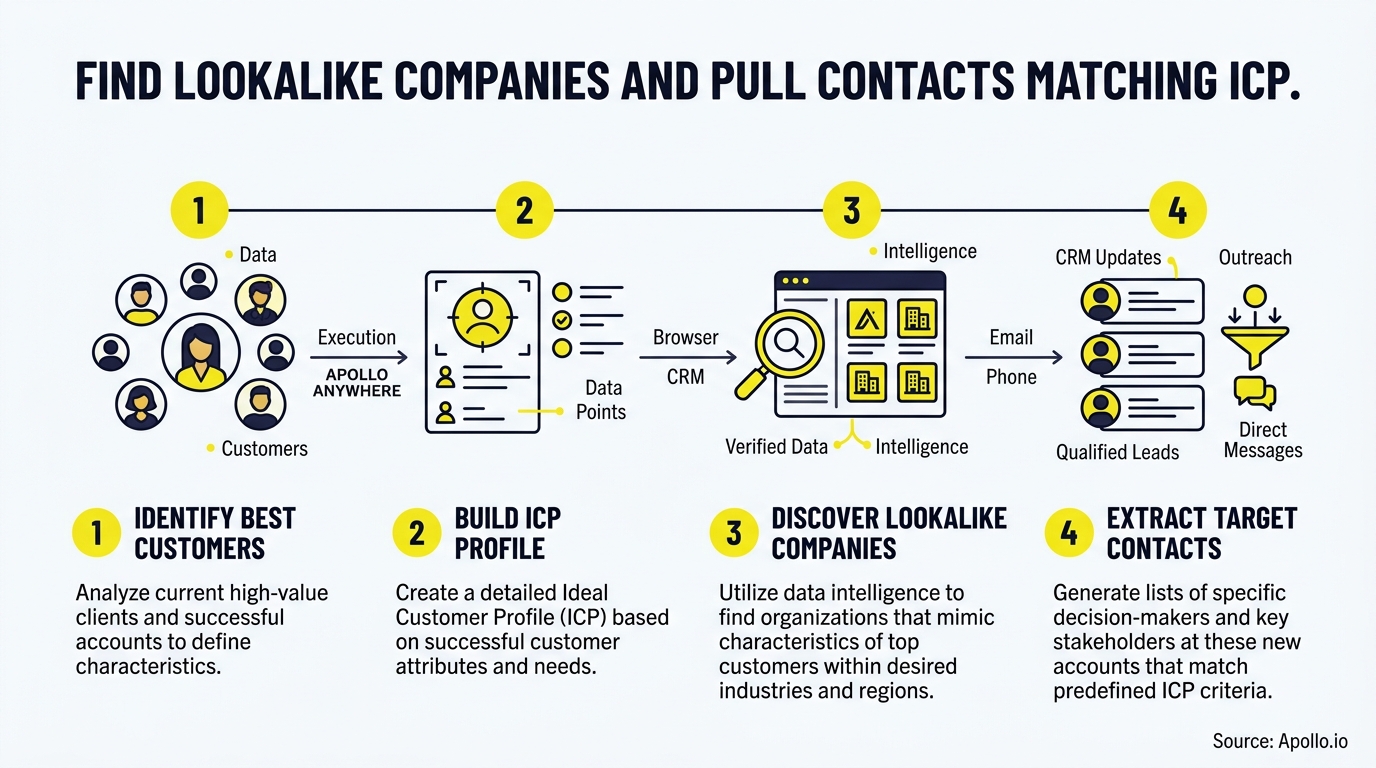
You build this workflow in five stages: select outcome-qualified seed accounts, score similarity across multiple fields, inspect match reasons, map the buying group, then validate and export. Skipping any step is where most lookalike programs break down.
- Select seed accounts. Pull only closed-won customers with strong retention or expansion, not every account that ever signed a contract. Weak seeds produce weak lookalikes.
- Score multi-field similarity. Weight industry, employee count, tech stack, funding stage, and growth signals instead of relying on one or two filters.
- Inspect match reasons. Every scored account should show why it matched (shared technology, similar hiring pattern, comparable revenue band) so reps trust the list.
- Map the buying group. Identify every role typically involved in your closed-won deals, not just one champion contact.
- Validate and export. Check email and phone verification status, remove duplicates, and push clean records into your sequence tool or CRM.
Struggling to find qualified leads that actually match this criteria? Search Apollo's 240M+ contacts with 65+ filters to build and score your lookalike list in one workspace.
Why Is One ICP Contact Not Enough For A Buying Group?
One ICP-matched contact isn't enough because modern B2B purchases involve multiple stakeholders across departments, not a single decision-maker. According to Forrester's 2024 Buyers' Journey Survey, the average purchase involves 13 participants, and 89% of purchases span at least two departments.
That means a lookalike account is only useful once you've mapped the roles that typically show up in your closed-won deals: economic buyer, technical evaluator, end user, and often a security or procurement reviewer. Personalizing outreach to the whole buying group also outperforms individual targeting.
Gartner's 2025 analysis found buying-group relevance increased consensus by 20%, while individual-level relevance had a negative effect on group consensus.
For teams building an ICP framework, this means your scoring model needs a role layer, not just a company layer.
What Should A Buying-Group Coverage Matrix Include?
A buying-group coverage matrix maps each closed-won deal's key roles against the contacts you've actually found and verified for a target account. Build one column per role (economic buyer, champion, technical evaluator, end user, procurement) and one row per target account, then mark coverage status.
| Role | Typical Title Pattern | Coverage Status | Verification Needed |
|---|---|---|---|
| Economic Buyer | VP/Director, budget owner | Found / Missing | Email + phone |
| Champion | Manager, daily user advocate | Found / Missing | |
| Technical Evaluator | IT, Security, RevOps | Found / Missing | |
| End User | Individual contributor | Found / Missing | |
| Procurement | Legal, Finance | Found / Missing | Email + phone |
Any row with more than one "Missing" status is a weak account. Prioritize outreach on accounts where you've filled at least three of five roles.
See Which Leads Are Actually Sales-Ready
Guessing which leads will convert while forecasts stay unreliable. Apollo scores and prioritizes prospects using real buying signals, so reps chase deals ready to close. Built-In grew win rates using Apollo's scoring.
Start Free with Apollo →How Can SDRs And RevOps Validate Contact Data Quality Before Outreach?
SDRs and RevOps teams validate contact data by applying confidence thresholds, checking provenance, and suppressing duplicates before any record enters a sequence. Skipping this step is expensive: Salesgenie reports that inaccurate contact data causes companies to lose an average of 12% of annual revenue.
Use this checklist before any lookalike-sourced list gets activated:
- Confidence threshold: Only export contacts above a minimum match-confidence score (both for company similarity and email verification status).
- Provenance: Know where each data point came from and when it was last verified.
- Duplicate suppression: Cross-check against existing CRM records to avoid re-contacting closed-lost or currently-engaged accounts.
- Freshness window: Flag contacts whose title or company hasn't been re-verified within your team's acceptable window.
RevOps leaders find that building this checklist into the export step, rather than after a bounce report, protects sender reputation and rep trust in the data.

How Do You Find And Verify ICP Contacts Once You've Identified Lookalike Companies?
You find and verify ICP contacts by layering role-based search filters on top of your scored lookalike account list, then running each contact through email and phone verification before export. This is where a documented ICP pays off, because it tells you exactly which titles, seniority levels, and departments to pull for each matched account.
Account Executives managing live deals can use this same process to find adjacent stakeholders at an existing target account, not just net-new companies.
Once the account list is scored and the roles are mapped, pull verified emails and direct dials for each role, then push them into your sequencing tool with account-level personalization rather than one-size-fits-all templates.
Tired of dirty data slowing down your outreach? Start free with Apollo's 240M+ verified business contacts and skip the manual list-cleaning step entirely.
Can You Run This Whole Workflow From ChatGPT, Claude, Or Perplexity?
Yes, you can run the entire lookalike-to-contact workflow from inside ChatGPT, Claude, Perplexity, or Codex using Apollo MCP, without opening a separate database tab. Connect Apollo to your AI tool through its connectors or integrations panel using OAuth, on any Apollo plan including free, and the data and action limits mirror your existing Apollo account.
From one conversation you can ask your AI tool to find companies that match your best customers' profile, enrich the resulting list with verified emails and phone numbers, map buying-group roles, and push qualified contacts into a sequence. This mirrors a broader shift in the market: MCP-style, prompt-driven prospecting is becoming standard as sales teams move away from manual filter-building toward natural-language requests that a connected data layer executes underneath.
Your best prospecting session shouldn't require opening a new tab. That's the practical case for running this workflow where you're already working, whether that's an AI assistant or your CRM.
How Does Tool Consolidation Improve Lookalike Prospecting Results?
Tool consolidation improves lookalike prospecting by keeping company scoring, contact enrichment, and outreach execution in one connected workspace instead of forcing data through multiple disconnected tools. Every export-import-dedupe cycle between separate platforms introduces stale data and manual error.
Collin Stewart of Predictable Revenue put it simply: "We reduced the complexity of three tools into one." Teams at Cyera found that "having everything in one system was a game changer" for managing prospecting and outreach together.
Founders and RevOps leaders building lean go-to-market motions benefit most here: fewer subscriptions to manage, one source of truth for account and contact data, and no reconciliation step between your lookalike model and your outreach sequences. Spending hours stitching spreadsheets together? Automate your sequences with Apollo's multi-channel platform once your lookalike list is validated.

What's Next After You've Built Your Lookalike List?
Once your lookalike accounts and ICP contacts are validated, the next step is loading them into a converting lead list and sequencing outreach around the buying-group roles you mapped. Don't treat this as a one-time export. Refresh your seed accounts quarterly as new deals close, and re-score existing lookalikes against updated firmographic and technographic signals.
Only 42% of B2B companies had a formally documented ICP as of 2025, according to La Growth Machine, and companies that go further to formalize win-rate data see measurably better results: CXL found organizations with a documented, data-backed ICP achieve 68% higher account win rates than those without one. The lookalike-plus-verified-contact workflow above is how that documentation turns into pipeline.
Ready to turn your best customers into your next best accounts? Start a Trial and build your first lookalike list with verified ICP contacts today.
Justify Your Investment With Apollo Fast
Struggling to quantify time saved and pipeline impact for leadership? Apollo replaces scattered tools with one platform your reps actually use, so wins show up in the numbers fast. Leadium tripled annual revenue after consolidating with Apollo.
Start Free with Apollo →Don't miss these
Sales
Inbound vs Outbound Marketing: Which Strategy Wins?
Sales
What Is a Sales Funnel? The Non-Linear Revenue Framework for 2026
Sales
What Is a Go-to-Market Strategy? The 2026 GTM Playbook
See Apollo in action
We'd love to show how Apollo can help you sell better.
By submitting this form, you will receive information, tips, and promotions from Apollo. To learn more, see our Privacy Statement.
4.7/5 based on 9,690 reviews
