
How to Find Companies Using a Specific Technology to Target
Finding companies that run a specific technology, whether that's a competitor's platform, a complementary tool, or an integration partner, is one of the fastest ways to build a qualified target list. The catch: most technographic data is a probabilistic signal, not a guarantee, so treating a detected install as gospel leads to wasted outreach on false positives.
This guide breaks down where to source technology-install data, how to validate it before you send a single email, and how to turn stack changes into timely campaigns. For a broader view of building your target list once you've identified the right accounts, see Target Account List: Build, Segment, and Automate in Apollo.

Ditch Manual Research, Let Apollo Do It
Spending hours every day hunting down emails and phone numbers that turn out wrong. Apollo hands your reps verified contact data instantly, so selling time stays selling time. 98% email accuracy means fewer bounces and more real conversations.
Start Free with Apollo →Key Takeaways
- Technographic data (which tools a company runs) is strongest as a filter, not a final answer, since even top providers report accuracy near 90% after multi-source verification.
- Use Apollo MCP when you need to pull companies matching a technology filter and enrich their contacts without leaving ChatGPT, Claude, Perplexity, or Codex.
- Stack change events (new adoptions, removals) generate more urgency than static install lists because they signal active buying windows.
- Combining technographic filters with firmographic and intent data meaningfully improves ICP accuracy over industry and headcount filters alone.
- Apollo consolidates technology filtering, contact enrichment, and outreach into one workspace, so SDRs and RevOps teams don't need to stitch together a detection tool, a data provider, and a sequencing platform separately.
What Does It Mean To Find Companies That Run A Specific Technology?
Finding companies that run a specific technology means identifying organizations whose website, job postings, or public infrastructure show evidence of using a particular software, platform, or tool. This is called technographic data, and it's distinct from firmographic data (industry, headcount, revenue).
Technographic signals come from detectable sources: website code (tracking pixels, JavaScript libraries, CDN headers), job listings mentioning required tools, public API documentation, and vendor case studies. According to Cold Email Manifesto, standard firmographic filtering alone typically yields only 50-60% ICP accuracy, which is why layering in technographic signals matters for precision targeting.
It is not the same as knowing a company's internal, non-public infrastructure. Backend systems, private databases, and internally hosted tools rarely leave a public footprint, so detection tools have blind spots by design.
How Do You Find Companies Using A Specific Technology?
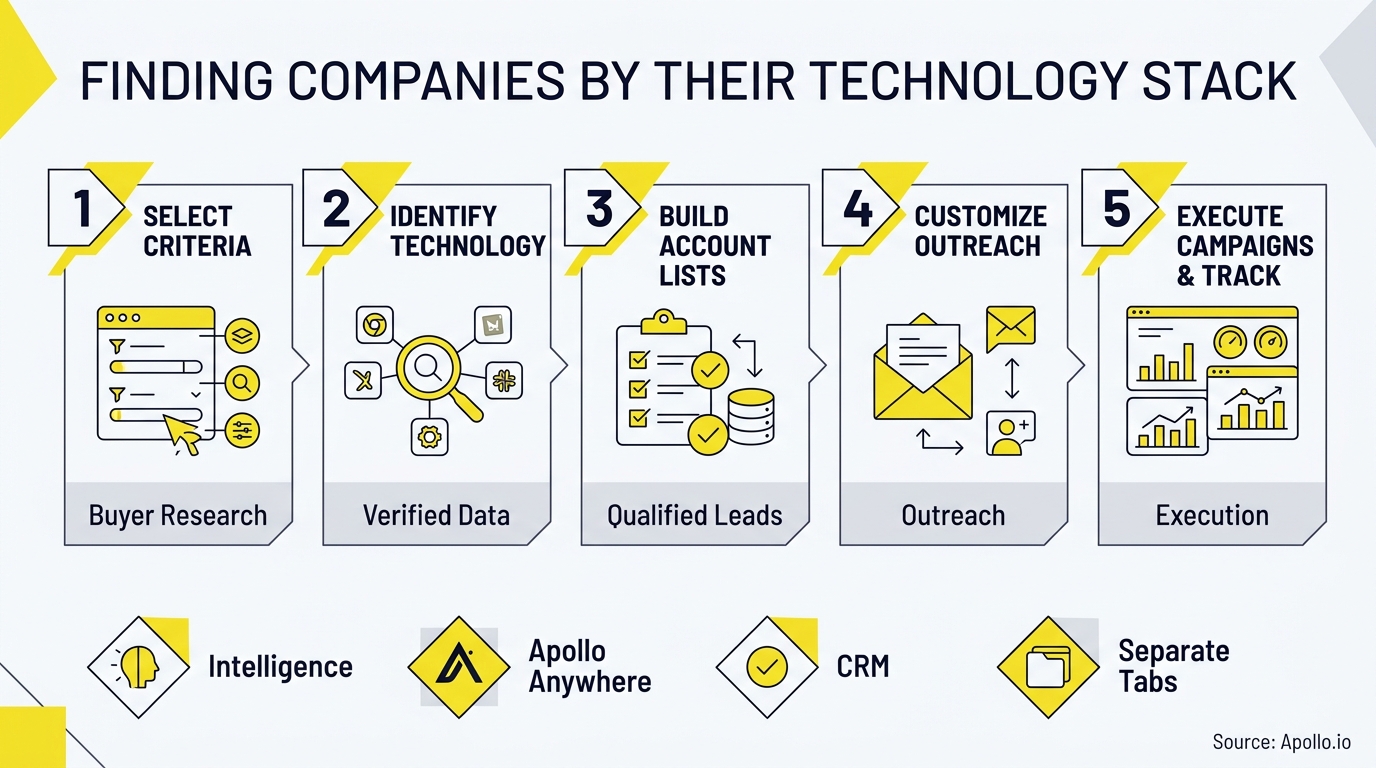
You find companies using a specific technology by combining a detection source (visible or inferred), a verification step, and firmographic filters to narrow the list to your actual ICP. The workflow has three stages: source selection, validation, and activation.
Stage 1: Choose your source based on technology visibility. Website-facing technologies (analytics tools, chat widgets, e-commerce platforms, CDNs) are detectable by crawlers.
Backend or internal technologies (CRMs, data warehouses, internal APIs) are harder to confirm publicly and often require job-posting data, case studies, or direct enrichment signals instead.
Stage 2: Validate before you build a list. Cross-check at least two sources. A tag detected once, months ago, may reflect a trial or a since-removed integration.
Stage 3: Activate with firmographic and intent overlays. Layer company size, industry, and buying-stage signals on top of the technology filter so your list reflects real fit, not just technical presence.
Struggling to find qualified leads once you've identified the technology fit? Search Apollo's 240M+ contacts with 65+ filters to combine technology, firmographic, and intent criteria in one pass.
Which Sources Should You Use for Visible vs. Internal Technologies?
The right source depends on whether the technology leaves a public footprint or lives inside a company's private infrastructure. Use this matrix to match your detection method to the technology type:

| Technology Type | Best Source | Detection Method | Reliability Notes |
|---|---|---|---|
| Website analytics, chat, CDN, e-commerce | Crawler-based detection tools | Public HTML/JavaScript scan | High visibility, but can miss removed or A/B-tested tools |
| Marketing automation, CRM (public-facing forms) | Crawler tools + job postings | Form fingerprinting, career page mentions | Moderate; confirm with a second source |
| Cloud infrastructure (AWS, Azure, GCP) | DNS/MX records, job postings, case studies | Inference-based | Directional only; large enterprises often run hybrid or multi-cloud |
| Internal CRM, data warehouse, DevOps tools | Job postings, vendor case studies, direct enrichment | Inference-based | Lowest confidence; requires manual verification |
| AI infrastructure (MCP servers, agent APIs) | Public API docs, llms.txt files, agent-readiness scores | Public evidence scan | Emerging category; limited public evidence does not confirm absence |
Know Which Leads Are Sales-Ready With Apollo
Marketing hands off leads that never turn into opportunities, and your forecast is basically a guess. Apollo scores and prioritizes prospects by buying intent, so reps chase deals ready to close. Built-In saw a 10% win rate lift using Apollo's signals.
Start Free with Apollo →How Do You Score Confidence In Technographic Data?
You score confidence in technographic data by weighting how the technology was detected, how recently it was confirmed, and how many independent sources agree. A single, months-old detection should never carry the same weight as a technology confirmed across multiple sources this month.
| Confidence Level | Criteria | Recommended Action |
|---|---|---|
| High | Confirmed by 2+ sources within the last 30-60 days, technology is customer-facing | Add to active outreach list |
| Medium | Confirmed by 1 source, or detected 60-180 days ago | Add to nurture list; verify via enrichment before outreach |
| Low | Inferred only (job posting, case study), no recent direct confirmation | Use for research, not personalized outreach claims |
| Stale | Last confirmed 180+ days ago | Re-verify or exclude from list |
This matters because technographic data providers, even those combining automated detection with human review, report accuracy rates around 90% at best. That gap is exactly why a validation checklist belongs in every workflow, not just a nice-to-have.
What Should Be On Your Technographic Validation Checklist?
A validation checklist confirms a detected technology is current and relevant before you personalize outreach around it. Run through these steps before adding a company to an active sequence:
- Confirm the detection date is within your acceptable freshness window (30-90 days for high-confidence claims)
- Cross-check against a second independent source (job posting, case study, or direct enrichment)
- Verify the company still matches your firmographic ICP (size, industry, region)
- Check for recent funding, leadership changes, or public statements that might signal a stack migration in progress
- Flag any technology detected only through inference (no direct public evidence) as lower priority
Why Do Stack Changes Matter More Than Static Technology Lists?
Stack changes matter more than static lists because a company that just adopted or removed a technology is in an active decision window, while a company that has used the same tool for years is not. A static list tells you technical fit.
A change event tells you timing.
Recent platform updates reflect this shift. BuiltWith's rebuilt platform now tracks adoption velocity and churn volatility rather than just install snapshots, reporting how many sites begin using a technology each day.
That lets sales teams target recent adopters (who may need onboarding help or integrations) or likely switchers (who may be evaluating alternatives) instead of blasting every company that has ever used a tool.
Practical change-event campaigns include:
- New adoption: "Congrats on the new [tool] rollout, here's how [complementary capability] fits in"
- Removal/churn: "Noticed you moved off [tool], here's what teams like yours switched to"
- Competitor displacement: Target accounts that just adopted a competing product with a comparison-focused sequence
How Can SDRs And RevOps Teams Turn Technology Filters Into Pipeline?
SDRs and RevOps teams turn technology filters into pipeline by layering technographic data with firmographic filters and intent signals inside a single prospecting workflow, then activating the list through sequences immediately, before the signal goes stale. Waiting weeks between detection and outreach erodes the timing advantage entirely.
For SDRs, this means building lists where the technology filter, contact enrichment, and sequence launch all happen in one workspace rather than bouncing a CSV between a detection tool, a data provider, and a separate outreach platform. Collin Stewart of Predictable Revenue noted, "We reduced the complexity of three tools into one," describing exactly this kind of consolidation.
For RevOps leaders, the priority is a single source of truth for technographic and firmographic data so reps aren't manually reconciling lists from multiple vendors. Tired of dirty data slowing down list-building? Start free with Apollo's data enrichment to keep technology and contact data in one place.
For Account Executives prepping for a call, knowing a prospect's current stack shapes the entire conversation, from which pain points to lead with to which integrations to demo first.
How Do You Run This Workflow Inside ChatGPT, Claude, Or Perplexity?
You run this workflow inside your AI tool by connecting Apollo through the tool's integrations settings, then asking natural-language questions about companies and technologies directly in the conversation. Apollo MCP (Model Context Protocol) brings Apollo's search, enrichment, and sequencing capabilities into ChatGPT, Claude, Perplexity, and Codex, so you're not exporting CSVs between tools.
Once connected via OAuth (available on any Apollo plan, including free), you can ask your AI tool to find companies matching a technology and headcount filter, enrich the resulting contacts with verified emails and phone numbers, and add qualified prospects directly to a sequence, all from one conversation. For developers who prefer terminal-native access, the Apollo CLI supports the same workflow from the command line.
Your best prospecting session shouldn't require opening a new tab. This matters because G2's 2024 buyer behavior research found integration compatibility was the top purchase consideration among B2B software buyers, meaning your own workflow efficiency (fewer tools, less manual handoff) is itself a competitive advantage.
How Do BuiltWith, Wappalyzer, And HG Insights Compare For Technographic Data?
BuiltWith, Wappalyzer, and HG Insights differ mainly in depth of detection, historical data, and how they package technographic data alongside other signals. Here's how they compare:
| Provider | Primary Focus | Notable Capability |
|---|---|---|
| BuiltWith | Website technology detection | Adoption velocity, churn tracking, and AI Readiness scores (AI Maturity, Agent Readiness) added in 2026 |
| Wappalyzer | Lightweight technology detection | Browser extension and API for quick, single-site lookups |
| HG Insights | Technology install data plus spend intelligence | Combines technographics with buyer intent and estimated IT spend across a large company and product database |
| Job-posting data tools | Inferred technology usage | Surfaces internal/backend tools not visible on public websites |
Each approach has tradeoffs: crawler-based tools excel at visible, customer-facing technologies but miss internal systems, while job-posting inference catches backend tools but with lower confidence. That's exactly why the multi-source validation approach outlined above matters regardless of which primary tool you choose.

What's Next After You've Built A Technology-Based Target List?
Once you've validated a technology-based target list, the next step is connecting it to enrichment, sequencing, and pipeline tracking so the signal turns into booked meetings, not just a spreadsheet. A validated list that sits idle loses its timing advantage fast.
For teams building out a full sales tech stack around this workflow, see How to Build a Sales Tech Stack That Scales Revenue. And if you're evaluating whether to consolidate multiple point tools into one platform, Census's story of replacing their sales tech stack and Cyera's note that "having everything in one system was a game changer" both illustrate what that consolidation looks like in practice.
Apollo brings B2B data, sales engagement, and AI-powered execution together in one connected go-to-market system, so teams don't have to stitch together separate vendors for technology detection, contact research, and outreach. To see why Apollo stands alone as the only fully agentic GTM platform, combining sales intelligence, outbound execution, and enrichment in one workspace, Request a Demo and start targeting companies by tech stack today.
Prove ROI Fast, Scale Outreach With Apollo
Struggling to justify tool spend before leadership loses patience? Apollo replaces scattered point solutions with one platform, so reps send more outreach without adding headcount. See pipeline impact in your first weeks, not next quarter.
Start Free with Apollo →Don't miss these
Sales
Inbound vs Outbound Marketing: Which Strategy Wins?
Sales
What Is a Sales Funnel? The Non-Linear Revenue Framework for 2026
Sales
What Is a Go-to-Market Strategy? The 2026 GTM Playbook
See Apollo in action
We'd love to show how Apollo can help you sell better.
By submitting this form, you will receive information, tips, and promotions from Apollo. To learn more, see our Privacy Statement.
4.7/5 based on 9,690 reviews
