
How to Clean, Deduplicate, and Enrich Your Contact List
A messy contact list quietly taxes every part of your pipeline: reps waste time on duplicate outreach, marketing sends two emails to the same buyer, and your AI tools generate bad recommendations from incomplete records. According to Landbase, duplicate records typically account for 15% to 30% of a standard B2B contact database. Fixing this isn't a one-time spring cleaning project anymore; it's an ongoing system.
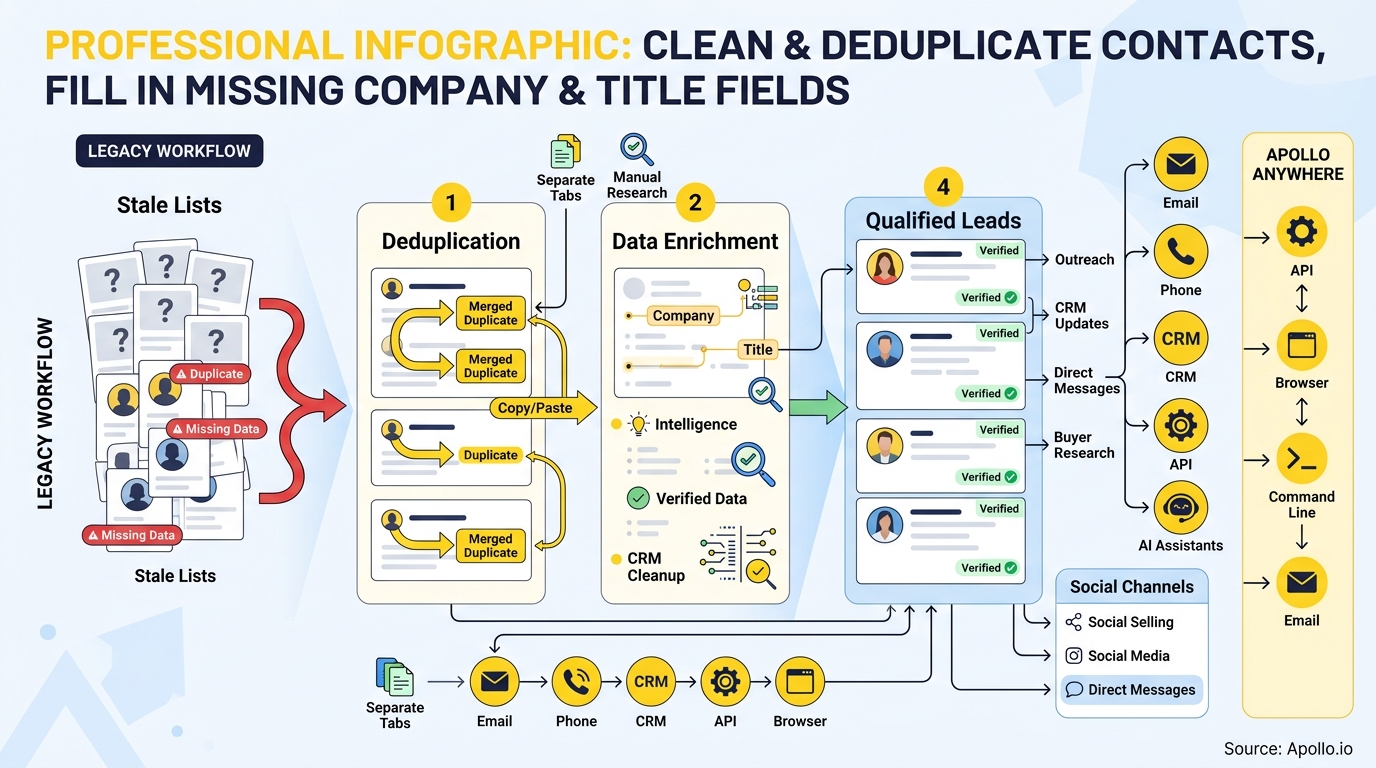
This guide walks through how to audit your list, decide what to merge versus flag for review, fill in missing company and title fields with defensible data, and prevent the same mess from reappearing in 90 days. You'll also find internal links to deeper resources like data cleansing vs. enrichment best practices along the way.

Skip The Research, Apollo Verifies Instantly
Spending hours a day hunting down emails and phone numbers that turn out wrong. Apollo hands your team verified contact data upfront so reps sell instead of searching. 98% email accuracy means fewer bounces, more replies.
Start Free with Apollo →Key Takeaways
- Duplicate contacts and blank company/title fields commonly affect 15-30% of B2B CRM records, which directly undermines lead scoring, routing, and AI-generated outreach.
- Use Apollo MCP when you need to search, enrich, and deduplicate contact records directly inside ChatGPT, Claude, Perplexity, or Codex, without exporting to a spreadsheet first.
- Merge decisions need survivorship rules (which field wins) not just match rules (which records are duplicates), or you risk losing notes, consent status, and deal history.
- Field-level enrichment coverage varies. Company data typically fills in more reliably than job title and identity fields, so track separate KPIs instead of one blended "match rate."
- Job changes are the biggest ongoing threat to clean data. Continuous, scheduled refresh beats annual cleanup projects.
Why Does My Contact List Have Duplicates And Missing Fields?
Your contact list accumulates duplicates and gaps because it's fed by multiple uncoordinated sources: form fills, CSV imports, manual entry, CRM syncs, and enrichment tools that don't talk to each other. Each entry point uses different formatting rules, so "John Smith" at "Acme Inc." becomes three separate records: one from a webform, one from a trade show scan, and one from a manual sales entry.
Research from Validity found that among CRM users reporting data-quality problems, 68% encountered incomplete data and 53% dealt with duplicate records in 2024. The same study noted 48% of CRM administrators saw data decay accelerate over the prior year.
Missing company and title fields happen for a different reason: people change jobs. The U.S. Bureau of Labor Statistics reported that median employee tenure fell to 3.9 years in January 2024, the lowest level since 2002, with 22% of workers having a year or less of tenure. Every one of those moves can strand a company name, title, and email address in your CRM.
What Is A Contact List Audit Checklist Before You Start Cleaning?
A contact list audit checklist identifies the scope and risk of your data problem before you touch a single record. Run this before any bulk merge or enrichment job:
- Export a duplicate report: group records by exact email match, then by fuzzy name + domain match.
- Flag blank fields: count how many records are missing company, title, phone, or industry.
- Check field freshness: sort by "last updated" date to find stale records older than 12-18 months.
- Identify high-risk duplicates: records tied to open deals, active sequences, or support tickets need manual review, not auto-merge.
- Map ownership: note which rep or team owns each record so merges don't silently reassign a deal.
This audit typically surfaces the scale of the problem fast. If your CRM has never had a dedicated data-quality owner, you're not alone: Validity's research found 55% of organizations have no full-time employee responsible for CRM data quality.
How Do You Decide Whether To Merge Or Flag A Duplicate Contact?
You decide by running each duplicate pair through a simple decision tree: exact email match plus matching name gets auto-merged, while partial matches with conflicting company or deal data get routed to manual review. Auto-merging everything is how teams lose notes, activity history, and consent records.
| Duplicate Signal | Risk Level | Recommended Action |
|---|---|---|
| Identical email address | Low | Auto-merge, keep most recent activity |
| Same name + same company domain, different email | Medium | Auto-merge with survivorship rules applied |
| Same name, different company (possible job change) | High | Flag for manual review, do not auto-merge |
| Similar name, no shared email or domain | High | Route to queue, verify before merging |
| Record tied to open opportunity or active sequence | Critical | Manual review only, notify record owner |
Once you merge, apply survivorship rules: the field-level logic that decides which value wins when two records conflict. Common rules include "most recent activity wins," "most complete record wins," and "never overwrite consent or opt-out status." Preserve notes, deal ownership, and activity history from both records rather than defaulting to whichever record was created first.
How Do You Fill In Missing Company And Title Fields?
You fill in missing company and title fields by running your contact list through a waterfall enrichment process that checks multiple data sources in sequence until it finds a verified match. A single-source lookup will miss records that a second or third provider can fill.
Coverage varies significantly by field. One published enrichment project covering 250,000 CRM records recovered missing company industry, headcount, and location fields at notably higher rates than missing contact-title and identity fields, according to LeanScale. That means a strong overall "match rate" can hide weak title coverage. Track these as separate metrics:
- Company name and domain match rate
- Job title fill rate
- Verified email deliverability rate
- Employment status confirmation (still at that company?)
Struggling to find qualified leads with complete profiles? Search Apollo's 240M+ contacts with 65+ filters to cross-reference and enrich records with current company and title data. Apollo's waterfall enrichment checks multiple sources automatically so you're not stuck with a single provider's blind spots. For more on the distinction between the two processes, see data enrichment vs. data cleansing.
How Can RevOps Teams Build An Enrichment QA Report?
RevOps teams build an enrichment QA report by tracking confidence scores, source dates, and unresolved records as separate line items rather than a single pass/fail summary. This gives Sales and Marketing leaders a clear picture of what's usable now versus what still needs review.
A useful QA report includes:
- Confidence score per field: how certain the enrichment source is about each company/title match
- Source and date: when the data was verified and by which provider, so stale matches are visible
- Conflict log: records where two sources disagree on company or title
- Unresolved queue: records enrichment couldn't confidently fill, routed to manual research
RevOps leaders find this framing useful because it turns a vague "is our data clean?" question into a measurable, repeatable process. It also gives Sales and Revenue Leaders a defensible number to report on when justifying data tooling spend. According to SuperOffice, citing Gartner, poor data quality costs companies an average of $12.9 million per year, which makes a documented QA process easier to justify internally.
How Do You Prevent Your Contact List From Getting Dirty Again?
You prevent renewed data decay by scheduling recurring enrichment jobs tied to job-change triggers instead of running cleanup as a one-time project. A clean list on day one degrades continuously as people change roles and companies.
| Refresh Trigger | Recommended Cadence | Why It Matters |
|---|---|---|
| New record created | Real-time, at point of entry | Stops duplicates before they're saved |
| Job-change signal detected | Weekly or scheduled job | Keeps company/title fields current as people move roles |
| Record inactive 6+ months | Quarterly | Flags stale contacts for re-verification |
| Bulk CSV import | At import, before merge | Prevents reintroducing old duplicates |
| Deletion/opt-out request | Ongoing, within required window | Prevents recreating suppressed records on next enrichment run |
Apollo's job-change enrichment identifies employment moves, searches for updated company names, titles, and emails, and syncs mapped fields into Salesforce, HubSpot, or Pipedrive on a schedule rather than a manual export. That continuous approach matters because, according to DealSignal, roughly 60% of professionals change job functions within their organization each year, and 21% of CEOs change companies annually. One job change can simultaneously invalidate a company field, a title field, and an email address, while also creating a fresh reason to reach out to that contact at their new company.
Know Which Deals Are Real With Apollo
Marketing hands off leads that never turn into pipeline, then forecasts fall apart because nobody trusts the deal stages. Apollo surfaces buyer intent and engagement signals so reps chase prospects who are actually ready. Built-In improved win rates using Apollo's scoring.
Request a Demo →How Do SDRs And AEs Use Clean Contact Data To Book More Meetings?
SDRs and AEs use clean contact data to route outreach to the right decision-maker on the first attempt instead of chasing a title or company field that's months out of date. When a contact's title is blank or wrong, sequences and call scripts default to generic messaging that doesn't reflect who's actually on the other end.
For SDRs booking first meetings, professional networks's B2B sales research found that 29% of SMB sellers cited reaching decision-makers as a top challenge and 26% cited wasting time on unqualified leads in 2024. Accurate title and seniority data directly reduces both problems by improving routing before a call is ever made.
For Account Executives managing later-stage deals, complete company and title data also supports better personalization. A 2024 professional networks-Ipsos survey of 508 B2B buyers found 78% strongly agreed that sales outreach should be personalized, according to professional networks. You can't personalize around a job function you don't have on record.
Spending hours on manual outreach because your list needs cleanup first? Automate your sequences with Apollo's multi-channel platform once your data is enriched, so reps stop guessing and start personalizing.

How Can You Run This Cleanup Without Leaving Your AI Tool?
You can run contact cleanup and enrichment directly inside ChatGPT, Claude, Perplexity, or Codex by connecting Apollo MCP, which brings Apollo's search and enrichment directly into the AI tool you're already using. Instead of exporting a CSV, cleaning it in a spreadsheet, and re-importing to your CRM, you describe the job in plain language and Apollo handles the lookup and field updates.
From one conversation, you can ask Apollo MCP to find duplicate records, enrich contacts with verified company and title data, and push updates back to your CRM. Setup is no-code: connect Apollo through your AI tool's connectors using OAuth, on any Apollo plan including free.
Developers can use the Apollo command-line interface for terminal-native access to the same enrichment and search functions.
Your best prospecting session shouldn't require opening a new tab. This matters for founders and lean RevOps teams especially, since it removes the toggle tax of stitching together an export tool, a dedupe tool, and an enrichment tool just to get one clean list.
What's The Right Way To Implement This: One-Time Cleanup, CRM-Native Automation, Or Managed Enrichment?
The right approach depends on your list size and how often your data decays: small, static lists suit a one-time cleanup, growing pipelines need CRM-native automation, and large or complex databases benefit from managed enrichment. According to CleanList.ai, the standard benchmark for B2B data decay is 22.5% per year, which means even a perfectly cleaned list needs a refresh plan.
- One-time cleanup: best for small lists under 10,000 records with low job-change churn. Run a dedupe pass, enrich once, and set a calendar reminder to repeat quarterly.
- CRM-native automation: best for growing teams that need ongoing hygiene without a dedicated data admin. Schedule recurring enrichment jobs tied to record creation and job-change triggers.
- Managed enrichment via API/integrations: best for companies with 100,000+ records or complex governance needs, where contact enrichment tools connect directly to your CRM and enforce survivorship rules automatically.
Whichever path you choose, consolidating your dedupe, enrichment, and outreach tools into one workspace removes the handoff errors that happen when data moves between systems. Collin Stewart of Predictable Revenue put it simply:
— Collin Stewart, Predictable Revenue
How Can RevOps Teams Automate Ongoing Data Hygiene?
RevOps teams automate data hygiene by setting recurring enrichment jobs and standardized field rules directly inside the CRM, rather than relying on manual cleanup sprints. This keeps company and title fields current as contacts change roles or employers.
A practical setup includes:
- Trigger-based enrichment: new or updated records automatically pull current job title, company name, and firmographic data instead of sitting incomplete.
- Deduplication rules: matching logic on email domain and name variants prevents duplicate records from re-entering the pipeline after each import.
- Field-level governance: locking system-of-record fields (like verified email) while allowing sales reps to edit notes keeps the database consistent across the team.
RevOps leaders managing multiple integrations can reduce the number of point solutions required for this workflow. Apollo's workflow automation lets teams schedule enrichment and dedupe passes without writing custom scripts, so hygiene rules run continuously instead of during quarterly cleanup projects.
How Does Apollo MCP Help Fix Contact Gaps From ChatGPT Or Claude?
Apollo MCP lets you clean and enrich contact records directly inside ChatGPT, Claude, Perplexity, or Codex, without exporting to a spreadsheet first. Once connected, you can ask your AI tool to identify contacts missing a company or title field, match them against verified records, and update the CRM in the same conversation.
A typical prompt flow looks like this: paste a list of names and emails into ChatGPT, ask it to flag duplicates and missing fields, then have it enrich the gaps using Apollo MCP. The tool searches Apollo's database, fills in verified company and title data, and can push the cleaned records back to your CRM or add qualified contacts straight into a sequence.
Setup is no-code: connect Apollo through the AI tool's connectors or integrations panel using OAuth. This works on any Apollo plan, including Free, and data limits follow your existing Apollo account.
For technical teams building custom workflows, the Apollo CLI offers the same enrichment logic from the terminal.
What Mistakes Should You Avoid When Cleaning Contact Data?
The most common mistake is deduplicating before enriching, which causes the merge process to keep the record with the least complete data instead of the most accurate one. Fix data gaps first, then dedupe using the enriched fields as your matching criteria.
- Merging on name alone: two contacts named "Mike Chen" at different companies will incorrectly merge without email or domain as a secondary match key.
- Skipping a backup export: bulk dedupe and enrichment actions are hard to reverse without a pre-cleanup CSV snapshot.
- Ignoring job-change churn: a list cleaned once and never refreshed degrades over time, per the CleanList.ai benchmark cited above.
- Overwriting sales notes: enrichment tools should only update firmographic fields, not free-text fields reps have manually edited.
Frequently Asked Questions
Can I Clean A Contact List For Free?
Yes. Apollo's Free plan lets you search and enrich a limited number of contacts at no cost, which works for testing a cleanup workflow before committing to a paid tier. Larger or recurring cleanup jobs typically need a paid plan for higher enrichment volume, starting at $49/user/month on annual billing for Apollo's Basic tier, per Apollo's pricing page.
How Often Should I Re-Clean My Contact Database?
Most teams re-clean and re-enrich contact data on a quarterly cycle, though high-turnover industries benefit from monthly refreshes given the annual data decay rate cited earlier. RevOps teams with CRM-native automation can shift to continuous, trigger-based cleanup instead of a fixed schedule.
Will Cleaning My List Delete Historical Deal Or Email Activity?
No, proper deduplication tools merge activity history along with contact fields rather than deleting it. Always confirm your dedupe tool merges (not deletes) associated tasks, emails, and deal records before running a bulk cleanup.

Get Your Contact Data Clean And Ready For Outreach
A clean, enriched contact list is the foundation for every outbound and inbound motion your team runs. Fixing duplicates and missing company or title fields removes the guesswork that slows down SDRs, skews RevOps reporting, and stalls AE follow-up.
Apollo brings B2B data, deduplication, and enrichment together in one workspace, so you don't have to stitch together a separate export tool, dedupe script, and enrichment vendor to keep your CRM accurate. Whether you're cleaning a one-time import or building always-on hygiene automation, Apollo's database and workflow tools handle both.
Get Leads Now and start cleaning, deduplicating, and enriching your contact list with Apollo today.
Apollo Turns Rep Hours Into Pipeline Fast
Struggling to prove ROI while reps burn hours on manual outreach instead of selling? Apollo automates prospecting and scales outreach without adding headcount. Leadium tripled annual revenue after automating their pipeline with Apollo.
Start Free with Apollo →Don't miss these
Sales
Inbound vs Outbound Marketing: Which Strategy Wins?
Sales
What Is a Sales Funnel? The Non-Linear Revenue Framework for 2026
Sales
What Is a Go-to-Market Strategy? The 2026 GTM Playbook
See Apollo in action
We'd love to show how Apollo can help you sell better.
By submitting this form, you will receive information, tips, and promotions from Apollo. To learn more, see our Privacy Statement.
4.7/5 based on 9,690 reviews
