
How to Build a Search That Excludes Existing Customers and Pipeline
A prospecting search that only checks "is this person already in my CRM?" isn't enough anymore. You need a suppression waterfall that separates customers, open opportunities, recently contacted leads, and bad-fit accounts, because treating them all as one "exclude" bucket sends conflicting signals to buyers and burns seller capacity.
Here's how to build a search that keeps net-new prospecting clean without blocking legitimate expansion or deal-support outreach.

Apollo Turns Contact Hunting Into One Click
Spending hours every day chasing down emails and phone numbers that turn out wrong. Apollo verifies business contact data instantly so reps get back to selling. 98% email accuracy means less guessing, more closing.
Start Free with Apollo →Key Takeaways
- Build a lifecycle-based suppression hierarchy (customer, open opportunity, recently contacted, competitor, opt-out) instead of one flat exclusion list.
- Use Apollo MCP when you need to check account status and pull a clean net-new list without leaving ChatGPT, Claude, or Perplexity.
- Static CSV exclusions go stale fast. Sync suppression rules to your CRM so accounts drop out of prospecting automatically the moment they close.
- Match on domain and account ID, not just email or company name, to avoid false inclusions from subsidiaries and duplicate records.
- Use Apollo MCP for AI-connected search when your team wants suppression logic and enrichment running inside the same conversation as prospecting.
What Should You Exclude, Route, Recycle, Or Retain?
Not every account in your CRM belongs in the same suppression bucket. The lifecycle status determines whether a record should be excluded from net-new outreach, routed to a different owner, recycled back into prospecting, or retained for a separate motion.
| Lifecycle Status | Action | Why |
|---|---|---|
| Active customer | Exclude from net-new; route to customer success or expansion rep | Prevents duplicate outreach and protects the relationship |
| Open opportunity | Exclude from net-new; retain with deal owner | Avoids a second rep contacting the same buying group mid-deal |
| Closed-lost (recent, <90 days) | Exclude temporarily | Gives the account space before re-engagement |
| Closed-lost (aged, >90 days) | Recycle into prospecting | Circumstances change; a stale loss isn't a permanent no |
| Recently contacted (no reply, <30 days) | Exclude from new sequences | Prevents overlapping cadences to the same contact |
| Opt-out or do-not-contact | Exclude permanently | Legal and reputational requirement |
| Employee or competitor domain | Exclude permanently | Not a valid prospecting target |
This is the structure missing from most exclusion advice: a single flat list can't capture seven different lifecycle states, each requiring different handling.
How Do You Exclude Existing Customers From A Prospecting Search?
You exclude existing customers by filtering on account-level fields (domain or CRM account ID) synced from your CRM, not by manually checking company names. Manual name-matching misses subsidiaries, rebrands, and duplicate entries.
For Sales Professionals and SDRs building a net-new list, the reliable filter chain looks like this:
- Customer status field synced from CRM (e.g.,
Customer = false) - Domain match against your customer account list, not just email address
- Parent/subsidiary mapping so a customer's sister company isn't treated as untouched whitespace
Digital Applied reports that account-based programs, which by design exclude existing accounts from top-of-funnel reach, generate 2.6x more pipeline per marketing dollar than broad-reach demand generation. Precision suppression isn't just hygiene, it's a pipeline-efficiency lever.
Struggling to find qualified net-new leads once customers are filtered out? Search Apollo's 240M+ contacts with 65+ filters to rebuild your addressable market fast.
How Do You Exclude Open Pipeline From A Search In Sales Navigator?
You exclude open pipeline in Sales Navigator by connecting CRM Sync and filtering on opportunity-related fields, since Sales Navigator alone doesn't know which accounts have active deals. CRM Sync pulls that context in.
Implementation steps:
- Enable CRM Sync (supports Salesforce, HubSpot, Microsoft Dynamics 365, and Oracle Sales)
- Build a saved search with a CRM-based filter for "Open opportunity = true"
- Invert that filter to exclude those accounts from your net-new list
- Check the Match Data Report, which refreshes on a recurring cycle, to confirm sync accuracy before running outreach
Because this data refreshes regularly rather than sitting in a quarterly export, an account that closes a deal today drops out of exclusion and becomes eligible for prospecting again without manual list maintenance.
See Deal Stages Clearly, Close On Time
Forecasting off gut feel because deal data lives in five different tabs. Apollo shows real-time engagement and buyer signals right where you're already prospecting. Built-In grew win rates 10% using Apollo's scoring and signals.
Start Free with Apollo →How Do You Build A Salesforce Report To Suppress Customers And Pipeline?
You build this suppression in Salesforce by creating a report or list view with cross-object filters on Account and Opportunity, then feeding that filtered list into your outbound tool as an exclusion source.
Copyable filter logic for a Salesforce report:
Account.Type != "Customer"
AND Account.Id NOT IN (SELECT AccountId FROM Opportunity WHERE StageName != "Closed Won" AND StageName != "Closed Lost")
AND Account.Do_Not_Contact__c != true
For RevOps leaders maintaining this logic, build it as a reusable report type rather than a one-off filter. That way, sales, marketing, and any connected AI prospecting tool all pull from the same suppression definition, which matters given that Salesforce's Spring '26 release added CRM-aware prospecting (Agentforce Prospecting) that blends account and pipeline data with external signals directly inside CRM and Slack.
If your suppression logic lives in one report definition, every downstream tool inherits it automatically.

How Do You Set Up HubSpot Active List Filters To Exclude Customers?
You set this up in HubSpot by creating an active list with filter criteria on lifecycle stage and deal association, which updates automatically as records change status. Active lists (not static lists) are what keep the exclusion current.
Filter criteria to use:
- Lifecycle stage is not "Customer"
- Associated deal stage is not any open stage (exclude all stages before Closed Won/Lost)
- Last contacted date is more than 30 days ago (or your team's cadence-overlap window)
Once built, sync this active list to your outbound sequencing tool as a permanent exclusion filter. For Account Executives managing existing deals, this same filter logic (inverted) becomes your "protect this account" list, ensuring no other rep or automated sequence touches an account mid-negotiation.
How Do You Match And Exclude Customers Using A CSV Or Spreadsheet?
You match and exclude using a CSV by joining on normalized domain, not raw email or company name, since name variations and personal emails create false negatives. Domain-based VLOOKUP or SQL joins catch far more overlap.
Common matching pitfalls to test for before trusting a CSV exclusion:
- Duplicate records: verify your customer list is deduplicated first
- Subsidiary domains: acme.com vs. acme-europe.com may be the same account
- Stale entries: a customer list exported six months ago misses recent churn or wins
- Personal vs. work email: matching on email alone misses contacts who changed jobs
Research from Salesgenie shows duplicate records account for 15%-20% of all data in a typical B2B organization, which means a naive CSV match will both over-exclude and under-exclude without a domain-normalization step. Warehouse SQL join syntax for this: LEFT JOIN customers ON LOWER(SPLIT_PART(prospect.email, '@', 2)) = LOWER(customer.domain) WHERE customer.domain IS NULL.
How Can AI Tools Search And Suppress Customers In One Step?
AI tools connected to your CRM and data provider can search, apply suppression logic, and return a clean list inside a single conversation, without exporting to a spreadsheet first. This is what teams mean when they say search and exclusion are converging into one workflow.
Apollo MCP connects Apollo directly into ChatGPT, Claude, Perplexity, and Codex, so you can ask for a list of companies matching your ICP, apply customer and open-opportunity exclusion in the same prompt, and enrich the results with verified contact data, all without switching tabs. Setup is no-code: connect Apollo through the AI tool's integrations menu via OAuth on any plan, including free. For developer-facing workflows, the Apollo command-line interface gives the same access from the terminal.
Your best prospecting session shouldn't require opening a new tab. Founders and RevOps leaders consolidating their stack have used this to fold list-building, suppression, and enrichment into one workspace.
Cyera's team put it simply: "Having everything in one system was a game changer."
How Do SDRs And RevOps Keep Suppression Lists Accurate Over Time?
SDRs and RevOps keep suppression accurate by syncing exclusion rules to CRM in real time and auditing match quality on a fixed schedule, rather than refreshing a CSV once a quarter. Employment and account data change constantly, so static lists degrade fast.
A practical 30-day governance checklist:
- Week 1: Assign an owner for suppression logic (usually RevOps) and document the lifecycle hierarchy from the table above
- Week 1: Confirm domain-based matching is live across Salesforce/HubSpot, not just email matching
- Week 2: Set refresh cadence (daily or real-time sync preferred over weekly exports)
- Week 3: Run an audit sample of 50 excluded accounts and 50 included accounts to check for false positives/negatives
- Week 4: Review with sales leadership; set the threshold for acceptable match error and revisit CRM field mapping
This matters because poor CRM data isn't a minor inconvenience. A study by Validity found that incomplete data affects 68% of organizations and incorrect data affects 61%, meaning exclusion logic built on unaudited CRM fields will inherit those errors. RevOps leaders should treat this checklist as a recurring 30-day cycle, not a one-time setup. For teams also building expansion or win-back plays, see how job change alerts turn CRM updates into pipeline wins, and pair suppression with a stronger sales prospecting list strategy so net-new volume doesn't drop after cleanup.

How Do You Put A Suppression Waterfall Into Practice?
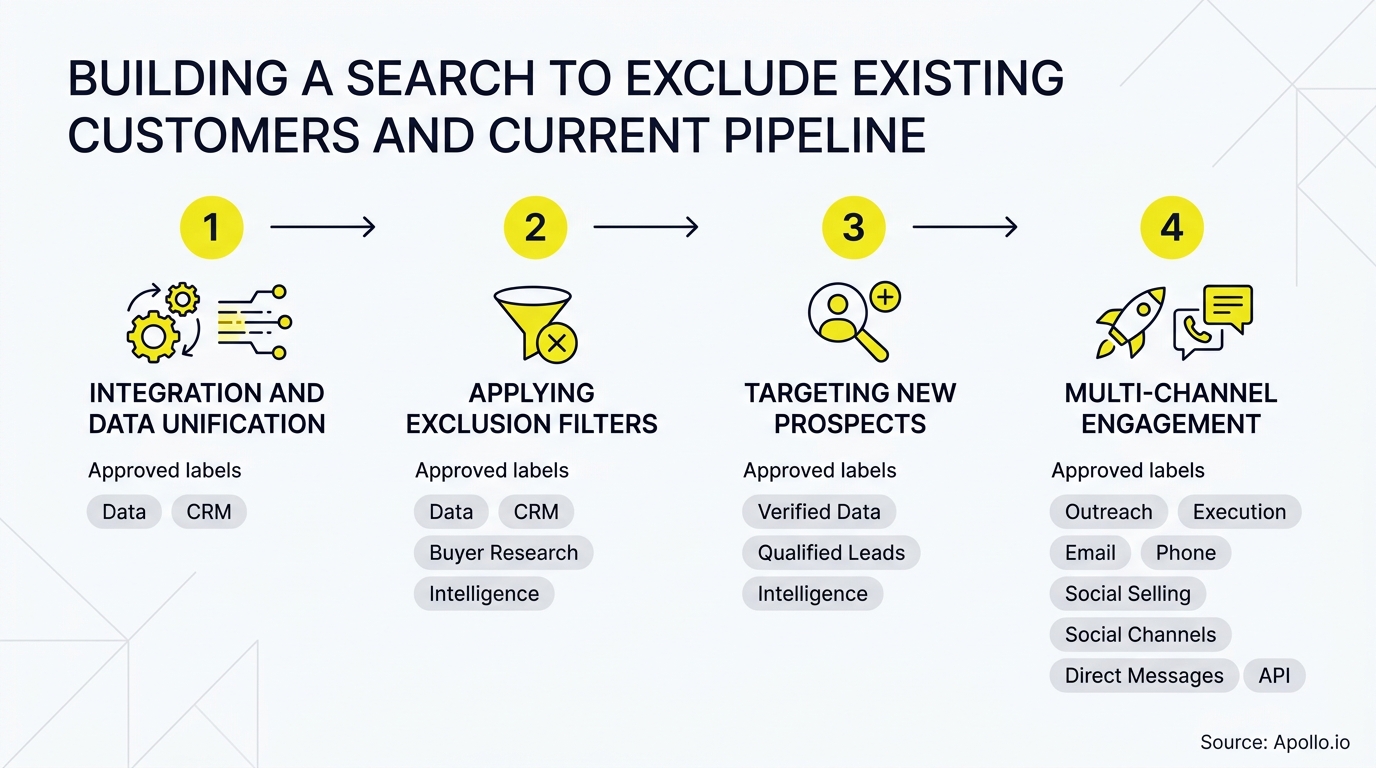
A suppression waterfall works by running searches through sequential filters, customer status, then open pipeline, then recent contact, then opt-out, so each account is checked against every lifecycle rule before it reaches a rep's list. This replaces the single flat exclusion file most teams start with.
Once suppression is dialed in, the harder problem is keeping outreach on the remaining whitespace personalized and timely. Spending hours manually rebuilding lists every time pipeline changes? Apollo's sales pipeline tools keep net-new and existing accounts separated automatically as deals move through stages.
Get your suppression logic right once, connect it to your CRM, and net-new prospecting stays clean without a rep manually checking CRM before every list pull. That's the difference between a search that respects your pipeline and one that quietly damages it.
Ready to build cleaner searches without stitching together a spreadsheet and three tools? Schedule a Demo and see how Apollo keeps customers, pipeline, and net-new prospects properly separated in one workspace.
Prove ROI Fast, Scale Outreach With Apollo
Struggling to justify tool spend when value takes months to show up? Apollo automates prospecting so reps produce more without adding headcount. Leadium tripled annual revenue after automating outbound with Apollo.
Start Free with Apollo →Don't miss these
Sales
Inbound vs Outbound Marketing: Which Strategy Wins?
Sales
What Is a Sales Funnel? The Non-Linear Revenue Framework for 2026
Sales
What Is a Go-to-Market Strategy? The 2026 GTM Playbook
See Apollo in action
We'd love to show how Apollo can help you sell better.
By submitting this form, you will receive information, tips, and promotions from Apollo. To learn more, see our Privacy Statement.
4.7/5 based on 9,690 reviews
