
How to Ensure Integration Does Not Slow Down System Performance in 2026
Slow integrations are not an IT problem. They are a revenue problem. A KPMG report in April 2026 found that 87% of leaders consider integrating customer-facing functions a critical priority, yet only 5% have fully achieved it — and companies that have are 3x more likely to achieve higher revenue growth. For RevOps leaders and sales teams, that gap translates directly into slow lead routing, missed follow-ups, and broken data flows that stall pipeline. Understanding how your CRM integration strategy handles performance under load is the first step to protecting revenue.

Research Less, Pipeline More With Apollo
Tired of burning hours verifying contact info instead of closing deals? Apollo delivers accurate, ready-to-work leads so your team sells from day one. Join 600K+ companies turning research time into revenue.
Start Free with Apollo →Key Takeaways
- Integration slowdowns are a business-resilience issue, not just a technical one — latency and service degradation cost companies measurable revenue.
- Less than half of teams perform API performance testing before rollout, leaving a major safeguard unused.
- A pre-launch readiness checklist with defined SLO thresholds and rollback criteria is the single most underused prevention tactic.
- End-to-end monitoring across multi-step workflows catches chained failures that single-point checks miss.
- RevOps teams that consolidate their GTM stack reduce integration surface area and eliminate the most common sources of performance degradation.
Why Does Integration Slow Down System Performance?
Integration slows system performance when API calls, data sync processes, or workflow automation add latency to critical business operations — including lead routing, CRM updates, and sequence triggers. According to Cazoomi, around 80% of business leaders consider data integration essential for business success, which means performance failures carry outsized consequences.
Common root causes include:
- Integration sprawl: Too many point-to-point connections that create cascading latency
- Synchronous API calls in sequential workflows: Each step waits for the previous one to complete
- Unvalidated data payloads: Dirty records that trigger retries and processing loops
- Legacy architecture: Systems built before real-time data requirements existed
- Missing rate limiting and retry logic: Integrations that flood endpoints during peak load
The 2025 State of RevOps Survey found that 99% of RevOps respondents struggle with technical data issues such as duplicates, floating lead records, and legacy automations — all of which compound integration latency.
What Is the Business Cost of Integration Performance Failures?
Integration performance failures cost revenue through service degradation, not just full outages. Latency in lead routing means slower follow-up.
Delayed CRM sync means reps work from stale data. Broken enrichment flows mean AI recommendations are based on inaccurate records.
A Gartner survey of 413 martech leaders found 45% said AI agents failed to meet promised performance expectations, with half citing lack of technical and data-stack readiness. For sales and marketing teams investing in AI-powered workflows, integration performance is the prerequisite — not an afterthought.
For Revenue Operations teams managing multi-tool stacks, every additional integration is a potential performance liability. The practical answer is reducing integration surface area by consolidating tools into unified platforms wherever possible.
What Should an Integration Performance Readiness Checklist Include?
An integration performance readiness checklist ensures you define measurable targets, test against them, and establish clear go/no-go criteria before any integration goes live. Most teams skip this step: Postman's 2024 State of the API Report found only 45% of teams perform API performance testing before release, down from over 50% in each of the prior four years.
| Checklist Area | What to Validate | Pass Threshold |
|---|---|---|
| Response time SLO | P95 latency under expected load | Under 500ms for sync calls |
| Error rate | Failed requests as % of total | Under 1% at peak load |
| Throughput | Requests handled per minute | Meets or exceeds baseline by 20% |
| Data validation | Malformed records rejected before processing | 100% invalid records filtered |
| Retry logic | Exponential backoff on failure | No infinite retry loops |
| Rollback plan | Documented steps to revert to prior state | Executable in under 30 minutes |
If any threshold fails, the integration does not go live. Define the rollback criteria in writing before testing begins — not after a production incident.
Turn Funnel Gaps Into Closed Deals
Pipeline forecasting a guessing game? Apollo surfaces high-fit buyers the moment they're ready, turning weak top-of-funnel into real opportunities. Top sales teams use Apollo to hit numbers — not hope for them.
Schedule a Demo →How Do RevOps Teams Monitor Integration Performance End-to-End?
RevOps teams monitor integration performance end-to-end by instrumenting each step of multi-step workflows — not just individual API endpoints. Single-point health checks miss chained failures where one slow step degrades the entire workflow downstream.
Practical monitoring setup for B2B GTM stacks:
- Trace IDs across workflow steps: Assign a correlation ID to each lead or record so you can follow it through CRM sync, enrichment, routing, and sequence enrollment
- Latency alerting by workflow stage: Alert when any individual step exceeds its SLO, not just when the whole workflow fails
- Dead letter queues: Capture records that fail processing so they can be replayed without data loss
- Synthetic transaction monitoring: Run test payloads through production integrations on a schedule to catch degradation before users report it
For data sync workflows connecting CRM, enrichment, and engagement platforms, end-to-end tracing is particularly critical. A delay in contact enrichment that is invisible to a single-endpoint monitor can silently degrade personalization quality across every sequence a rep sends.
Struggling to keep your pipeline data clean and in sync? Apollo's data enrichment keeps 230M+ contacts verified and flowing cleanly into your CRM.

How Can SDRs and RevOps Leaders Prevent Integration Latency in Their GTM Stack?
SDRs and RevOps leaders prevent integration latency by reducing the number of point-to-point connections in their GTM stack and choosing platforms that handle data flow internally. Research from Corporate Visions shows 77% of B2B buyers prioritize integration capabilities, and solutions that fail to integrate seamlessly are often deprioritized regardless of features or price. The same principle applies internally: tools that do not integrate cleanly become performance liabilities.
For SDRs, integration latency shows up as:
- Stale contact data at the point of outreach
- Sequences that do not trigger because CRM sync is delayed
- Duplicate records that waste time and inflate activity metrics
For RevOps leaders, the structural fix is consolidation. "Having everything in one system was a game changer" — Cyera. Fewer integrations mean fewer failure points, lower maintenance overhead, and cleaner data flowing into sales performance management dashboards.
Spending too much time managing broken data handoffs between tools? Apollo's unified GTM platform consolidates prospecting, engagement, and enrichment in one workspace — so your integrations are simpler and your data stays clean.
What Architecture Decisions Prevent Integration Performance Degradation?
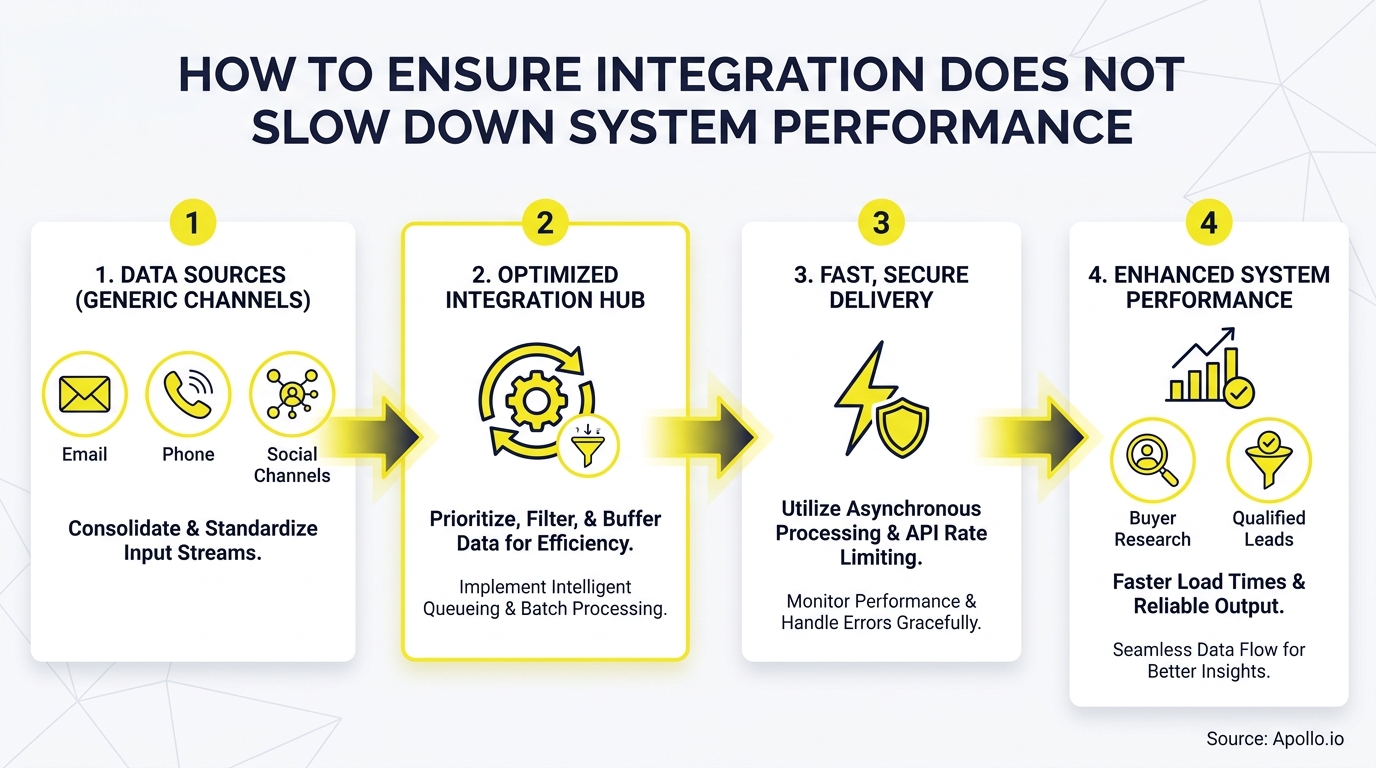
Asynchronous processing, event-driven design, and data validation at ingestion are the three architecture decisions most directly responsible for preventing integration performance degradation at scale.
- Async over sync where possible: Use queues and webhooks for non-time-critical operations like CRM field updates and enrichment writes. Reserve synchronous calls for actions that require immediate confirmation.
- Event-driven triggers: Fire integrations based on state changes rather than polling on a schedule. Polling creates unnecessary load and introduces lag.
- Validate at ingestion: Reject malformed or incomplete records at the entry point. Bad data that enters a pipeline creates retries, failed writes, and downstream errors that compound latency.
- Rate limiting and circuit breakers: Cap outbound API calls to stay within partner rate limits and use circuit breakers to stop cascading failures when a downstream service degrades.
- Idempotent operations: Design write operations so that retrying them does not create duplicate records or conflicting states.
For teams building on top of automated lead generation systems, these patterns apply directly to the workflows that route inbound leads, enrich contact records, and enroll prospects into sequences.

How to Get Started: Protecting GTM Performance Through Smarter Integration
Ensuring integration does not slow down system performance requires treating it as a business-resilience priority from day one. Set measurable SLO targets before building.
Test under realistic load before going live. Monitor every step of multi-step workflows — not just the endpoints.
And reduce integration surface area by consolidating your GTM tools where possible.
The teams that move fastest in 2026 are not the ones with the most integrations. They are the ones whose integrations are governed, monitored, and built on clean data. "We reduced the complexity of three tools into one" — Predictable Revenue.
That is the performance advantage that compounds over time.
Apollo brings prospecting, engagement, enrichment, and pipeline management into a single platform — so your GTM stack has fewer seams to break and more signal flowing to the reps who need it. Schedule a Demo to see how Apollo consolidates your revenue stack without sacrificing performance.
Prove ROI Before the Next Budget Review
ROI pressure killing your tool adoption? Apollo delivers measurable pipeline impact from day one — 4x more meetings, 10% higher win rates. Start your free trial and walk into your next budget review with numbers that speak for themselves.
Start Free with Apollo →Don't miss these
Sales
Inbound vs Outbound Marketing: Which Strategy Wins?
Sales
What Is a Sales Funnel? The Non-Linear Revenue Framework for 2026
Sales
What Is a Go-to-Market Strategy? The 2026 GTM Playbook
See Apollo in action
We'd love to show how Apollo can help you sell better.
By submitting this form, you will receive information, tips, and promotions from Apollo. To learn more, see our Privacy Statement.
4.7/5 based on 9,690 reviews
