
How to Automatically Log Emails and Calls From Your Sales Tool Into Your CRM
Manual CRM logging is a quota killer. According to Everstage, Salesforce reports that reps spend only 28% of their time actually selling, with administrative tasks consuming nearly half the workweek. Every minute spent typing call notes or copying email threads into Salesforce or HubSpot is a minute not spent closing. The fix is automatic activity logging, and in 2026, setting it up correctly means more than just flipping a sync toggle. You need governed, compliance-aware capture that keeps your CRM data accurate enough to power AI forecasting, coaching, and handoffs. This guide covers exactly how to do that. For a broader foundation, see Apollo CRM Integration: Connect Salesforce and HubSpot Fast.

Let Apollo Find Contacts Instantly
Tired of burning hours on manual research just to find a bounced email? Apollo delivers verified contact data so your reps spend time selling, not searching. Join 600K+ companies building pipeline faster.
Start Free with Apollo →Key Takeaways
- Auto-logging emails and calls reclaims selling time lost to manual CRM admin, a productivity priority for SDRs, AEs, and RevOps in 2026.
- Raw activity sync and governed field-level write-back are different things: governed logging includes deduplication, field mapping, and error handling.
- Compliance logging (CAN-SPAM opt-outs, DNC records, consent timestamps) must be part of your setup, not an afterthought.
- CRM data quality is now the limiting factor for AI tools: accurate logged activity directly improves forecasting, lead scoring, and deal continuity.
- Unified platforms that combine engagement, dialing, and CRM sync reduce integration risk and eliminate the tool fragmentation that causes logging gaps.
What Does "Automatically Log" Actually Mean?
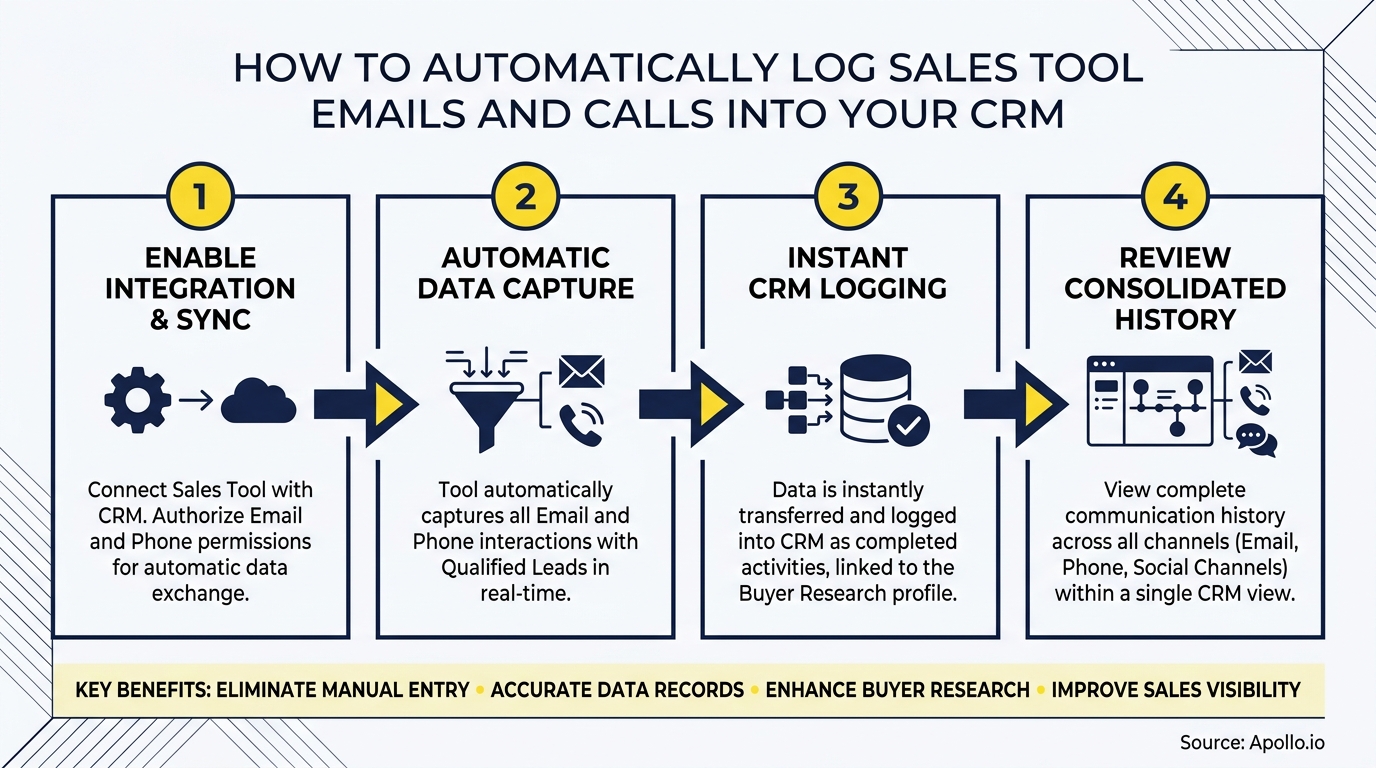
Automatic email and call logging means your sales tool captures every outbound email sent and call placed, then creates a corresponding activity record in your CRM without any rep action. There are two distinct levels of maturity here.
| Level | What Gets Written to CRM | Risk If Done Poorly |
|---|---|---|
| Raw Sync | Activity timestamp, subject line, call duration | Duplicate records, orphaned contacts |
| Governed Write-Back | Matched contact/account/opportunity, structured fields, outcome, next steps | Overwritten data, missed opt-outs |
| AI-Assisted Capture | Stakeholders, objections, deal risks, updated contact titles extracted from transcripts | Hallucinated CRM updates without human approval |
The trend in 2026 is toward AI-assisted capture. Momentum's "Autopilot for Contacts," acquired by Salesforce in early 2026, extracts stakeholder titles, influence, and priorities from call content and writes structured data directly to Salesforce Contact records. But most teams should start at Level 2 before trusting AI write-back. See What Is Sales Automation? Benefits, Tools, and How Apollo Helps for context on where logging fits in a broader automation strategy.
How Do You Map Fields and Match Records Correctly?
Field mapping is where most auto-logging setups break. A logged email that attaches to the wrong contact, or a call that creates a duplicate account record, degrades CRM data faster than manual entry ever could.
Matching priority order (use this sequence):
- Email address as primary deduplication key for contacts
- Domain as primary dedup key for accounts
- Open opportunity linked to matched contact/account
- Record owner from the sending rep's CRM user ID
Error handling rules to configure:
- If no contact match: create a new contact stub (do not silently drop the activity)
- If multiple contacts match: flag for rep review, do not auto-assign
- If the opportunity is closed: log to account level, not the closed deal
- Enable rollback or activity deletion for mis-matched records
Spending time on field mapping upfront is what separates clean CRM data from the situation Avisodescribes: manual data entry is prone to errors and incompleteness, leading to unreliable CRM data that undermines every downstream workflow. Learn how data sync improves B2B sales and marketing ROI to understand the downstream impact.
How Do RevOps Teams Handle Compliance When Logging Communications?
RevOps leaders must treat compliance logging as a required output of auto-logging setup, not optional governance. Every logged email and call creates a record that can surface in audits, and every unlogged opt-out can create regulatory exposure.
Minimum compliance logging requirements:
- Opt-out timestamp: When a contact unsubscribes, log the exact date/time and source to their CRM record and suppress future sends immediately.
- DNC flag: Calls placed to numbers on Do-Not-Call lists must be flagged; your dialer integration should check DNC status before connecting.
- Consent record: Log the consent basis (inbound form, prior relationship, etc.) as a CRM field, not just a note.
- Retention policy: Define how long raw call recordings and email bodies are retained versus activity metadata only.
- Audit trail: Every CRM field update made by an automated sync should carry a system-user stamp, not the rep's user ID, so it is auditable.
This is not theoretical risk. The FCC's rules require callers to honor do-not-call and consent revocation requests within no more than 10 business days. A logging setup that does not capture opt-outs in real time creates a compliance gap. For teams building outbound at scale, review what sales intelligence tools should do to understand compliant data practices.

How Do SDRs and AEs Benefit From Automatic Activity Logging?
SDRs benefit most from automatic call logging because it eliminates post-call admin between dials, keeping them in flow. AEs benefit from email thread capture because it preserves full conversation context across a multi-stakeholder deal.
For SDRs: Automatic call logging captures outcome (connected, voicemail, no answer), duration, and disposition code without the rep touching the CRM. This keeps sequences moving and ensures managers can coach from real data rather than self-reported activity.
For AEs managing complex deals: Logged email threads attached to the opportunity record give every team member, including SEs, legal, and customer success, the full buying committee context. Forrester's research found buying decisions involve an average of 13 people, making logged stakeholder communications critical for deal continuity.
Struggling to keep your pipeline visible across a full buying committee? Get complete deal visibility with Apollo's deal management, where calls, emails, and meetings connect directly to opportunities.
For sales leaders, the payoff is coaching at scale. When every call is logged with outcome and duration, managers can identify which talk tracks generate meetings and which sequences stall. This is the foundation that sales analytics tools need to produce actionable insight rather than vanity metrics.
Turn Weak Funnels Into Pipeline Gold
Quota stress keeping you up at night? Apollo surfaces high-intent prospects the moment they're ready to buy, so your reps stop chasing cold leads and start closing. Trusted by 600K+ companies building predictable pipeline.
Start Free with Apollo →Which Integration Approach Should You Choose?
The right integration method depends on whether your sales tool has a native CRM connector, and how much control you need over field-level write permissions.
| Approach | Best For | Key Tradeoff |
|---|---|---|
| Native connector (e.g., Apollo to Salesforce/HubSpot) | Teams wanting fast setup with field mapping built in | Dependent on vendor's sync frequency and field support |
| Middleware (e.g., Zapier, Make) | Teams with non-standard CRM objects or custom fields | Higher maintenance, failure points multiply |
| CRM-native logging (inbox/dialer plugins) | Teams already fully in HubSpot or Salesforce ecosystem | Limited cross-tool coverage |
| Unified GTM platform | Teams consolidating prospecting, engagement, and CRM sync | Requires platform adoption; eliminates fragmentation risk |
Revenue tech consolidation is accelerating in 2026 for a reason. Each additional integration point is also an attack surface.
After the August 2025 OAuth breach affecting Salesloft Drift integrations, security teams are now auditing every connected app that writes to CRM. A unified platform with built-in logging reduces that surface area significantly.
As Cyera put it: "Having everything in one system was a game changer."
Apollo's native CRM integration for HubSpot and Salesforce syncs emails, calls, and meetings automatically, with field-level control and dedup logic built in, so teams skip the middleware layer entirely.
How Do You Implement and Validate Auto-Logging Successfully?
A clean implementation follows four phases: configure, test, train, and monitor.
Implementation checklist:
- Admin: Enable the CRM integration with least-privilege OAuth scopes. Map activity types to CRM objects. Set dedup keys. Configure opt-out field sync. Define retention rules.
- QA test (before rollout): Send a test email to a known contact. Confirm the activity appears on the correct Contact and Opportunity. Place a test call. Verify outcome field populates. Trigger an opt-out and confirm suppression fires within your defined SLA.
- Rep training: Show reps what auto-logs versus what still requires manual input (e.g., meeting notes, next steps). Clarify that auto-logged activities are read-only in CRM to prevent overwriting.
- Manager monitoring: Build a dashboard showing activity log volume by rep. Flag reps with zero logged calls in a rolling 7-day window as a data quality signal, not a performance judgment.
According to SalesHQ, automated activity capture eliminates the need for manual CRM updates, ensuring better data hygiene and providing a complete overview of customer interactions. That complete overview is what makes AI forecasting, lead scoring, and deal risk signals reliable. For a full look at building the stack that supports this, see how to build a sales tech stack that scales revenue.
Spending too much time switching between your dialer, email tool, and CRM? Run email, calls, and CRM sync from one workspace with Apollo's sales engagement platform.

Start Logging Automatically and Sell More in 2026
Automatic email and call logging is no longer a nice-to-have CRM hygiene feature. It is the data foundation that makes AI forecasting, coaching dashboards, and buying committee handoffs possible. Research from Kixie shows CRM adoption can deliver a 34% boost to sales productivity when it automates administrative tasks and centralizes customer data. Getting there requires governed logging, not just a sync toggle.
Apollo gives B2B GTM teams a unified platform where prospecting, multi-channel engagement, AI-assisted calling, and CRM sync operate from a single workspace. No middleware, no fragmented OAuth tokens, no manual copy-paste.
Predictable Revenue put it clearly: "We reduced the complexity of three tools into one."
Ready to eliminate manual CRM logging and give your reps more time to sell? Start a free trial with Apollo and connect your CRM in minutes.
Prove Pipeline ROI From Day One
ROI pressure killing your next tool approval? Apollo delivers measurable pipeline impact fast — so you walk into budget reviews with real numbers, not estimates. Leadium 3x'd their revenue. You're next.
Start Free with Apollo →Don't miss these
Sales
Inbound vs Outbound Marketing: Which Strategy Wins?
Sales
What Is a Sales Funnel? The Non-Linear Revenue Framework for 2026
Sales
What Is a Go-to-Market Strategy? The 2026 GTM Playbook
See Apollo in action
We'd love to show how Apollo can help you sell better.
By submitting this form, you will receive information, tips, and promotions from Apollo. To learn more, see our Privacy Statement.
4.7/5 based on 9,690 reviews
