
How to Automate Dialing and Call Logging in a Sales Platform (2026)
Manual call workflows are a silent pipeline killer. Before automated dialers existed, a sales professional wrote on Reddit that they managed 30 open browser tabs simultaneously just to hit 15-25 calls per hour — a two-minute-per-dial grind that left reps exhausted and CRM data incomplete. Today, automating dialing and call logging eliminates that friction entirely, giving reps back the time they need to actually sell. If you want to understand the broader picture of what sales automation is and how to use it the right way, that context makes this guide even more valuable.

Research Less, Close More With Apollo
Tired of burning hours hunting down emails and phone numbers that bounce? Apollo delivers verified contact data so your reps spend time selling, not searching. Join 600K+ companies building pipeline faster.
Start Free with Apollo →Key Takeaways
- Automating dialing and call logging directly reclaims selling time — the single biggest lever for SDR and AE productivity in 2026.
- What gets logged now matters more than whether it gets logged: transcripts, sentiment, action items, and structured field updates are the new standard.
- Compliance must be built into the automation workflow, not added as an afterthought — DNC suppression, consent capture, and audit trails are non-negotiable at scale.
- Sales teams using automation tools make 23% more calls per day, translating directly into more pipeline opportunities.
- Platforms that consolidate dialing, logging, and engagement in one workspace eliminate tool-switching friction and improve data quality across the board.
Why Does Manual Dialing and Logging Destroy Selling Time?
Manual call workflows cost reps hours each day in non-revenue-generating work, making automation a direct ROI lever. According to CRM and sales automation research, CRM data automation can reduce administrative time by at least 17%, freeing that capacity for actual selling conversations.
The problem compounds as teams scale. Every manual call log entry takes time a rep could spend on the next dial. Every missed log creates a data gap that breaks follow-up context, skews sales analytics, and weakens pipeline forecasting for RevOps teams. The fix is not discipline — it is automation embedded directly in the platform.
How Does Automated Dialing Work in a Sales Platform?
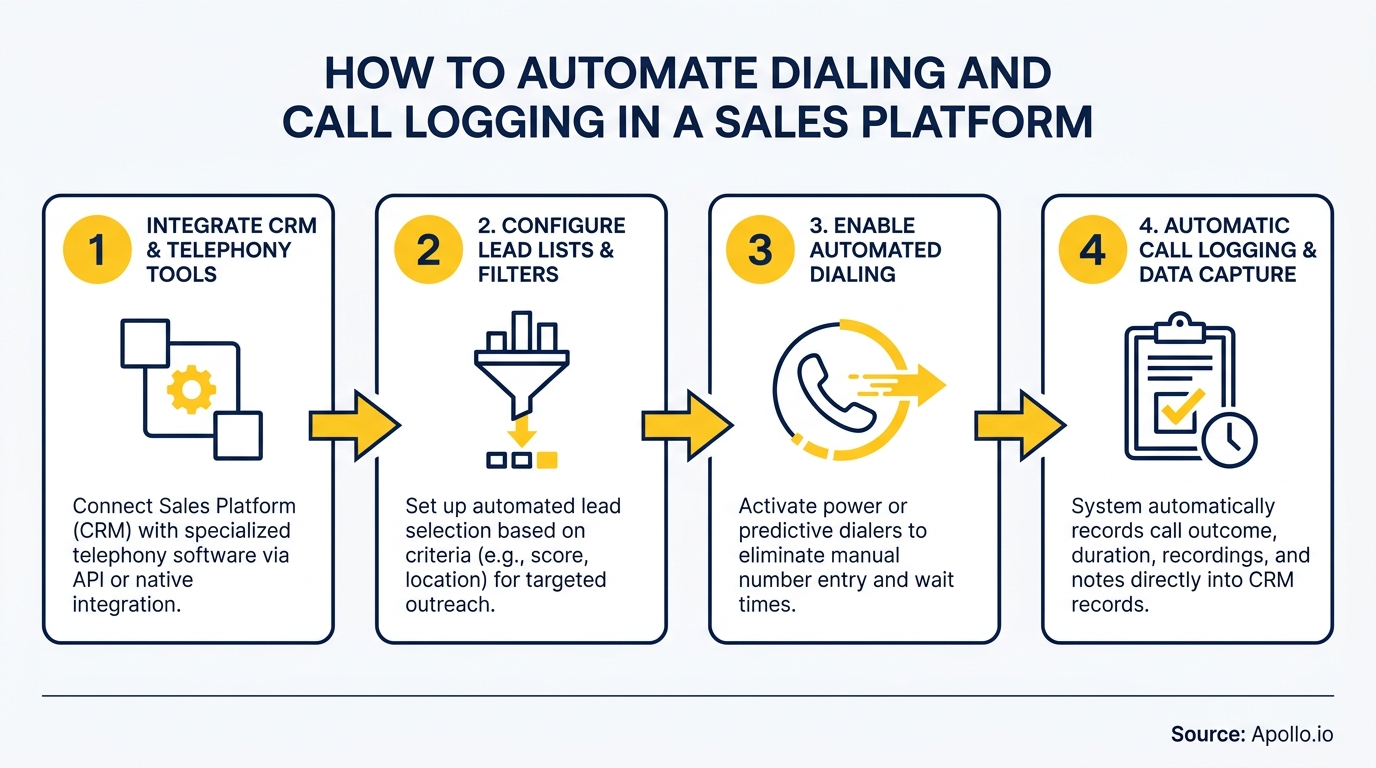
Automated dialing in a sales platform uses click-to-call or power dialer functionality to eliminate manual number entry and reduce dead time between calls. The customer selects which contacts to call; the platform dials sequentially, skipping voicemails or unanswered calls based on configured rules.
Key dialing automation capabilities to look for:
- Click-to-dial: Launch calls directly from a contact record with one click.
- Power dialer: Automatically queues the next call when the previous one ends.
- Voicemail drop: Leaves a pre-recorded message instantly, keeping the rep moving.
- Local presence: Displays a local area code to improve answer rates.
- DNC suppression: Automatically screens numbers against Do Not Call lists before dialing.
According to Utmost Agency, sales teams using automation tools make 23% more calls per day — a direct output of eliminating the manual steps between each dial.
Spending too much time on manual outreach? Automate your sequences with Apollo's multi-channel sales engagement platform.
How Does Automatic Call Logging Work?
Automatic call logging captures call metadata, outcomes, recordings, and AI-generated summaries directly into the correct CRM record without any rep input. The platform detects call completion, identifies the associated contact or account, and writes a structured activity record in real time.
In 2026, basic logging is table stakes. The differentiation is whatgets logged. Leading platforms now push:
| Log Artifact | What It Captures | Business Value |
|---|---|---|
| Call disposition | Outcome (connected, voicemail, no answer) | Activity reporting accuracy |
| Call recording | Full audio tied to the contact record | Coaching, dispute resolution |
| AI transcript | Full searchable text of the conversation | Context for follow-up, deal review |
| AI summary | Key points, objections, next steps | Eliminates post-call note-writing |
| Sentiment analysis | Buyer engagement signals | Prioritize follow-up and coaching |
| Structured field updates | CRM fields auto-populated from call content | Data completeness for RevOps |
A commenter added in a Reddit discussionthat manual logging compliance jumped from 30% to 85% when a 1-hour rule was enforced — but added a sharp caveat: "Even if you automate entry, the data is only worth something if leadership uses it to make real decisions." Automation solves the capture problem; leadership must solve the utilization problem.

How Do SDRs and AEs Benefit from Dialing and Logging Automation?
SDRs benefit most from dialing automation through higher daily call volume and faster sequence execution, while AEs benefit most from rich call logs that preserve deal context across long sales cycles.
For SDRs building pipeline, automated dialing means more dials per hour, voicemail drops in seconds, and zero time spent writing call notes. Every call automatically advances the sequence to the next step. For guidance on timing those calls optimally, see the best times to call and email prospects.
For AEs managing complex deals, automated logging means every stakeholder interaction is captured with context. When a prospect has already researched your product independently, AEs can reference prior call summaries to skip basics and engage at the right level — directly addressing objections with full historical context visible in the CRM.
For RevOps leaders, consolidated call data in a single platform powers accurate revenue operations reporting without manual reconciliation across disconnected tools. Research by ElectroIQ shows companies employing sales automation experience a 14.5% increase in sales productivity and a 12.2% reduction in marketing overhead.
Turn Funnel Chaos Into Pipeline Clarity
Pipeline forecasting a guessing game because marketing leads never convert? Apollo surfaces high-intent prospects already in buying mode, so your reps chase opportunities — not dead ends. Join 600K+ companies building predictable pipeline.
Start Free with Apollo →What Compliance Controls Must Be Built Into Call Automation?
Compliant call automation requires DNC suppression, consent verification, call recording disclosures, and audit trail logging — all enforced before and during each dial, not manually checked afterward.
The FTC reported over 2 million Do Not Call complaints in FY2024 and more than 253 million active DNC registrations, making suppression checks a non-negotiable foundation for any outbound automation setup. Compliance must be embedded in the workflow, not bolted on as a checklist.
Core compliance controls to configure:
- DNC list sync: Automatic suppression against national and internal opt-out lists before each dial.
- Consent flags: CRM fields that gate dialing eligibility based on recorded consent status.
- Recording disclosure: Automated announcement or beep tone when recording is active.
- Call time restrictions: Block dials outside permitted hours by time zone.
- Audit trail: Immutable log of every call attempt, outcome, timestamp, and rep ID.
- Retention policy: Automated archival or deletion of recordings per data retention rules.
How Do You Implement Automated Dialing and Logging in a Unified Platform?
Implementation is fastest when dialing and logging live natively in the same platform as your contact database and engagement sequences, eliminating the integration gaps that cause data loss and wrong-record associations.
The core implementation steps:
- Audit your current call data: Identify what fields are missing, incomplete, or logged to wrong records.
- Define your call activity schema: Required fields — contact ID, account ID, duration, disposition, rep ID, timestamp, recording URL, AI summary.
- Configure matching rules: Set the logic that associates each call to the correct contact, account, and open opportunity.
- Set up compliance controls: DNC sync, time-zone restrictions, consent field mapping.
- Enable AI logging: Activate transcription, summary generation, and structured field updates post-call.
- Build downstream triggers: Auto-create follow-up tasks, update deal stages, or enroll contacts in next-step sequences based on call disposition.
Platform consolidation is the single biggest accelerant here. As Predictable Revenue found when moving to a unified platform: "We reduced the complexity of three tools into one" — and the call data quality improvement was immediate because there were no sync gaps between systems. You can read how Predictable Revenue reduced tech stack costs by 50% through consolidation. For a broader view of how to build a stack that scales, see this playbook for building a sales tech stack.
Tired of taking notes during calls? Let Apollo's AI call assistant handle summaries, transcripts, and next steps automatically.
How Does Apollo Automate Dialing and Call Logging in One Platform?
Apollo consolidates prospecting, dialing, call logging, AI conversation intelligence, and engagement sequences in a single workspace — eliminating the tool-switching that breaks rep workflows and creates CRM data gaps.
With Apollo's conversation tracking and call management platform, every call is automatically recorded, transcribed, summarized, and logged to the right contact record. Reps never leave the platform to dial, take notes, or update fields. Cyera's team described the impact directly: "Having everything in one system was a game changer."
Apollo's unified approach means SDRs can find a contact, dial them, leave a voicemail drop, have the call logged with an AI summary, and trigger the next sequence step — all without switching tabs. RevOps gets clean, consistent call data with no manual reconciliation.
Sales leaders get coaching-ready recordings and sentiment data tied to every rep's activity. That is the difference between a platform that logs calls and one that turns every call into structured pipeline intelligence.

Start Automating Your Calls Today
Automating dialing and call logging is one of the highest-ROI changes a B2B GTM team can make in 2026. The reps who still manage 30 browser tabs to hit their dial targets are competing against teams where every call auto-logs, auto-summarizes, and triggers the next step before the rep has hung up the phone.
Apollo gives SDRs, AEs, and RevOps teams the dialing automation, AI call logging, and unified engagement platform to execute more calls with better data — without adding another tool to the stack. Start free with Apollo and see how a consolidated platform transforms your call workflows from day one.
Prove Pipeline ROI Before Next Review
Budget approval stuck on unclear metrics? Apollo delivers measurable pipeline impact from day one — so you walk into every leadership review with numbers that justify the investment. Leadium 3x'd their revenue. You're next.
Start Free with Apollo →Don't miss these
Sales
Inbound vs Outbound Marketing: Which Strategy Wins?
Sales
What Is a Sales Funnel? The Non-Linear Revenue Framework for 2026
Sales
What Is a Go-to-Market Strategy? The 2026 GTM Playbook
See Apollo in action
We'd love to show how Apollo can help you sell better.
By submitting this form, you will receive information, tips, and promotions from Apollo. To learn more, see our Privacy Statement.
4.7/5 based on 9,690 reviews
