
How a Sales Engagement Platform Integrates with Your CRM
Your CRM holds the record of truth for every deal, contact, and account. But if your sales engagement platform operates in a separate silo, reps waste time on manual data entry, sequences fall out of sync, and forecast accuracy suffers. A well-integrated sales engagement platform solves this by creating a bi-directional data flow: activity logs, contact updates, and deal stage changes write back automatically into your CRM, and CRM records trigger the right outreach at the right moment. Learn how to connect Salesforce and HubSpot fast with Apollo's CRM integration.

Research Less, Pipeline More With Apollo
Tired of your reps burning hours verifying contact info instead of closing deals? Apollo delivers 97% email accuracy across 230M+ contacts so your team spends time selling, not searching. Start building pipeline today.
Start Free with Apollo →Key Takeaways
- Sales engagement platforms integrate with CRMs via bi-directional sync, writing activities, contacts, and deal updates back into your system of record automatically.
- A Bain survey found only about 20% of companies have realized the full value of their CRM and revenue technology investments — poor integration is a primary reason.
- RevOps leaders should prioritize governance: define field-mapping rules, assign integration ownership, and audit OAuth token access regularly.
- Security risks are real — the 2025 OAuth token incidents affecting CRM-connected platforms make token hygiene and least-privilege scopes non-negotiable buying criteria.
- Apollo consolidates prospecting, engagement, and CRM sync in one platform, eliminating the complexity of stitching together multiple tools.
How Does a Sales Engagement Platform Integrate with a CRM?
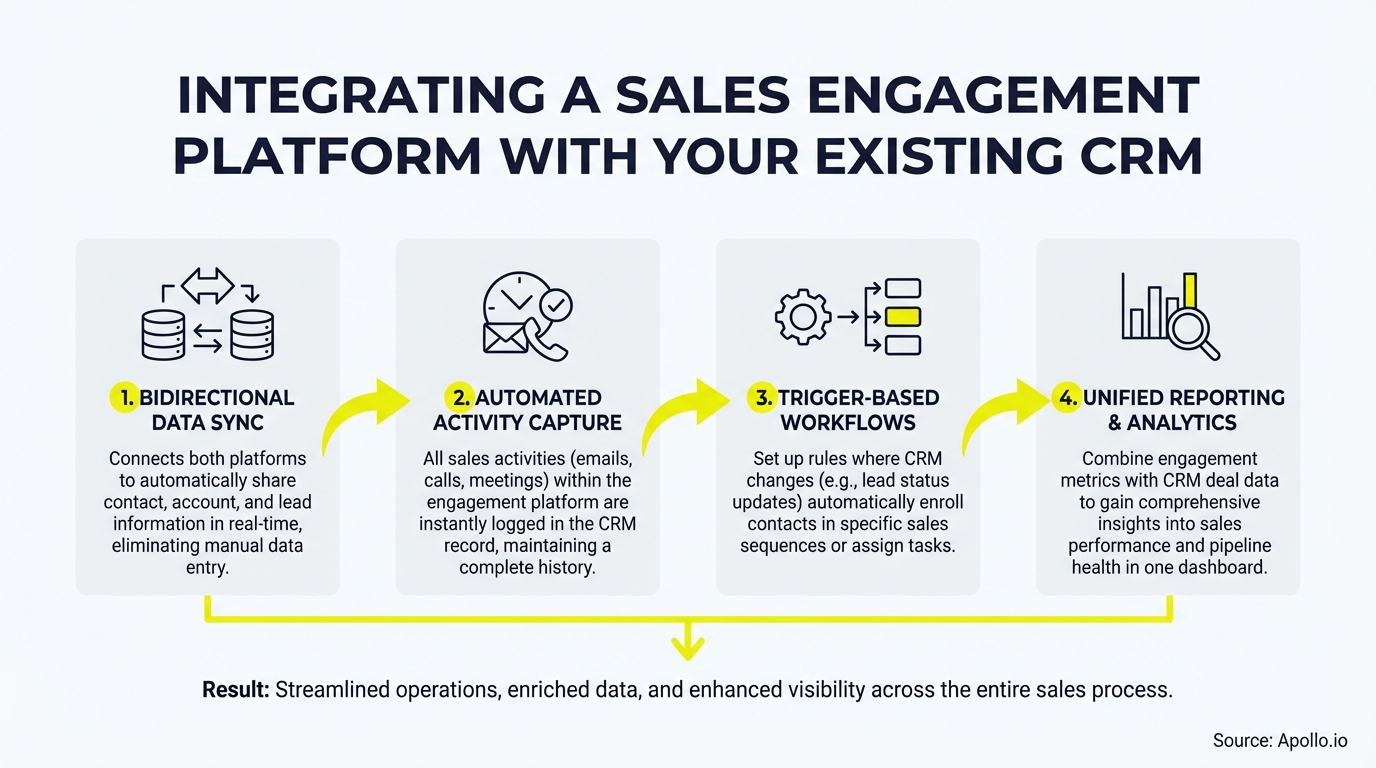
A sales engagement platform integrates with your CRM by establishing a persistent, bi-directional data connection that keeps both systems in sync. When a rep sends an email, logs a call, or advances a sequence step, that activity writes back to the corresponding CRM contact, lead, or opportunity record automatically.
Conversely, when a CRM record is updated (stage change, new contact, field edit), the engagement platform can trigger the next sequence step or reassign a task.
The core integration mechanisms include:
- API-based native connectors: Pre-built integrations with Salesforce, HubSpot, Pipedrive, and other major CRMs that require minimal configuration.
- Activity writeback: Emails sent, calls made, meetings booked, and sequence steps completed are logged as CRM activities automatically.
- Field mapping: Custom fields in the engagement platform map to standard or custom CRM fields, keeping contact and company data consistent.
- Event-driven triggers: CRM events (e.g., deal moved to "Negotiation") can automatically enroll contacts into a new sequence or remove them from an active one.
As noted by Overloop, seamless CRM integration ensures that prospect data, contact details, and interaction history are automatically synchronized across a centralized dashboard — eliminating duplicate entry and data drift.
Why Is CRM Integration a Revenue Priority in 2026?
CRM integration has shifted from a technical nicety to a revenue execution requirement. Research from Bain & Company found that only about 20% of companies have realized the full value of their CRM and revenue technology investments — meaning the vast majority are paying for tools that aren't fully connected to how their teams actually sell.
For RevOps leaders, disconnected systems create three compounding problems:
- Inaccurate forecasts: Deal stages in the CRM don't reflect actual engagement activity because reps aren't logging manually.
- Rep time drain: SDRs and AEs spend time on admin work instead of selling — precisely the inefficiency CRM-engagement integration is designed to eliminate.
- Data quality decay: As SuperAGI notes, poor data quality leads to inaccurate predictions and ineffective personalization, compounding over time when systems are siloed.
Spending hours reconciling CRM data manually? Automate your sequences and CRM sync with Apollo's sales engagement platform.
How Do RevOps Teams Map Sales Plays to CRM Objects?
Mapping sales plays to CRM objects means defining exactly which engagement actions update which CRM fields, and when. This process-layer mapping is where most integrations fail — connecting the systems technically without aligning them to actual sales motions.
| Sales Play | CRM Object Updated | Writeback Fields |
|---|---|---|
| Cold outbound sequence enrolled | Lead / Contact | Sequence name, enrollment date, last touch |
| Email opened or replied | Activity Log on Contact | Engagement timestamp, channel, rep owner |
| Meeting booked | Opportunity / Activity | Meeting date, type, outcome |
| Call completed | Activity Log on Lead/Contact | Call disposition, duration, notes |
| Sequence completed (no reply) | Contact / Lead Status | Status = "Nurture", last sequence name |
For sales analytics to be meaningful, these writeback rules must be defined before go-live, not after. Assign a RevOps owner to audit field mappings quarterly and validate that automation isn't overwriting manually entered deal context.

What Security Risks Should SDRs and RevOps Know About CRM Integrations?
CRM integrations carry real security exposure that every RevOps team must address before connecting a sales engagement platform. The 2025 OAuth token incidents involving CRM-connected platforms demonstrated that compromised integration credentials can expose entire CRM instances to unauthorized access — making token governance a front-line concern, not just an IT issue.
Key security practices for 2026:
- Least-privilege OAuth scopes: Only grant the permissions the integration actually needs. Avoid broad read/write access to all objects.
- Token rotation: Set short token lifetimes and enforce regular rotation. Revoke stale tokens for disconnected apps immediately.
- Integration-user accounts: Use a dedicated service user (not a named rep account) for the integration connection, so access is auditable and revocable.
- Connected app inventory: Maintain a live list of every app with CRM access. Review it monthly and remove apps no longer in active use.
- Anomaly monitoring: Alert on unusual API call volumes or off-hours data access from integration users.
For SDRs, the takeaway is simple: never authorize a new sales tool to connect to the CRM without RevOps approval. For AEs and sales leaders, integration security belongs on the vendor evaluation checklist — ask every platform vendor specifically about OAuth scope controls and token management before signing.
Turn Funnel Guesswork Into Pipeline Clarity
Forecasts feel like fiction when leads stall and no one knows why. Apollo surfaces in-market buyers and moves them through your funnel with precision. 600K+ companies finally forecast with confidence.
Schedule a Demo →How Does Apollo Integrate with Salesforce and HubSpot?
Apollo provides native, bi-directional integrations with Salesforce and HubSpot that sync contacts, accounts, activities, and deal data without requiring custom development. The integration is designed so that SDRs and AEs work entirely within Apollo's interface while every action — emails, calls, sequence steps, meeting bookings — writes back to the CRM automatically.
Key Apollo CRM integration capabilities include:
- Two-way contact and account sync with conflict resolution rules
- Automatic activity logging for every engagement touch
- CRM-triggered sequence enrollment based on deal stage or contact status changes
- Deal management updates that reflect sequence outcomes in real time
- Data enrichment that pushes verified contact attributes into CRM fields
Apollo also consolidates the prospecting, engagement, and CRM sync layers into a single platform — eliminating the need to stitch together separate tools for each function. As Cyera put it, "Having everything in one system was a game changer." See exactly how Apollo connects to HubSpot and Salesforce, or explore the full multichannel engagement platform that drives those synced activities.
Missing pipeline visibility after sequences complete? Track every deal stage in Apollo's sales pipeline dashboard.
What Is the Implementation Checklist for CRM Integration?
A successful integration follows a defined sequence of steps, not a one-time connector setup. Use this checklist before going live:
- Audit your CRM data quality — resolve duplicate contacts, standardize field formats, and identify required vs. optional fields before syncing.
- Define field mapping rules — document which engagement platform fields map to which CRM objects, including conflict resolution logic (which system wins on a data mismatch).
- Set writeback scope — specify exactly which activity types write back automatically vs. require rep confirmation.
- Configure OAuth with least-privilege scopes — grant only the permissions the integration requires.
- Create a dedicated integration user — never use a named rep account for the system connection.
- Test with a pilot segment — run a small rep cohort for two weeks before full rollout, validating data accuracy on both sides.
- Train reps on what is and isn't automated — reps who understand what the system logs for them are more likely to adopt the CRM consistently. As SyncMatters reports, low CRM adoption remains a persistent challenge when reps view the tool as administrative overhead rather than a productivity asset.
- Assign a RevOps owner for ongoing governance — schedule quarterly audits of field mappings, token access, and connected app inventory.
For teams building multi-step outreach alongside their CRM setup, Apollo's sequence builder lets you design engagement workflows that trigger and write back to CRM automatically.

Start Integrating Smarter with Apollo in 2026
The gap between having a CRM and getting full value from it comes down to integration depth. When your sales engagement platform writes every activity back to the system of record, syncs contact data in both directions, and triggers sequences from CRM events, your entire GTM team operates from a single source of truth.
Apollo unifies prospecting, engagement, and CRM sync in one platform — so SDRs book more meetings, AEs have full deal context, and RevOps maintains clean data without manual reconciliation. Customers like Predictable Revenue describe it simply: "We reduced the complexity of three tools into one."
Compare how Apollo stacks up against other platforms in the Apollo vs. Salesloft vs. Outreach breakdown, or explore Apollo's full use cases for sales and marketing teams.
Ready to connect your CRM and stop leaving pipeline on the table? Start Free with Apollo and see bi-directional CRM sync in action.
Prove Pipeline ROI With Apollo
Budget approval stuck on unclear metrics? Apollo delivers measurable pipeline impact from day one — 46% more meetings with AI, real results your CFO can't argue with. Start free today.
Start Free with Apollo →Don't miss these
Sales
Inbound vs Outbound Marketing: Which Strategy Wins?
Sales
What Is a Sales Funnel? The Non-Linear Revenue Framework for 2026
Sales
What Is a Go-to-Market Strategy? The 2026 GTM Playbook
See Apollo in action
We'd love to show how Apollo can help you sell better.
By submitting this form, you will receive information, tips, and promotions from Apollo. To learn more, see our Privacy Statement.
4.7/5 based on 9,690 reviews
