
Can You Push Sales Activity Data (Calls, Emails) Into Your CRM Automatically?
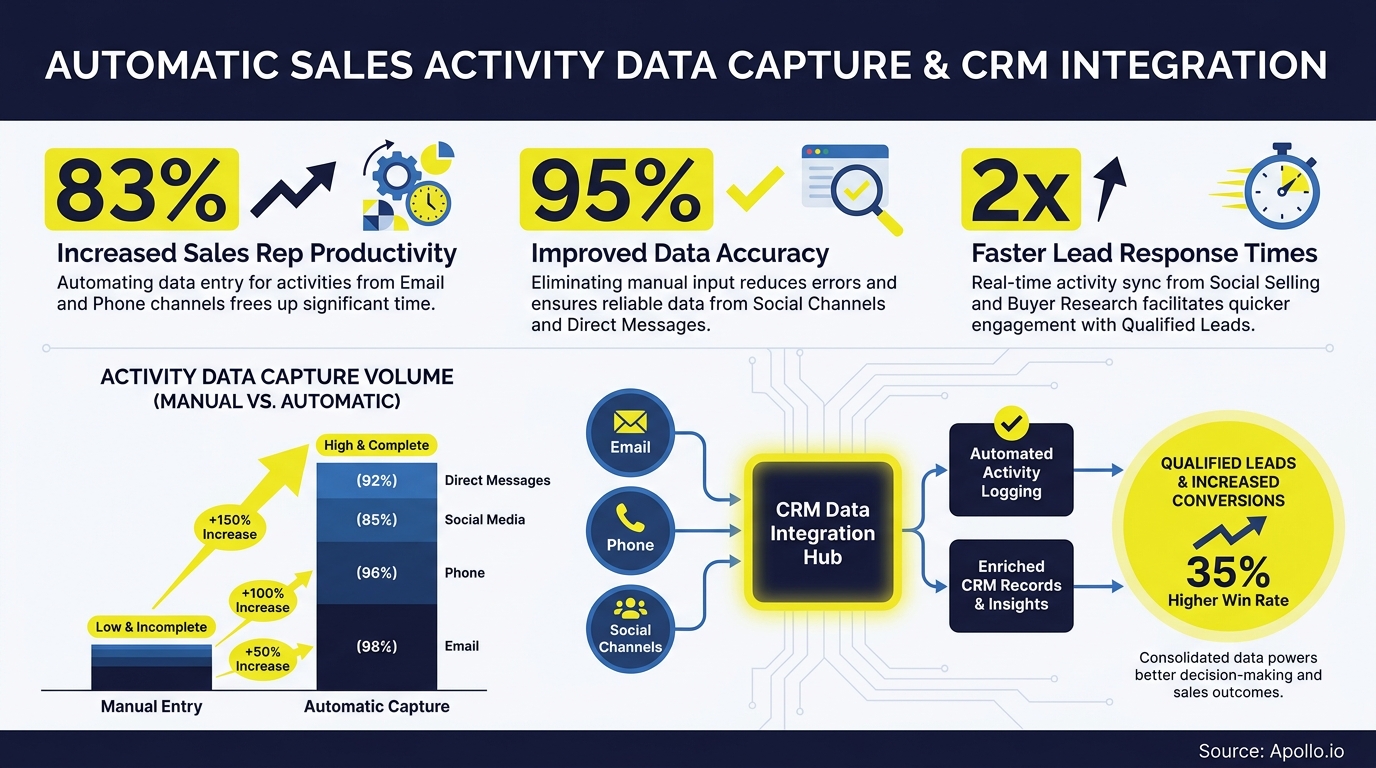
Yes, you can automatically push sales activity data including calls, emails, and meetings directly into your CRM. Modern sales teams have multiple paths to do this: native CRM capture, sales engagement platform integrations, call intelligence tools, iPaaS connectors, and direct API/webhooks. The right approach depends on your stack, data governance needs, and reporting goals.
The stakes are real. According to Salesforce's 2026 State of Sales, the average seller spends only 40% of their time actually selling. Every minute spent manually logging a call or copy-pasting email threads is quota capacity lost. Automatic activity capture solves that, but only if you set it up correctly.

Apollo Turns Hours of Research Into Minutes
Tired of your reps burning the day on manual research instead of selling? Apollo surfaces verified contacts instantly, so your team spends time closing — not digging. Nearly 100K paying customers already made the switch.
Start Free with Apollo →Key Takeaways
- Calls, emails, and meetings can all sync to CRM automatically using multiple integration methods, each with different tradeoffs in data control and implementation effort.
- Automatic activity capture is a RevOps data quality project, not just a rep convenience feature. Poor CRM data directly erodes forecasting accuracy and personalization.
- Not everything should sync. A governance-first approach (what to capture, what to exclude, deduplication rules) prevents noisy, unreliable CRM records.
- The market is shifting from simple activity logging toward AI-generated CRM field updates, next steps, and deal signals extracted from conversations.
- Security matters: every integration that writes to CRM expands your attack surface and requires OAuth scope management and audit controls.
What Sales Activity Data Can Be Pushed Into CRM Automatically?
The four core activity types that sync automatically are outbound/inbound calls (with duration, outcome, and recording links), emails (sent, received, opens, replies), meetings (calendar events, attendees, and notes), and tasks or follow-up reminders triggered by conversation outcomes.
Each maps to specific CRM objects. Calls and emails typically log to the Activity or Task object on a Contact, Lead, or Opportunity record. Meetings log to Events. Most CRMs, including Salesforce and HubSpot, support all four natively when connected to the right source tool. Understanding how data sync improves B2B sales and marketing ROI is the foundation for choosing what to capture.
What Are the Main Integration Methods for Auto-Logging Activity?
There are five primary architectures for pushing sales activity data into CRM automatically. Each offers different levels of data control, implementation effort, and failure risk.
| Method | Best For | Data Control | Implementation Effort | Key Risk |
|---|---|---|---|---|
| Native CRM capture (e.g., HubSpot inbox, Salesforce Inbox) | Teams already inside the CRM ecosystem | High | Low | Limited to CRM-native workflows only |
| Sales engagement platform (e.g., Apollo sequences) | Multi-channel outreach teams | High | Low-Medium | Sync conflicts if deduplication not configured |
| Call intelligence tools | Teams logging calls with transcripts and summaries | Medium | Medium | Transcript data volume can bloat CRM records |
| iPaaS connectors (Zapier, Make, Workato) | Custom multi-tool workflows | Medium-High | Medium-High | Brittle at scale; API rate limits cause dropped records |
| Direct API / Webhooks | Engineering-led RevOps teams with custom needs | Maximum | High | Requires ongoing maintenance and error handling |
For most B2B GTM teams, a sales engagement platform connected to HubSpot or Salesforce delivers the fastest time-to-value with the best balance of data control and automation coverage.
How Do RevOps Leaders Decide What to Sync vs. Exclude?
RevOps leaders should apply a governance-first framework before enabling any automatic sync. Not every activity belongs in CRM.
Syncing everything creates data noise that undermines the reporting and AI features the automation was meant to support.
Use this decision matrix when configuring your activity capture rules:
- Sync: Outbound calls with dispositions, replied emails in active sequences, booked meetings tied to open opportunities, and call summaries from qualified prospects.
- Exclude: Internal team emails, calendar noise (blocked time, personal appointments), spam-flagged bounced emails, and cold outreach to unqualified contacts before lead qualification.
- Deduplicate: Set a matching rule on Contact email + Activity date + Activity type. Without this, a single call logs multiple times if both the dialer and the engagement platform are syncing.
- Field mapping: Map call duration to a custom field, call outcome to a picklist, and email subject to the Activity Subject field. Unmapped data becomes invisible to reporting.
Research from Teamgate found that for every dollar invested in CRM data quality, companies typically see an average return of $8.71. Getting governance right upfront multiplies the ROI of every downstream automation.
Spending too much time managing disconnected activity logs? Automate your sequences and sync activity to CRM with Apollo's multi-channel platform.
Turn Weak Leads Into Real Pipeline
Marketing leads stalling before they hit your pipeline. Apollo surfaces high-intent prospects and delivers verified contacts so your team pursues buyers — not dead ends. Nearly 100K paying customers stopped guessing and started closing.
Start Free with Apollo →How Do SDRs and AEs Benefit From Automatic Activity Sync?
SDRs gain back selling time immediately. According to net2phone, sales professionals estimate that automating tasks like data entry, note-taking, and scheduling saves them two hours and 15 minutes daily. For an SDR running 50 touches per day, that recovered capacity translates directly into more sequences, more follow-ups, and more booked meetings.
For Account Executives managing open opportunities, the benefit is context continuity. When every call and email is automatically captured on the Opportunity record, AEs walk into renewal calls and multi-stakeholder deals with a complete interaction history.
They can prepare more effectively, spot engagement gaps, and reduce the risk of a deal stalling because a previous conversation wasn't documented.
Data from Everstage shows automation has helped top-performing B2B sales organizations free up about 20% of sellers' capacity and improve productivity by up to 30%. That capacity gain is most visible when activity capture is automatic rather than rep-dependent.

What Are the Security and Governance Risks of Automatic CRM Activity Sync?
Automatic activity sync expands your CRM security perimeter. Every tool granted write access to CRM via OAuth becomes a potential attack vector. In August 2025, attackers used compromised OAuth tokens tied to a sales integration to access Salesforce customer instances, according to Arctic Wolf's security research. The incident made CRM integration governance a board-level concern for revenue teams.
Practical steps to reduce risk:
- Audit all connected apps with CRM write permissions quarterly.
- Use minimum-scope OAuth permissions. A call logger does not need read/write access to all CRM objects.
- Enable token rotation and revoke access for tools no longer in active use.
- Maintain audit logs of which integration wrote which CRM records and when.
- Apply data retention rules to transcripts and email body content stored in CRM.
The CRM integration strategy that actually works combines automation coverage with explicit permission governance, not just a set-it-and-forget-it OAuth grant.
How Is AI Changing Automatic CRM Activity Capture in 2026?
The shift in 2026 is from logging activities to extracting intelligence from them. Salesforce's Summer '25 Agentforce release moved beyond syncing call records to automatically suggesting Next Steps and Stage progression updates based on conversation content.
Microsoft's Copilot for Sales now writes AI-generated email summaries directly into CRM records from inside Outlook, removing the context-switch entirely.
The practical implication for RevOps: clean, complete activity data in CRM is now the prerequisite for AI agents to function. A Bain report in April 2025 found that 70% of companies struggle to integrate sales plays into CRM and revenue technology, with more than half citing inadequate data foundations. Teams that build solid activity capture now will unlock AI-powered forecasting, coaching, and next-best-action capabilities faster than those who delay. Understanding how sales analytics drives revenue growth starts with ensuring every touchpoint is captured in the first place.

How Do You Get Started With Automatic CRM Activity Sync?
Start with a unified platform that handles prospecting, engagement, and CRM sync in one workspace. Apollo connects natively to Salesforce and HubSpot, automatically logging calls, emails, and meeting activities to the correct CRM records without manual entry. As Cyera put it, "Having everything in one system was a game changer." Apollo's AI GTM system handles CRM integration and outreach in a single workspace, eliminating the integration complexity that causes data gaps.
Implementation checklist:
- Connect your CRM (Salesforce or HubSpot) via Apollo's native integration.
- Define your sync rules: which activity types log automatically, which require rep confirmation.
- Set deduplication matching rules (email + date + activity type).
- Map custom fields for call disposition, duration, and email engagement signals.
- Audit OAuth permissions and set a quarterly review cadence.
- Review CRM activity completeness in reporting after 30 days and adjust filters.
Struggling with gaps in your pipeline because activity data isn't flowing into your CRM? Get complete pipeline visibility with Apollo's deal management and automatic CRM sync.
Automatic activity capture is no longer a nice-to-have. With sellers spending less than half their time selling, every logged call and email that flows into CRM automatically is quota capacity recovered. Start with governance, pick the right integration architecture for your stack, and build the data foundation your AI tools will depend on. Get Leads Now and see how Apollo's unified platform keeps your CRM current without the manual work.
Prove Pipeline ROI With Apollo
ROI pressure killing your tool budget? Apollo delivers measurable pipeline impact from day one. Leadium 3x'd their annual revenue — see your numbers move fast.
Start Free with Apollo →Don't miss these
Sales
Inbound vs Outbound Marketing: Which Strategy Wins?
Sales
What Is a Sales Funnel? The Non-Linear Revenue Framework for 2026
Sales
What Is a Go-to-Market Strategy? The 2026 GTM Playbook
See Apollo in action
We'd love to show how Apollo can help you sell better.
By submitting this form, you will receive information, tips, and promotions from Apollo. To learn more, see our Privacy Statement.
4.7/5 based on 9,690 reviews
