
What Is a Sales Tracker Template and How Do You Build One in 2026?
Most sales tracker templates were designed for a world that no longer exists.
They track rep activity: calls made, emails sent, deals in stage.
But in 2026, buyers research independently, consume content before talking to anyone, and make decisions at their own pace.
A sales tracker template that ignores digital self-serve engagement, education milestones, and AI content governance is leaving critical pipeline data on the table.
This guide covers what modern trackers must include, plus field-by-field templates you can implement immediately.
For a broader look at how tracking connects to revenue growth, see how sales analytics drives revenue growth.

Research Less. Pipeline More With Apollo.
Tired of your reps burning hours verifying contacts instead of closing deals? Apollo delivers 230M+ accurate business contacts so your team spends time selling, not searching. Start building real pipeline today.
Start Free with Apollo →Key Takeaways
- Modern sales tracker templates must capture self-serve buyer engagement, not just rep activity.
- Education milestones and time-to-decision fields help teams understand why deals stall.
- AI governance columns (AI-generated vs. human-authored assets) are now a best practice for content attribution.
- The most effective trackers sync with your CRM rather than operating as standalone spreadsheets.
- SDRs, AEs, and RevOps teams each need slightly different tracker views to act on the same pipeline data.
What Is a Sales Tracker Template?
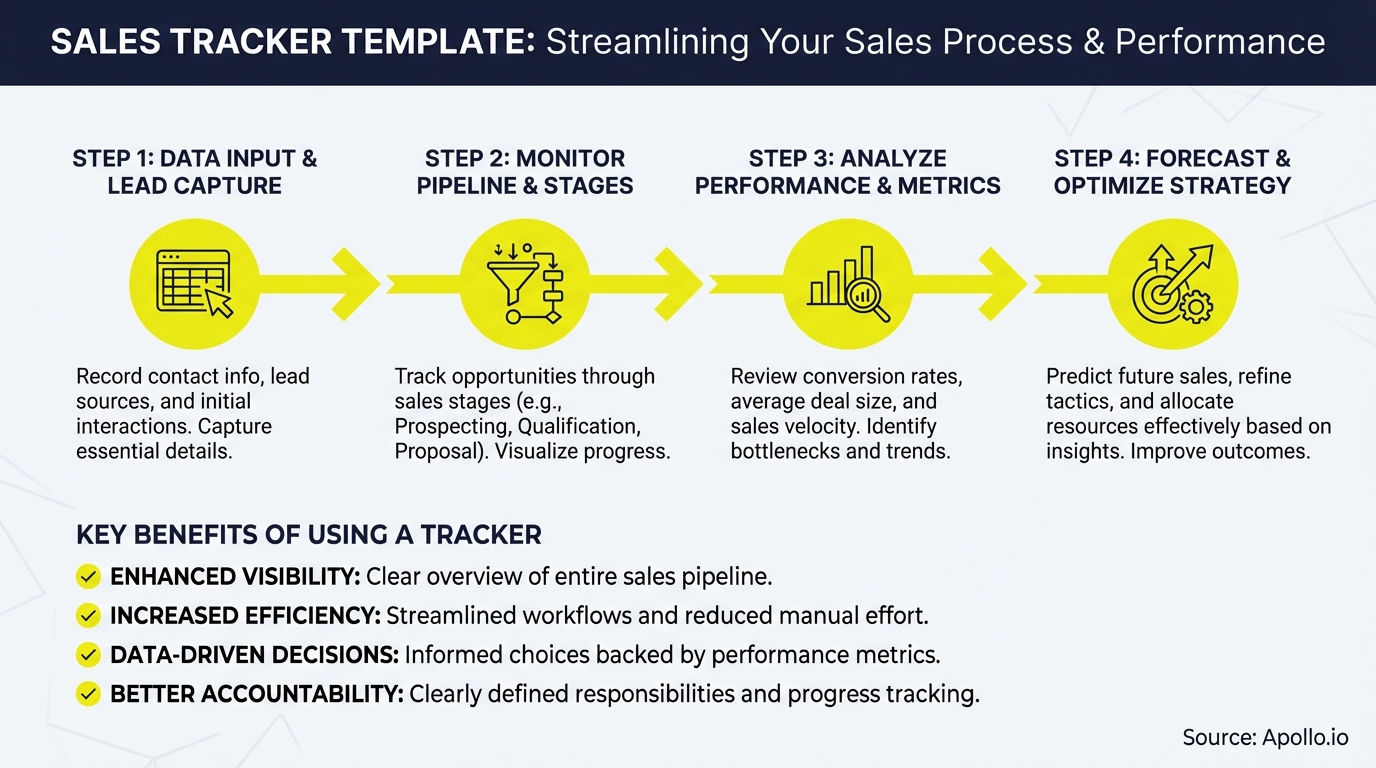
A sales tracker template is a structured document, spreadsheet, or platform view that records pipeline activity, deal progression, and buyer engagement in a consistent format.
It gives every team member a shared language for where deals stand and what actions move them forward.
Traditional trackers focused on rep inputs: number of calls, follow-up dates, deal value. Modern trackers add buyer-side signals: content consumed, self-serve portal visits, education assets completed, and time spent in each stage. According to Flowlu, only 16% of sales professionals met their quota in 2024, a significant drop from prior years. Better tracking is one of the most direct levers teams can pull to reverse that trend.
What Fields Should Every Sales Tracker Template Include?
The right fields depend on your sales motion, but the following core and advanced fields apply to most B2B GTM teams in 2026.
| Field Category | Core Fields | 2026 Advanced Fields |
|---|---|---|
| Deal Basics | Company, Contact, Deal Value, Stage | ICP Score, Buying Committee Size |
| Activity Tracking | Last Contact Date, Next Action, Owner | Self-Serve Touches, Digital Intent Signals |
| Education Milestones | Assets Sent | Assets Consumed, Comprehension Check, Education Stage |
| AI Governance | Content Used | AI-Generated vs. Human-Authored, Approval Status, Prompt Source |
| Stage Aging | Close Date | Days in Stage, Time-to-Decision, Stage Entry Date |
| Outcomes | Won/Lost, Revenue | Win Rate by Content Touch, NBA Recommended vs. Taken |
Struggling to keep your pipeline organized across multiple tools? Get complete pipeline visibility with Apollo's deal management and track every deal from first touch to close in one workspace.

How Do SDRs and AEs Use Sales Tracker Templates Differently?
SDRs and AEs have different tracking priorities, but both benefit from a unified template structure with role-specific views.
SDRs need tracker columns focused on prospecting volume and early engagement: sequences active, replies received, meetings booked, and which outreach assets generated responses.
For outreach resources that pair with your tracker, the Apollo Outbound Sales Resource Kit includes free templates and scripts aligned to each stage.
AEs and Account Executives managing active deals need stage aging, education milestone completion, stakeholder mapping, and next-best-action audit columns. Research from Mindtickle shows sales reps spend only 28% of their week actively selling, with administrative tasks consuming nearly half their workweek. A well-designed tracker reduces that admin burden significantly.
RevOps leaders benefit most from aggregate views: pipeline velocity, stage conversion rates, and content attribution by sequence. The Revenue Operations Alliance found that over 56% of RevOps professionals cite ARR/MRR as the most useful metric for executive alignment, which means your tracker's rollup view needs to surface revenue impact clearly.
How Do You Track Rep-Free Buyer Engagement in a Sales Template?
Rep-free tracking captures what buyers do between human touchpoints.
This is the biggest gap in standard templates today.
With the majority of B2B interactions now occurring through digital channels, trackers that only log rep actions miss half the buying journey.
Add these columns to your template to capture self-serve engagement:
- Self-Serve Touches: Number of portal, microsite, or resource page visits logged by your marketing automation or CRM.
- Digital Intent Signals: Pricing page views, demo request clicks, competitor comparison views.
- Human Assist Moments: The specific touchpoint where a buyer shifted from self-serve to requesting rep contact.
- Education Asset Consumed: Which specific piece of content (case study, ROI calc, product video) was engaged with before or after each stage transition.
This data answers the question every AE wants answered: "What did this buyer actually look at before they agreed to a call?" For templates that connect outreach to pipeline, explore Apollo's AI-powered sales pipeline builder to see how engagement data flows automatically into deal records.
Turn Funnel Gaps Into Pipeline Wins
Pipeline forecasting a guessing game? Apollo surfaces in-market buyers the moment they're ready, turning weak top-of-funnel into qualified opportunities. Built-In saw a 10% win rate lift — your team is next.
Schedule a Demo →What Are Education Milestone and Stage Aging Fields?
Education milestone tracking captures whether a buyer has received and engaged with the information needed to progress. Stage aging measures how long a deal has sat in a given stage, flagging stalled opportunities before they go cold.
Key fields to add to any sales tracker template:
- Education Stage: Awareness / Consideration / Decision-Ready (updated manually or via automation rules)
- Assets Sent vs. Consumed: Two separate columns. Sent alone tells you nothing about comprehension.
- Comprehension Check Date: Date of last call or message confirming the buyer understood the value prop.
- Days in Stage: Auto-calculated from Stage Entry Date to today. Flag anything over your average deal cycle.
- Time-to-Decision: Total days from first qualified touch to closed-won or closed-lost.
These fields let sales managers diagnose why deals stall. If assets are sent but never consumed, that's a content gap. If days-in-stage is spiking, that's a qualification or education problem. For deeper analysis techniques, see sales productivity strategies and ROI benchmarks.

How Should Teams Handle AI Governance in a Sales Tracker?
AI governance in a sales tracker template means logging which content assets were AI-generated versus human-authored, tracking their approval status, and measuring performance differences between the two types.
This matters because enablement teams are actively investing in AI-generated content. A tracker without governance columns can't answer: "Did AI-generated case studies perform better or worse than human-written ones in Q2?" Add these columns:
- Asset Type: AI-Generated / Human-Authored / Hybrid
- Prompt Source: Link or description of the prompt used (for reproducibility)
- Approval Status: Draft / Reviewed / Approved / Archived
- Attribution Outcome: Did this asset correlate with stage advancement or win?
Pairing governance data with win rate by content touch gives RevOps a direct line from content investment to revenue. For AI tools that can accelerate this analysis, see which AI sales tools actually close more deals.
What Is the Best Format for a Sales Tracker Template in 2026?
The best format is one that your team will actually update. That said, the trend in 2026 is clear: trackers work best as CRM-synced front-ends, not standalone spreadsheets.
Sales teams still prefer the flexibility of a spreadsheet view, while RevOps needs the data to live in the system of record.
Format options by use case:
- Google Sheets / Excel: Best for early-stage teams or quick experiments. Add a CRM sync via Unito or native connectors to avoid data silos.
- Notion: Good for teams that blend project management and deal tracking. Use database views to filter by stage, owner, or education status.
- CRM-native views (HubSpot, Salesforce): Best for RevOps at scale. Build custom deal properties that mirror the fields above and create saved list views per role.
- Apollo Deal Management: Combines contact data, engagement history, and pipeline tracking in one workspace, reducing the need to maintain a separate spreadsheet. As Cyera noted, "Having everything in one system was a game changer."
For teams building out a broader sales tech stack, the sales tech stack playbook for modern teams covers how to layer tools without creating data fragmentation.
How Do You Start Using a Sales Tracker Template Today?
A great sales tracker template is only as good as the data going into it and the actions it drives.
Start simple, add advanced fields as your process matures, and always connect your tracker to your CRM so data stays clean.
Quick-start checklist:
- Copy the core field table above into your preferred format (Sheets, Notion, or CRM).
- Add the three education milestone columns: Asset Sent, Asset Consumed, Comprehension Check Date.
- Set a stage aging threshold. Flag any deal over your average cycle length.
- Add AI governance columns if your team uses AI-generated content.
- Schedule a weekly 15-minute review where AEs update stage and education fields.
- Review high-converting sales sheet templates to complement your tracker with outreach and qualification assets.
Ready to move beyond spreadsheets? Apollo consolidates your prospecting, engagement, pipeline tracking, and deal management in one platform, so your tracker data is always live and actionable. Get Leads Now and see how 600K+ companies use Apollo to run a tighter, more predictable sales process.
Prove Pipeline ROI From Day One
Budget approval stuck on unclear metrics? Apollo delivers measurable pipeline impact fast — Leadium 3x'd revenue and GTM Ops books 4x more meetings. See your ROI before the next renewal conversation.
Schedule a Demo →Don't miss these
Sales
Inbound vs Outbound Marketing: Which Strategy Wins?
Sales
What Is a Sales Funnel? The Non-Linear Revenue Framework for 2026
Sales
What Is a Go-to-Market Strategy? The 2026 GTM Playbook
See Apollo in action
We'd love to show how Apollo can help you sell better.
By submitting this form, you will receive information, tips, and promotions from Apollo. To learn more, see our Privacy Statement.
4.7/5 based on 9,690 reviews
