
How to Stack Filters to Refine and Qualify B2B Leads
Most B2B lead lists fail before a single email is sent. The problem is not the outreach — it is the list. When you stack filters like industry, job title, and location together, you move from a broad pool of contacts to a precise segment that actually matches your ideal customer profile. According to Landbase, 67% of lost sales result from inadequate lead qualification — a number that stacked filtering directly addresses.
This guide shows you how to combine firmographic and persona filters into a repeatable workflow, why data quality determines whether those filters work, and how SDRs and RevOps teams can build lists that convert — not just lists that look big. For a deeper foundation on finding the right contacts, start with sales prospecting best practices before applying the filter stack below.

Get Verified Contacts, Skip the Hunt
Tired of burning hours tracking down emails that bounce and numbers that go nowhere? Apollo surfaces verified business contacts instantly, so your reps spend time selling — not searching. Join 600K+ companies building pipeline faster.
Start Free with Apollo →Key Takeaways
- Stacking industry, title, and location filters together narrows your list to high-fit prospects rather than inflating it with noise.
- Data quality determines filter accuracy — dirty records make even perfect filter logic produce bad results.
- Personalized, segmented outreach consistently outperforms generic batch sends on open and click rates.
- SDRs and RevOps teams get the most value by combining fit filters with behavioral signals, not using fit filters alone.
- Saved searches drift over time as enrichment updates — QA your filtered lists regularly to keep results reliable.
Why Does Filter Stacking Matter for Lead Quality?
Filter stacking matters because single-filter lists are too broad to act on efficiently. Filtering by industry alone returns thousands of companies with wildly different buyer profiles.
Adding job title narrows to the right person inside those companies. Adding location lets you prioritize by territory, time zone, or regional market fit.
Research from Reach Marketing shows that personalized email campaigns using segmentation by industry, job role, and behavior result in a 29% higher open rate and a 41% higher click-through rate. That lift comes directly from relevance — and relevance starts at the filter level, before you write a single word of copy.
As AI Bees notes, marketers are increasingly prioritizing lead quality over volume to maximize ROI, identifying leads that match their ICP rather than chasing large but unfocused lists. Stacked filters are the mechanism that makes ICP matching repeatable at scale.
What Is the Right Order to Stack Filters?
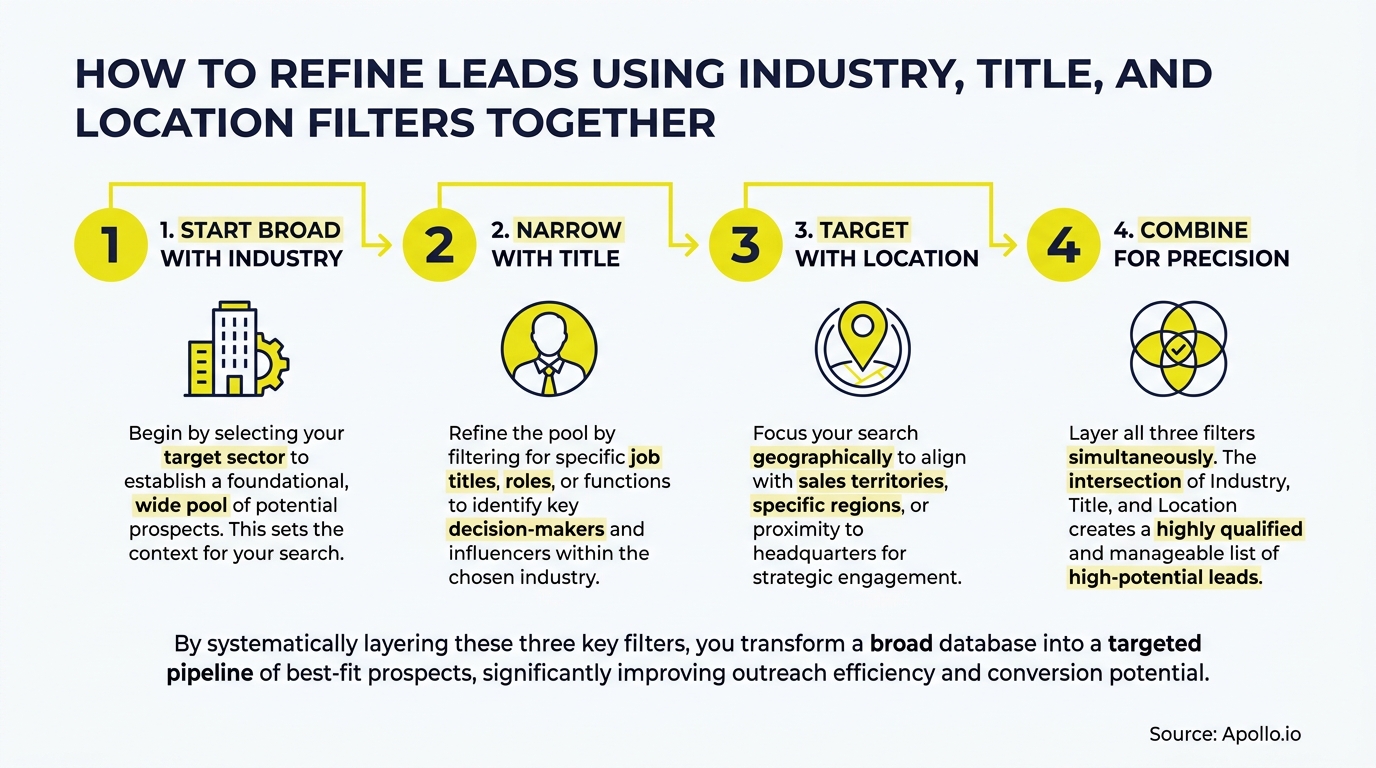
The correct stacking order moves from broadest to most specific: start with industry, then add company size or headcount, then job title or seniority, then location. This sequence prevents you from over-filtering early and losing valid prospects before you have a representative sample.
| Filter Layer | What It Targets | Example Value |
|---|---|---|
| 1. Industry | Vertical / sector fit | SaaS, Manufacturing, Healthcare IT |
| 2. Company Headcount | Size / budget signal | 50–500 employees |
| 3. Job Title / Seniority | Persona / buyer role | VP of Sales, Head of RevOps, Director+ |
| 4. Location | Territory / geo coverage | Northeast US, DACH region, UK |
| 5. Signal Layer (optional) | Timing / readiness | Recent funding, hiring for SDR roles, intent data |
Adding a signal layer after your fit filters is increasingly standard in 2026. Fit alone does not create pipeline — timing does. Layering intent data signals on top of your ICP filters helps prioritize who to contact first within the filtered pool.
Struggling to find qualified leads at scale? Search Apollo's 230M+ contacts with 65+ filters and build your ICP list in minutes.

Why Does Data Quality Determine Whether Filters Work?
Filter logic only performs as well as the underlying data. If job titles are outdated, locations are wrong, or industry tags are miscategorized, even a perfectly structured filter stack returns unreliable results. Data from Landbase shows that companies with accurate data experience 66% higher conversion rates — a direct argument for investing in data quality before optimizing filters.
A practical pre-filter QA checklist:
- Sample your existing list: Pull 50 random records and check title accuracy, company status, and location against public sources.
- Flag stale records: Any contact untouched for 12+ months should be re-verified before inclusion.
- Normalize industry taxonomy: Make sure your industry values map to a consistent classification (NAICS or your CRM's standard) before filtering.
- Remove duplicates: Duplicate records skew counts and waste outreach capacity.
- Enrich before filtering: Missing fields (no title, no location) cannot be filtered on — enrichment fills those gaps.
Apollo's data enrichment tools keep contact records current with 97% email accuracy, so your filter stack operates on verified business contact information rather than stale exports.
Turn Funnel Gaps Into Qualified Pipeline
Pipeline forecasting a guessing game because quality leads keep stalling before they become opportunities? Apollo surfaces in-market buyers with precision targeting so your team works real prospects, not wishful thinking. Nearly 100K paying customers trust Apollo to build predictable pipeline.
Start Free with Apollo →How Do SDRs and RevOps Teams Build Better Filtered Lists?
SDRs and RevOps leaders use stacked filters differently, but both benefit from a two-phase approach: broad filters first, then manual sampling to identify patterns that sharpen the next filter pass.
A sales professional wrote on Reddit that the most effective workflow is to use basic filters to get 80% of the way there, then manually review a sample of 50 accounts to spot patterns separating good fits from poor fits — signals like recent funding, tech stack, or active job postings. Those patterns then feed a scoring system where accounts accumulate points for matching multiple criteria.
For SDRs, this means building a core filter stack (industry + title + location), then reviewing the top 50 accounts manually before launching sequences.
For RevOps teams, it means encoding those patterns into saved search templates that the whole team reuses — so list quality is consistent, not rep-dependent.
Learn more about building a scalable outbound prospecting system that goes beyond filters alone.
A Reddit user shared a firsthand perspective that the best approach is to start broad with filters like industry, headcount, and geography, then manually review 30–50 leads to identify specific traits — not just broad parameters — that separate good fits from poor fits. That research then informs a tighter second-pass filter configuration.
What Are Ready-to-Use Filter Combinations for Common ICPs?
Ready-to-use filter stacks give SDRs a starting point without building from scratch each time. Below are three common ICP configurations.
| ICP Target | Industry | Title / Seniority | Location | Signal Add-On |
|---|---|---|---|---|
| SaaS RevOps Buyer | Software / SaaS | VP/Director of RevOps or Sales Ops | US (any), UK, ANZ | Hiring for RevOps roles |
| Mid-Market HR Tech | HR Software, Staffing | CHRO, VP People, Head of HR | Northeast US, DACH | Series B+ funding in last 12 months |
| Manufacturing Ops | Industrial Manufacturing | VP Operations, Plant Manager | Midwest US, Southeast US | 10–500 employees, growth hiring |
These templates are starting points.
After your first manual sample review, adjust title variations (e.g., "Head of" vs. "VP of" vs. "Director of") to capture the full persona range.
For broader guidance on identifying the right contacts, see how to find better buyer leads.
How Do You Prevent Filter Drift from Degrading Your Lists?
Filter drift happens when enrichment updates change job titles, locations, or company classifications over time, causing the same saved search to return different results. This is not a bug — it reflects real-world data changes — but it requires a QA process to keep lists reliable.
- Re-run saved searches weekly: Compare counts to your baseline. A sudden spike or drop signals a classification change worth investigating.
- Add exclusion filters: Exclude industries, titles, or locations that consistently produce low-quality results from past sequences.
- Version your filter configs: Save named snapshots of filter combinations in your CRM or prospecting tool so you can compare performance across versions.
- Tie filter versions to sequence performance: Track reply rate and meeting booked rate per saved search so you know which configurations produce pipeline.
This connects directly to your revenue operations workflow. RevOps owns the filter governance layer — defining which saved searches are canonical, who can modify them, and how performance is measured. Without that governance, individual reps optimize locally while team-level list quality degrades.

Start Building Smarter Lead Lists in 2026
Stacking industry, title, and location filters is not complicated — but doing it well requires clean data, a clear sequencing logic, and a QA habit that keeps results from drifting. The teams that consistently build high-quality lists treat filter configuration as a repeatable system, not a one-time task.
Apollo brings together 230M+ verified contacts, 65+ search filters, and sales automationin one platform — so SDRs, AEs, and RevOps teams build, enrich, and act on filtered lists without switching tools. As Cyera put it: "Having everything in one system was a game changer."
Start Prospecting — build your first stacked filter search free, and see the difference precision targeting makes to your pipeline.
Prove Pipeline ROI Before Next Quarter
ROI pressure killing your tool budget before it even gets approved? Apollo delivers measurable pipeline impact fast — 46% more meetings with AI, real results leadership can see. Start free today.
Start Free with Apollo →Don't miss these
Sales
Inbound vs Outbound Marketing: Which Strategy Wins?
Sales
What Is a Sales Funnel? The Non-Linear Revenue Framework for 2026
Sales
What Is a Go-to-Market Strategy? The 2026 GTM Playbook
See Apollo in action
We'd love to show how Apollo can help you sell better.
By submitting this form, you will receive information, tips, and promotions from Apollo. To learn more, see our Privacy Statement.
4.7/5 based on 9,690 reviews
