
How to Tag Leads for Smarter, Customized Drip Campaigns
Your drip campaign is only as smart as your lead tags. If every lead enters the same sequence regardless of their intent, behavior, or buyer stage, you're not personalizing — you're just automating noise. Research from Martal shows segmented campaigns see 30% higher open rates and 50% more clicks than non-targeted messaging. The payoff for getting tagging right is real.
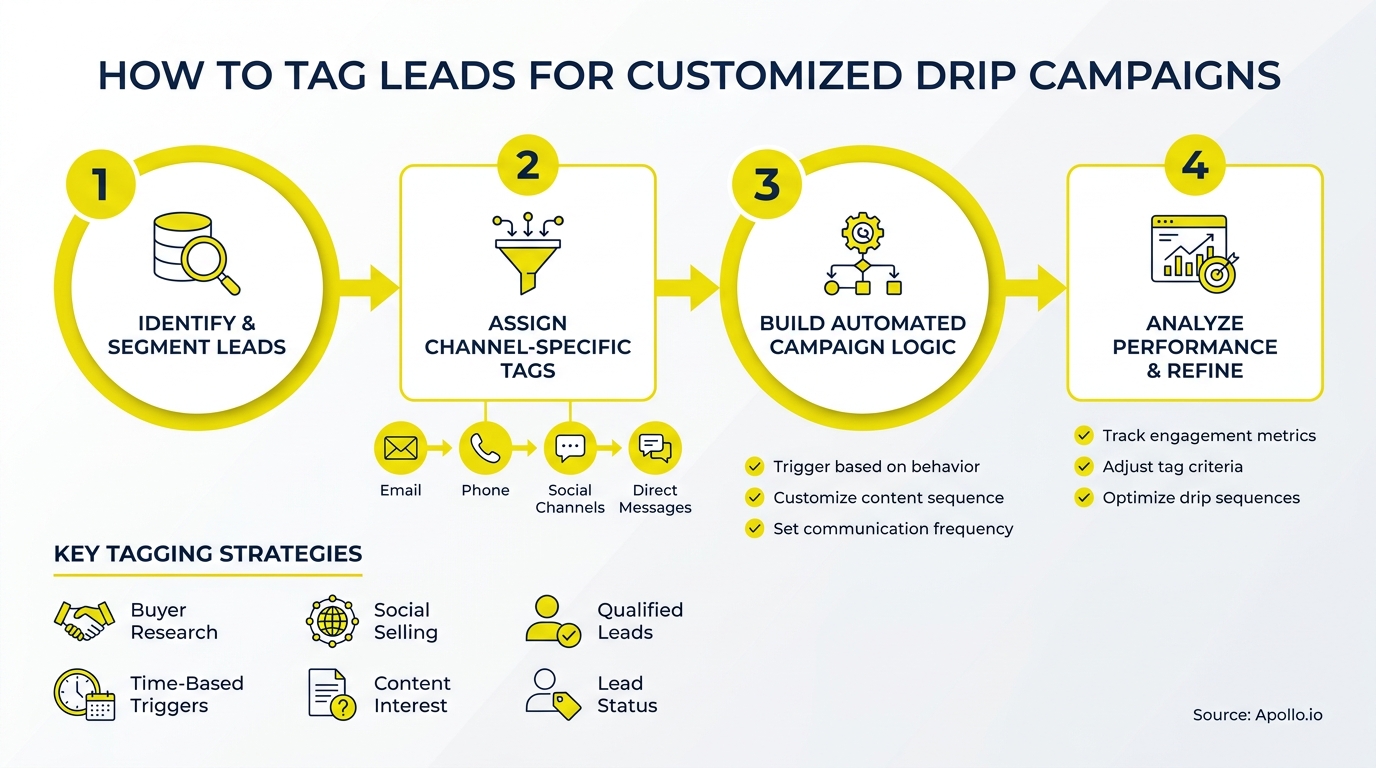
This guide covers how to tag leads for customized drip campaigns in 2026: a five-category taxonomy, a buyer-stage drip blueprint, and governance rules to keep your tags clean. Whether you're an SDR building outbound sequences or a RevOps leader standardizing CRM tag rules, this is the implementation framework you need. Start by understanding what drip email marketing is designed to accomplish before you layer on tagging logic.

Get Verified Leads, Skip the Research
Tired of burning hours hunting down emails that bounce and numbers that go nowhere? Apollo delivers 230M+ verified contacts so your team sells instead of searches. Start building real pipeline today.
Start Free with Apollo →Key Takeaways
- Lead tags should cover five distinct categories: fit, intent, behavior, lifecycle stage, and consent — not just one or two.
- Behavioral tags are the most actionable signal for drip personalization, yet most B2B teams still rely on static firmographic labels.
- Each tag needs an owner, a source system, a trigger rule, and an exit condition — without governance, tags decay fast.
- Personalized, segmented drips consistently outperform generic sequences across open rates, clicks, and pipeline contribution.
- AI is shifting tags from static labels to dynamic, continuously updated signals — teams should audit and future-proof their taxonomy now.
What Is Lead Tagging for Drip Campaigns?
Lead tagging for drip campaigns means assigning structured labels to contacts so your automation platform can route them into the right sequence with the right content at the right time. Tags are the decision layer between your database and your campaign logic.
Without them, every lead gets the same message regardless of where they are in their buying journey.
Tags differ from static list fields. A field like "Industry: SaaS" doesn't change. A tag like intent:pricing-research can be added, removed, or updated based on behavior. This dynamic quality is what makes tagging the foundation of truly personalized nurture. According to Leadspicker, 80% of business buyers are more likely to purchase from companies that provide personalized experiences.
What Are the Five Categories of Lead Tags?
A complete lead-tag taxonomy covers five distinct categories, each answering a different question about the contact. Most teams only use one or two, which is why their drip personalization stays shallow.
| Tag Category | What It Answers | Example Tags | Source System |
|---|---|---|---|
| Fit | Is this the right type of buyer? | fit:icp-tier1, fit:smb, fit:enterprise | CRM enrichment, firmographics |
| Intent | Is this buyer in-market now? | intent:in-market, intent:competitive-research, intent:pricing | Intent data, web behavior |
| Behavior | What has this lead actually done? | behavior:demo-requested, behavior:webinar-attended, behavior:pricing-visited | MAP, CRM, web analytics |
| Lifecycle | Where are they in the buying journey? | stage:awareness, stage:consideration, stage:decision, stage:customer | CRM pipeline, lead score |
| Consent | What are we permitted to send? | consent:email-opt-in, consent:gdpr-confirmed, consent:do-not-contact | Preference center, form submission |
Use a consistent naming convention:category:value. This makes filtering, reporting, and automation rules far easier to manage at scale. For deeper context on how intent signals power this kind of tagging, see how intent data powers smarter B2B sales.
How Do You Map Tags to Drip Sequences by Buyer Stage?
Each lifecycle tag should map directly to a specific drip sequence, a defined content type, a touch cadence, and an exit trigger. This is the blueprint most teams skip — and why their nurture programs underperform.
| Lifecycle Tag | Drip Sequence | Content Type | Exit Trigger |
|---|---|---|---|
stage:awareness | Educational nurture | Blog posts, thought leadership, short videos | Tag updates to stage:consideration |
stage:consideration | Solution comparison | Case studies, comparison guides, webinar invites | Demo request or behavior:pricing-visited |
stage:decision | Sales acceleration | ROI calculators, customer proof, trial offers | Meeting booked or opportunity created |
stage:customer | Onboarding / expansion | Feature tips, success stories, upsell offers | NPS survey sent or renewal date reached |
Combine lifecycle tags with behavioral tags for tighter targeting. A lead tagged stage:consideration + behavior:pricing-visited + intent:in-market should enter a high-urgency sequence immediately — not the standard 14-day nurture drip. Explore proven prospect nurturing strategies for sequence design ideas.
Struggling to find qualified leads to tag in the first place? Search Apollo's 230M+ contacts with 65+ filters to build lists that match your ICP.

How Do RevOps Leaders Govern CRM Tag Rules at Scale?
RevOps leaders govern tag rules by assigning every tag an owner, a source system, a confidence threshold, and a review schedule. Without this governance layer, tags accumulate, contradict each other, and silently break your drip logic.
Apply these four governance rules to every tag in your taxonomy:
- Tag owner: One team (marketing ops, sales ops, or RevOps) is accountable for each tag category.
- Source of truth: Define which system writes the tag. CRM enrichment writes fit tags; MAP writes behavior tags; intent platforms write intent tags.
- Expiry logic: Behavioral and intent tags should expire. A
behavior:pricing-visitedtag from six months ago is not the same signal as one from last week. Set TTL (time-to-live) rules. - Human review threshold: Tags that trigger sales handoffs — like
stage:decision+intent:in-market— should require a rep review before routing, not fully automated handoff.
Data quality is non-negotiable here. Research from Landbase shows companies with accurate data experience 66% higher conversion rates. Tags built on stale or inaccurate contact data will route the wrong leads into the wrong sequences every time. Use Apollo's contact enrichment to keep the underlying data clean before automation runs on top of it.
Turn Funnel Guesswork Into Real Pipeline
Tired of watching marketing leads stall before they ever reach sales? Apollo surfaces in-market buyers with precision so every lead your team touches is worth the call. Join 600K+ companies building pipeline they can actually forecast.
Start Free with Apollo →What Are Behavioral Lead Tags and Why Do They Matter Most?
Behavioral lead tags capture what a prospect has actually done — visited a pricing page, attended a webinar, clicked a specific email link, downloaded a case study — and use those actions to trigger more relevant follow-up. They matter most because behavior reveals intent more reliably than any firmographic field.
Most B2B teams still rely on static tags. That gap is the opportunity. Here are the highest-signal behavioral tags to prioritize:
behavior:demo-requested— highest intent signal, route to sales immediatelybehavior:pricing-visited— enter decision-stage sequence within 24 hoursbehavior:case-study-downloaded— enter social proof sequencebehavior:webinar-attended— follow up with replay + next step offerbehavior:email-clicked-3x— flag as high-engagement, escalate outreachbehavior:unsubscribed— suppress all sequences immediately
Behavioral tags work best when they update automatically via your MAP or CRM workflow rules — not manually. For SDRs, these tags signal when to move a prospect from sequence to direct outreach.
For AEs, they provide pre-meeting context on exactly what a prospect has been researching.
How Do Privacy-Safe Personalization Tags Work?
Privacy-safe personalization tags work by separating what you know about a lead from what you're permitted to act on. Consent tags must gate all other tag-driven automation — no sequence should fire without a confirmed opt-in or a legitimate interest basis documented in the tag record.
With buyers increasingly cautious about data use, consent-first tagging is both a trust signal and an operational safeguard. Build these consent tags into every workflow:
consent:email-opt-in— required before any email sequence startsconsent:gdpr-confirmed— required for EU contactsconsent:content-preferences-set— use to respect topic and frequency preferencesconsent:do-not-contact— suppresses all outreach across all channels
Consent tags should be set at the source — form submission, preference center, or CRM field — and should never be overwritten by enrichment or automation without a documented re-consent event. This is the privacy angle most drip tagging guides skip entirely.
How Do You Measure Whether Your Lead Tags Are Improving Pipeline?
Measure tag effectiveness by tracking pipeline contribution and conversion rates per tag combination, not just email open rates. The goal is to know which tag clusters produce qualified opportunities — and which produce noise.
Three metrics to track per tag or tag combination:
- Sequence-to-meeting rate: What percentage of leads with this tag combination book a meeting?
- Meeting-to-opportunity rate: How many of those meetings convert to open opportunities?
- Tag-to-close rate: Which tag clusters correlate with closed-won deals?
Run a quarterly tag audit. Remove tags that no sequence uses. Retire tags that show no pipeline correlation after 90 days. Promote high-signal tags into lead score inputs. This connects your tagging system directly to revenue outcomes rather than treating nurture as a black box. For teams building out a full system, see how to build a sales tech stack that scales revenue.

Start Tagging Smarter in 2026
A well-structured lead-tag taxonomy turns your drip campaigns from generic sequences into contextual conversations. The five-category framework — fit, intent, behavior, lifecycle, consent — gives every contact a precise routing signal.
Governance rules keep those signals accurate over time. And measurement connects your tagging logic to pipeline reality.
Personalization built on clean data and smart tags is one of the highest-leverage investments a B2B GTM team can make. Apollo consolidates lead intelligence, enrichment, sequencing, and CRM sync in one platform — so your tags actually travel with the contact across every touchpoint.
Get Leads Now and start building smarter drip campaigns with Apollo's all-in-one GTM platform.
Prove Pipeline ROI With Apollo
ROI approval stuck because you can't quantify the impact? Apollo gives sales teams measurable pipeline results fast. Leadium 3x'd annual revenue — see your ROI before the next budget review.
Start Free with Apollo →Don't miss these
Sales
Inbound vs Outbound Marketing: Which Strategy Wins?
Sales
What Is a Sales Funnel? The Non-Linear Revenue Framework for 2026
Sales
What Is a Go-to-Market Strategy? The 2026 GTM Playbook
See Apollo in action
We'd love to show how Apollo can help you sell better.
By submitting this form, you will receive information, tips, and promotions from Apollo. To learn more, see our Privacy Statement.
4.7/5 based on 9,690 reviews
