
How to Synchronize Lead Status Changes Between Your CRM and Sales Tool
Your CRM says a lead is "Working." Your sales engagement tool thinks they're still in an active sequence. Your rep is about to send a follow-up to someone who booked a demo yesterday. This is the lead-status sync problem — and it costs real revenue. According to Dynamiq Solutions, companies with poor alignment between CRM and marketing systems can see up to a 10% revenue loss. The fix is not just an API task — it requires a governance model, clear source-of-truth rules, and a conflict-resolution playbook. If you're building or rebuilding your CRM integration, start with the framework below.

Scale Your Team Without the Chaos
Tired of inconsistent outreach and reps going rogue on process? Apollo gives your team a unified playbook — verified contacts, automated sequences, and repeatable pipeline. Join 600K+ companies scaling smarter.
Start Free with Apollo →Key Takeaways
- Lead Status, Lifecycle Stage, and cadence status are three distinct fields — conflating them is the root cause of most sync failures.
- Every sync setup needs a declared source of truth: the CRM almost always wins for status, while the sales tool wins for sequence state.
- A RACI model for field ownership prevents the "who updates what" confusion that breaks handoffs between marketing, SDRs, and AEs.
- Disconnected systems don't just cause data headaches — they raise customer acquisition costs and slow pipeline velocity.
- In 2026, lead status changes are AI triggers, not just database fields — clean sync is a prerequisite for any AI-driven workflow.
What Is Lead Status Synchronization and Why Does It Break?
Lead status synchronization is the process of keeping lead lifecycle fields consistent and current across your CRM and sales engagement tool when either system records a change. It breaks most often because teams conflate three distinct concepts:
| Field Type | Definition | Typical Owner | Source of Truth |
|---|---|---|---|
| Lead Status | Current sales rep action state (e.g., New, Working, Contacted, Disqualified) | SDR / AE | CRM |
| Lifecycle Stage | Funnel position (MQL, SQL, Opportunity, Customer) | Marketing / RevOps | CRM |
| Cadence / Sequence Status | Engagement state in the sales tool (Active, Paused, Finished, Replied) | Sales Tool | Sales Engagement Tool |
Mixing these fields — or letting both systems write to the same field simultaneously — creates conflicts that stale out your pipeline. TryKondo's B2B Sales Report found that sales representatives spend nearly 18% of their week on CRM updates and administrative tasks alone, largely because of this kind of data inconsistency.
What Is the Source of Truth for Lead Status?
The CRM is almost always the source of truth for Lead Status and Lifecycle Stage. The sales engagement tool owns sequence and cadence state.
This separation prevents bi-directional conflicts from overwriting authoritative data.
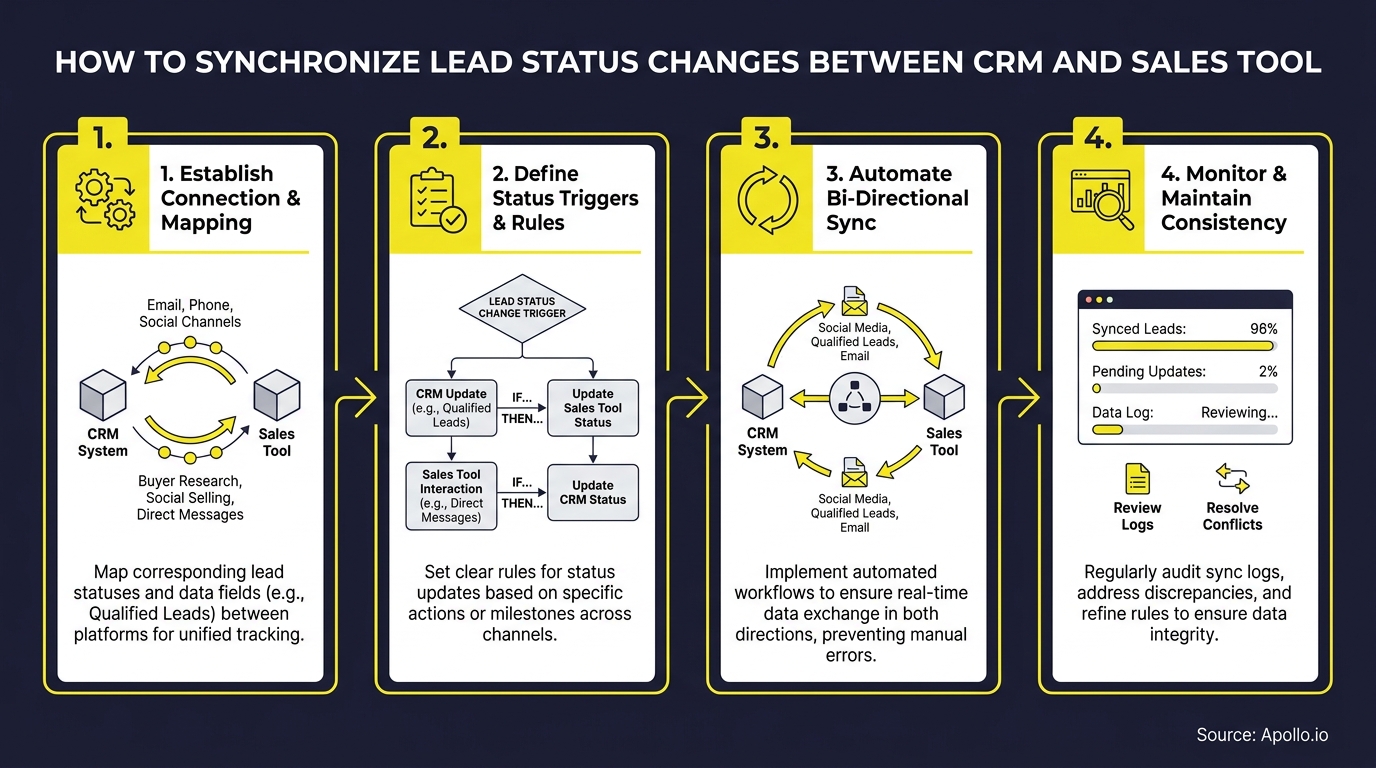
Use this decision framework when configuring your sync:
- One-way sync (CRM → Sales Tool): Best for status fields like Disqualified or Converted that must be honored immediately. When the CRM updates, the sales tool pauses or removes the contact from active sequences.
- One-way sync (Sales Tool → CRM): Best for sequence outcomes — replied, bounced, unsubscribed — written back to the CRM as activities or status updates.
- Bi-directional sync: Use sparingly. Limit to fields where both systems legitimately originate changes (e.g., owner assignment). Always define a precedence rule to resolve conflicts.
As IJRTI research notes, integration is a strategic requirement for companies aiming for stronger revenue and retention — not an optional technical detail.
Struggling to manage pipeline across disconnected tools? Apollo's unified pipeline management keeps lead status, sequences, and contact data in one workspace — no sync gymnastics required.
How Do RevOps Teams Build a Lead Status Sync Governance Model?
RevOps teams build effective lead status governance with a RACI matrix that assigns clear ownership for every status value and every system. Without this, both systems write conflicting data and nobody owns the resolution.
Sample RACI for Lead Status Fields:
| Activity | RevOps | SDR/BDR | AE | Marketing |
|---|---|---|---|---|
| Define status taxonomy | Accountable | Consulted | Consulted | Consulted |
| Update Lead Status in CRM | Informed | Responsible | Responsible | — |
| Trigger sequence from status change | Accountable | Responsible | — | — |
| Write sequence outcomes to CRM | Accountable | Informed | Informed | Informed |
| Monitor sync health / audit logs | Responsible | — | — | Informed |
The Smarteters reports that poor alignment between revenue teams can drive customer acquisition costs up by 36% — making this governance layer a direct cost-reduction lever, not just an operational nicety.

How Do You Resolve Conflicts When Both Systems Update Simultaneously?
Conflict resolution for simultaneous lead status updates follows a deterministic precedence model: define which system wins per field, log every change with a timestamp, and route unresolvable conflicts to an exception queue for human review.
Conflict Resolution Playbook:
- Precedence rule: CRM wins for status and lifecycle fields. Sales tool wins for sequence state. Document this in your integration configuration, not just in a wiki.
- Last-modified timestamp: For bi-directional fields, the most recent update wins — but only if the delta exceeds a defined threshold (e.g., 5 minutes) to prevent ping-pong loops.
- Locking pattern: When a rep is actively editing a record, lock sync writes for that field for 60 seconds to prevent the integration from overwriting mid-entry.
- Retry logic: Failed sync events should retry up to three times with exponential backoff before escalating to the exception queue.
- Exception queue: A dedicated Slack channel or CRM view for sync failures. RevOps reviews daily and resolves within one business day.
- Audit log requirement: Every status change — system-originated or rep-originated — must log the source system, user (or API key), previous value, new value, and timestamp.
This matters even more in 2026, as platforms like Salesforce and Google Cloud now push real-time CRM updates directly into rep workspaces via AI agents. When a status change can trigger an AI-driven sequence or next-best-action recommendation, a stale or conflicting value causes downstream automation errors — not just a reporting gap. See how sales automation depends on clean status data to work correctly.
Turn Funnel Guesswork Into Pipeline Clarity
Tired of watching leads stall between marketing and sales with no clear path forward? Apollo surfaces in-market buyers, scores intent, and keeps your pipeline moving in real time. Nearly 100K paying customers stopped forecasting blind.
Schedule a Demo →What Field Mapping Template and Monitoring Checklist Should SDRs and RevOps Use?
SDRs and RevOps teams should maintain a documented field mapping table and a weekly monitoring checklist to catch sync drift before it affects pipeline.
Here is a tool-agnostic starting template:
Field Mapping Template (Tool-Agnostic):
| CRM Field | Sales Tool Field | Sync Direction | Trigger Event | Precedence |
|---|---|---|---|---|
| Lead Status | Contact Status | CRM → Tool | Status change | CRM wins |
| Lifecycle Stage | Segment / Tag | CRM → Tool | Stage transition | CRM wins |
| Lead Owner | Assigned Rep | Bi-directional | Assignment change | CRM wins |
| Sequence Status | Cadence State | Tool → CRM | Sequence event | Tool wins |
| Disqualification Reason | Removal Reason | CRM → Tool | Disqualify action | CRM wins |
| Last Activity Date | Last Touched | Tool → CRM | Any engagement | Tool wins |
Weekly Monitoring Checklist:
- Review exception queue: any unresolved sync failures from the past 7 days?
- Spot-check 10 leads: does CRM status match the sales tool status?
- Verify Disqualified leads are paused/removed from active sequences.
- Confirm no active sequences exist for Converted or Closed-Won records.
- Check integration health dashboard for error rate spikes.
- Review audit logs for any unauthorized or unexpected field overwrites.
For teams using Apollo, the Apollo CRM integration with Salesforce and HubSpothandles native bi-directional sync with configurable field mapping — reducing the manual governance burden significantly. As Cyera noted: "Having everything in one system was a game changer."
Spending hours chasing down sync errors and status mismatches? Apollo's sales engagement platform keeps sequences, status, and CRM data in sync natively — so your SDRs focus on selling, not data cleanup.
Frequently Asked Questions About Lead Status Sync
What Is the Difference Between One-Way and Two-Way Sync?
One-way sync pushes data from one system to another without writing back. Two-way (bi-directional) sync allows both systems to update a shared field.
Use one-way sync for most status fields to avoid conflicts, and reserve bi-directional sync for fields where both systems legitimately originate changes.
What Happens When Both Systems Update the Same Field at the Same Time?
Without a precedence rule, the last write wins — which means whichever system syncs last overwrites the other, often incorrectly. The fix is a declared source-of-truth rule per field, a timestamp comparison, and a retry/exception queue for unresolvable conflicts, as described in the conflict resolution playbook above.
How Should Disqualified or Lost Leads Be Handled in Sync?
Disqualified or Lost status changes should immediately trigger a one-way sync from the CRM to the sales tool, pausing or removing the contact from any active sequences. The disqualification reason should also sync as a field or note so reps have context if the lead re-enters the pipeline later.
How Do You Audit the Last Sync for a Specific Lead?
Most native integrations and iPaaS tools (Zapier, Make, native connectors) maintain an integration log or activity timeline. For each lead, check the CRM activity log for system-generated entries tagged with the integration's API key.
The timestamp on the last system-logged activity is your last-synced marker.

How Does Clean Lead Status Sync Improve Revenue Operations in 2026?
Clean lead status sync directly improves pipeline velocity, rep productivity, and AI-agent accuracy. More mature RevOps teams that align people, processes, and technology deliver measurably higher sales win rates, as research from JohnnyGrow confirms. And with AI agents from platforms like Salesforce, Microsoft Copilot, and HubSpot now reading and writing CRM records in real time, a stale or conflicting lead status no longer just causes a reporting error — it misfires an AI-driven sequence or sends a rep chasing the wrong opportunity.
The practical takeaway: lead status is no longer just a database field. It is an AI trigger. Treat it with the same discipline you apply to pipeline data. Clean sync, governed ownership, and deterministic conflict resolution are the foundation of any reliable AI-powered sales automation workflow.
Apollo natively connects prospecting, engagement, and CRM data in one platform — eliminating the sync complexity that plagues disconnected stacks. As Census put it: "We cut our costs in half." Start Prospecting with Apollo for free and see what a unified GTM platform does for your lead status workflow.
Prove Pipeline ROI From Day One
Budget approval stuck on unclear metrics? Apollo delivers measurable pipeline impact fast — 46% more meetings with AI, +10% win rates reported by customers. Start free and show ROI before your next review.
Start Free with Apollo →Don't miss these
Revenue Operations
Top Market Intelligence Tools for B2B Teams in 2026
Revenue Operations
Sales Operations Analyst Salary: 2026 Compensation Guide and Benchmarks
Revenue Operations
Sales Compensation Software: How to Automate Commission Management
See Apollo in action
We'd love to show how Apollo can help you sell better.
By submitting this form, you will receive information, tips, and promotions from Apollo. To learn more, see our Privacy Statement.
4.7/5 based on 9,690 reviews
