
How to Synchronize Account-Based Marketing Lists with Your CRM
Most ABM programs stall not because of bad strategy, but because the account list in your ABM platform and the accounts in your CRM are two different realities. Static CSV uploads, quarterly refreshes, and mismatched company names mean sales reps work from stale data while marketing targets accounts that are already closed-won — or churned. According to AdRoll, when sales and marketing teams are synced through ABM strategies, companies become 67% better at closing deals. The gap between that potential and reality almost always comes down to sync quality.
This guide gives RevOps leaders, marketing ops managers, and SDRs a practical blueprint for synchronizing ABM lists with CRM accounts — covering data modeling, deduplication, cadence governance, and buying-committee contact activation. For a broader look at CRM integration strategy, see Apollo's integration guide.

Get Verified Contacts, Skip the Research
Tired of burning hours hunting down emails that bounce and numbers that go nowhere? Apollo surfaces accurate, verified contacts instantly. Join 600K+ companies turning research time into real pipeline.
Start Free with Apollo →Key Takeaways
- CRM data quality is the single biggest risk to ABM list sync — stale, duplicate, or incomplete account records corrupt every downstream workflow.
- A canonical data model with a persistent account identifier (domain or CRM ID) prevents match failures across platforms.
- Sync cadence should match your sales motion: real-time for pipeline-stage triggers, daily for active accounts, and quarterly only for low-priority segments.
- Account-level sync is not enough — buying committees require contact-level mapping with role and title coverage per account.
- Sales-marketing alignment around a shared account list turns ABM from a marketing activity into a revenue motion.
Why Is ABM List Synchronization with CRM So Hard?
ABM list synchronization fails because ABM platforms and CRMs use different primary keys, field schemas, and update frequencies — and neither system is designed to be the other's source of truth. According to Landbase, 80% of companies report their CRM data is inaccurate. When that data feeds your ABM target list, every downstream action — ads, sequences, intent scoring — runs on a flawed foundation.
The most common failure modes are:
- No persistent account identifier: ABM tools match on company name; CRM stores domain, DUNS number, or a custom ID. Mismatches create duplicates or missed accounts.
- One-way sync: Accounts flow from CRM to ABM but engagement signals never write back, leaving reps without intent context.
- Stale refresh cadence: Quarterly list refreshes miss deals that opened and closed between updates.
- Account vs. contact confusion: Marketing targets the account object; sales needs contacts. Without explicit mapping, activation stalls.
Research from Influ2 shows that 30% of marketers had difficulty integrating marketing and sales processes, and 29% had difficulty integrating marketing and sales tools — confirming this is an operational problem, not just a technology one. Understanding how data sync improves B2B sales and marketing ROI is the first step toward solving it.
How Do You Build a Canonical Data Model for ABM-CRM Sync?
A canonical data model defines the fields, identifiers, and ownership rules that both your CRM and ABM platform agree on before any sync runs. Without it, every integration becomes a custom mapping project that breaks on the next platform update.
Required canonical fields for every account object:
| Field | Source of Truth | Purpose |
|---|---|---|
| Primary Domain | CRM | Universal match key across platforms |
| CRM Account ID | CRM | Persistent record identifier for deduplication |
| Account Owner | CRM | Routing and suppression logic |
| Opportunity Stage | CRM | Sync filter and cadence trigger |
| ABM Tier / Segment | ABM platform | List membership and budget allocation |
| Intent Score | ABM platform | Write-back to CRM for rep prioritization |
| Engagement Score | ABM platform | Write-back for pipeline scoring |
Use primary domain as your universal match key — it is the only field that reliably exists in both CRM and ABM systems without manual normalization. Store it as a lowercase, protocol-stripped value (e.g., acme.com not https://www.acme.com) in both systems before you configure any sync rule.
Assign field ownership explicitly. CRM owns firmographic and opportunity data. The ABM platform owns intent, engagement, and scoring. Neither system should overwrite the other's owned fields. This is the governance layer that prevents data drift after go-live. Platforms like those covered in Apollo's CRM integration guide for Salesforce and HubSpot make this field mapping configurable without engineering support.
How Do You Deduplicate and Reconcile ABM Accounts with CRM Records?
Deduplication for ABM-CRM sync means establishing a match confidence threshold before any account enters the synchronized list. Low-confidence matches create ghost accounts; overly strict matching misses real targets.
A three-tier match confidence model:
- High confidence (auto-sync): Domain match + CRM Account ID present. Sync immediately with no review.
- Medium confidence (review queue): Domain match only, or name fuzzy-match with no domain. Flag for RevOps review within 48 hours.
- Low confidence (reject + enrich): Name-only match with no domain or ID. Route to enrichment before adding to any list.
Set a weekly reconciliation job that compares your ABM account list against the CRM account object. Any ABM account without a corresponding CRM Account ID should trigger an enrichment workflow rather than a manual lookup. Tired of chasing stale account data? Apollo's contact enrichment tools keep your CRM records current with verified business data across 230M+ people and 30M+ companies.
Maintain an audit log with rollback capability. Every sync event should record: timestamp, match method, field delta, and the system that triggered the write.
If a bad data push corrupts 500 account records, you need to restore the prior state in minutes, not days.
Turn Funnel Guesswork Into Real Pipeline
Pipeline forecasting a guessing game because leads stall before they ever reach your AEs? Apollo surfaces in-market buyers and moves them through the funnel faster. Nearly 100K paying customers stopped guessing and started closing.
Schedule a Demo →What Sync Cadence Should You Use for ABM and CRM Accounts?
Sync cadence is the frequency at which your ABM platform and CRM exchange account data. The right cadence depends on your sales cycle length, deal velocity, and how frequently accounts change status.
| Cadence | Trigger | Best For | Risk If Wrong |
|---|---|---|---|
| Real-time (webhook) | Opportunity stage change, deal created | High-velocity SMB, inbound-heavy | API rate limits, runaway sync loops |
| Daily batch | Scheduled overnight job | Mid-market with active pipeline | 24-hour lag on urgent suppression |
| Weekly | Scheduled + manual trigger | Enterprise with long sales cycles | Stale intent data reaching reps |
| Quarterly | TAL review cycle | Static tier-1 named accounts only | Significant account drift between refreshes |
Recommended default for most B2B GTM teams: real-time webhooks for opportunity stage changes and new deal creation; daily batch for all other account field updates. This hybrid approach captures the events that matter most to sales without overwhelming your integration layer.
Set drift thresholds to trigger an alert when more than a defined percentage of accounts change ABM tier within a single sync window — this usually signals a data quality problem upstream, not a genuine shift in your target market.

How Do RevOps Leaders Map Contacts to CRM Accounts for Buying Committees?
RevOps leaders solve buying-committee activation by building a contact layer on top of the account sync — because an account in your CRM is not the same as an activated buying group. Syncing accounts without contacts means your ABM ads reach a company, but your sequences reach no one.
As Modop notes, ABM platforms integrate with CRM systems and marketing automation tools to enable bi-directional data syncing, ensuring marketing and sales teams work from a shared, up-to-date data foundation. That foundation only activates when contacts are mapped to accounts with role coverage.
Minimum contact coverage per account tier:
- Tier 1 (named accounts): Economic buyer + champion + technical evaluator + procurement contact
- Tier 2 (target segment): Economic buyer + one additional role
- Tier 3 (broad ICP): One verified contact in a relevant function
Map contacts to accounts using the same primary domain key from your canonical model. Any contact whose email domain matches the account domain is a candidate.
Enrich contacts with title, seniority, and function before assigning them to a buying-committee role. SDRs running sequences against Tier 1 accounts should see all mapped contacts in a single workspace view — not spread across CRM, email, and the ABM platform separately.
Need to fill gaps in buying-committee coverage? Search Apollo's 230M+ verified contacts with 65+ filters to find the right stakeholders by title, function, and seniority within any target account.
How Do You Measure ABM List Sync Effectiveness?
ABM list sync effectiveness is measured by account coverage, match rate, contact activation rate, and downstream pipeline contribution — not by list size. A synchronized list that generates no pipeline is just a well-organized spreadsheet.
Core metrics to track:
- CRM match rate:Percentage of ABM accounts with a confirmed CRM Account ID (target: above 90%)
- Contact coverage rate: Percentage of target accounts with at least one verified, role-mapped contact
- Sync lag: Average time between a CRM stage change and the ABM platform reflecting it
- Account engagement rate: Percentage of synced accounts showing intent or web activity within 30 days
- Pipeline influenced: Opportunities sourced or influenced in accounts on the synchronized list
Review these metrics monthly at minimum. If match rate drops below 85%, trigger an enrichment and deduplication pass. If contact coverage falls below tier thresholds, assign SDRs or BDRs to fill gaps before the next campaign flight. For a structured approach to solving data synchronization headaches across business systems, Apollo's ops guide covers governance and attribution in detail.

How to Synchronize ABM Lists with CRM Accounts: Your 2026 Action Plan
Synchronizing ABM lists with CRM accounts in 2026 requires treating your account data as a live operational asset, not a quarterly export. The teams winning with ABM have moved from static target-account lists to signal-triggered account segments that update based on intent, opportunity stage, and buying-group engagement.
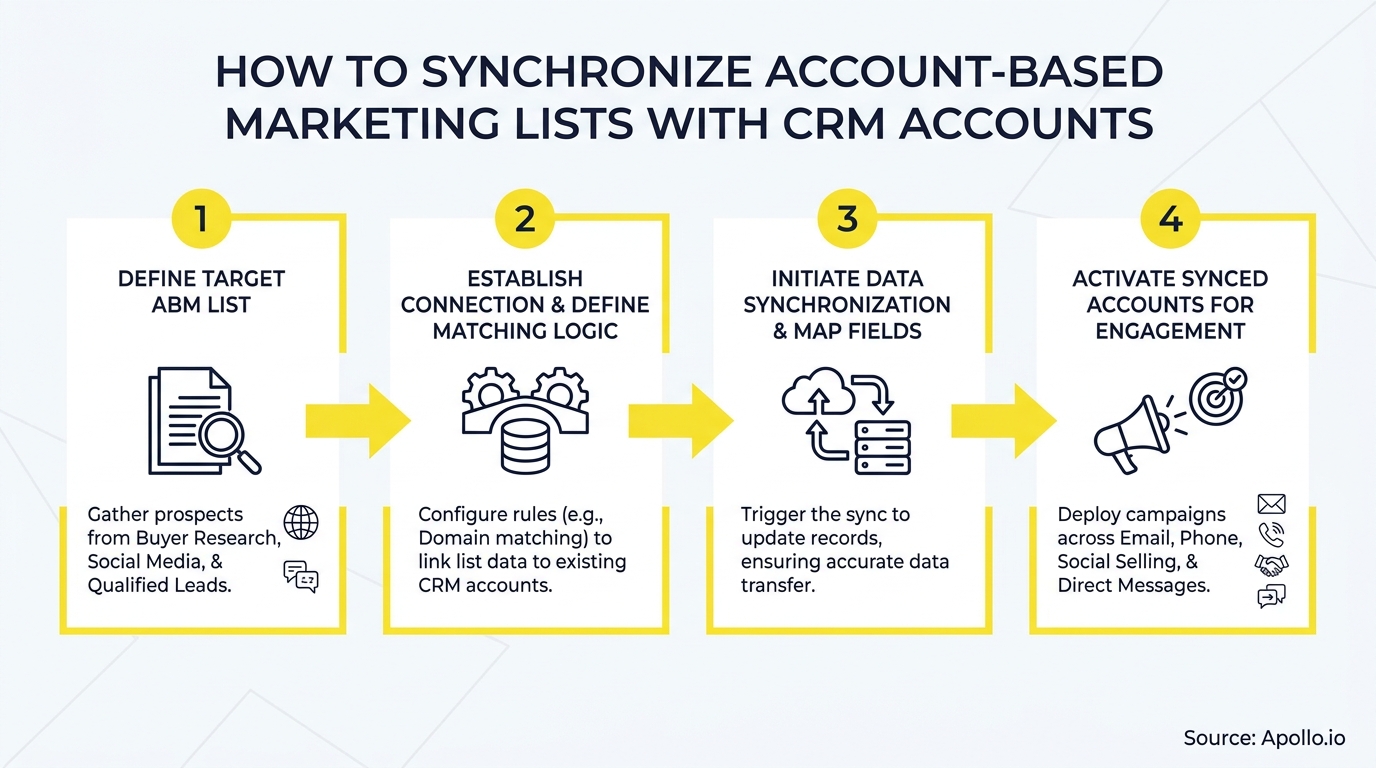
Start with these five steps:
- Audit your CRM account data — identify missing domains, duplicate records, and accounts with no contacts.
- Define your canonical data model — agree on primary domain as the universal match key and assign field ownership between CRM and ABM platform.
- Configure bi-directional sync — CRM pushes firmographic and opportunity data; ABM platform writes back intent, engagement scores, and most-engaged contacts.
- Set cadence rules — real-time webhooks for stage changes, daily batch for field updates, weekly reconciliation for deduplication.
- Build the contact layer — map buying-committee roles to each account tier and fill coverage gaps before launching campaigns.
Apollo consolidates prospecting, enrichment, sequencing, and CRM sync into a single GTM workspace — eliminating the tool sprawl that causes list drift in the first place. As Cyera's team put it, "Having everything in one system was a game changer." Start prospecting with Apollo for free and see how a unified platform keeps your ABM lists and CRM accounts in sync from day one.
Ramp Reps Faster, Prove ROI Sooner
ROI pressure killing your next tool renewal? Apollo gets new reps producing pipeline from day one with scalable, repeatable workflows. Nearly 100K paying customers proved the value fast.
Start Free with Apollo →Don't miss these
Sales
Inbound vs Outbound Marketing: Which Strategy Wins?
Sales
What Is a Sales Funnel? The Non-Linear Revenue Framework for 2026
Sales
What Is a Go-to-Market Strategy? The 2026 GTM Playbook
See Apollo in action
We'd love to show how Apollo can help you sell better.
By submitting this form, you will receive information, tips, and promotions from Apollo. To learn more, see our Privacy Statement.
4.7/5 based on 9,690 reviews
