
How to Set Up Automatic Tasks When Leads Meet Certain Criteria (2026)
Most sales reps spend the majority of their time on non-selling work, not because they lack discipline, but because no system tells them exactly when to act on a lead. Setting up automatic tasks when leads meet certain criteria fixes that. Instead of relying on memory or manual review, your CRM or sales platform creates structured next actions the moment a lead hits a defined threshold. The result: faster follow-up, fewer dropped leads, and reps focused on conversations, not admin. If you're still deciding which leads deserve attention, start by understanding what buyer leads actually are and how to find better ones.

Scale Your Team Without the Chaos
Tired of inconsistent outreach and reps wasting hours on manual research? Apollo standardizes your playbooks and surfaces verified contacts instantly. Join 600K+ companies building predictable pipeline at scale.
Start Free with Apollo →Key Takeaways
- Criteria quality determines automation quality. Define ICP fit, intent signals, lifecycle stage, and inactivity thresholds before building any workflow.
- A trigger matrix prevents task spam. Map each criterion type to a specific task type, owner, and SLA before going live.
- Governance is the missing layer. Most teams automate without shared MQL/SQL definitions, handoff rules, or duplicate suppression.
- Automated lead nurturing increases purchase rates, making task automation a revenue driver, not just a productivity tool.
- The market is shifting from rule-based task creation to AI-assisted qualification agents. Building clean criteria now future-proofs the upgrade path.
What Are Automatic Lead Tasks and Why Do They Matter?
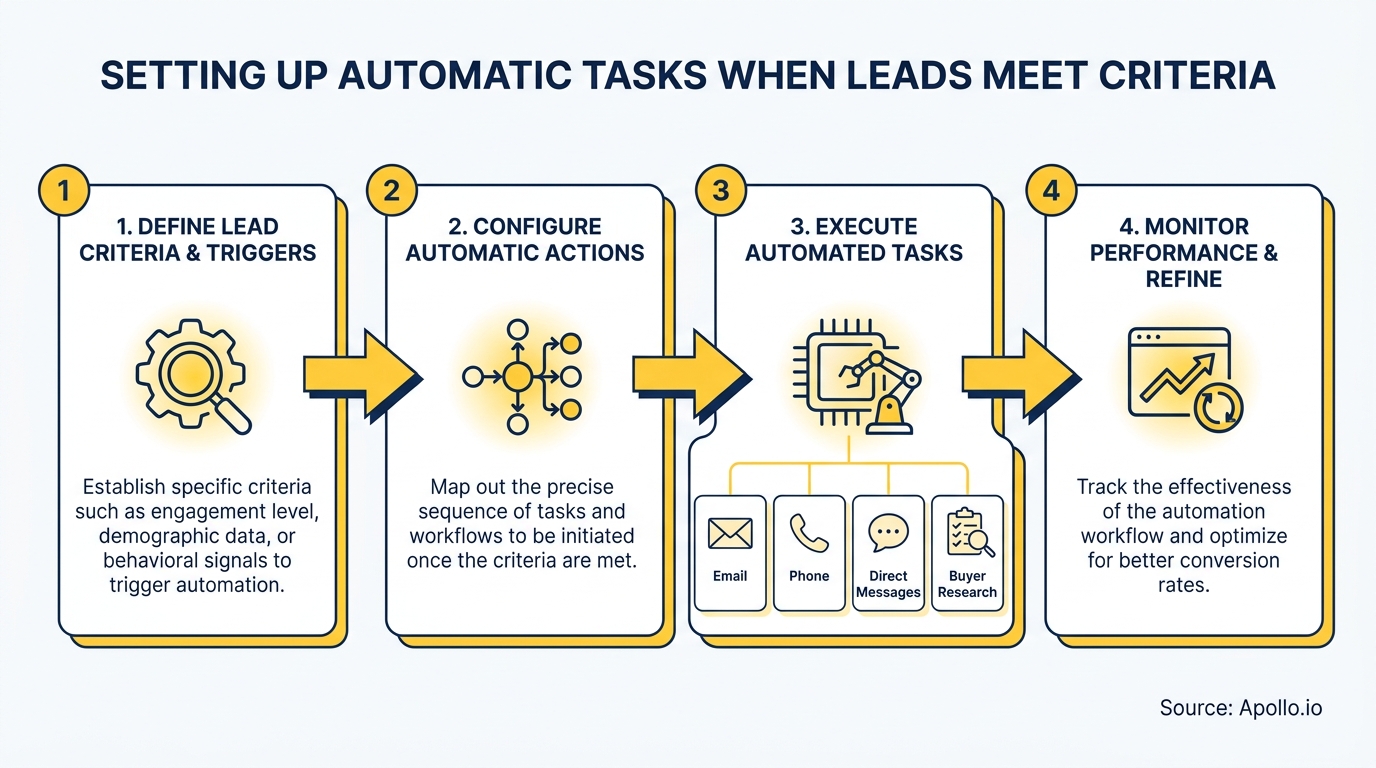
Automatic lead tasks are CRM or platform actions triggered when a lead record matches predefined conditions. A form submission, a lead score crossing a threshold, a buying-signal detected via intent data, or 14 days of inactivity can each fire a specific task assigned to a specific rep with a specific due date. No manual review required.
The business case is direct. According to Sendspark, automation helps generate 50% more sales-ready leads at a 33% lower cost. Meanwhile, SQ Magazine reports that automated lead nurturing increases purchase rates by 47%. These are not marginal gains. They reflect what happens when reps act on the right signal at the right time instead of triaging an inbox.
How Do You Build a Lead Criteria Trigger Matrix?
A trigger matrix maps each lead condition to a task type, owner, priority, and SLA. Building this table before touching your workflow builder prevents duplicate tasks, misrouted work, and alert fatigue.
| Criterion Type | Example Trigger | Task Created | Owner | SLA |
|---|---|---|---|---|
| ICP Fit | Industry + headcount + title match | Personalized outreach | SDR/BDR | 4 hours |
| Intent Signal | High-intent topic cluster detected | Call + email sequence start | AE | Same day |
| Lifecycle Stage | Lead score crosses MQL threshold | Sales review + qualification call | SDR | 24 hours |
| Buying Urgency | Pricing page visit + demo request | Priority call task | AE | 1 hour |
| Inactivity | No response after 14 days | Re-engagement or disqualify | SDR | 48 hours |
A sales professional shared a firsthand perspective on Redditabout triggering tasks only on repeat form submissions: they incremented a custom field on each submission, then set the automation rule to fire only when that field exceeded a defined threshold. This prevents first-touch noise while catching genuinely re-engaged leads. It also highlights a common trap: without a suppression rule, you can generate duplicate tasks for the same lead event.

What Is the Workflow Blueprint for Governance and SLA Compliance?
The workflow blueprint defines not just when a task fires but who owns it, when it escalates, and how duplicates are suppressed. Missing any of these layers turns automation into noise.
Five governance rules every team needs:
- Shared definitions. Agree on MQL and SQL criteria across sales and marketing before building triggers. Teams sharing buyer-journey insights convert at significantly higher rates, according to Gartner's 2024 B2B Commercial Strategy Survey.
- Task ownership. Every auto-task must map to a named role (SDR, AE, RevOps). Unowned tasks expire.
- Due dates and SLAs. Set absolute due dates, not relative ones. "Due in 24 hours" drifts; a timestamp does not.
- Escalation rules. If a task ages past SLA with no activity, auto-reassign or alert a manager. Delays compound quickly in high-volume pipelines.
- Duplicate suppression.Add a filter: if an open task of the same type already exists for this record, skip creation. This is the single most common fix teams miss.
Spending hours on manual outreach instead of building governed sequences? Automate your sequences with Apollo's multi-channel sales engagement platform.
Turn Funnel Guesswork Into Pipeline Wins
Tired of watching marketing leads stall before they ever reach your pipeline? Apollo surfaces high-fit prospects and buying signals so your team acts first. 600K+ companies replaced the guesswork with predictable revenue.
Start Free with Apollo →How Do SDRs and RevOps Teams Implement This Across Platforms?
The trigger-task logic is platform-agnostic. The underlying pattern is identical whether you use HubSpot, Salesforce, or a workflow tool like Zapier: define the record condition, set the trigger event, create the task object, assign the owner, and set the due date.
| Platform | Trigger Mechanism | Task Object | Best For |
|---|---|---|---|
| HubSpot | Workflow enrollment criteria | HubSpot Task | Marketing-to-sales handoffs |
| Salesforce | Record-triggered flow or Process Builder | Task object (Activity) | Complex multi-condition logic |
| Apollo | Workflow engine + lead scoring rules | Sequence step / task | SDR outreach automation from one unified platform |
| Zapier | Zap trigger on CRM field change | Task in connected CRM | Cross-tool integrations |
For SDRs managing high-volume prospecting, the biggest efficiency gain comes from having criteria, tasks, and outreach sequences in one workspace. A Reddit user wrote on Reddit that automating context assembly before responding to inbound requests dropped their team's response time from 15 minutes to 2-3 minutes across 200+ weekly requests. The ROI was immediate because the trigger eliminated manual pre-work, not the response itself. RevOps leaders can apply the same principle: automate the research and routing, not the relationship.
For teams building out sales automation the right way, the key is starting with one high-value trigger (pricing page visit + ICP fit) before expanding to a full criteria library.
What Are the Three Maturity Levels for Lead Task Automation?
Most teams are not fully automated. Building toward a maturity model helps avoid overbuilding before the data foundation is solid.
- Starter (1-2 triggers). One form-fill trigger creates a call task for SDRs within 4 hours. One inactivity trigger re-queues leads after 14 days. Simple, measurable, low-maintenance.
- Intermediate (3-5 triggers). Add ICP-fit scoring, intent data signals from your intent data provider, and lifecycle stage changes. Tasks now route to AEs vs. SDRs based on score.
- Advanced (agent-assisted). In March 2026, Salesforce announced Agentforce Sales, which moves beyond task creation into autonomous lead research, outreach initiation, and CRM updates inside governed workflows. At this stage, your criteria matrix becomes the governance layer for AI agents, not just rule-based automation.
According to cflowapps, as of 2025 over 65% of global businesses have implemented some form of workflow automation. Most sit at the starter or intermediate level. Getting governance right at those stages is what makes the advanced upgrade viable.
How Do You Measure Whether Your Automatic Tasks Are Working?
Measure task automation by outcomes, not volume. More tasks created is not a win if completion rates are low or pipeline does not move.
- Task completion rate: What percentage of auto-created tasks are completed within SLA? Below 70% signals over-triggering or mis-assignment.
- Time to first activity: Measure hours from trigger to first rep action. SLA compliance here directly correlates with connect rates.
- Lead-to-meeting conversion by trigger type: Which criteria drive the highest meeting booking rate? Double down on those. For running those meetings effectively, have a qualification framework ready before the call.
- Duplicate task rate: Flag any lead with more than one open task of the same type. A rate above 5% indicates missing suppression logic.
- Pipeline influenced per trigger: Tie each trigger type to downstream pipeline value. This is the number RevOps leaders and revenue leaders need to justify automation investment.
Struggling to qualify and route leads before they hit your pipeline? Build a smarter sales pipeline with Apollo's lead qualification and routing tools.

Start With Criteria, Not Configuration
The most common mistake teams make when setting up automatic tasks is opening the workflow builder before defining what a qualified lead actually looks like. Criteria quality drives automation quality.
Build your trigger matrix first, agree on governance rules with both sales and marketing, set SLAs with escalation paths, and add duplicate suppression before going live.
Apollo consolidates prospecting, lead scoring, inbound form optimization, and sales engagement in one platform so SDRs, AEs, and RevOps teams can build and act on criteria-triggered workflows without stitching together four separate tools. As Cyera put it: "Having everything in one system was a game changer."
Ready to put your lead criteria to work? Try Apollo free and set up your first trigger-based workflow today.
Prove Pipeline ROI With Apollo
ROI pressure killing your tool budget approvals? Apollo delivers measurable pipeline impact your leadership can see — fast. Leadium 3x'd annual revenue. Get results that justify every dollar.
Start Free with Apollo →Don't miss these
Sales
Inbound vs Outbound Marketing: Which Strategy Wins?
Sales
What Is a Sales Funnel? The Non-Linear Revenue Framework for 2026
Sales
What Is a Go-to-Market Strategy? The 2026 GTM Playbook
See Apollo in action
We'd love to show how Apollo can help you sell better.
By submitting this form, you will receive information, tips, and promotions from Apollo. To learn more, see our Privacy Statement.
4.7/5 based on 9,690 reviews
