
How to Log Meetings from Your Sales Tool into CRM Automatically (2026)
Your reps are losing selling time to a task that should not exist: manually logging meetings into CRM. According to Overton Collective, sales reps spend an average of 5.5 hours per week on manual data entry into CRM systems. That is time ripped directly from pipeline. Automatic meeting logging fixes this at the source, turning every booked call into a structured CRM record without anyone lifting a finger. If you want a deeper look at connecting your tools, start with Apollo's CRM integration guide for Salesforce and HubSpot.

Get Verified Contacts, Skip the Hunt
Tired of burning hours tracking down accurate emails and phone numbers? Apollo surfaces verified business contacts instantly, so your team sells instead of searches. Nearly 100K paying customers already made the switch.
Start Free with Apollo →Key Takeaways
- Manual CRM entry consumes hours of rep time each week that could go toward selling activities.
- Automatic meeting logging works through a capture-normalize-match-map-write pipeline, not a simple sync toggle.
- Field mapping quality determines whether your CRM data drives decisions or just clutters records.
- RevOps teams need governance rules for duplicates, no-shows, and missing contacts before going live.
- Platforms that unify scheduling, engagement, and CRM sync eliminate the integration gap entirely.
Why Does Automatic Meeting Logging Matter for Revenue Teams?
Automatic meeting logging matters because it directly recovers seller capacity and improves CRM data quality simultaneously. Research from TryKondo's B2B Sales Report shows reps spend only 28-30% of their time actively selling, with data entry consuming 9% of their week on its own. Every meeting that goes unlogged is a blind spot in forecasting, follow-up, and coaching.
The data quality argument is equally compelling. When meeting activity is entered manually, it is inconsistent, delayed, or skipped entirely. Automated logging creates a reliable activity trail that RevOps leaders can actually trust for pipeline reviews and territory analysis. This is why sales analytics depend on clean, complete CRM data flowing in without human intervention.
How Does Automatic Meeting Logging Actually Work?
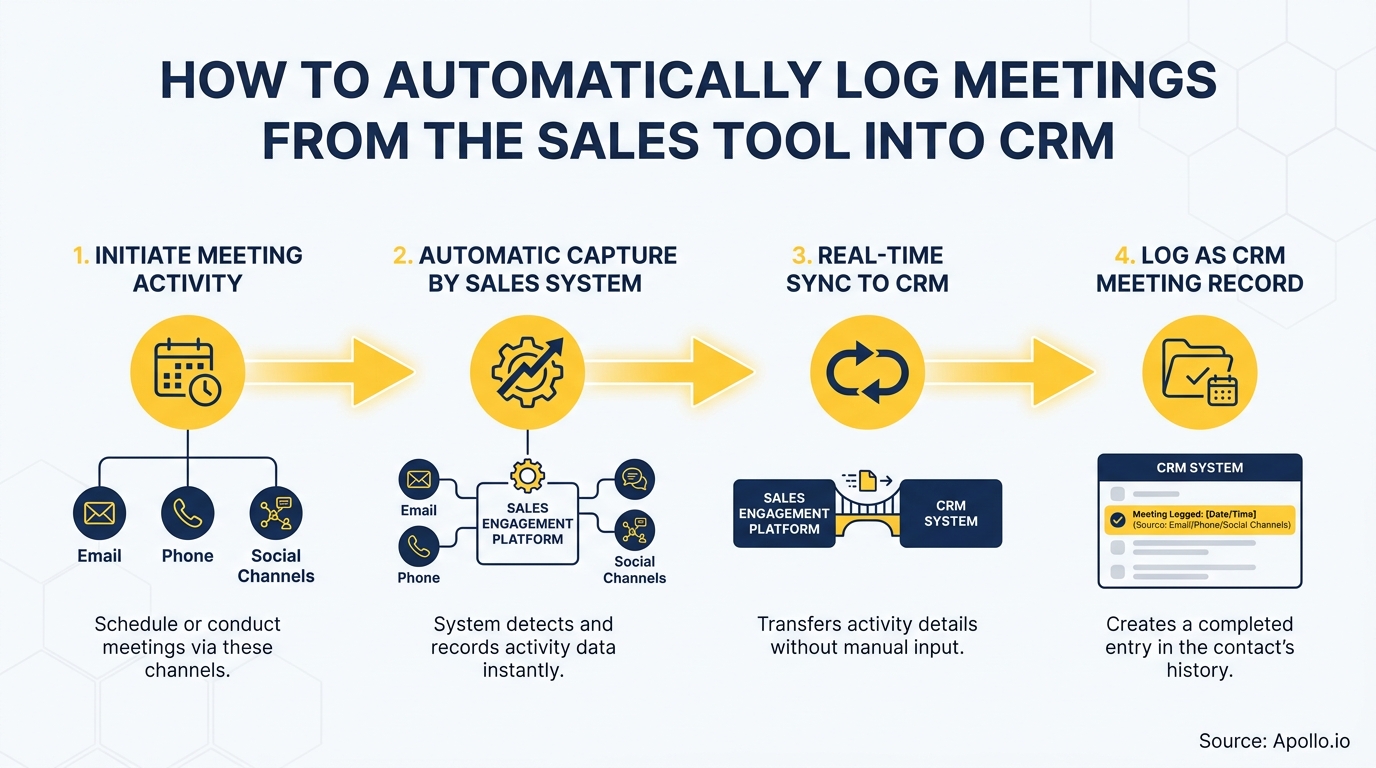
Automatic meeting logging works through a six-stage pipeline: capture, normalize, match, map, validate, and write to CRM. Understanding each stage prevents the common failure modes teams hit after setup.
- Capture: The sales tool (calendar, dialer, or engagement platform) detects a completed meeting event.
- Normalize: Raw event data (attendees, duration, subject, outcome) is standardized into a consistent format.
- Match: Attendee emails are matched to existing CRM contacts and accounts. Unmatched attendees trigger a create-or-skip rule.
- Map: Normalized fields are mapped to specific CRM activity fields (see table below).
- Validate: Required fields are checked. Duplicates are flagged against existing activity records.
- Write: The activity record is created or updated in the CRM, linked to the correct contact, account, and opportunity.
Platforms like Apollo handle this end-to-end inside a unified workspace. Tired of post-call admin eating your afternoon? Apollo's AI call assistant captures summaries and next steps automatically so they land in your CRM without manual work.
What Is the Right Field Mapping for Meeting Activities in CRM?
Field mapping for meeting activities determines whether your logged data is actionable or just noise. Map too few fields and managers lack context.
Map unstructured notes and you cannot report on them. The table below covers the essential fields for automatic meeting logging to Salesforce or HubSpot.
| Meeting Data Point | CRM Field | Notes |
|---|---|---|
| Meeting date and time | Activity Date | Required. Use UTC to avoid timezone errors. |
| Attendees (internal + external) | Related Contacts / Attendees | Match by email. Flag unmatched for review. |
| Meeting outcome | Disposition / Result (picklist) | Use a controlled picklist: Completed, No-Show, Rescheduled, Cancelled. |
| AI-generated summary | Description / Notes | Cap at 500 chars. Full transcript stored separately. |
| Next steps | Next Step (text) + Task creation | Trigger a follow-up task automatically. |
| Opportunity stage impact | Opportunity Stage | Advance stage only if meeting outcome = Completed. |
| No-show status | Disposition = No-Show | Trigger re-engagement sequence. Do not advance stage. |
| Recording / transcript link | Custom URL field | Store link, not the full transcript, to keep record size manageable. |
For a step-by-step walkthrough of connecting your tools, see the Apollo guide to CRM integration for HubSpot and Salesforce users.
Turn Funnel Gaps Into Pipeline Gold
Pipeline forecasting a guessing game because quality leads never make it past marketing? Apollo surfaces in-market buyers with precision targeting so your funnel fills with prospects that actually convert. Nearly 100K paying customers stopped guessing and started closing.
Start Free with Apollo →How Do RevOps Teams Handle Data Quality and Governance?
RevOps teams govern automatic meeting logging by setting required fields, deduplication rules, validation thresholds, and retention policies before the first record is written. Skipping this step creates the exact CRM mess the automation was supposed to prevent.
Dedupe rules for CRM activities:
- Check for existing activity records with the same contact, date, and activity type within a 30-minute window.
- If a match exists, update the existing record rather than creating a duplicate.
- Set a unique external ID (meeting ID from your sales tool) on every activity record to enable idempotent writes.
Missing contact and account handling:
- If attendee email does not match a CRM contact: create a stub contact and flag for enrichment review.
- If no account match exists: log the activity to a holding account or queue for RevOps triage.
- Never silently drop unmatched meetings. Every dropped record is a pipeline blind spot.
AI transcript governance:
- Store full transcripts in a purpose-built conversation intelligence system, not the CRM description field.
- Write only structured extracts (summary, objections, next steps, BANT signals) to CRM fields.
- Set a human-review threshold: flag any AI summary where confidence score falls below your defined minimum before it writes to the opportunity record.
This matters beyond hygiene. A 2025 Bain survey of 1,200+ senior commercial executives found 70% do not effectively integrate sales plays into their technology, and only about 20% have realized full value. Clean, structured meeting data is the foundation that makes every downstream workflow reliable. For broader guidance, see Apollo's CRM integration strategy guide.

How Can SDRs and AEs Set Up Automatic Logging Without RevOps Support?
SDRs and AEs can configure basic automatic meeting logging in under an hour using native CRM calendar sync, without waiting for a RevOps project. Here is the fastest path:
- Enable calendar syncin your CRM (Salesforce Activity Sync or HubSpot Calendar Sync). Grant the minimum OAuth scopes required: read calendar events, write activity records.
- Set the default activity type to "Meeting" for all synced calendar events tied to contacts in your CRM.
- Configure attendee matching: auto-match by email domain, skip internal-only meetings (filter by your company domain).
- Add a meeting outcome field to your activity layout so reps can update disposition from mobile after the call ends.
- Enable task creation on completed meetings so next steps auto-generate as a follow-up task assigned to the meeting owner.
For AEs managing active opportunities, auto-logging also means every customer touchpoint appears on the deal timeline without manual entry, which is critical for accurate forecasting. Best practices for running successful sales meetings align well with structured logging because the meeting agenda maps directly to the fields you capture.
Spending too much time on post-meeting admin? Apollo's deal management tools keep every meeting, note, and next step connected to the right opportunity automatically.
What Security Checks Should Teams Run Before Enabling CRM Meeting Sync?
Teams should complete a security review before enabling any sales tool to write automatically to CRM, because every integration that can write to CRM is part of the revenue data attack surface. This is not theoretical: a 2025 incident involving compromised OAuth tokens tied to a third-party sales app was used to target Salesforce customer instances and export data at scale, as documented by Google's Threat Intelligence Group.
Minimum security checklist for meeting-to-CRM integrations:
- Request least-privilege OAuth scopes only (write activities, not read all objects).
- Enable token rotation and session timeout policies.
- Audit connected app permissions quarterly and revoke unused integrations.
- Enable CRM field-level security so auto-logged fields cannot overwrite protected deal data.
- Document consent workflows for AI transcription, especially for recordings involving external buyers.
Platforms that consolidate scheduling, engagement, and CRM sync in one workspace reduce this risk by minimizing the number of OAuth connections in your stack. As Cyera noted, "Having everything in one system was a game changer."

Is Automatic CRM Meeting Logging Worth the Setup Time?
Yes. The ROI is direct: automated CRM data entry reduces admin time by at least 17%, according to data cited by sales automation research compiled in 2025, freeing that capacity for selling. And according to Everstage, top-performing B2B sales organizations leveraging automation have freed up about 20% of sellers' capacity and improved productivity by up to 30%.
The compounding effect is data quality. Every manual-entry step introduces errors, omissions, and inconsistencies. Automated logging creates a complete, consistent activity record that improves forecasting accuracy, enables coaching at scale, and feeds the AI workflows that revenue leaders are now building on top of CRM data. This is what makes sales automation a force multiplier rather than just a time-saver.
Teams that consolidate their sales engagement, meeting intelligence, and CRM sync into fewer tools see the fastest payoff. "We reduced the complexity of three tools into one," noted Predictable Revenue after adopting Apollo. That kind of consolidation is what transforms automatic logging from a nice-to-have feature into a revenue operations foundation.
Ready to stop losing hours to manual CRM updates? Start free with Apollo and connect your meetings, sequences, and CRM in one unified platform.
Prove Pipeline ROI Before Next Review
ROI pressure killing your tool budget? Apollo delivers measurable pipeline impact fast — teams like Leadium 3x'd annual revenue after switching. Start your free trial and show leadership real numbers.
Start Free with Apollo →Don't miss these
Sales
Inbound vs Outbound Marketing: Which Strategy Wins?
Sales
What Is a Sales Funnel? The Non-Linear Revenue Framework for 2026
Sales
What Is a Go-to-Market Strategy? The 2026 GTM Playbook
See Apollo in action
We'd love to show how Apollo can help you sell better.
By submitting this form, you will receive information, tips, and promotions from Apollo. To learn more, see our Privacy Statement.
4.7/5 based on 9,690 reviews
