
How to Integrate Your CRM, Calendar, and Contact Lists with Your Sales Tool in 2026
Most sales teams have a CRM. Far fewer have actually connected it to their calendar, contact lists, and sales execution tools in a way that generates pipeline. According to a Freshworks analysis, businesses that use a CRM are 86% more likely to exceed their sales goals than those that don't — but that advantage disappears when the CRM sits disconnected from where selling actually happens. If you're ready to connect Salesforce, HubSpot, and your sales platform fast, this guide covers exactly how to do it right.

Build Pipeline, Not Spreadsheets
Tired of burning hours verifying contact info that goes nowhere? Apollo delivers accurate business contacts so your team spends time selling, not searching. Join 600K+ companies turning research time into revenue.
Start Free with Apollo →Key Takeaways
- Clean data before connecting: deduplication and field mapping are prerequisites, not afterthoughts.
- Calendar-to-CRM sync only pays off when meetings automatically trigger pipeline actions and next steps.
- RevOps teams that define field ownership and logging rules upfront avoid the most common sync failures.
- Security governance (OAuth token audits, least-privilege access) is now a required step, not optional.
- Consolidating your sales tech stack into one platform eliminates integration debt and data silos entirely.
Why Does CRM, Calendar, and Contact Integration Keep Failing?
Most CRM integration failures stem from skipping governance, not from technical problems. Data quality is the primary blocker: contact lists with duplicates, outdated job titles, and unmapped fields break sync logic before it starts. As dstrat.com notes, CRM integration ensures customer data flows instantly between sales, marketing, and support platforms — but only when that data is clean and consistently structured.
Security has also become a hard requirement. In August 2025, attackers abused OAuth tokens tied to a sales platform's Salesforce integration to access CRM and workspace data.
Every integration now needs token governance, not just workflow automation. Before connecting any tool, RevOps teams should audit connected app permissions, token scopes, and refresh-token policies.
What Is the Pre-Integration Checklist for Data Quality?
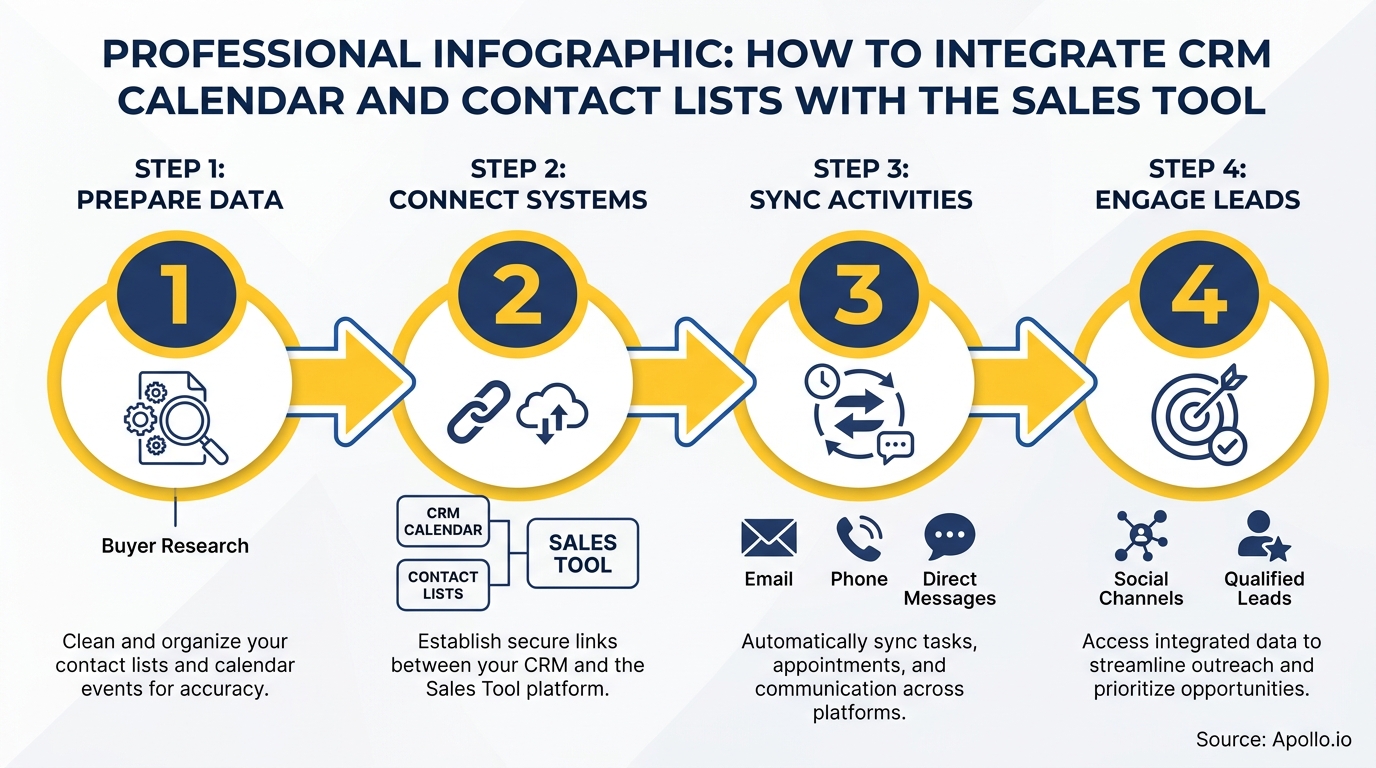
Complete this checklist before activating any CRM, calendar, or contact sync to prevent broken workflows downstream.
| Step | Action Required | Owner |
|---|---|---|
| Deduplication | Merge or suppress duplicate contacts and accounts before import | RevOps |
| Field Mapping | Map source fields (name, title, company, email) to CRM fields explicitly | RevOps / Admin |
| Data Freshness | Flag contacts not updated in 6+ months for enrichment before sync | RevOps / Sales Ops |
| Permissions Audit | Assign least-privilege OAuth scopes to each connected app | IT / RevOps |
| Ownership Rules | Define which system is the record-of-truth for each field | RevOps |
| Duplicate Handling Logic | Set merge rules: which record wins on conflict | RevOps |
Struggling with stale contacts polluting your CRM? Enrich and verify your contact data with Apollo before your next sync to eliminate bad records at the source.
Turn Funnel Gaps Into Closed Revenue
Pipeline forecasting a guessing game because quality leads dry up before they convert? Apollo surfaces in-market buyers the moment they're ready to engage. Nearly 100K paying customers replaced unreliable forecasts with predictable pipeline.
Schedule a Demo →How Do You Map Calendar Events to CRM Pipeline Actions?
Calendar-to-CRM integration pays off when every meeting automatically creates or updates a CRM record, rather than just logging an event. This is the "calendar-to-pipeline" step most guides skip.
Here is the playbook for turning synced meetings into pipeline actions:
- Meeting logged: Auto-create a CRM activity record linked to the contact and opportunity.
- Contact role assigned: Tag attendees as Champion, Decision Maker, or Evaluator based on title and meeting type.
- Stage trigger: Move the opportunity stage forward when a discovery or demo meeting is completed.
- Next steps captured: Use AI meeting summaries to auto-populate the "Next Step" field in the CRM record.
- Sales play triggered: Enroll the contact in the appropriate follow-up sequence based on meeting outcome.
This is what separates a productivity integration from a revenue integration. For AEs managing multiple deals, this workflow means every meeting automatically advances the pipeline record without manual CRM updates. Learn more about how data sync improves B2B sales and marketing ROI when meetings and contacts are connected end-to-end.
How Do RevOps Teams Set Governance Rules That Prevent Sync Failures?
RevOps governance is the layer between integration setup and reliable data flow. Without it, syncs overwrite fields incorrectly, create duplicate records, and lose meeting history.
Key governance decisions to document before go-live:
- Field ownership: If both the CRM and the sales tool can write to "Job Title," decide which wins. The enrichment tool should usually own contact fields; the CRM should own deal fields.
- Meeting logging rules: Define which calendar event types auto-log (customer-facing calls only, not internal). Set the minimum attendee criteria.
- Duplicate handling: Use email address as the primary match key. Define whether to merge automatically or route to a human review queue.
- Activity capture rate KPI: Track the percentage of customer-facing meetings that appear in CRM. Anything below 90% signals a sync failure to investigate.
According to LinkPoint360, sales forecast accuracy increases by up to 42% after implementing a CRM system — but only when activity data is consistently captured. Governance rules are what make that consistency possible.

How Do SDRs and AEs Benefit from a Fully Connected Sales Stack?
SDRs benefit most from contact list sync: when prospect data flows from the sales tool into the CRM automatically, reps stop copying and pasting between tabs and start selling. Every contact added to a sequence should create or update a CRM record with source, status, and engagement history.
AEs benefit most from calendar sync: when discovery calls and demos auto-log to the opportunity, deal stages stay current and forecast accuracy improves. AI-generated meeting summaries that populate CRM next-step fields eliminate the post-call admin that consumes selling time. See how teams connect HubSpot, Salesforce, and Apollo to give both SDRs and AEs one unified workspace for prospecting, meetings, and pipeline management.
Apollo's agentic GTM platform links prospecting, engagement, meeting intelligence, follow-up automation, and CRM sync in one place. As the team at Cyera put it: "Having everything in one system was a game changer." That is what consolidated integration actually looks like in practice — not five tools loosely connected, but one platform where every action updates the record automatically.
Spending too much time on manual CRM updates after every call? Let Apollo's AI call assistant auto-log summaries and next steps to your CRM.
How Do You Validate and Troubleshoot Your CRM Integration?
Validation prevents silent failures where data appears to sync but lands in the wrong fields or never reaches the CRM. Run these tests within 48 hours of go-live:
- Test scenario 1: Book a meeting with a test contact. Confirm the CRM activity record appears, linked to the correct contact and opportunity.
- Test scenario 2: Add a new contact in the sales tool. Confirm it appears in the CRM within the expected sync window without creating a duplicate.
- Test scenario 3: Update a job title in the CRM. Confirm the sales tool reflects the change based on your field ownership rules.
- Audit logs: Review integration error logs weekly for the first month. Common errors include missing required fields, permission scope failures, and rate limit errors.
- Monitor activity capture rate: Pull a weekly report of customer-facing meetings vs. CRM-logged activities. Gaps indicate calendar sync failures.
For teams exploring how to build and scale the right connected stack, the sales tech stack playbook for modern teams covers phased rollout strategies from a single system of record through full attribution.

How to Get Started: Your CRM Integration Action Plan for 2026
Integrating your CRM, calendar, and contact lists with your sales tool is one of the highest-ROI infrastructure investments a GTM team can make. Research from Bitrix24 shows properly implemented CRM software can deliver an ROI of over 245%. The difference between "properly implemented" and "partially connected" is governance, field mapping, and calendar-to-pipeline automation — not the tool itself.
The fastest path to a fully integrated stack is eliminating the integration debt that comes from stitching together five separate tools. Apollo consolidates prospecting, contact enrichment, sales engagement, meeting intelligence, and CRM sync into one platform, giving SDRs, AEs, and RevOps a single workspace where every action automatically updates the pipeline record.
As Predictable Revenue summarized after making the switch: "We reduced the complexity of three tools into one." That is the goal: fewer integrations to maintain, cleaner data, and more time selling.
Start Prospecting with Apollo for free and connect your CRM, calendar, and contacts in one unified GTM platform.
Ramp Reps Faster, Prove ROI Sooner
ROI pressure killing your tool adoption? Apollo gets new reps producing pipeline from day one with guided workflows any team can follow. Nearly 100K paying customers proved the value before the next budget review.
Start Free with Apollo →Don't miss these
Sales
Inbound vs Outbound Marketing: Which Strategy Wins?
Sales
What Is a Sales Funnel? The Non-Linear Revenue Framework for 2026
Sales
What Is a Go-to-Market Strategy? The 2026 GTM Playbook
See Apollo in action
We'd love to show how Apollo can help you sell better.
By submitting this form, you will receive information, tips, and promotions from Apollo. To learn more, see our Privacy Statement.
4.7/5 based on 9,690 reviews
