
How to Incorporate Manual Corrections into an Automated Workflow
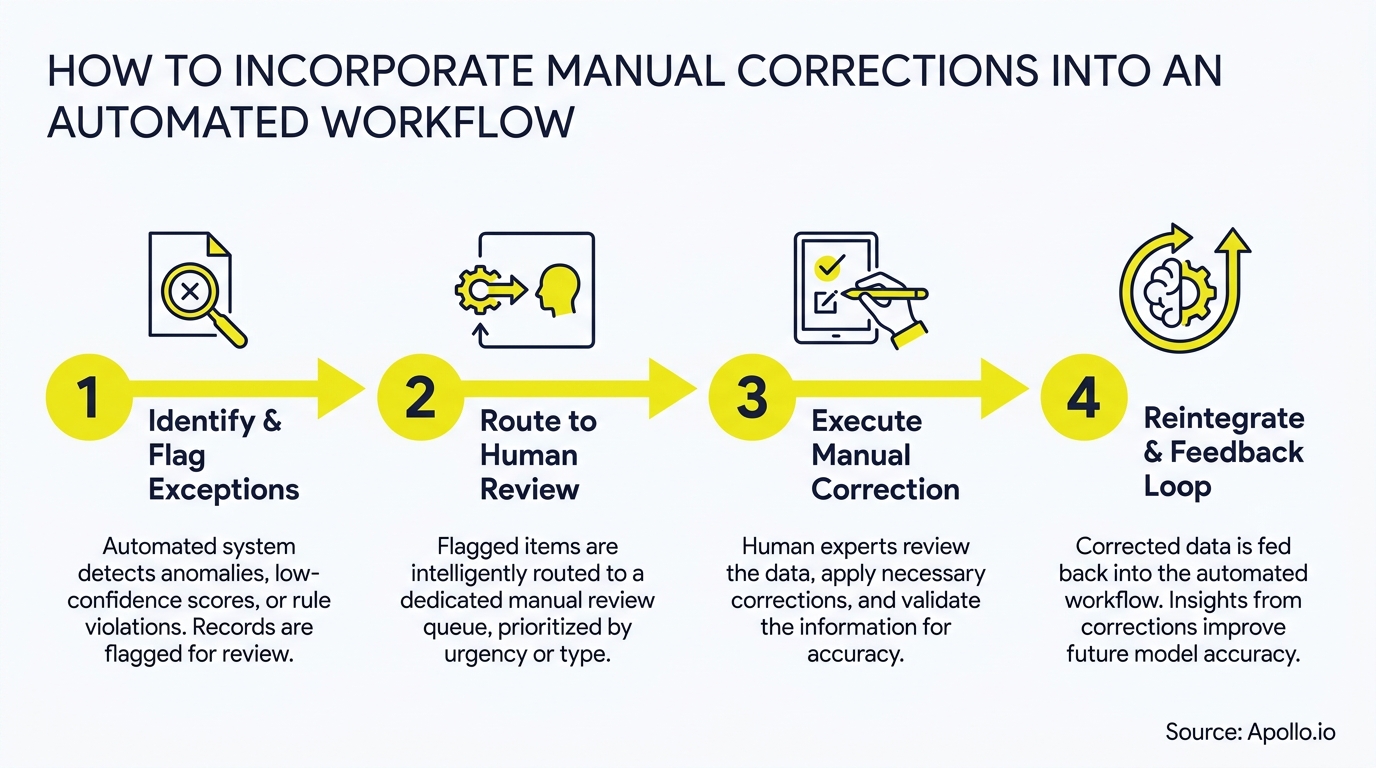
Automation promises speed and scale, but AI-generated outputs still fail in ways that matter: wrong account mappings, off-brand messaging, inaccurate prospect data. The fix is not to slow down automation. It is to design manual corrections as a standard control layer inside the workflow, not a last-minute patch applied after something breaks. If you are building or refining sales automation for your GTM team, this guide gives you a governance-first framework to make human oversight scalable and auditable.

Research Less, Close More With Apollo
Tired of burning hours manually hunting down contacts that go nowhere? Apollo surfaces verified leads instantly so your reps spend time selling, not searching. Join 600K+ companies building pipeline faster.
Start Free with Apollo →Key Takeaways
- Manual corrections work best when they are engineered into the workflow from the start, not bolted on after errors appear.
- Risk-tiered routing (auto-approve low-risk, escalate high-impact) keeps correction queues from becoming bottlenecks.
- Structured correction signals, capturing why something was wrong, improve automation rules over time and prevent recurring errors.
- RevOps and SDR teams that standardize SLAs, checklists, and escalation paths turn correction from a drain into a quality engine.
- Apollo's workflow automation platform lets GTM teams build human-review steps directly into automated sequences, keeping data clean without slowing outreach.
Why Do Automated Workflows Still Need Manual Corrections?
Automated workflows need manual corrections because AI outputs carry inherent accuracy risk, and that risk compounds at scale. According to Humans in the Loop, Human-in-the-Loop annotation is a key strategy for preventing "model collapse", where an AI's performance degrades over time without human feedback to course-correct it.
For B2B GTM teams, the consequences are concrete: misrouted leads, incorrect firmographics, AI-drafted outreach that misses brand voice. Research from Sopro shows that while 58% of sales teams use AI to write outreach messages and 57% use it for prospect research, many still combine AI output with human editing to preserve accuracy and brand voice. The goal is not to eliminate AI, but to build a correction layer that catches errors before they reach prospects or CRM records.
What Is a Risk-Tiered Correction Framework?
A risk-tiered correction framework routes workflow outputs to different review paths based on their potential impact, rather than sending everything through a single approval queue. Low-risk items auto-approve; high-impact or ambiguous items route to a human reviewer with a defined SLA.
This approach replaces the outdated "everything needs approval" model. Teams now run correction queues like reliability programs, tracking queue backlog, time-to-review, and error escape rate.
Here is a practical SLA matrix to apply:
| Risk Level | Example Items | Routing | SLA |
|---|---|---|---|
| Low | Standard field formatting, email subject lines | Auto-approve | Instant |
| Medium | Enrichment gaps, lead score changes | Async review queue | 24 hours |
| High | Compliance language, pricing claims, territory changes | Named reviewer + escalation | 4 hours |
| Critical | Customer-facing regulatory content, parent account mapping | Senior sign-off + audit log | 2 hours |
Automating the routing decision, not just the task, is what keeps correction queues from becoming an unbounded bottleneck for resource-constrained teams.

How Do You Build an Auditable Human-in-the-Loop Process?
An auditable human-in-the-loop process requires four artifacts: an edit trail, versioned outputs, structured correction signals, and an escalation path. Together, these turn every manual fix into a documented, reusable governance record.
- Edit trail: Log who changed what, when, and from which AI-generated version. Most workflow tools support this natively; for embedded AI environments (Copilot, Firefly), enable version history and require reviewers to comment before accepting changes.
- Structured correction signals:Replace free-text "this is wrong" notes with categorized fields: correction type (factual error, brand violation, compliance risk), source of truth referenced, and automation rule that failed. This feeds directly back into prompt and rule improvement.
- Escalation path: Define who gets notified if a reviewer misses their SLA. Treat missed reviews as incidents with runbooks, not as informal follow-ups.
- Periodic stewardship reviews: Schedule recurring audits (weekly or monthly) to catch systemic errors that individual corrections miss.
A Reddit user shared a firsthand perspectiveon production-grade failure handling: every workflow crossing more than three nodes gets an execution ID passed as a field from start to finish. On any failure, the partial state plus the execution ID lands in a Notion database treated as a dead-letter queue. A scheduled workflow polls it every 15 minutes and re-queues anything past the retry window. This pattern, where manual corrections feed directly back into automation, is the standard that high-performing teams are moving toward.
How Can RevOps Leaders Standardize Corrections at Scale?
RevOps leaders can standardize corrections by designing automation aroundthe correction step itself, not just automating the task that precedes it. The correction step needs its own workflow: routing, notification, time-boxing, and feedback capture.
A practical example: a sales professional wrote on Reddit about building a weekly flow that queries bad CRM data for each salesperson and sends a personalized report with direct links to each problem record, plus a 15-minute calendar block reserved to fix them. The result: reps went down a prioritized list, clicked directly to each record, already knowing what to fix, with time reserved to do it. That is correction as a designed workflow, not an afterthought.
For RevOps teamsmanaging GTM data quality, this model applies directly: automated data checks surface errors, structured reports route them to owners, and calendar-blocked time ensures corrections happen on schedule. Spending too much time chasing bad CRM data? Apollo's data enrichment keeps contact and account records verified automatically, reducing the correction load before it starts.
Turn Funnel Gaps Into Pipeline Gold
Pipeline forecasting a guessing game because leads stall before they ever become opportunities? Apollo surfaces in-market buyers at the right moment, so your funnel fills with prospects that actually convert. 600K+ companies trust Apollo to close the gap.
Start Free with Apollo →What Metrics Prove That Your Correction Layer Is Working?
The metrics that prove a correction layer is working are defect escape rate, mean time to correction, and rework volume, tracked over time against a baseline. Tracking only throughput misses quality drift.
| Metric | What It Measures | Target Direction |
|---|---|---|
| Defect escape rate | Errors that reach downstream systems uncaught | Decrease |
| Mean time to correction | Average time from error detection to fix | Decrease |
| Correction SLA adherence | % of reviews completed within SLA | Increase toward 95%+ |
| Rework volume | Volume of outputs requiring human edits per period | Decrease as automation improves |
| Rule improvement rate | Automation rule updates triggered by correction signals | Increase early, plateau as quality stabilizes |
Data from AI Workflow Designer shows that workflow automation can lead to an error reduction of up to 75% for repetitive administrative tasks. A well-governed correction layer accelerates reaching that threshold by closing the feedback loop between human fixes and automation rules.
For sales productivitymeasurement, connect correction metrics to pipeline outcomes: how does data accuracy affect meeting conversion rates, or how does outreach quality (post-human-edit) affect reply rates versus pure AI output?
How Do SDRs and AEs Benefit from Structured Correction Workflows?
SDRs and AEs benefit directly when correction workflows catch bad data before it reaches their queue, not after they have already acted on it. Structured correction keeps their time focused on selling, not data cleanup.
For SDRs running high-volume outreach, AI-assisted prospecting and messaging still requires a human review pass. The correction workflow defines exactly when that review happens (before send, not after bounce), who owns it, and what checklist they follow. This is especially relevant for automated lead generation systems where contact data and personalization tokens need verification before sequences fire.
For Account Executives managing complex accounts, the correction layer protects against high-stakes errors: wrong parent account mapping, incorrect pricing references in templates, or compliance language that was not cleared.
AEs should sit in the "High" or "Critical" tier of the SLA matrix for anything customer-facing.
Struggling to keep outreach accurate at scale? Apollo's sales engagement platform lets teams build review steps directly into multi-channel sequences, so nothing goes out unchecked.
How to Get Started: A Phased Implementation Roadmap
Start with your highest-risk, highest-volume workflow and add one correction checkpoint before expanding across the stack. Trying to govern everything at once creates adoption resistance and unmanageable queues.
- Phase 1 (Week 1-2): Audit current workflows. Identify where errors most frequently occur and what their downstream impact is. Assign a risk tier to each workflow type.
- Phase 2 (Week 3-4): Build the correction routing layer for your top two high-risk workflows. Set SLAs, assign reviewers, and create structured correction signal forms.
- Phase 3 (Month 2): Activate edit trails and escalation paths. Run your first stewardship review. Use correction signals to update at least three automation rules or prompts.
- Phase 4 (Month 3+): Expand the framework to remaining workflows. Track defect escape rate and rework volume monthly. Reduce correction SLAs as automation quality improves.
Teams using Apollo's CRM and workflow automation can embed review steps, data verification triggers, and enrichment checkpoints directly into their GTM workflows, without needing a separate governance tool. As Predictable Revenue noted, "We reduced the complexity of three tools into one." That consolidation matters when every additional platform adds another correction surface to manage. Learn how to build a sales tech stack that scales revenue without multiplying your oversight burden.

Build Corrections In, Not On Top
Manual corrections are not a sign that automation failed. They are the mechanism that keeps automation trustworthy over time.
The teams that scale AI-powered GTM workflows successfully are the ones that treat human review as a designed system: risk-tiered, SLA-bound, auditable, and connected back to automation improvement.
Start with one high-risk workflow, build the correction layer, measure defect escape rate, and expand from there. The governance framework compounds in value as correction signals continuously sharpen your automation rules.
Ready to build smarter, more auditable GTM workflows? Request a Demo and see how Apollo helps GTM teams automate with confidence, correction checkpoints included.
Prove Pipeline ROI Before Next QBR
ROI pressure killing your tool budget? Apollo delivers measurable pipeline impact — meetings, deal velocity, and win rates your CFO can see. Leadium 3x'd revenue. Start your free trial today.
Start Your Free Trial →Don't miss these
Sales
Inbound vs Outbound Marketing: Which Strategy Wins?
Sales
What Is a Sales Funnel? The Non-Linear Revenue Framework for 2026
Sales
What Is a Go-to-Market Strategy? The 2026 GTM Playbook
See Apollo in action
We'd love to show how Apollo can help you sell better.
By submitting this form, you will receive information, tips, and promotions from Apollo. To learn more, see our Privacy Statement.
4.7/5 based on 9,690 reviews
