
How to Export Leads From a Prospecting Platform Into Your CRM (2026)
Exporting leads from a prospecting platform into your CRM sounds simple. In practice, it's where pipeline goes to die. Duplicate records, broken field mappings, and stale data quietly erode the ROI of every prospecting hour your team invests. According to Bain & Company, 70% of companies fail to effectively integrate their sales plays into their CRM, with only about 20% realizing full value. Getting this workflow right is a revenue decision, not just an ops task. For a deeper look at CRM integration strategy and what actually works, start there before choosing your method.

Scale Smarter With Apollo's GTM Engine
Tired of manual research eating your selling time? Apollo surfaces verified contacts and automates outreach so your team scales without the chaos. Join 600K+ companies building predictable pipeline.
Start Free with Apollo →Key Takeaways
- Most CRM export failures trace back to data quality issues before the transfer even begins — fix the source, not just the destination.
- CSV imports are the slowest and riskiest method; native integrations and bi-directional sync are now the standard for GTM teams at scale.
- Field mapping and deduplication rules must be configured before the first export — not after duplicates appear.
- RevOps leaders who consolidate prospecting and CRM sync into one platform eliminate the most common failure points entirely.
- Speed-to-CRM matters: the faster a qualified lead lands in your CRM with routing and sequences triggered, the higher the conversion probability.
Why Do Most Lead Exports Fail Before They Start?
Most lead exports fail because the destination CRM already contains unreliable data, making any new import worse. Research from Teamgate shows that 91% of companies with 11 or more employees use CRM platforms — meaning nearly every B2B team is running this workflow. But adoption doesn't equal accuracy. When exported leads land on top of incomplete, duplicate, or incorrect records, they compound the problem rather than solve it.
The core failure modes are predictable:
- No deduplication logic: Exported contacts create duplicate leads or contacts instead of updating existing records.
- Missing required fields: CRM validation rules reject records silently or route them to a junk queue.
- Wrong object mapping: Leads get pushed as Contacts (or vice versa), breaking pipeline stage logic.
- No ownership assignment: Records land without a rep owner, stalling follow-up entirely.
Struggling to find qualified leads worth exporting in the first place? Search Apollo's 230M+ verified contacts with 65+ filters to build lists that are clean before they ever reach your CRM.
What Are the Four Methods to Export Leads Into a CRM?
There are four primary methods to move leads from a prospecting platform into a CRM, each with distinct tradeoffs for speed, reliability, and maintenance overhead.
| Method | Best For | Key Risk | Maintenance |
|---|---|---|---|
| CSV Import | One-time or low-volume transfers | Manual errors, stale data, no activity sync | High |
| Native Integration | Teams using platforms with built-in CRM connectors | Limited field customization on some platforms | Low |
| iPaaS (Zapier, Make) | Custom workflows between tools without native sync | Brittle multi-step logic, latency, cost at scale | Medium |
| Direct API | High-volume, real-time enterprise pipelines | Engineering dependency, endpoint deprecations | High (dev-owned) |
In 2026, the clear trend is away from CSV. Teams want bi-directional sync where outreach activity (emails sent, calls made, sequences enrolled) writes back to the CRM automatically, keeping attribution clean. See how data sync improves B2B sales and marketing ROI when it's set up correctly.
Turn Funnel Gaps Into Closed Revenue
Pipeline forecasting a guessing game because quality leads never convert? Apollo surfaces verified, in-market buyers so every stage moves with confidence. Nearly 100K paying customers stopped guessing and started closing.
Start Free with Apollo →How Should RevOps Teams Configure Field Mapping and Deduplication?
RevOps teams should configure field mapping and deduplication rules before the first export runs — not after duplicate records accumulate. This is the single highest-leverage pre-flight step.
A misconfigured "create contacts" setting in a HubSpot-Salesforce sync, for example, can generate thousands of duplicate records in hours.
Pre-Flight Checklist for Any Export Method
- Define your dedupe key: Email address is the standard matching field. Confirm it's required and validated in your CRM before import.
- Map required fields explicitly: First name, last name, company, email, phone, lead source, and owner. Missing any of these typically triggers validation errors.
- Set "create vs. update" logic: Decide whether an existing matching record should be updated or left unchanged when a duplicate is found.
- Assign ownership rules: Use round-robin or territory-based routing so every imported lead has an owner from the moment it lands.
- Confirm object type: In Salesforce, decide whether records enter as Leads or Contacts. In HubSpot, confirm Contact vs. Company association rules.
For RevOps leaders managing this at scale, connecting Apollo with Salesforce and HubSpot eliminates manual field mapping entirely through pre-built native sync.
How Do SDRs and AEs Lose Pipeline to Slow or Broken Exports?
SDRs lose pipeline when lead records arrive in the CRM too late, without context, or with missing contact data that prevents sequencing from triggering. The problem compounds fast: a lead showing high buying intent that sits unrouted for 24 hours is a materially different opportunity than one reached within the hour.
For Account Executives managing active deals, broken exports create a different failure mode. Contacts enriched in a prospecting platform but never synced to the CRM mean AEs prep for calls without full account context. Job changes, new stakeholders, and intent signals stay invisible. Job change alerts that feed directly into your CRM solve exactly this blind spot.
The fix at the SDR level is simple: use a prospecting platform with a native CRM integration that pushes records on selection, not on manual export. Waiting to batch-export at end of week is a quota risk.

What Is the Fastest Way to Move Leads Into Salesforce or HubSpot Without Creating Duplicates?
The fastest duplicate-safe method is a native integration that checks for existing records by email before creating new ones. Both Salesforce and HubSpot support "upsert" logic — update if exists, create if not — which is the foundation of any reliable export workflow.
For Salesforce:
- Use the Lead object for net-new prospects, Contact for known accounts.
- Enable duplicate rules in Setup to block or flag matching records on import.
- Map "Lead Source" to track which prospecting platform originated each record.
For HubSpot:
- HubSpot deduplicates Contacts by email address automatically on import.
- Use the "Update existing contacts" option during CSV import to avoid creating duplicates for known records.
- Note: HubSpot updated its CRM Exports API in 2025 to include partitioning and association limits — if your prospecting platform syncs via API rather than CSV, confirm your connector handles large export batches correctly.
Tired of manually cleaning up bad imports? Apollo's data enrichment keeps CRM records accurate automatically, so what enters your CRM is verified before it arrives.
Why Do Teams Switch From CSV Exports to Native CRM Integration?
Teams switch from CSV exports to native CRM integration because manual exports break at scale, introduce data lag, and miss activity write-back entirely. A CSV captures a static snapshot.
A native integration maintains a live, bi-directional record: contacts created, sequences enrolled, emails sent, and calls logged all sync back to the CRM without manual intervention.
According to Kixie, businesses using CRM see a 34% improvement in sales productivity. That improvement only materializes when the CRM data is trustworthy — which requires automated, validated sync rather than periodic CSV uploads.
Teams that consolidate prospecting, enrichment, sequencing, and CRM sync into one platform avoid the integration debt entirely. As Cyera noted after switching: "Having everything in one system was a game changer." Apollo's native Salesforce and HubSpot integrations handle this without middleware or manual mapping steps. See how Predictable Revenue reduced their tech stack complexity by consolidating into a single platform.
How to Export Leads From a Prospecting Platform Into Your CRM the Right Way
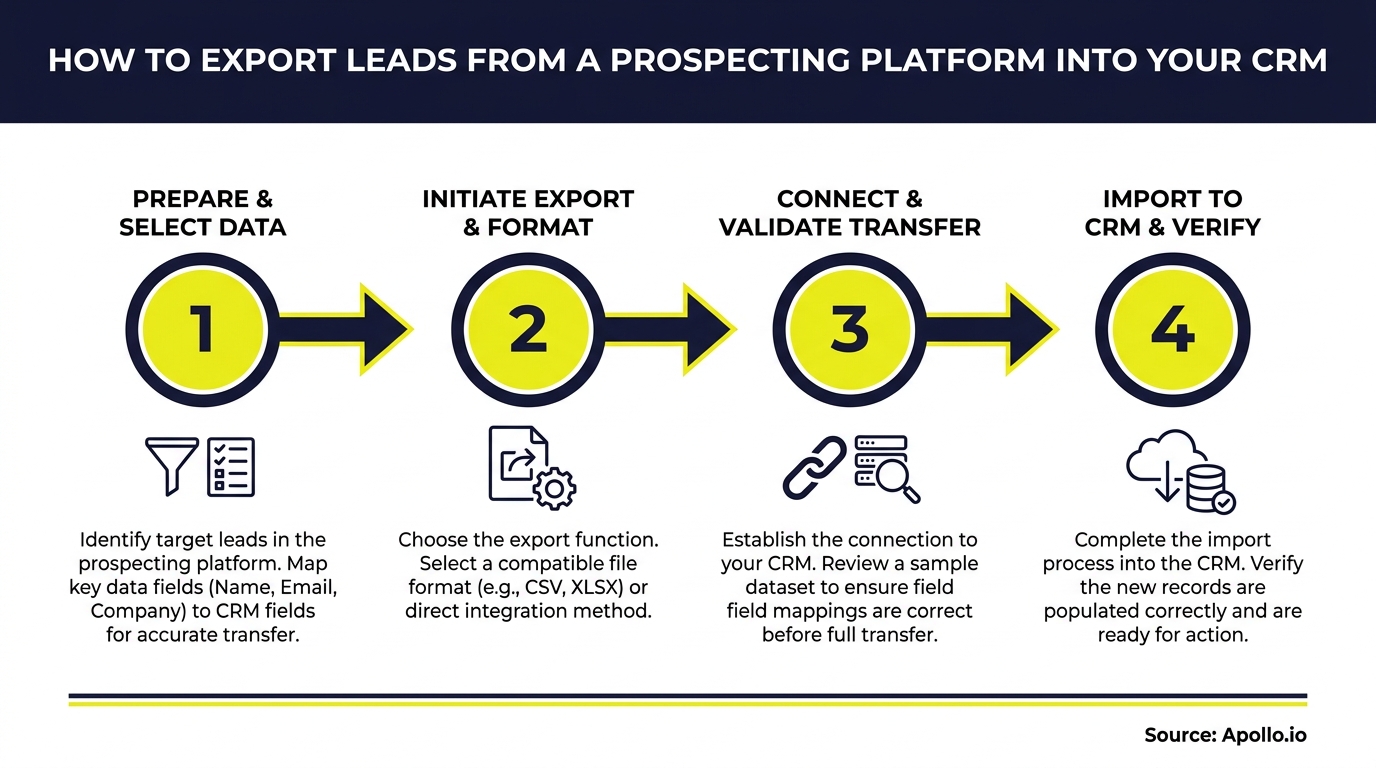
The right export workflow follows a consistent sequence regardless of which tools you use: validate before export, map fields explicitly, deduplicate on arrival, assign ownership immediately, and verify post-import.
- Filter your prospect list to ICP-matched records only. Exporting unqualified contacts poisons CRM data quality from day one.
- Verify required fields are populated in the prospecting platform before export: email, company, title, and phone at minimum.
- Choose your integration method using the framework above. Default to native integration; use CSV only for one-time, low-volume transfers.
- Configure deduplication and ownership rules before the first record lands.
- Run a test import with 10-20 records and confirm field mapping, object assignment, and routing behave as expected.
- Check for errors post-import: Review your CRM's import log for rejected records, missing fields, or unassigned owners.
- Trigger sequences immediately on imported leads rather than waiting for manual rep action.
For a complete CRM strategy that goes beyond lead import, including routing logic and pipeline governance, that resource covers the full lifecycle.

Start Exporting Leads the Right Way in 2026
Exporting leads into your CRM is only valuable when the records arrive clean, mapped correctly, and routed instantly. The teams closing more pipeline aren't running better CSV imports — they've eliminated the export step by using platforms where prospecting and CRM sync are the same motion.
Apollo gives SDRs, AEs, and RevOps teams a unified workspace where leads discovered in the platform sync directly to Salesforce or HubSpot with verified data, deduplication, and activity write-back built in. No middleware. No manual cleanup. No stale lists. Get Leads Now and see how Apollo keeps your CRM accurate from the first contact forward.
Prove Pipeline ROI With Apollo
ROI pressure killing your tool budget approval? Apollo delivers measurable pipeline impact from day one — not months later. Nearly 100K paying customers closed the ROI gap fast.
Start Free with Apollo →Don't miss these
Sales
Inbound vs Outbound Marketing: Which Strategy Wins?
Sales
What Is a Sales Funnel? The Non-Linear Revenue Framework for 2026
Sales
What Is a Go-to-Market Strategy? The 2026 GTM Playbook
See Apollo in action
We'd love to show how Apollo can help you sell better.
By submitting this form, you will receive information, tips, and promotions from Apollo. To learn more, see our Privacy Statement.
4.7/5 based on 9,690 reviews
