
How to Enrich Custom Fields in Your Existing CRM from a Sales Platform (2026)
Your CRM is only as useful as the data inside it. According to Landbase, 70% of CRM data is outdated, incomplete, or inaccurate — which means your scoring models, routing rules, and AI automations are all working from a compromised foundation. Enriching custom fields from a sales platform is how RevOps and sales teams fix that at the source, without waiting for manual updates from reps.
This guide walks through the exact process: from governance setup to live enrichment workflows, with practical steps for connecting your sales platform to Salesforce or HubSpot and keeping custom fields populated automatically.

Research Less, Close More With Apollo
Tired of burning hours on manual lead research while your pipeline stalls? Apollo surfaces verified contacts instantly, so your team spends time selling — not searching. Nearly 100K paying customers have made the switch.
Start Free with Apollo →Key Takeaways
- Most CRM databases start from a low-trust baseline — enrichment must be continuous, not a one-time project.
- Poor CRM data quality has direct revenue consequences, with a significant share of admins reporting double-digit annual revenue losses tied to bad data.
- Governance (field ownership, data dictionaries, overwrite rules) must come before you connect any enrichment pipeline.
- Real-time enrichment embedded in workflows outperforms quarterly batch cleanup on both cost and data freshness.
- RevOps teams using a unified sales platform for enrichment consolidate their tech stack and reduce the operational complexity of maintaining multiple data vendors.
Why Is CRM Custom Field Enrichment So Urgent in 2026?
CRM custom field enrichment is urgent because bad baseline data blocks every downstream process that depends on it — from lead scoring to AI-assisted forecasting. A report from Validity found that 31% of CRM admins faced annual revenue losses of at least 20% due to poor data quality. Meanwhile, WaveCnct reports that 76% of CRM users find less than half of their CRM data accurate and complete.
The shift toward AI-assisted CRM has raised the stakes further. Enrichment pipelines that were once "nice to have" are now a prerequisite for AI agents and agentic automation to function reliably.
Bad data in means bad automation out.
What Is a Governance-First Approach to CRM Custom Fields?
A governance-first approach means defining field ownership, acceptable values, and overwrite rules before connecting any enrichment source. Without this foundation, enrichment pipelines overwrite rep-edited fields, create duplicate data, and undermine trust in the CRM.
Key governance artifacts to create before enrichment setup:
- Data dictionary: A shared document listing each custom field, its definition, accepted values, data type, and the team that owns it.
- Field ownership assignments: Each field has one owner (RevOps, Marketing Ops, or Sales Ops) responsible for accuracy and SLA compliance.
- Overwrite rules: Define when enrichment can overwrite an existing value (e.g., only if the field is blank, or only if the record is older than 90 days).
- SLAs: Set refresh frequency expectations per field type — firmographic fields may refresh monthly, while contact-level fields like job title may require weekly checks.
A Reddit user shared a firsthand perspectivethat CRM enrichment is really a three-part problem: existing data cleanup, go-forward enrichment with controls to prevent new bad data, and process and governance. Skipping part three makes parts one and two temporary fixes.
How Do You Map and Populate Custom Fields from a Sales Platform?
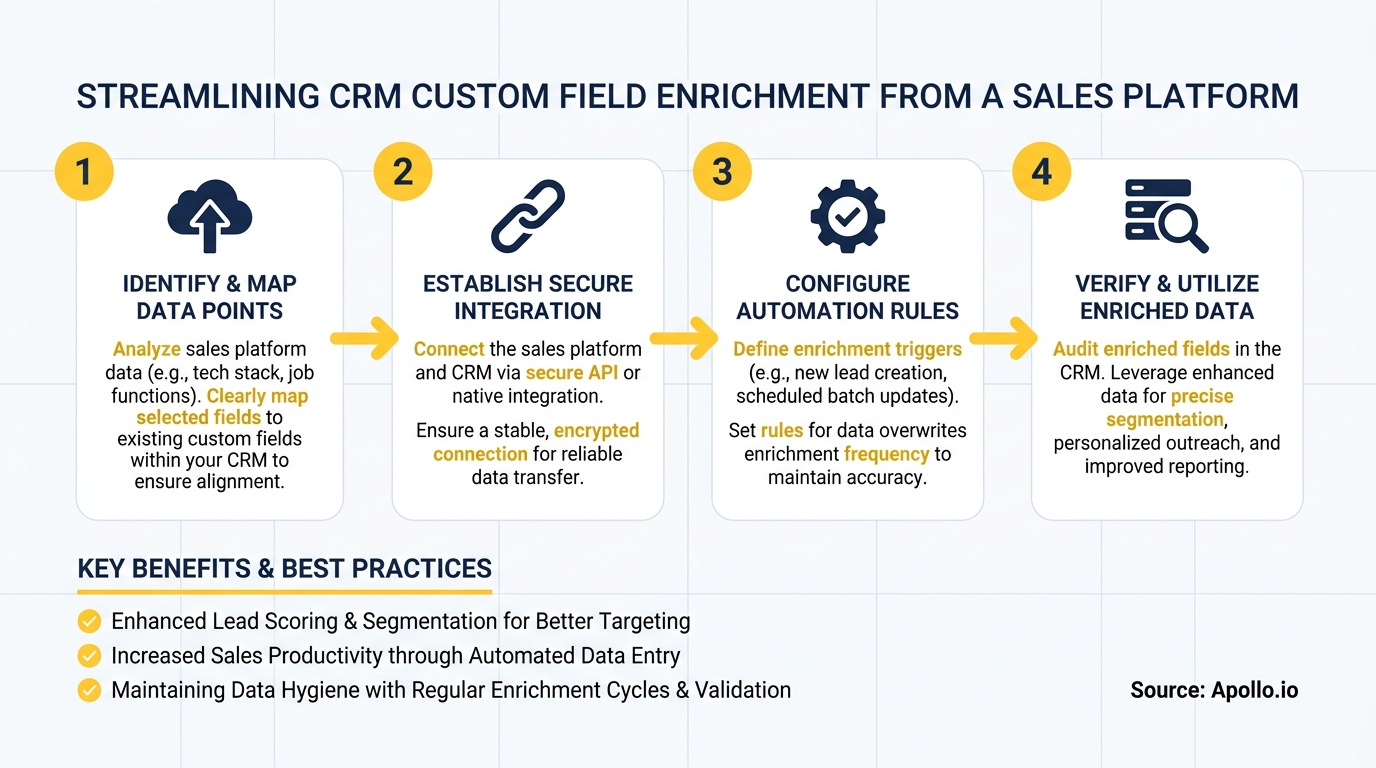
Enriching custom fields from a sales platform involves mapping the platform's data attributes to your CRM's custom field schema, then triggering writes through a native integration, API, or workflow automation. Apollo's enrichment tools support mapping to custom fields across 65+ data attributes — including firmographic, technographic, and contact-level signals.
Step-by-step implementation:
- Audit existing custom fields — identify which are empty, stale, or inconsistently populated.
- Map sales platform attributes to CRM fields — match field types (text, picklist, boolean) and confirm value formats align.
- Set overwrite logic — configure whether enrichment fills blank-only fields or can update existing values based on recency.
- Choose batch vs. real-time enrichment — batch for existing records; real-time triggers for new records or job change events.
- Test on a sandbox or limited record set — validate field population before deploying to your full database.
- Enable ongoing sync — schedule recurring enrichment runs and set up alerts for field-level failure rates.
For a detailed walkthrough on connecting Apollo to your CRM, see the Apollo for HubSpot and Salesforce integration guide.
What Is the Difference Between Batch and Real-Time CRM Enrichment?
Batch enrichment processes a bulk set of existing records on a schedule, while real-time enrichment triggers field updates the moment a record is created or a data signal changes. Both have a role in a mature enrichment strategy.
| Approach | Best For | Tradeoffs |
|---|---|---|
| Batch enrichment | Historical record cleanup, quarterly firmographic refresh | Data can age between runs; higher per-run credit cost |
| Real-time enrichment | New record creation, job change alerts, routing triggers | Requires event-driven integration setup; ongoing monitoring needed |
| Continuous scheduled refresh | Keeping high-priority accounts always current | More efficient than full re-enrichment; lower cost over time |
A Reddit user wrote on Reddit about building custom logic that listens to Salesforce events and calls enrichment endpoints — noting that tracking job changes automatically was a major pain point solved by event-driven architecture. This approach means custom fields like "Current Title" and "Company Size" stay accurate without manual rep intervention.
For teams using Apollo, data sync workflows handle both scheduled and trigger-based enrichment natively, reducing the need for custom API builds.

How Do RevOps Teams Keep Custom Fields Accurate Over Time?
RevOps teams maintain custom field accuracy by treating enrichment as a continuous process with observable health metrics, not a one-time project. The market has shifted decisively toward always-on enrichment — quarterly batch cleanup is increasingly seen as inadequate for AI-ready CRM operations.
Ongoing accuracy practices for RevOps:
- Monitor field completion rates — track what percentage of ICP accounts have each priority custom field populated.
- Set field-level alerts — flag records where high-priority fields (e.g., "Employee Count", "Tech Stack") haven't been updated within your SLA window.
- Use job change signals as enrichment triggers — when a contact changes roles, trigger a full record re-enrichment. See how job change alerts drive pipeline when wired into CRM workflows.
- Run enrichment health reviews quarterly — compare field completion before and after enrichment runs to validate ROI.
Research from Cleanlist.ai confirms that 88% of B2B marketers report enriched data substantially improves lead quality and conversion rates — which is why RevOps leaders treat enrichment as a revenue protection measure, not a data hygiene exercise.
Tired of managing enrichment across multiple disconnected tools? Apollo's data enrichment platform keeps your CRM custom fields current with 230M+ verified contacts — without the multi-vendor complexity.
Turn Funnel Gaps Into Qualified Pipeline
Tired of watching marketing leads stall before they ever reach sales? Apollo surfaces verified, in-market buyers so your team works the right prospects at right moment. Nearly 100K paying customers have replaced pipeline guesswork with predictable revenue.
Schedule a Demo →What Custom Fields Should SDRs and AEs Prioritize Enriching?
SDRs and AEs should prioritize enriching the custom fields that directly influence outreach personalization, routing accuracy, and deal qualification. Fields that sit empty or stale block territory assignments, scoring models, and sequence triggers.
High-priority custom fields by role:
| Role | Priority Custom Fields | Why It Matters |
|---|---|---|
| SDRs | Job Title, Seniority, Direct Dial, Tech Stack | Enables personalized outreach and correct sequence enrollment |
| AEs | Employee Count, Annual Revenue, Buying Committee Members | Supports deal qualification and multi-threaded outreach |
| RevOps | ICP Score, Lead Source, Enrichment Date | Powers routing rules, forecasting, and pipeline health reports |
| Marketing | Industry, Persona, Intent Signal | Improves segmentation accuracy and campaign targeting |
For AEs managing enterprise accounts, enriched firmographic fields also feed deal management workflows — ensuring account context is always current when preparing for executive-level conversations. Enrichment is not just a data task; it directly accelerates deal velocity.
How Does Consolidating Enrichment Into One Platform Save Teams Money?
Consolidating enrichment into a single sales platform eliminates the cost and complexity of maintaining separate data vendors, enrichment tools, and CRM middleware. Teams that rely on multiple point solutions often pay for overlapping data, manage duplicate field mappings, and spend engineering time maintaining brittle integrations.
Predictable Revenue reduced their operational complexity significantly after consolidating:"We reduced the complexity of three tools into one," as described in the Predictable Revenue customer story. Apollo's all-in-one GTM platform handles prospecting, enrichment, engagement, and CRM sync in a single workspace — removing the need to stitch together separate enrichment APIs, engagement tools, and CRM connectors.
For teams building or auditing their stack, the sales tech stack playbook outlines how to evaluate consolidation opportunities and identify redundant tools.

Start Enriching Your CRM Custom Fields Today
CRM custom field enrichment is no longer optional for teams running AI-assisted workflows, predictive scoring, or automated routing. The process starts with governance (field ownership and overwrite rules), moves to integration (mapping sales platform attributes to CRM schema), and succeeds with continuous enrichment rather than periodic cleanup.
Apollo connects to Salesforce and HubSpot natively, maps to custom fields across 65+ data attributes, and supports both scheduled and real-time enrichment triggers — all in one platform. Teams like Cyera found that "having everything in one system was a game changer."
Ready to keep your CRM custom fields current without managing a fragmented data stack? Schedule a demo with Apollo and see how enrichment, prospecting, and engagement work together in one unified platform.
Prove Pipeline ROI Before Next QBR
ROI pressure killing your tool budget? Apollo delivers measurable pipeline impact fast — with 35% more bookings from AI-powered messaging. Nearly 100K paying customers closed the loop on ROI.
Schedule a Demo →Don't miss these
Sales
Inbound vs Outbound Marketing: Which Strategy Wins?
Sales
What Is a Sales Funnel? The Non-Linear Revenue Framework for 2026
Sales
What Is a Go-to-Market Strategy? The 2026 GTM Playbook
See Apollo in action
We'd love to show how Apollo can help you sell better.
By submitting this form, you will receive information, tips, and promotions from Apollo. To learn more, see our Privacy Statement.
4.7/5 based on 9,690 reviews
