
How to Clean Up a Messy CRM Before Importing It Into a New System (2026)
Migrating to a new CRM is one of the highest-leverage decisions a GTM team can make — and one of the most common ways to replicate old problems at scale. Most migrations don't fail at the technology stage. They fail at the data stage, because teams import what they have instead of what they need. According to Validity's State of CRM Data Management report, 31% of CRM administrators reported that poor-quality data costs them at least 20% of their annual revenue. Before you move a single record, you need a cleanup plan. This guide gives you one.
If you're planning your CRM integration strategy, start with this CRM integration strategy guide — then come back here to make sure your data is ready for the move.

Clean Data, Real Connections With Apollo
Tired of bounced emails and wrong numbers killing your outreach? Apollo delivers 97% email accuracy so every rep hits real contacts, not dead ends. Start building pipeline that actually converts.
Start Free with Apollo →Key Takeaways
- A "lift-and-shift" import without cleanup locks bad data into your new system permanently — duplicates, broken ownership, and gaps compound over time.
- Pre-import cleanup should follow a defined quality gate: set pass/fail thresholds by defect type before any records move.
- RevOps leaders who treat cleanup as a governance project — not a one-time task — see significantly better post-migration data health.
- AI-powered CRM features (scoring, routing, personalization) amplify dirty data. Cleanup is now an AI readiness requirement, not just a hygiene preference.
- Ongoing enrichment and automated monitoring after import prevent data decay from undoing your migration investment.
Why Does CRM Cleanup Matter Before Migration?
Cleaning your CRM before migration matters because bad data imported into a new system doesn't get fixed — it gets institutionalized. A Reddit user shared a firsthand perspectivethat captures this perfectly: "If you import raw data and rely on the CRM to clean it, you end up locking bad decisions into the system. Duplicates multiply, ownership rules break, and sales stop trusting it fast."
The revenue cost is real. Research from Landbase shows poor data quality costs the average B2B company between $12.9 million and $15 million per year through wasted marketing spend, lost sales opportunities, and operational inefficiencies. For RevOps leaders building a business case for cleanup investment, that number makes the conversation straightforward.
In 2026, the stakes are even higher. ServiceNow's push toward autonomous CRM workflows and Microsoft Dynamics 365's Wave 1 AI roadmap both assume clean, standardized, auditable data underneath.
Dirty data doesn't just create noise — it creates AI risk: wrong outreach, misrouted leads, and compliance gaps.
How Do You Audit Your CRM Data Before Importing?
Start with a baseline defect profile — a structured count of every data quality problem type — before touching a single record. This gives you a defensible starting point and helps you prioritize cleanup effort.
Run a count across these five defect categories:
| Defect Type | What to Measure | Target Before Import |
|---|---|---|
| Duplicate Records | % of contacts/accounts with matching email or company+name | <3% duplicate rate |
| Missing Required Fields | % of records missing email, company, or owner | >90% completeness on required fields |
| Incorrect/Outdated Data | % of emails bouncing; job titles or companies no longer valid | <5% hard bounce rate |
| Inconsistent Formatting | Phone number formats, state abbreviations, industry labels | 100% standardized before import |
| Orphaned Records | Contacts with no associated account or activity in 18+ months | Reviewed and purged or archived |
A Reddit user described the shock of this audit in a CRM discussion: their company's CRM listed 30,000 "customers" — after cleanup, 7,000 were real customers, and only 1,500 were active accounts. That ratio is more common than most teams expect.
Tired of stale contact data undermining your pipeline? Apollo's data enrichment fills gaps with 230M+ verified business contacts — so your new CRM starts with accurate data, not inherited noise.

What Is a Pre-Import Quality Gate and How Do You Build One?
A pre-import quality gate is a defined pass/fail checklist that determines whether your data is migration-ready before any records enter the new system. Think of it as a go/no-go decision point with measurable thresholds, not a gut check.
Build your gate around these criteria:
- Dedupe threshold passed: Duplicate rate below your defined ceiling (e.g., <3%)
- Required fields complete: Email, first name, last name, company, and owner populated on all migrating records
- Email deliverability validated: Bulk verification run; hard-bounce records quarantined or enriched
- Field formats standardized: Consistent phone format, country codes, state/province abbreviations
- Ownership assigned: Every record has a named owner — no orphans entering the new system
- Consent and retention reviewed: Records flagged for PII minimization or deletion based on age and source
If any threshold fails, the import does not proceed. This gate protects the new system from inheriting old problems and gives RevOps a structured audit trail for stakeholders. For more on the difference between enrichment and cleansing as part of this process, see data enrichment vs. data cleansing: key differences and best practices.
Turn Funnel Gaps Into Predictable Pipeline
Pipeline forecasting a guessing game because quality leads dry up before they convert? Apollo surfaces in-market buyers with pinpoint timing so your reps stop chasing dead ends. Over 600K companies now forecast with confidence.
Schedule a Demo →How Do RevOps Teams Execute the Actual Cleanup?
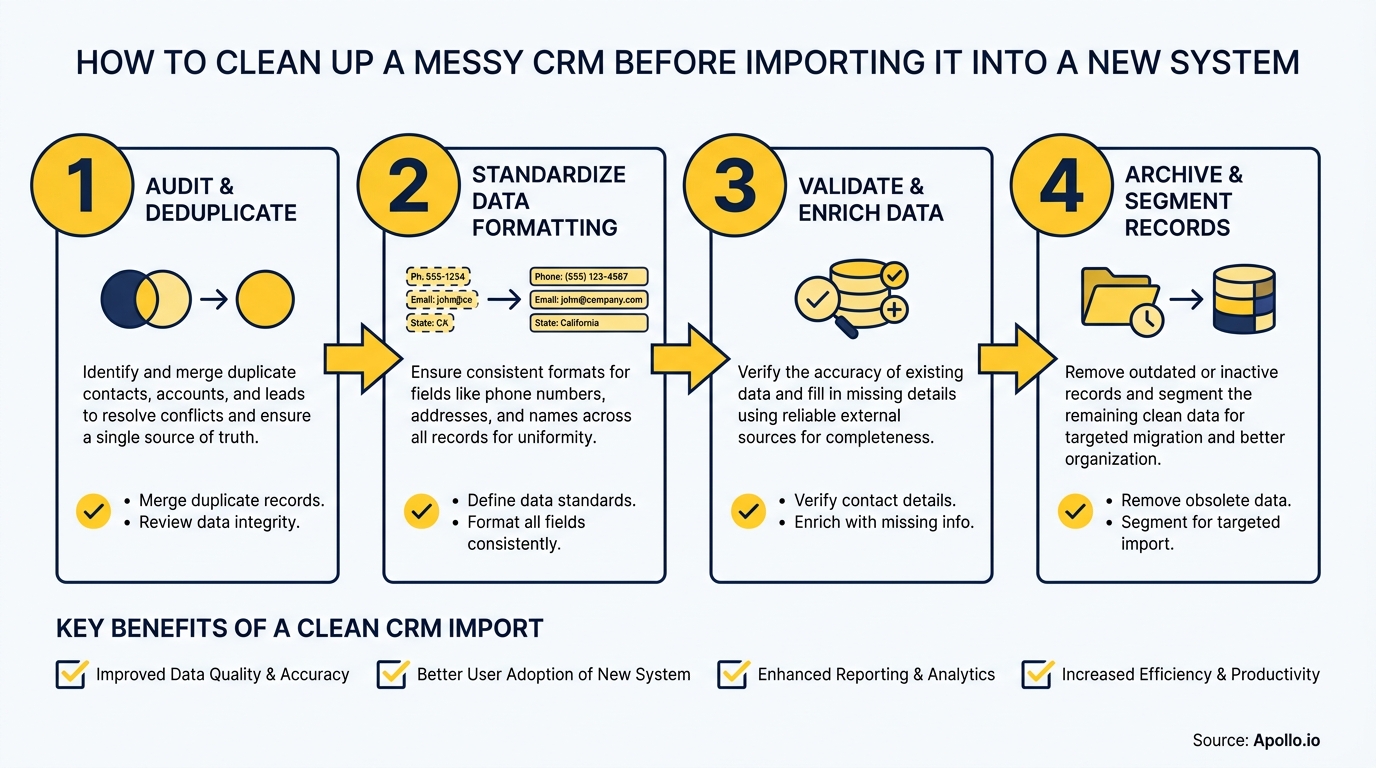
RevOps teams execute CRM cleanup most effectively by following a fixed sequence: freeze, define, purge, normalize, dedupe, enrich — in that order. Skipping steps or running them in parallel creates cascading errors.
- Freeze the data. Export a full snapshot. Stop new records from entering the source CRM during cleanup. This prevents moving targets.
- Define a "real" record. Align sales, marketing, and ops on the minimum fields that make a contact worth importing. Email + company + owner is a common baseline.
- Purge obvious junk. Delete test records, placeholder entries ("John Test", "aaa@aaa.com"), and accounts with no activity and no owner.
- Normalize formatting. Standardize phone numbers, job title taxonomies, industry labels, and lifecycle stage values. Use find-and-replace in bulk before import.
- Deduplicate.Run matching rules on email (exact), then company + name (fuzzy). Define survivorship rules: which record wins when merging (usually the most recently updated).
- Enrich gaps. For records that pass the gate but are missing fields, run enrichment to fill in company size, industry, or verified email before import.
Apollo's Data Health Center gives GTM teams a single workspace to identify, clean, and enrich CRM records — without switching between four different tools to do it.
How Do SDRs and AEs Stay Productive During a CRM Migration?
SDRs and AEs can maintain productivity during a migration by continuing to work from the existing system until the new CRM has been validated — not by switching early. The migration window is when sales teams lose the most trust in their data, so clear communication from RevOps on timelines and data status is critical.
Practical steps to protect rep productivity:
- Give SDRs a freeze-date notice at least two weeks before migration so they can complete outreach sequences before the cutover
- Assign AEs a "migration owner" for their accounts — someone responsible for verifying their top 20 accounts are correctly migrated
- Run a parallel period where both systems are read-accessible, so reps can verify their pipeline didn't lose deals in transit
- Use job change alerts post-migration to immediately surface stale contacts — buyers change roles constantly, and a clean import is still stale within months without ongoing signals
Concerned about keeping pipeline healthy while your team migrates systems? Apollo's pipeline tools keep your GTM team moving even when your CRM is mid-transition.
How Do You Maintain Data Quality After the Migration?
Post-migration data quality requires ongoing governance, not a single cleanup event. NRev.ai reports that in 2025, 37% of CRM users reported losing revenue as a direct consequence of poor data quality — meaning a clean import can decay quickly without monitoring in place.
Build these into your post-migration operating model:
- Data quality SLAs: Set measurable targets (e.g., email validity >95%, duplicate rate <3%) and review monthly
- Automated enrichment on new records: Any net-new contact entering the CRM gets auto-enriched before routing to a rep
- Scheduled dedupe runs: Weekly or biweekly automated matching, not quarterly manual reviews
- Decay alerts: Flag records with no activity, no valid email, or no recent engagement after 90 days
- Ownership audits: Monthly check for orphaned records — contacts with no assigned owner are a leading indicator of future data rot
For teams syncing data across multiple systems, this guide on data sync and B2B sales ROI covers how to keep CRM records accurate across your full tech stack.

Clean Data Is the Foundation — Now Build on It
A clean CRM migration isn't just an IT project — it's a revenue decision. The cost of importing dirty data compounds: duplicated outreach, misrouted leads, broken AI features, and a sales team that stops trusting the system.
The cost of cleanup, done once and governed continuously, is a fraction of that.
RevOps teams who treat cleanup as a quality gate — not a scramble before go-live — give their organizations a durable competitive advantage. Clean data means better AI outputs, faster onboarding for new reps, and a single source of truth that sales and marketing actually agree on.
Apollo brings together data enrichment and cleansing, CRM integration, and engagement in one platform — so you're not managing five tools to keep your GTM data clean. As Cyera put it: "Having everything in one system was a game changer."
Ready to start fresh with verified, enriched data in your new CRM? Try Apollo free and see how clean your pipeline can be.
Prove Pipeline ROI With Apollo
ROI pressure killing your next budget approval? Apollo surfaces measurable pipeline impact so you can walk into every review with hard numbers. Leadium 3x'd their annual revenue — your case starts now.
Start Free with Apollo →Don't miss these
Sales
Inbound vs Outbound Marketing: Which Strategy Wins?
Sales
What Is a Sales Funnel? The Non-Linear Revenue Framework for 2026
Sales
What Is a Go-to-Market Strategy? The 2026 GTM Playbook
See Apollo in action
We'd love to show how Apollo can help you sell better.
By submitting this form, you will receive information, tips, and promotions from Apollo. To learn more, see our Privacy Statement.
4.7/5 based on 9,690 reviews
