
How to Automatically Flag Outdated Contacts for Review
Your CRM is lying to your outbound engine. Every day SDRs burn cycles calling contacts who left their company months ago, marketers blast campaigns to bouncing addresses, and RevOps teams wonder why pipeline numbers don't match reality.
The root cause is almost always the same: stale contact data that nobody flagged for review.
Learning how to automatically flag outdated contacts for review is the difference between a clean, revenue-generating database and a liability that erodes deliverability, wastes sales effort, and poisons AI-driven personalization. This blueprint gives RevOps teams and sales leaders a practical, auditable system to catch decay before it costs you deals. For broader context on how data hygiene fits into your overall go-to-market motion, see What Is Sales Transformation and How Can RevOps Lead It?

Build Pipeline, Not Spreadsheets
Tired of your reps burning hours verifying contact info instead of closing deals? Apollo delivers 230M+ accurate business contacts so your team spends time selling. Start building real pipeline today.
Start Free with Apollo →Key Takeaways
- B2B contact data decays faster than most teams realize, making automated flagging a revenue-protection priority, not a nice-to-have.
- Job changes are now the primary trigger for automatic review, and modern enrichment platforms productize this signal as a first-class data-health workflow.
- A tiered staleness scoring model (30/60/90-day thresholds) gives RevOps a structured review queue instead of a vague "clean your CRM" task.
- Flagging must cover account-level fields (domain, address, routing) alongside contact-level fields to prevent broken territory assignments and segmentation errors.
- Poor data quality carries a substantial financial cost, making an automated flagging system one of the highest-ROI investments a RevOps team can make.
Why Is Stale Contact Data Such a Costly Problem?
Stale contact data is costly because it silently misdirects sales effort, inflates bounce rates, and feeds inaccurate inputs into AI-driven scoring and personalization. According to Forbes, poor data quality costs organizations an average of $12.9 million annually. That figure spans wasted outreach, missed routing, and compounding downstream errors across every team that touches the CRM.
The decay rate makes this urgent. Research from Landbase shows B2B contact data decays at rates ranging from 22.5% to 70.3% annually, depending on industry and role turnover. A meaningful share of your database becomes unreliable within a single quarter without an automated system in place. For SDRs and AEs running high-volume outbound, this translates directly to wasted touches and damaged sender reputation.
Tired of dirty data derailing your sequences? Keep your pipeline clean with Apollo's 230M+ verified business contacts.
What Triggers Should Automatically Flag a Contact for Review?
A contact should be automatically flagged for review when a defined staleness signal fires in your CRM or enrichment platform. There are two categories of triggers: contact-level and account-level.
Contact-Level Staleness Signals
- Job change detected: Enrichment platforms now productize job-change detection as a first-class workflow. When a contact's title, employer, or email domain changes, the record is automatically marked outdated and sequences are paused pending re-verification.
- Email hard bounce: A single hard bounce is a near-certain signal the address is invalid. Auto-flag immediately and suppress from future sends.
- Inactivity threshold crossed: No opens, clicks, or replies after a defined window (see tiered model below).
- Last verified date exceeded: If a record has not been re-enriched within your defined SLA (e.g., 90 days), flag it for refresh.
Account-Level Staleness Signals
- Domain change or redirect detected: Indicates an acquisition, rebrand, or shutdown.
- HQ address invalidated: Affects territory routing and physical mail campaigns.
- Firmographic shift: Employee count or revenue band crossing a threshold changes ICP fit and routing logic.
Dual-flagging at both contact and account levels prevents a common gap: updating a person's email while leaving a stale company record that breaks segmentation and routing downstream. This is especially critical for RevOps teams managing territory assignments and forecasting accuracy.

What Is the 30/60/90-Day Staleness Scoring Model?
The 30/60/90-day staleness scoring model assigns tiered review urgency to contacts based on how long they have been inactive or unverified, creating a structured queue instead of a manual list-cleaning task.
| Tier | Threshold | Automated Action | Review Owner |
|---|---|---|---|
| Watch | 30 days inactive or unverified | Tag "At Risk"; trigger enrichment check | SDR or AE assigned |
| Review | 60 days inactive or unverified | Pause sequences; add to review queue | RevOps or team lead |
| Suppress | 90 days inactive or unverified | Move to non-marketing status; escalate | RevOps data steward |
A sales professional wrote on Reddit that when setting this up for clients, they create segments based on no activity in the past 90, 150, and 180 days, no opens in the last 15, 25, or 50 emails, plus bounced and unsubscribed contacts, then use a workflow to automatically move anyone entering those lists to a non-marketing contact status. This tiered approach translates directly to the model above.
For contacts in the Suppress tier, a key decision is whether to hard-delete or preserve as non-marketing. A commenter added in a Reddit discussion that true junk (form spam, confirmed leavers who bounce) warrants deletion, while disengaged but legitimate leads should be kept as non-marketing contacts to preserve historical attribution.
Turn Weak Leads Into Qualified Pipeline
Tired of marketing leads that never convert to real opportunities? Apollo surfaces in-market buyers with pinpoint accuracy so your team stops chasing dead ends. Over 600K companies now forecast with confidence.
Start Free with Apollo →How Do RevOps Teams Build the Automation Architecture?
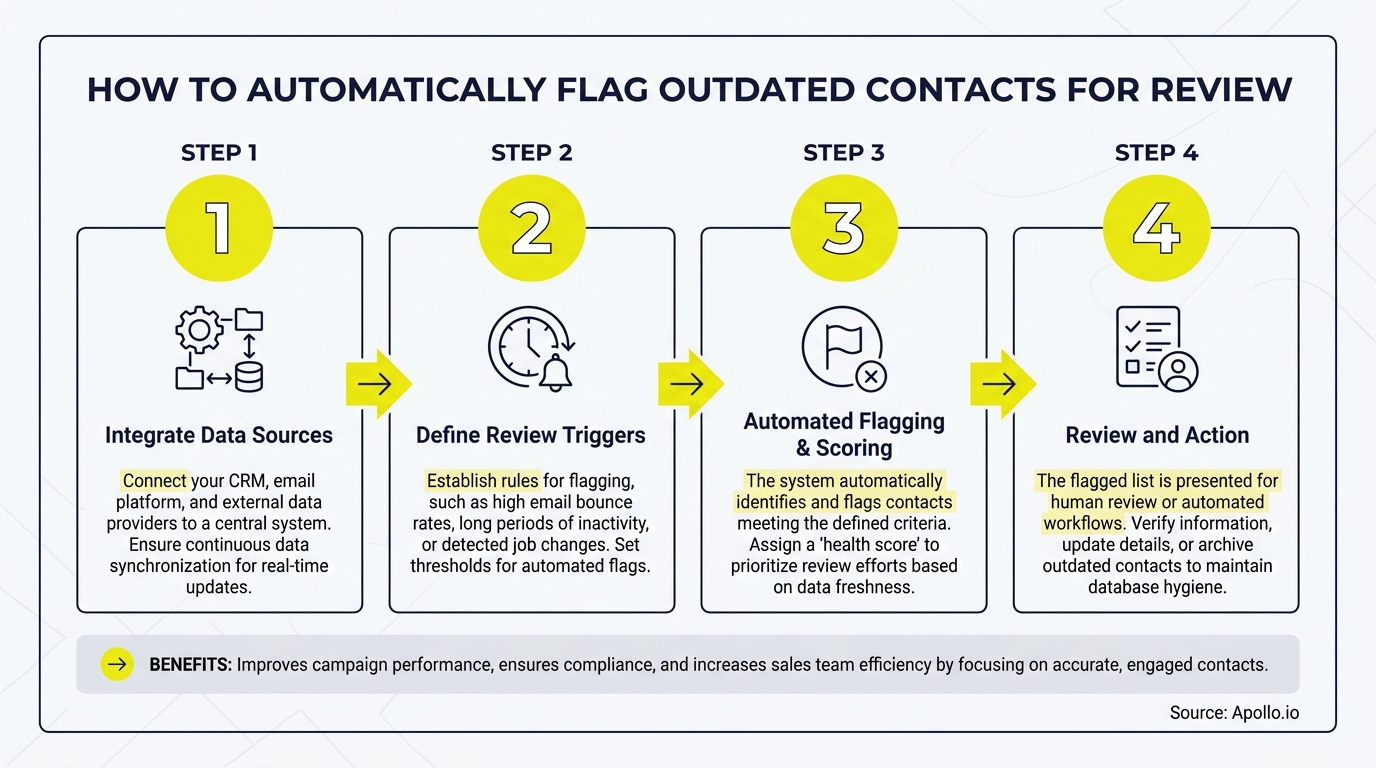
RevOps teams build automated flagging by connecting four layers: the CRM as the system of record, an enrichment service for change detection, a workflow engine for rule execution, and a review queue for human-in-the-loop oversight.
- Define staleness fields in your CRM: Add custom fields for
last_verified_date,data_health_status, andflag_reasonto every contact and account record. - Configure enrichment triggers: Set scheduled enrichment (monthly minimum) to detect job changes, email validity shifts, and firmographic updates. Apollo's contact enrichment supports continuous monitoring so records are flagged when attributes actually change, not just on a fixed calendar.
- Build workflow rules: Trigger flag actions when staleness signals fire (bounce detected, job change confirmed, inactivity threshold crossed). Write the flag reason to the
flag_reasonfield for audit trail purposes. - Route to a review queue: Flagged records populate a shared queue in your CRM. Assign SLA: Watch-tier records reviewed within 5 business days, Review-tier within 2, Suppress-tier same day.
- Document outcomes: Require reviewers to log the resolution (enriched, deleted, converted to non-marketing) in the change history. This audit trail supports compliance and governance reviews.
Waterfall enrichment strengthens this architecture further. Chaining multiple data sources in sequence before flagging a record as stale reduces false positives in the review queue, a pattern increasingly common in modern GTM stacks. For integration guidance specific to your CRM, see CRM Integration: Connect HubSpot, Salesforce, and Apollo Fast.
How Does Automated Flagging Protect Email Deliverability?
Automated flagging protects email deliverability by preventing bounce-prone contacts from entering sequences in the first place, which directly defends your domain reputation. Post-2024 bulk-sender enforcement has made bounce and spam thresholds significantly more punitive, turning contact freshness into a deliverability KPI.
Data from SalesMotion shows that email decay accelerated to 3.6% per month in November 2024, meaning a list left unchecked for even two months carries meaningful bounce risk. Automated suppression of flagged contacts before they enter campaigns is the fastest way to keep bounce rates below the thresholds that trigger inbox provider penalties.
This connects directly to how teams verify email addresses for B2B sales: verification at import is necessary, but it is not sufficient. Continuous flagging catches degradation that happens after a contact enters your database. For teams building B2B email lists that convert, an automated review workflow is the operational layer that keeps list quality high over time.
How Do SDRs and RevOps Leaders Use Flagged Contact Queues Daily?
SDRs use flagged contact queues to stop wasting touches on departed contacts, while RevOps leaders use them to enforce data SLAs and keep pipeline metrics trustworthy. The review queue is the operational handoff between automated detection and human judgment.
For SDRs, the workflow is simple: before enrolling a contact in a sequence, check their data_health_status field. If flagged, do not enroll until the record is cleared. This prevents the common scenario of sending three-step sequences to someone who left their company six months ago, a problem that damages sender reputation and wastes quota-carrying time.
For RevOps leaders, the queue provides a daily dashboard view of database health. Key metrics to track include: number of records entering each staleness tier per week, average time to resolution per tier, and percentage of flagged records resolved via enrichment versus suppression. These metrics feed directly into forecasting accuracy and support accurate pipeline reporting for sales leaders.
The right sales automation approach builds human review checkpoints into automated workflows, rather than replacing human judgment entirely. Governance and audit trails ensure that what gets auto-updated versus what requires approval is controlled and documented.

Start Flagging Stale Contacts Automatically in 2026
Automated stale-contact flagging is not a data hygiene project. It is a revenue protection system. With B2B contact data decaying at rates between 22.5% and 70.3% annually (per Keepsync), every week without an automated review workflow is another week of compounding inaccuracy feeding your outbound engine, your AI models, and your forecast.
The blueprint is straightforward: define staleness fields, configure enrichment triggers, build tiered workflow rules, route to a human review queue, and document outcomes. Teams that implement this system protect deliverability, sharpen SDR productivity, and give RevOps the clean data foundation needed for reliable pipeline visibility.
Apollo consolidates prospecting, enrichment, engagement, and CRM sync in one platform, so flagging, re-enriching, and suppressing contacts happens inside a single workspace instead of across five disconnected tools. As Cyera put it, "Having everything in one system was a game changer." Start a free trial and build your automated contact review workflow today.
Prove Pipeline ROI Before Next QBR
ROI pressure killing your tool budget? Apollo delivers measurable pipeline impact your leadership can see — fast. Teams like Built-In gained +10% win rates and +10% ACV using Apollo's signals and guidance.
Schedule a Demo →Don't miss these
Sales
Inbound vs Outbound Marketing: Which Strategy Wins?
Sales
What Is a Sales Funnel? The Non-Linear Revenue Framework for 2026
Sales
What Is a Go-to-Market Strategy? The 2026 GTM Playbook
See Apollo in action
We'd love to show how Apollo can help you sell better.
By submitting this form, you will receive information, tips, and promotions from Apollo. To learn more, see our Privacy Statement.
4.7/5 based on 9,690 reviews
