
How to Automate Task Creation in CRM From Sales Tool Actions (2026)
Every time a prospect replies to an email, books a meeting, or stalls in your pipeline, the next step should appear in your CRM automatically. Instead, most reps create those tasks manually, burning time that should go to selling. According to Everstage, automation has helped top-performing B2B sales organizations free up about 20% of sellers' capacity and improve productivity by up to 30%. The gap between teams that automate CRM task creation and those that don't is widening fast.
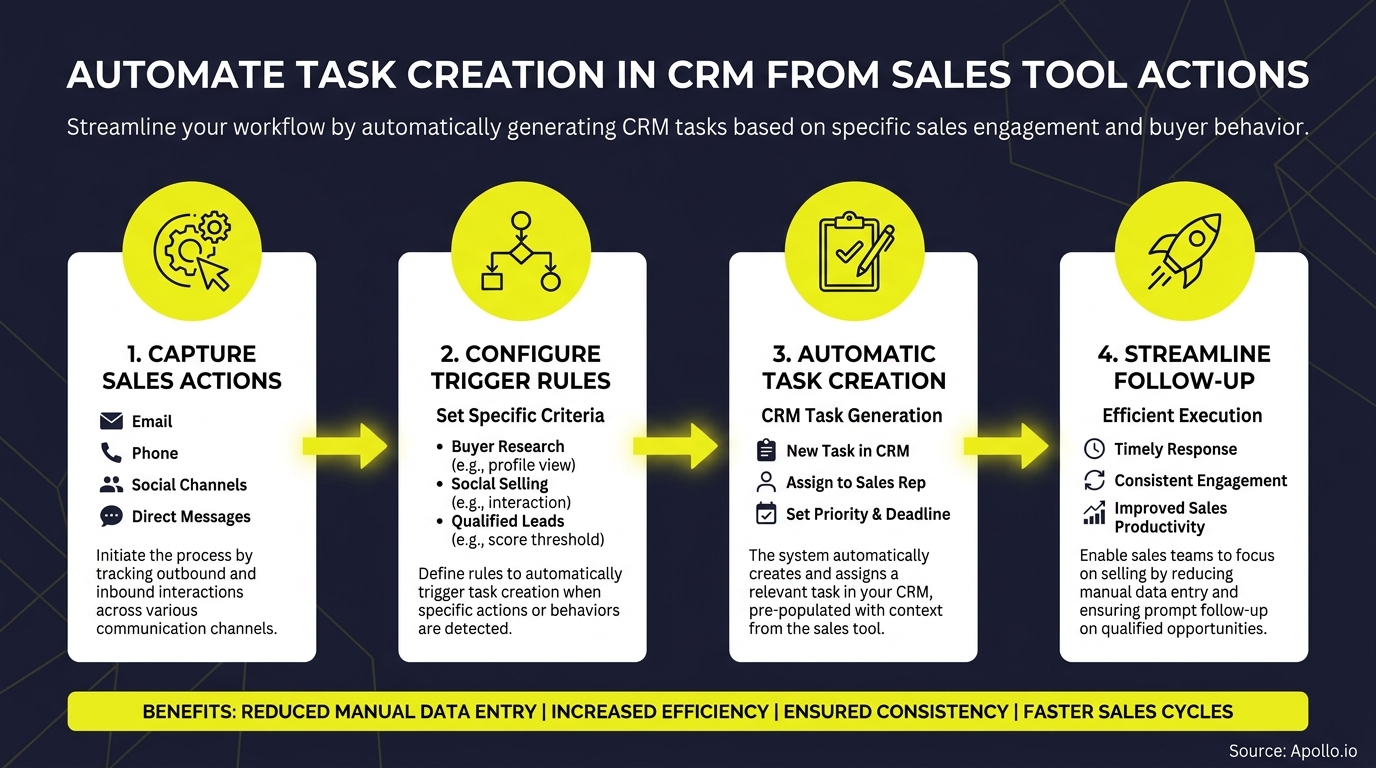
This guide gives you the trigger taxonomy, implementation architecture, governance checklist, and ROI framework to automate CRM task creation from sales tool actions, without creating chaos in your pipeline. For the foundation, start with a solid CRM integration strategy.

Let Apollo Find Your Next Buyer
Tired of burning hours on manual research just to verify a single contact? Apollo surfaces accurate leads instantly so your reps spend time selling, not searching. Join 600K+ companies building pipeline faster.
Start Free with Apollo →Key Takeaways
- Sales tool actions like email replies, meeting bookings, and call outcomes should auto-create CRM tasks with a defined owner, due date, and SLA.
- The right architecture (native CRM workflow vs. iPaaS webhook vs. AI agent) depends on your trigger complexity and data quality.
- Governance failure modes like duplicates, stale tasks, and wrong assignees are preventable with a simple validation checklist.
- CRM task automation is a data quality initiative first. Incomplete records block automation before it ever fires.
- 76% of companies achieve positive ROI from sales automation within the first year, making the business case straightforward.
What Is CRM Task Automation From Sales Tool Actions?
CRM task automation from sales tool actions means configuring your sales stack so that specific events in tools like your sales engagement platform, dialer, or meeting scheduler automatically create, assign, and schedule follow-up tasks inside your CRM without rep involvement.
This is distinct from manual task logging. Instead of a rep remembering to create a "Send proposal" task after a demo, the CRM creates it the moment the meeting ends. The trigger lives in the sales tool; the task lives in the CRM. Sales automation at this level removes the gap between what happened and what needs to happen next.
What Is the Trigger-to-Task Matrix for Sales Actions?
Every sales tool action maps to a specific CRM task type, owner, due date, and risk level. Use this matrix as your starting blueprint.
| Sales Tool Action (Trigger) | CRM Task Type | Owner | Due Date SLA | Risk Tag |
|---|---|---|---|---|
| Prospect replies to email | Follow-up call or email | Assigned rep | Same day | Low |
| Meeting booked | Prep brief / agenda creation | AE or SDR | 24 hours before meeting | Low |
| Meeting completed (no next steps logged) | Send follow-up email + log outcome | AE | 2 hours post-meeting | Medium |
| Proposal sent | Check-in call or email | AE | 3 business days | Medium |
| Deal stalled (no activity 7+ days) | Re-engagement outreach | AE or manager review | Next business day | High |
| Call ended with "send info" outcome | Send resources task | Assigned rep | Same day | Low |
| Intent signal detected (pricing page visit) | Outreach task | SDR or AE | Within 1 hour | High |
| Contract sent | Follow-up and legal review check | AE | 2 business days | High |
For SDRs and BDRs, the most impactful triggers are email replies and intent signals. For Account Executives managing active deals, meeting outcomes and proposal-sent triggers drive the highest follow-up adherence.
Map your highest-volume triggers first, then expand.
Spending hours on manual follow-up logging? Automate your entire sales workflow with Apollo's AI-powered automation.
How Do You Choose the Right Implementation Architecture?
The right architecture for automating CRM task creation depends on your trigger complexity, data quality, and existing tool stack. Three options cover most teams.
| Architecture | Best For | Tools | Reliability |
|---|---|---|---|
| Native CRM Workflow | Simple field-change triggers | Salesforce Flow, HubSpot Workflows | High (no middleware) |
| Webhook / iPaaS | Cross-tool triggers (sales engagement → CRM) | Zapier, Make, Workato | Medium (depends on mapping) |
| AI Agent | Context-dependent next actions | Salesforce Agentforce, HubSpot Breeze | Medium-High (requires clean data) |
Use native CRM workflows when the trigger and task both live inside the CRM (e.g., deal stage change creates a task). Use iPaaS/webhooks when the trigger fires in an external sales tool and needs to push data into the CRM. Use AI agents for ambiguous triggers where context matters, but only when your CRM data is clean and complete.
In March 2026, Salesforce announced Agentforce Sales agents capable of updating pipeline fields and recommending next steps after customer touchpoints, signaling that AI-assisted task creation is moving from experimental to standard. For teams connecting Apollo with their CRM, the Apollo CRM integration enables automatic activity sync and task triggers across Salesforce and HubSpot.
Turn Funnel Guesswork Into Pipeline Clarity
Tired of watching marketing leads stall before they ever reach your pipeline? Apollo surfaces high-intent prospects and arms your team with the signals to act fast. 600K+ companies stopped guessing and started closing.
Start Free with Apollo →How Do RevOps Teams Prevent Automation Failure Modes?
RevOps teams prevent CRM task automation failures by building a governance checklist before going live, not after. The four most common failure modes are duplicates, wrong assignees, stale tasks, and untraceable errors.
Governance checklist before activating any trigger:
- Dedupe check: Confirm the trigger won't fire multiple times for the same event (e.g., email reply received twice in different tools).
- Assignee validation: Verify the task routes to the correct rep, not a default admin or former employee.
- Suppression rules: Exclude records already in a terminal stage (closed-lost, churned) from generating new tasks.
- Audit log: Every automated task should include a source field logging which tool and trigger created it.
- Human-in-loop controls: High-risk triggers (contract sent, executive escalation) should require rep confirmation before the task is marked complete.
- Data quality gate: Automation should not fire if the contact record lacks an owner, phone number, or deal stage. Incomplete records create orphaned tasks.
The data quality gate matters more than most teams expect. Only 35% of sales professionals completely trust their organization's data accuracy, which means roughly two-thirds of CRM records could create misfired tasks without proper validation. Learn how data sync improves B2B sales and marketing ROI as the foundation for reliable automation.

What Is the ROI of Automating CRM Task Creation?
The ROI of automating CRM task creation is measurable across three dimensions: time recaptured, follow-up adherence rate, and conversion lift from faster response.
Research from Cirrus Insight shows that 76% of companies achieve positive ROI from sales automation within the first year, with 12% seeing ROI in under one month. Additionally, iCumulus reports that when automation is powered by AI, businesses report 10-20% increases in ROI.
KPIs to track after implementing CRM task automation:
- Task creation rate:% of qualifying trigger events that auto-generate a CRM task (target: 90%+).
- Follow-up adherence: % of auto-created tasks completed within SLA window (baseline vs. post-automation).
- Rep time on admin: Measure weekly via activity reports before and after automation launch.
- Pipeline velocity: Average days between trigger event and next logged activity.
- Conversion rate by trigger type: Which triggers produce the highest close rate when followed up on time?
For a quick ROI estimate: multiply your rep count by average weekly admin hours spent on task creation, then apply the productivity gain benchmark from the literature above. The output gives you the hours recaptured per quarter to redirect toward selling.
How Does Apollo Consolidate CRM Task Automation Into One Platform?
Apollo consolidates CRM task automation by unifying prospecting, sales engagement, and CRM sync into a single platform, eliminating the need for separate tools that each require their own webhook configurations and maintenance.
When a prospect replies to an Apollo sequence, books a meeting, or hits a custom signal trigger, Apollo can push activity data and trigger follow-up tasks directly into Salesforce or HubSpot through its native integration. This removes the iPaaS middleware layer for the most common trigger types.
As Cyera put it: "Having everything in one system was a game changer."
Apollo's workflow engine lets RevOps teams configure trigger-to-task rules across prospecting, engagement, and enrichment events without stitching together five different tools. For teams currently using multiple platforms, this is the consolidation play that reduces both cost and failure modes. See how the Apollo integration connects HubSpot and Salesforce in practice.

Start Automating CRM Tasks From Sales Tool Actions
Automating CRM task creation from sales tool actions is a three-step process: map your highest-impact triggers using the matrix above, choose the right architecture for each trigger type, and deploy governance controls before going live.
The teams winning in 2026 are not the ones with the most dashboards. They are the ones converting every sales signal into a prioritized next step, automatically. Start with two or three high-volume triggers, measure follow-up adherence and pipeline velocity, then expand. For broader context on building the full automation layer, explore sales automation tools that boost revenue and the sales tech stack playbook for modern teams.
Ready to eliminate manual task logging and turn every sales action into an automatic CRM next step? Start prospecting with Apollo for free and see how the unified platform cuts your tech stack while keeping your pipeline moving.
Prove Pipeline ROI With Apollo
ROI pressure killing your tool budget? Apollo delivers measurable pipeline impact from day one — no guesswork, no waiting. Leadium 3x'd annual revenue. Get results leadership can't ignore.
Start Free with Apollo →Don't miss these
Sales
Inbound vs Outbound Marketing: Which Strategy Wins?
Sales
What Is a Sales Funnel? The Non-Linear Revenue Framework for 2026
Sales
What Is a Go-to-Market Strategy? The 2026 GTM Playbook
See Apollo in action
We'd love to show how Apollo can help you sell better.
By submitting this form, you will receive information, tips, and promotions from Apollo. To learn more, see our Privacy Statement.
4.7/5 based on 9,690 reviews
