
How Do I Avoid Creating Duplicate Records When Syncing With My CRM?
Duplicate CRM records are not an inconvenience — they are a revenue problem. According to Validity's State of CRM Data Management report, 31% of CRM administrators say poor-quality data costs their organization at least 20% of annual revenue. For RevOps leaders and sales teams building on top of CRM data, that math is unacceptable. The good news: most duplicates created during sync are preventable with the right architecture. This article gives you a prevention-first playbook — from choosing match keys to handling race conditions — so duplicates never enter your CRM in the first place. If you are also looking to improve how your tools connect, the CRM integration strategy guide covers the broader integration picture.

Let Apollo Find Your Best Leads Fast
Tired of burning hours on manual research just to land bad contact data? Apollo surfaces verified, ICP-matched prospects so your team spends time selling — not searching. Join 600K+ companies building predictable pipeline.
Start Free with Apollo →Key Takeaways
- Most CRM duplicates are an architecture problem, not a user error — fix the sync logic, not just the cleanup workflow.
- Using upsert operations with deterministic match keys (not just email) is the single highest-impact prevention measure.
- Race conditions can create duplicates even when your matching logic is correct — scheduled detection jobs are a necessary second layer.
- For RevOps teams, duplicate records directly break attribution, AI personalization, and pipeline forecasting.
- Clean CRM data is now an AI-readiness requirement, not just a data hygiene preference.
Where Do Duplicate CRM Records Actually Come From?
Duplicate records are created when a sync operation uses a createcall instead of checking for an existing record first. The four most common root causes are:
- Missing or inconsistent match keys: If your sync has no unique identifier to match on, every incoming record becomes a new record.
- Race conditions: Two systems write the same record at nearly the same moment, before either has confirmed the other's write. Microsoft explicitly warns this can happen even with deduplication rules enabled, which is why scheduled detection jobs are necessary in addition to create-time checks.
- Multi-object sync gaps: Teams deduplicate contacts but ignore accounts, leads, or opportunities. A duplicated account record then generates duplicated child records on every sync cycle.
- Multiple integration sources: A form submission, an enrichment tool, a marketing platform, and a sales tool all write to the same CRM without coordinating on record ownership.
Research from Databar.ai finds that in most organizations, 10–30% of CRM data is duplicated. That scale makes manual cleanup impractical — prevention is the only approach that scales.
Should You Use Upsert or Create When Syncing Records?
Always use upsert (update-or-insert) rather than create when syncing records into your CRM. An upsert checks whether a matching record exists using a defined key; if it finds a match, it updates that record instead of creating a new one.
| Operation | Behavior | Duplicate Risk |
|---|---|---|
| Create | Always inserts a new record | High — creates duplicates on every re-sync |
| Upsert | Updates if match found; inserts if not | Low — requires a reliable match key |
Platform-specific notes:

- HubSpot: Supports upsert via the Contacts API using email or a custom unique property. HubSpot's May 2026 update to its Salesforce company sync now supports matching companies by mapped field values such as domain, enabling deduplication even without a shared record ID.
- Salesforce: Uses External ID fields on any object to enable upsert via the REST API. Define an External ID field on Contact, Account, Lead, and custom objects before your first sync.
- Zoho CRM: Supports upsert via the
duplicate_check_fieldsparameter in the Insert Records API, allowing you to specify which fields to match on.
Why Does Email Matching Fail in B2B Syncs?
Email-only matching fails in B2B because buyers use multiple email addresses, subsidiaries use different domains, and partner-submitted leads often carry alias addresses. Relying solely on email as your match key will both over-merge (two different people at the same company sharing a role email) and under-merge (the same person using two different addresses).
A layered matching strategy is more reliable:
- Primary key: CRM record ID or External ID (most reliable for records already in the system)
- Secondary key: Company domain or website URL for account-level matching
- Tertiary key: Normalized company name + phone number combination
- Enrichment ID: A shared identifier from a data enrichment source, if both systems store it
HubSpot's own guidance notes that Salesforce leads and contacts with different email addresses are not treated as duplicates in HubSpot, while duplicate Salesforce records sharing the same email can cause HubSpot contacts to be overwritten. Multi-field matching avoids both failure modes. For teams using Apollo's CRM enrichment, enriched records carry consistent identifiers that support more reliable matching across sync events.
How Do Race Conditions Create Duplicates — and How Do You Stop Them?
A race condition occurs when two sync processes check for a record's existence simultaneously, both find nothing, and both proceed to create a new record. The result is two identical records, even though your upsert logic was correctly configured.
Two controls are required to address this:
- Create-time locking: Use database-level unique constraints or CRM duplicate rules that fire at record creation. In Salesforce, Duplicate Rules with the "Block" action prevent saves when a match is found. In HubSpot, unique property enforcement on the contact email field serves the same purpose.
- Scheduled detection jobs: Run a deduplication detection job on a defined schedule (daily is standard; hourly for high-volume syncs). This catches any records that slipped through during simultaneous processing windows.
Do not treat scheduled detection as optional. It is the safety net for every edge case your create-time logic cannot handle, including bulk imports, webhook bursts, and API rate-limit retries that re-submit the same payload.
Struggling with data sync across multiple tools? This guide on solving data synchronization headaches covers the architectural decisions that reduce sync conflicts across your entire stack.
Turn Funnel Gaps Into Closed Revenue
Pipeline forecasting a guessing game? Apollo surfaces verified, ICP-matched buyers the moment they're ready to act — so your team stops chasing cold leads and starts closing real opportunities. Nearly 100K paying customers can't be wrong.
Schedule a Demo →How Should RevOps Teams Build a Deduplication Monitoring Framework?
RevOps leaders need measurable proof that deduplication controls are working, not just a one-time setup. Track these KPIs in your CRM reporting or BI tool:
| KPI | What It Measures | Alert Threshold |
|---|---|---|
| Duplicate creation rate by source | Which integration creates the most duplicates | Flag if >1% of records from any source |
| Upsert match rate | % of sync events that matched vs. inserted | Investigate if match rate drops unexpectedly |
| Merge failure rate | Failed automated merges requiring manual review | Zero tolerance for rollback failures |
| Scheduled job catch rate | Duplicates caught by scheduled jobs vs. at create time | High catch rate signals broken upsert logic |
According to BeyondCRM, 44% of companies lose more than 10% of their annual revenue due to inaccurate CRM data. A monitoring framework turns that from a background risk into a visible, manageable metric. For SDRs and AEs, this matters directly: duplicate accounts split engagement history, causing reps to work the wrong record and misattribute pipeline.
Why Is CRM Deduplication Now an AI-Readiness Requirement?
Duplicate records in 2026 do more than create admin overhead — they actively break AI-powered sales workflows. When an AI agent or automated sequence encounters two records for the same prospect, it may trigger duplicate outreach, generate mismatched personalization, or route the lead to the wrong owner.
Salesforce's 2026 State of Sales report found that 74% of sales professionals are actively focused on data cleansing, including deduplication, specifically to maximize AI returns. Separately, Salesforce noted that 51% of sales leaders say disconnected systems are slowing their AI initiatives. MS Dynamics World confirms that duplicate records directly impact revenue visibility, automation performance, and AI-driven insights.
The governance layer that supports AI readiness includes:
- Golden record definition: Designate a single authoritative record per entity and define survivorship rules (which field value wins when two records merge).
- Source-of-truth assignment: Decide which system owns each object type and enforce write-priority rules in your sync configuration.
- Selective sync filters: Block records that do not meet minimum data completeness standards from entering the CRM at all. The safest duplicate is one that never syncs.
- Lineage tracking: Log which system created or last modified each record so merge decisions have an audit trail.
Tired of enrichment data creating new duplicates on every sync? Apollo's data enrichment updates existing CRM records with verified business contact information rather than inserting new ones, keeping your database clean as it grows.
How Do You Set Up a Clean Sync From the Start?
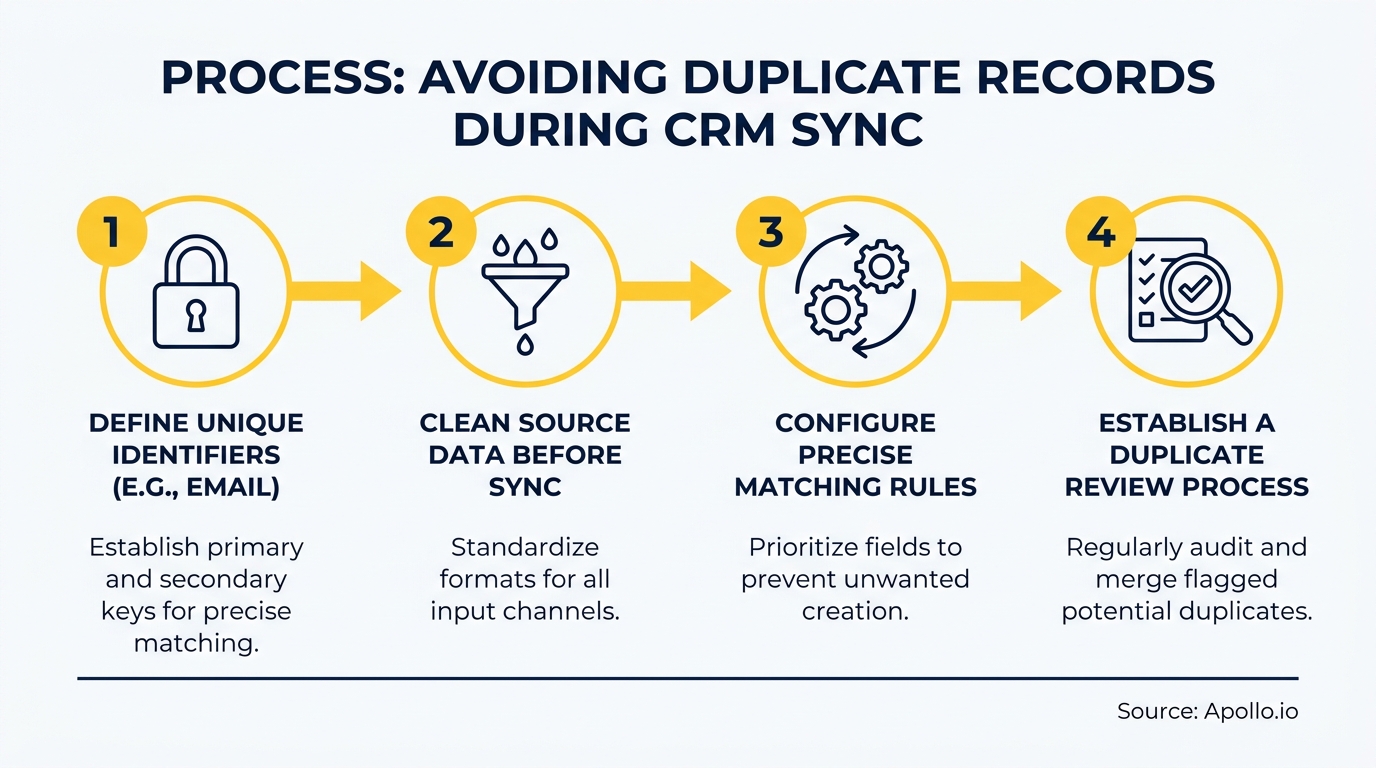
Prevention is cheaper than cleanup. Use this checklist before any new integration goes live:
- Define External ID fields on every object you plan to sync (contacts, accounts, leads, opportunities)
- Configure upsert as the default write operation in your integration layer
- Set up CRM-native duplicate rules with "Block" or "Allow with alert" enforcement
- Build sync inclusion filters to exclude incomplete or test records
- Run a sandbox test with production-representative data before enabling bidirectional sync
- Schedule a recurring deduplication detection job as a background safety net
- Document source-of-truth assignments and survivorship rules in your RevOps runbook
Teams using Apollo's native CRM integrations with Salesforce and HubSpot benefit from built-in field mapping and record-matching logic that reduces sync conflicts from day one. As Cyera noted, "Having everything in one system was a game changer" — consolidating your data sources reduces the number of systems competing to create records in your CRM. For a broader look at how data sync improves B2B sales and marketing ROI, that resource covers the downstream impact on pipeline quality and reporting accuracy.

Start With Clean Data, Stay Clean With the Right Tools
Avoiding duplicate records when syncing your CRM comes down to three non-negotiable practices: use upsert with deterministic match keys, add race-condition controls at both create time and on a schedule, and assign a single system of record before your first sync runs. The revenue cost of skipping these steps is measurable — clean CRM data is now a prerequisite for AI-powered sales, accurate forecasting, and consistent rep performance.
Apollo's unified GTM platform connects prospecting, enrichment, engagement, and CRM sync in one workspace, reducing the number of systems that can write conflicting records into your CRM. "We reduced the complexity of three tools into one," noted Collin Stewart of Predictable Revenue. If you are ready to build a cleaner, more reliable revenue stack, schedule a demo with Apollo to see how the platform keeps your CRM data accurate from source to sync.
Prove Pipeline ROI With Apollo
Budget approval stuck on unclear metrics? Apollo delivers measurable pipeline impact so you can justify every dollar — fast. Leadium 3x'd their annual revenue after making the switch.
Start Free with Apollo →Don't miss these
Sales
Inbound vs Outbound Marketing: Which Strategy Wins?
Sales
What Is a Sales Funnel? The Non-Linear Revenue Framework for 2026
Sales
What Is a Go-to-Market Strategy? The 2026 GTM Playbook
See Apollo in action
We'd love to show how Apollo can help you sell better.
By submitting this form, you will receive information, tips, and promotions from Apollo. To learn more, see our Privacy Statement.
4.7/5 based on 9,690 reviews
