
Can You Trigger Automated Tasks in Your CRM Based on Outreach Activities?
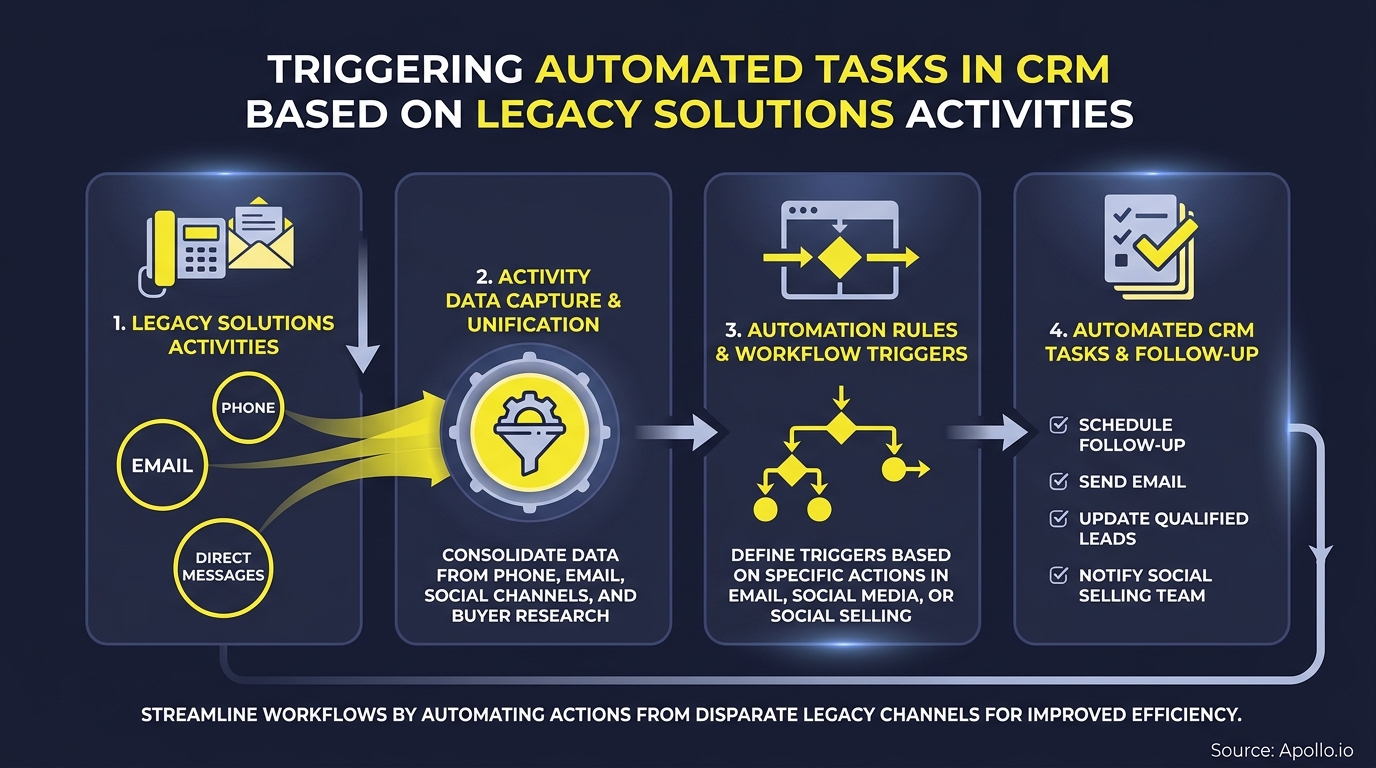
Yes, you can trigger automated CRM tasks based on outreach activities, and in 2026 it has become a core RevOps capability, not a nice-to-have. Most modern CRMs and sales engagement platforms support workflow automation that fires tasks, updates fields, or routes deals the moment a buyer signal occurs: an email reply, a completed call, a missed follow-up, or a booked meeting. If your team is still logging those actions manually, you are leaving pipeline hygiene and response speed on the table. A solid CRM integration strategy is the foundation that makes trigger-based automation reliable.

Build Pipeline Faster With Apollo
Tired of burning hours on manual research just to land a bounced email? Apollo surfaces verified contacts and automates outreach so your team spends time selling, not searching. Join 600K+ companies building predictable pipeline.
Start Free with Apollo →Key Takeaways
- CRM tasks can be automatically triggered by email opens, replies, call outcomes, meeting bookings, sequence completions, and deal-stage changes.
- Trigger-based automation solves a timing problem: buyers who receive irrelevant or delayed follow-up disengage faster than those who get contextual outreach at the right moment.
- Safe automation requires suppression rules, frequency caps, and clean data before you flip the switch.
- RevOps leaders, SDRs, and AEs each have distinct trigger use cases that require clear ownership and SLAs to avoid task conflicts.
- Platforms that unify outreach and CRM data in one workspace eliminate the integration complexity that causes trigger failures.
What Outreach Activities Can Trigger CRM Tasks?
Any captured outreach event can serve as a CRM workflow trigger if your integration passes the activity data bidirectionally. The table below covers the most common trigger signals and their corresponding CRM actions.
| Outreach Activity (Trigger) | CRM Task or Action Created | Owner |
|---|---|---|
| Email reply received | Create "Follow Up" task, move to next stage | AE / SDR |
| Email opened 3+ times, no reply | Create call task with priority flag | SDR |
| Call completed: positive outcome | Advance deal stage, create demo-scheduling task | AE |
| Call completed: voicemail left | Queue follow-up email task (24-hour delay) | SDR |
| Call: no answer, no voicemail | Log attempt, retry task in 48 hours | SDR |
| Meeting booked | Create pre-meeting research task, send confirmation | AE |
| Meeting no-show | Create reschedule task, notify manager | AE / Manager |
| Sequence completed: no engagement | Move to nurture list, remove from active pipeline | RevOps |
| Link clicked in email | Log intent signal, create high-priority call task | SDR / AE |
| Deal stage stalled 10+ days | Create manager escalation task | Manager |
| Unsubscribe or opt-out | Suppress all tasks, update contact status | RevOps (auto) |
| Form submission (inbound) | Create inbound lead task, assign to SDR queue | Marketing / SDR |
The key principle: every captured outreach event should produce either a task, a field update, or a suppression. Silence is not a valid outcome in a governed system.
Why Does CRM Workflow Automation Matter in 2026?
CRM workflow automation matters because manual follow-up is too slow and too inconsistent to compete in a multi-channel buying environment. Research by Paradigm Marketing and Design highlights that integrating CRM with marketing automation produces measurable improvements in lead quality and follow-up consistency. Meanwhile, a 2025 Gartner survey found 73% of B2B buyers actively avoid suppliers that send irrelevant outreach, making contextual, signal-driven tasks a revenue protection issue, not just an efficiency gain.
The shift in 2026 is from static cadences to signal-based triggers. Salesforce's Agentforce Sales announcement in March 2026 frames this as "agentic sales," where pipeline management agents update CRM fields and recommend next steps after every customer touchpoint, with seller approval retained. The message from every major vendor is the same: outreach activity should automatically generate the next action, and sellers should review intent, not create tasks.
Spending too many hours on manual follow-up logging? Apollo's AI sales automation turns outreach signals into next actions automatically, so your reps focus on selling, not data entry.
Turn Funnel Guesswork Into Pipeline You Trust
Pipeline forecasting a guessing game because leads stall before they ever reach your team? Apollo surfaces high-fit prospects and buying signals so your pipeline reflects reality. Nearly 100K paying customers stopped forecasting blind.
Schedule a Demo →How Do RevOps Teams Build a Safe Automation Playbook?
A safe automation playbook requires four guardrails before any trigger goes live: clean data, suppression rules, frequency caps, and defined ownership. Without these, automation amplifies errors instead of eliminating them.
A 2024 Salesforce report found only 35% of sales professionals completely trust their organization's data, which means triggers built on dirty records will route bad tasks at scale.
What Is the Pre-Flight Data Checklist?
Before enabling any outreach-to-CRM trigger, RevOps leaders should confirm the following:
- Lifecycle stages are standardized: Every contact has a stage value; no nulls or custom variants that break trigger conditions.
- Activity capture is bidirectional: Outreach events write back to the CRM record in real time. See how data sync improves B2B sales and marketing ROI when this is done correctly.
- Opt-outs and suppression lists are live: Unsubscribes suppress all downstream tasks before any trigger fires.
- Duplicate records are resolved: A contact appearing twice will generate duplicate tasks and split the activity history.
- Owner assignment rules exist: Every task trigger specifies an owner; unassigned tasks expire or create noise.
What Suppression and Frequency Rules Should You Set?
Suppression rules prevent irrelevant or excessive follow-up from degrading the buyer experience. Set these before launch:
- Frequency cap: No more than one outreach-triggered task per contact per 48 hours (adjust by segment).
- Opt-out suppression: Immediate, automatic, no manual step required.
- Competitor or partner suppression: Tag accounts that should never receive automated tasks.
- Closed-lost suppression: Stop all triggers for 90 days after a closed-lost deal unless a re-engagement sequence is explicitly activated.
- Human review gate: Escalation tasks (manager notification, legal-flagged accounts) require approval before the next automated action fires.
How Should SDRs and AEs Use Outreach Triggers Differently?
SDRs and AEs use outreach-triggered CRM tasks for different stages of the pipeline, and mixing ownership creates task conflicts. Clear role-based rules prevent both duplication and gaps.
For SDRs:The highest-value triggers are top-of-funnel signals: email opens with no reply (call task), link clicks (priority call task), and sequence completions with no engagement (move to nurture). SDRs benefit most from automation that surfaces warm signals before they go cold. Connecting a CRM integration with outreach tools ensures activity data arrives in the CRM the moment it happens, not hours later.
For AEs and Account Executives: Mid-funnel triggers matter most: meeting booked (pre-call research task), meeting no-show (reschedule task), deal stage stalled (escalation task), and post-demo silence (follow-up task with manager cc). AEs need triggers that protect deal velocity, not just pipeline volume.
Struggling to keep outreach and CRM tasks in sync across your entire team? Apollo's sales engagement platform syncs every outreach activity directly to your CRM, so SDRs and AEs always work from accurate, up-to-date records.

What CRM Integration Setup Makes Triggers Reliable?
Reliable trigger-based automation depends on a bidirectional, real-time integration between your outreach platform and CRM. A one-way sync or delayed webhook creates stale data that fires tasks at the wrong time or for the wrong reason. Resources like connecting HubSpot, Salesforce, and Apollo walk through the integration architecture that makes this work in practice.
The integration must handle three data flows:
- Activity write-back: Every outreach event (email sent, call logged, meeting booked) writes a timestamped activity record to the CRM contact or deal.
- Field updates: Trigger conditions update CRM fields (deal stage, lead status, last activity date) without requiring a rep to touch the record.
- Task creation: The CRM creates a new task assigned to the correct owner with a due date, subject line, and priority level derived from the trigger event.
Security matters here too. As CRM-outreach integrations proliferate, OAuth permission scopes, token rotation policies, and audit logs are part of the governance requirement, not an afterthought.
Platforms that consolidate outreach and CRM data in one workspace reduce the OAuth surface area and the risk of activity data living in disconnected silos. As Cyera noted, "Having everything in one system was a game changer."
How Do You Measure Whether Your CRM Triggers Are Working?
Trigger effectiveness is measured by task completion rate, response latency, and pipeline stage conversion rate, not by the number of tasks created. More tasks do not mean better automation.
The right metrics are:
- Task completion rate: What percentage of auto-generated tasks are completed within the SLA window? Below 70% signals over-triggering or poor ownership assignment.
- Response latency: How quickly does a triggered task result in buyer contact? Faster response correlates with higher conversion at top of funnel.
- Suppression accuracy: Are opt-outs and closed-lost contacts correctly excluded? Any task generated for a suppressed contact is a governance failure.
- Deal stage velocity: Are deals moving faster through stages where triggers are active versus stages without automation? This is the pipeline ROI signal.
For teams building a full automated lead generation system, trigger-based CRM tasks are the connective tissue between outreach activity and pipeline movement. Measure them with the same rigor as any other conversion metric.

Start Automating CRM Tasks from Outreach Activities Today
Trigger-based CRM automation turns buyer signals into seller actions without manual intervention. The setup requires clean data, suppression rules, role-based ownership, and a bidirectional integration, but once those are in place, your pipeline hygiene and response speed improve together.
Teams that consolidate outreach and CRM data in one platform remove the integration complexity that causes triggers to fail. As Predictable Revenue put it, "We reduced the complexity of three tools into one."
Apollo gives GTM teams a unified workspace where outreach activity, CRM sync, sequencing, and AI automation operate from a single data layer, so every email reply, completed call, and booked meeting can fire the right CRM task at the right time. Get Leads Now and see how Apollo connects outreach signals to CRM action in one platform.
Prove ROI Before Budget Review
ROI pressure killing tool adoption before it starts? Apollo delivers measurable pipeline impact fast — so you walk into every budget conversation with proof, not promises. Leadium 3x'd annual revenue. You're next.
Start Free with Apollo →Don't miss these
Sales
Inbound vs Outbound Marketing: Which Strategy Wins?
Sales
What Is a Sales Funnel? The Non-Linear Revenue Framework for 2026
Sales
What Is a Go-to-Market Strategy? The 2026 GTM Playbook
See Apollo in action
We'd love to show how Apollo can help you sell better.
By submitting this form, you will receive information, tips, and promotions from Apollo. To learn more, see our Privacy Statement.
4.7/5 based on 9,690 reviews
