
Can You Sync Custom Fields Between a Sales Platform and Your CRM?
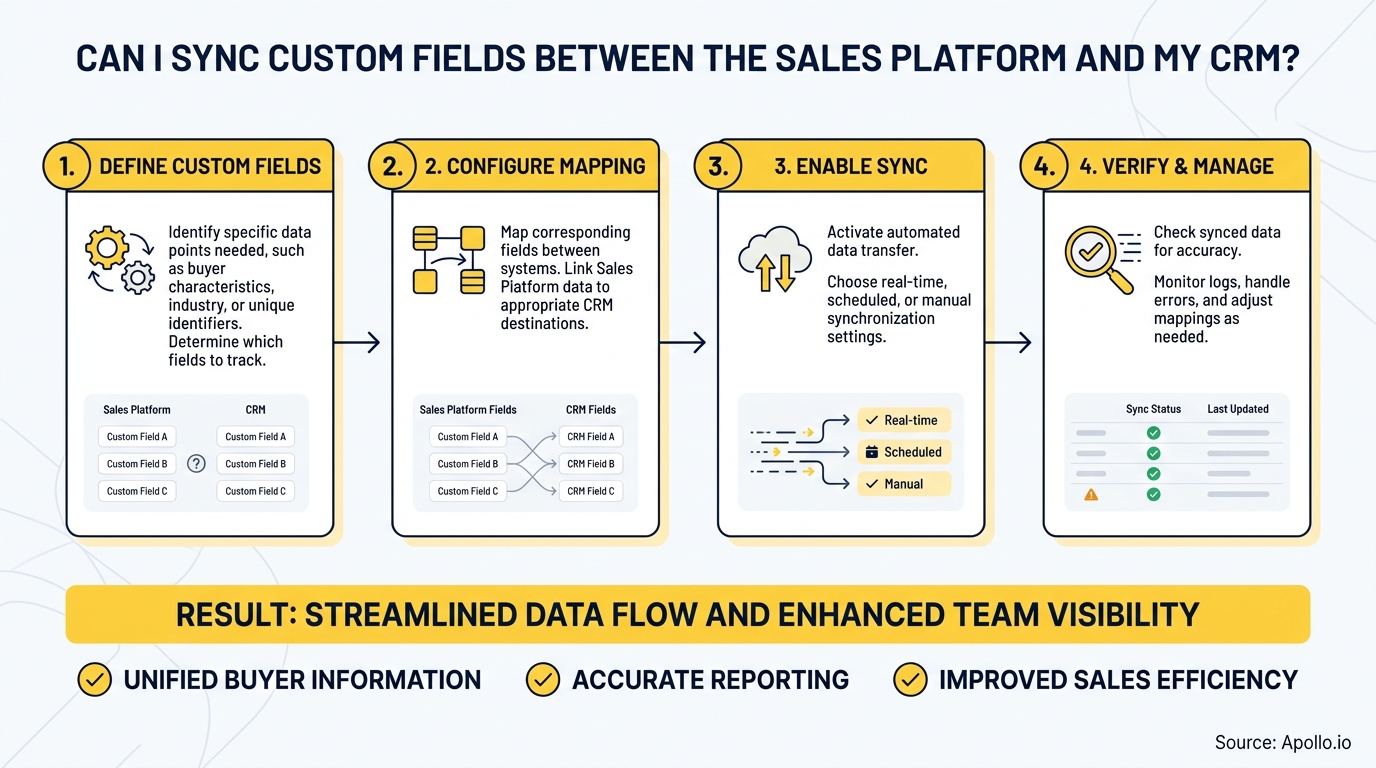
Yes, you can sync custom fields between a sales platform and your CRM, but the answer requires more than a checkbox. The real question is whether your sync is reliable, directional, governed, and secure enough to protect revenue. According to Bain, only about 20% of companies realize full value from their structured sales and marketing activities, largely because CRM integration breaks down at the field level. For RevOps leaders and SDRs managing day-to-day prospecting, that gap shows up as missing context, stale data, and broken AI workflows. Learn how data sync improves B2B sales and marketing ROI before diving into the technical setup.

Research Less, Pipeline More With Apollo
Tired of burning hours verifying contacts that go nowhere? Apollo delivers 230M+ accurate business contacts so your team sells instead of searches. 600K+ companies already made the switch.
Start Free with Apollo →Key Takeaways
- Custom field sync is possible across most modern sales platforms and CRMs, but directionality and conflict rules determine whether it's trustworthy.
- Bidirectional sync without overwrite governance creates data corruption risks, especially for AI-powered workflows and lead scoring.
- RevOps teams need a field ownership model: each synced field should have a defined source of truth and accepted values.
- Security hygiene for CRM connectors, including OAuth scopes and least-privilege access, is now a mandatory part of the sync conversation.
- Apollo's native CRM integrations let GTM teams consolidate enrichment, engagement, and field sync in one platform, reducing the need for multiple disconnected tools.
What Types of Custom Fields Can Sync Between a Sales Platform and CRM?
Most sales platform-to-CRM integrations support syncing text, number, date, picklist, checkbox, and multi-select custom fields, though compatibility depends on matching data types on both sides. Field type mismatches (for example, a free-text field on one side mapped to a dropdown on the other) are among the most common causes of sync failures and silent data corruption.
| Field Type | Sync Support | Common Risk |
|---|---|---|
| Text / String | Broadly supported | Character limit overflows |
| Number / Currency | Broadly supported | Decimal/format mismatch |
| Date / DateTime | Broadly supported | Timezone offset errors |
| Picklist / Dropdown | Conditional | Accepted values must match exactly |
| Multi-select | Limited | Delimiter conflicts on write-back |
| Checkbox / Boolean | Broadly supported | True/False vs. 1/0 mapping errors |
| Lookup / Relation | Platform-dependent | Object ID mismatches across systems |
As noted by MarketingLTB, real-time syncing is considered more valuable than batch syncing, and custom fields grow over time as teams refine segmentation, with proper tagging and taxonomies being key to scalable CRM usage. Audit your field list annually and retire mappings that no longer serve active workflows.
How Does Sync Directionality Work, and When Is Bidirectional Sync Risky?
Sync directionality determines which system writes to which, and choosing the wrong model is the most common cause of data loss in CRM integrations. There are three models to understand before configuring any field mapping.
- One-way (CRM as source of truth): Sales platform reads from CRM but never writes back. Safest for fields owned by marketing or finance.
- One-way (sales platform as source of truth): Activity fields, call outcomes, and sequence status push from the sales tool into CRM. Low risk when the field doesn't exist in CRM yet.
- Bidirectional: Both systems can update the field. Requires explicit conflict rules or the most recently updated record wins by default, which often corrupts trusted values.
Bidirectional sync is appropriate for fields where both systems legitimately create or update data, such as meeting notes or contact status. It is risky for fields like lead score, deal stage, or account owner where one system should always win.
Before enabling bidirectional sync, define your conflict rule: CRM-wins, platform-wins, or blank-only (only write if the destination field is empty).
Struggling to keep pipeline data clean across tools? Get complete pipeline visibility with Apollo's deal management and eliminate the guesswork from field-level updates.
Turn Weak Leads Into Pipeline With Apollo
Pipeline forecasting a guessing game because marketing leads never convert? Apollo surfaces ready-to-act buyers with precision targeting and real-time signals. Nearly 100K paying customers stopped guessing and started closing.
Schedule a Demo →How Do RevOps Teams Build a Field Ownership and Governance Model?
RevOps leaders need a governance model where every synced custom field has a documented owner, an accepted-values list, and a defined update source. Without this, bidirectional sync creates conflicting records that corrupt lead scoring, segmentation, and AI-powered routing.
A practical governance checklist for each synced field:
- Owner: Which team (sales, marketing, RevOps) is the authority for this field's value?
- Source of truth: CRM or sales platform?
- Accepted values: Documented list for picklists and dropdowns, enforced on both sides.
- Update trigger: Real-time event, scheduled batch, or manual update only?
- Audit trail: Is field-level change history logged in both systems?
Research from Revenue Memo shows that only 30% of companies have a unified data strategy across their go-to-market functions, while 46% of marketers report that data quality and accuracy negatively impact marketing optimization. A field governance model directly addresses both gaps. For teams building this from scratch, the Apollo CRM integration setup guide covers field mapping best practices for Salesforce and HubSpot.

What Security Controls Should RevOps Apply to CRM Field Sync?
CRM field sync connectors require OAuth tokens, service accounts, and API credentials that represent a meaningful attack surface. A 2025 incident involving stolen OAuth tokens tied to a CRM integration demonstrated how connector credentials can be used to access customer environments at scale.
Field sync security is no longer optional.
Minimum security controls for any CRM integration:
- Least-privilege OAuth scopes: Grant only the field-level read/write permissions the integration actually needs. Never use admin-level API credentials for sync connectors.
- Dedicated service account: Use a non-human integration user so token compromise doesn't expose a real employee's full CRM access.
- Field-level security (FLS): Enforce CRM field permissions at the integration layer so sensitive fields (compensation, legal status, internal notes) are never exposed through the connector.
- Token rotation and expiry: Rotate refresh tokens on a schedule and revoke stale credentials immediately after offboarding.
- Audit logs: Confirm that both the CRM and the sales platform log field-level write events with timestamps and user/system attribution.
- Failure alerting: Configure sync failure notifications so silent errors don't accumulate into large data gaps before anyone notices.
How Does Apollo Sync Custom Fields with Salesforce and HubSpot?
Apollo's native CRM integrations with Salesforce and HubSpot support bidirectional field mapping, allowing GTM teams to push enriched contact and account data into custom CRM fields without manual exports. For SDRs and AEs, this means prospect context, engagement history, and enrichment attributes flow directly into the CRM record, eliminating duplicate data entry.
Apollo supports mapping to custom fields on Contact, Lead, Account, and Opportunity objects in Salesforce, and to Contact and Company records in HubSpot. Field mapping is configurable at the admin level, with options to control sync direction and set update conditions. Teams can also use Apollo's CRM integration guides for HubSpot and Salesforce to configure field-level rules without developer support.
Tired of managing enrichment data across separate tools? Start free with Apollo's 230M+ verified business contacts and sync enriched fields directly into your CRM. As Cyera put it, "Having everything in one system was a game changer."
For teams consolidating their tech stack, Apollo replaces the need for separate enrichment, engagement, and sync tools. "We reduced the complexity of three tools into one," noted Predictable Revenue. Read more in the Predictable Revenue customer story.
What Should RevOps Check Before Going Live with Custom Field Sync?
A pre-launch audit prevents the most common field sync failures. Run through this checklist before activating any new CRM field mapping in production.
- Field data types match on both sides (no text-to-picklist mismatches)
- Accepted picklist values are identical in both systems
- Sync direction and conflict rule are documented for each field
- A dedicated integration service account is in use with scoped permissions
- Field-level security is enforced for sensitive fields
- Audit logging is active in both the CRM and the sales platform
- A test contact or sandbox record was used to validate write behavior before production rollout
- Failure alerting is configured and routed to the RevOps owner
- Rollback plan is documented (e.g., which fields to revert if sync corrupts values)
According to Demand Gen Report, more than half of organizations still relied on static, error-prone spreadsheets for vital customer intelligence. A governed field sync replaces that manual layer with a reliable, real-time data foundation that supports sales automation, lead scoring, and AI-powered routing.

Start Syncing Custom Fields the Right Way in 2026
Custom field sync between your sales platform and CRM is achievable and valuable, but only when directionality, conflict rules, governance, and security are addressed together. Teams that skip these steps create the data fragmentation that blocks AI adoption and erodes rep productivity.
Apollo's all-in-one GTM platform handles enrichment, engagement, and CRM field sync in a single workspace, removing the integration overhead that slows RevOps and SDR teams down. Explore Apollo's use cases for CRM integration and outreach to see how GTM teams are consolidating their stack.
Ready to eliminate manual field updates and sync enriched data directly into your CRM? Start a free Apollo trial today and connect your CRM in minutes.
Prove Pipeline ROI From Day One
ROI pressure killing your tool budget before it even gets approved? Apollo delivers measurable pipeline impact fast — 46% more meetings with AI, real results leadership can see. Start free today.
Start Free with Apollo →Don't miss these
Sales
Inbound vs Outbound Marketing: Which Strategy Wins?
Sales
What Is a Sales Funnel? The Non-Linear Revenue Framework for 2026
Sales
What Is a Go-to-Market Strategy? The 2026 GTM Playbook
See Apollo in action
We'd love to show how Apollo can help you sell better.
By submitting this form, you will receive information, tips, and promotions from Apollo. To learn more, see our Privacy Statement.
4.7/5 based on 9,690 reviews
