
Can You Set Up Notifications for New Leads That Fit Your Target Criteria?
Yes, you can set up notifications for new leads that match your ICP, and in 2026, it's one of the highest-ROI moves a B2B GTM team can make. The difference between a closed deal and a lost one often comes down to minutes. According to Revenue.io, responding to a lead within 5 minutes makes you 100 times more likely to convert them than waiting 30 minutes. ICP-based lead notifications remove the manual monitoring that causes those delays. If you're still relying on periodic list pulls or manual CRM checks, you're leaving pipeline on the table. Start by learning how to build a lead list that converts before layering in real-time alerts.

Scale Your Team Without the Chaos
Tired of inconsistent processes slowing your team down? Apollo gives every rep a repeatable playbook — verified contacts, automated outreach, and real-time lead flow. 600K+ companies scale smarter.
Start Free with Apollo →Key Takeaways
- ICP-based lead notifications let SDRs, AEs, and RevOps teams act on high-fit leads the moment they appear, dramatically improving conversion odds.
- Speed-to-lead is quantifiably tied to revenue: the gap between first and second responder is not marginal, it's decisive.
- Effective alerts require clean data, defined ICP filters, and routing rules, not just a notification toggle.
- Modern teams are moving alerts out of email inboxes and into seller workspaces like Slack and CRM, with enrichment and deduplication built in.
- Apollo consolidates prospecting, alerts, enrichment, and engagement in one platform, eliminating the need for multiple disconnected tools.
Why Does Speed-to-Lead Make ICP Notifications Non-Negotiable?
Speed-to-lead is the single biggest conversion lever that most teams under-invest in. Data from TrySetter shows that 78% of customers buy from the company that responds first. Yet Martechdo reports that a mere 0.1% of inbound leads receive a response in that crucial early window. The gap between knowing a lead exists and acting on it is where most pipeline leaks.
ICP-based notifications close that gap by triggering an alert the moment a new contact or account enters your defined criteria, whether that's company size, industry, job title, or intent signal. SDRs stop refreshing dashboards manually and start responding to real, qualified signals instead. For sales performance teams tracking quota attainment, faster lead response is one of the few levers with immediate, measurable impact.
What ICP Criteria Should Trigger a Lead Notification?
The right notification triggers are a filtered subset of your full ICP, focused on the signals most predictive of near-term conversion. Using too many filters creates alert noise; too few floods reps with low-fit leads.
| Criteria Type | Example Filters | Alert Priority |
|---|---|---|
| Firmographic | Industry, company size, revenue range, geography | Baseline (always include) |
| Persona | Job title, seniority, department | High (narrows to decision-makers) |
| Technographic | CRM used, marketing stack, specific tools | Medium (adds context) |
| Behavioral/Intent | Website visits, content downloads, job change, hiring spike | Critical (indicates active buying signal) |
RevOps leaders should define a minimum qualifying score before a notification fires. This prevents reps from being trained to ignore alerts, which defeats the entire system. A good rule of thumb: require at least two criteria types to match before triggering a real-time alert. Build your target account list first using Apollo's target account list builder to ensure your filters are grounded in verified data.

How Do SDRs and RevOps Set Up ICP-Based Notifications in Apollo?
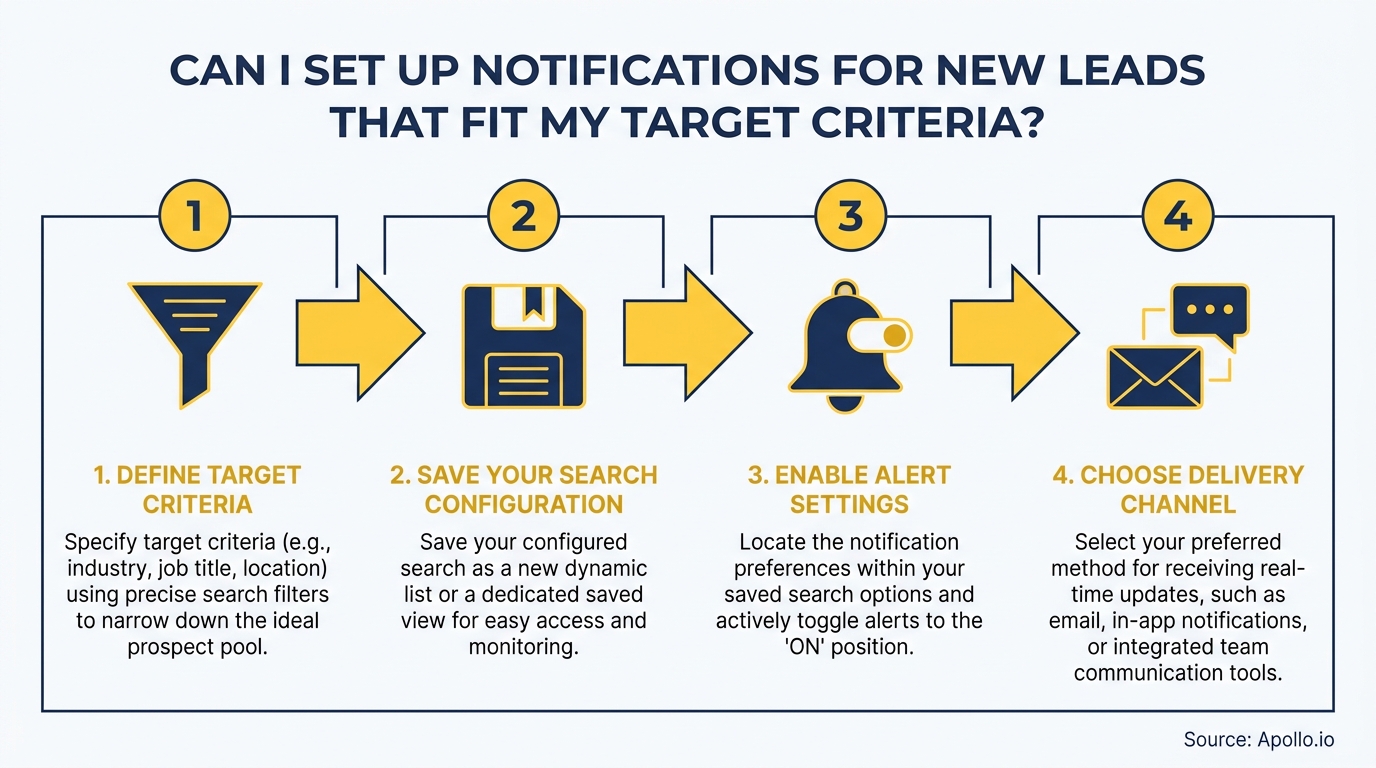
Apollo lets SDRs and RevOps teams configure saved searches with 65+ filters, then receive notifications when new contacts or accounts enter those search parameters. Here's a practical setup workflow:
- Define your ICP filtersin Apollo's search interface: industry, company size, job title, seniority, location, and any technographic or intent signals.
- Save the search and enable alerts for new matches. Apollo surfaces net-new contacts that enter your criteria based on database updates.
- Connect to your CRM so new matches auto-create or auto-update records, trigger assignment rules, and prevent duplicates.
- Route alerts to your team's workspace, whether that's Slack, email, or a CRM task queue, so reps see the notification in their flow of work.
- Enrich automatically so reps receive a notification that already includes verified contact data, not just a name and company.
Struggling to find qualified leads before setting up alerts? Search Apollo's 230M+ contacts with 65+ ICP filters to build the saved search that powers your notification workflow.
Turn Funnel Guesswork Into Real Pipeline
Pipeline forecasting a guessing game because leads stall before they ever become opportunities? Apollo surfaces in-market buyers the moment they're ready to engage. Nearly 100K paying customers stopped forecasting on hope.
Start Free with Apollo →What Does a Reliable Lead Alert Architecture Look Like?
A reliable ICP notification system connects four layers: data quality, trigger logic, routing rules, and delivery channel. Each layer must be functional for the system to work.
- Data quality layer: Verified contact and company data with regular enrichment. Stale data fires false alerts and trains reps to distrust the system. Apollo's contact enrichment keeps records current with 97% email accuracy.
- Trigger logic layer: Defined ICP criteria with scoring thresholds. New matches fire a trigger only when a minimum score is met.
- Routing layer: CRM assignment rules that send the lead to the right rep based on territory, segment, or ownership. No routing rules means alerts pile up unassigned.
- Delivery layer: Notifications land where reps work, in Slack, CRM, or email, with enough context (company, role, signal type) to act immediately without additional research.
Teams moving from email-only alert delivery to CRM-integrated, workspace-native notifications consistently report better alert response rates. The industry is shifting toward event-driven pipelines where triggers like job changes, hiring spikes, and intent surges replace periodic manual prospecting entirely. This architecture also supports the sales transformation initiatives RevOps teams are driving in 2026.
What Are the Most Common Lead Notification Mistakes to Avoid?
Alert fatigue is the silent killer of lead notification programs. When reps receive too many low-quality alerts, they stop acting on any of them, including the high-fit ones.
- No deduplication: The same contact fires multiple alerts across different saved searches or CRM records. Build deduplication into your CRM assignment rules.
- No routing ownership: Alerts go to a shared inbox or generic queue. Assign every alert to a named rep with a defined SLA for first response.
- Criteria too broad: Any company with 50+ employees triggers a notification. Tighten filters to persona-level specificity.
- No data quality checks: Alerts fire on contacts with bounced emails or outdated job titles. Enrich before notifying.
- No measurement: Teams never track alert-to-meeting rate. Without that metric, there's no feedback loop to improve criteria over time.
The competitive edge in 2026 isn't whether your platform can send an alert, most can. It's whether your alerts are clean, routed, enriched, and measured. A well-maintained lead nurturing workflow downstream of your alerts further improves conversion rates for leads that don't convert on first contact.
How Do ICP Notifications Fit Into a Full GTM Workflow?
Lead notifications are most powerful when they're a trigger point in a larger, automated GTM workflow, not a standalone email alert. Arena.im reports that real-time sales alerts lead to faster response times, higher conversion rates, and more revenue. The key is what happens after the alert fires.
A complete workflow looks like this: new ICP match detected, enrichment runs automatically, lead is routed to the right rep with CRM task created, rep receives a Slack or in-app notification with full context, and an engagement sequence is ready to launch with one click. Apollo handles every step of this in a single platform. As Cyera noted, "Having everything in one system was a game changer." That consolidation is what makes the modern sales tech stack faster and leaner than the disconnected multi-tool setups most teams inherited.
For lead generation programs at scale, this integrated alert-to-sequence workflow is what separates teams hitting quota from those chasing stale lists.

Start Capturing High-Fit Leads the Moment They Appear
ICP-based lead notifications transform prospecting from reactive to real-time. The data is clear: speed and fit together drive conversion.
Notifications without clean data and routing are noise. Clean data without notifications means slow follow-up.
Both together, in an integrated workflow, create a system where no high-fit lead goes cold.
Apollo gives SDRs, AEs, and RevOps teams the prospecting search, enrichment, routing, and engagement automation in one unified platform, replacing the patchwork of tools that slows down response time. Ready to set up ICP-based alerts that actually convert? Get Leads Now.
Prove Pipeline ROI Before Next Quarter
ROI pressure killing your tool budget? Apollo delivers measurable pipeline impact from day one. Leadium 3x'd annual revenue — see your own numbers before the next budget review.
Start Free with Apollo →Don't miss these
Sales
Inbound vs Outbound Marketing: Which Strategy Wins?
Sales
What Is a Sales Funnel? The Non-Linear Revenue Framework for 2026
Sales
What Is a Go-to-Market Strategy? The 2026 GTM Playbook
See Apollo in action
We'd love to show how Apollo can help you sell better.
By submitting this form, you will receive information, tips, and promotions from Apollo. To learn more, see our Privacy Statement.
4.7/5 based on 9,690 reviews
