
Which Tool Syncs with Microsoft Dynamics? A 2026 Decision Framework
Choosing the right tool to sync with Microsoft Dynamics 365 is no longer just a technical question. It's a governance, licensing, and ROI decision that affects every B2B GTM team from SDRs to RevOps leaders. With Microsoft actively deprecating legacy connectors and shifting toward Dataverse-centric architecture, the wrong choice today creates expensive rework tomorrow. Check out which AI sales tools actually close more deals to understand the broader landscape before you commit to a sync strategy.

Let Apollo Find Your Leads Instantly
Tired of burning hours verifying contact info that goes nowhere? Apollo delivers 230M+ accurate contacts so your reps spend time selling, not searching. Join 600K+ companies building pipeline faster.
Start Free with Apollo →Key Takeaways
- The legacy Dynamics 365 connector is now classified as a Premium connector — teams should evaluate Dataverse-based patterns as the forward-looking architecture.
- Microsoft's licensing enforcement for Power Apps/Power Automate tightened in 2025, making connector governance a buying criterion, not just an IT concern.
- The AI in CRM market is growing rapidly, and modern integrations must support AI-mediated workflows, not just bidirectional field mapping.
- Apollo syncs natively with Microsoft Dynamics 365, letting RevOps consolidate prospecting, enrichment, and engagement without stitching together separate tools.
- ROI from cloud-native data integration is well-documented — governance and architecture decisions made upfront determine whether you capture that value.
Which Tools Sync with Microsoft Dynamics 365?
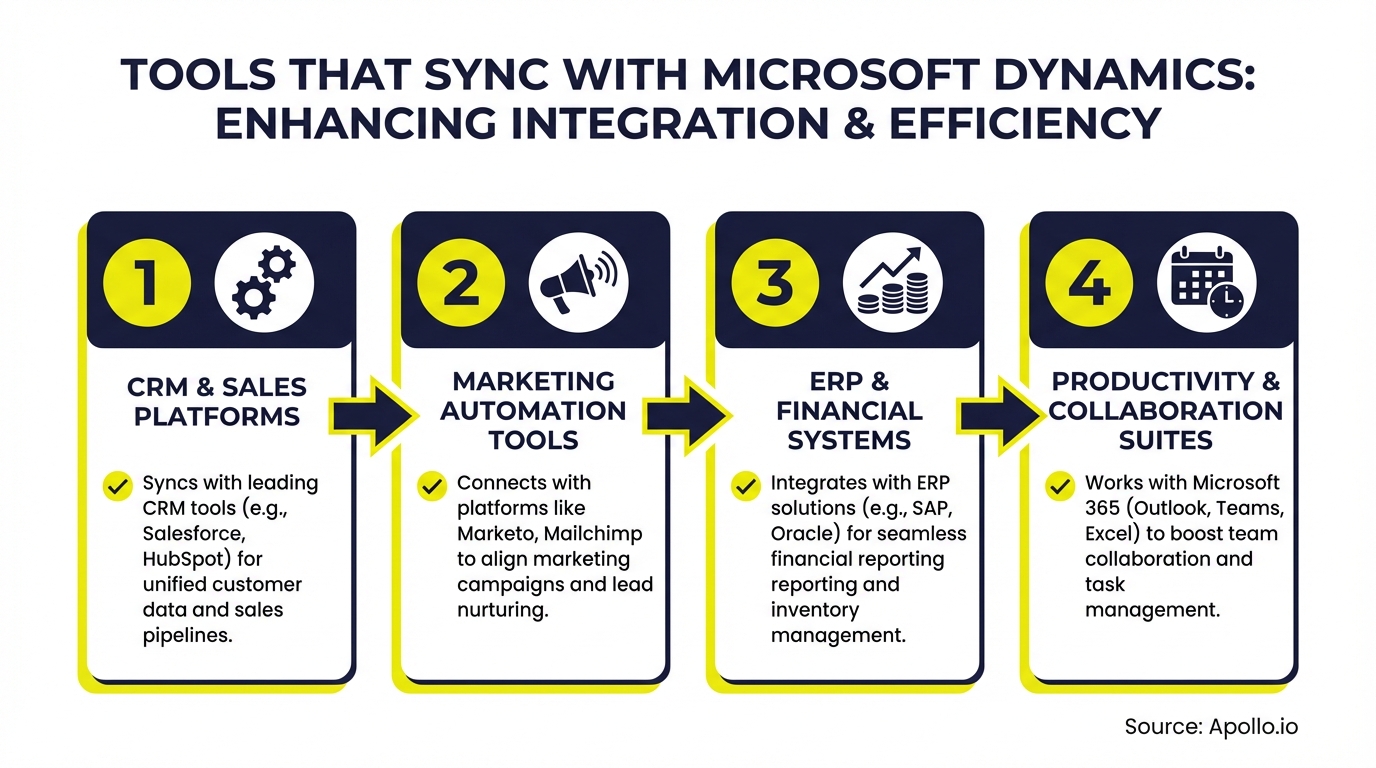
Several categories of tools sync with Microsoft Dynamics 365: sales intelligence platforms, marketing automation tools, iPaaS/automation layers, and all-in-one GTM platforms. The right choice depends on your use case, not just connector availability.
| Tool Category | Primary Use Case | Sync Mechanism | Best For |
|---|---|---|---|
| All-in-one GTM platforms (e.g., Apollo) | Prospecting, enrichment, engagement | Native CRM integration | SDRs, AEs, RevOps |
| iPaaS layers (e.g., Power Automate, Zapier) | Workflow automation between apps | Premium/Dataverse connectors | IT, RevOps architects |
| Marketing automation tools | Lead nurturing, campaign sync | API or native connector | Marketing teams |
| Data enrichment platforms | Contact/account data hygiene | Native or CSV push | RevOps, sales ops |
According to OpenPR, the Microsoft Dynamics services market grew from $7.86 billion in 2023 to $9.24 billion in 2024 at a CAGR of 17.5%, reflecting the scale of demand for tools and integrations in this ecosystem.
Why Is the Dataverse Shift Important for Dynamics Integrations?
The Dataverse shift matters because Microsoft has classified the classic Dynamics 365 connector as a Premium (and deprecated) connector, pushing teams toward Dataverse connectors and Power Automate/Logic Apps as the supported path forward. Integrations built on the legacy connector face lifecycle risk: Microsoft actively deprecates features across the stack, and sales and marketing leaders increasingly ask "will this sync still work next year?" before purchasing.
The practical implication for RevOps teams: audit any existing connector-based syncs now. Prioritize tools with native Dynamics or Dataverse API integrations over those relying solely on legacy connector paths.
This reduces both licensing exposure and maintenance overhead.
Research from ResearchAndMarkets.com shows the Microsoft Dynamics services market is expected to reach $10.88 billion in 2025 at a CAGR of 17.8%, underscoring how central Dynamics has become to enterprise GTM stacks.

How Does Licensing Affect Which Tool You Can Use?
Licensing directly determines which connectors you can use without additional cost. Microsoft's in-product licensing enforcement for Power Apps and Power Automate tightened in 2025, meaning Premium connectors (including the classic Dynamics 365 CRM connector) now require appropriate per-user or per-flow licensing.
Using a Premium connector without the correct entitlement triggers enforcement.
Key governance checkpoints before selecting a sync tool:
- Audit current licenses: Identify which users and flows are using Premium connectors.
- Evaluate Dataverse alternatives: The Dataverse connector may be included in existing Dynamics 365 licensing, reducing incremental cost.
- Assess third-party tools: Tools with native Dynamics API integrations (not Power Automate-dependent) bypass Premium connector licensing requirements entirely.
- Budget for governance: Assign a RevOps owner to track connector usage and entitlements quarterly.
For teams using data enrichment tools alongside Dynamics, native API integrations sidestep these licensing constraints and reduce total cost of ownership.
Turn Funnel Gaps Into Predictable Pipeline
Pipeline forecasting a guessing game? Apollo surfaces high-intent prospects before they stall, turning weak lead flow into a full, forecastable funnel. Nearly 100K paying customers trust Apollo to hit their numbers.
Schedule a Demo →How Do RevOps Leaders Choose the Right Sync Architecture?
RevOps leaders choose the right Dynamics sync architecture by matching the tool's integration mechanism to their specific workload, not by chasing the longest connector list. The framework below maps common GTM workloads to the appropriate approach.
| GTM Workload | Recommended Approach | Governance Priority |
|---|---|---|
| Contact/account enrichment | Native API integration (e.g., Apollo Enrich) | Data quality SLAs, field mapping |
| Outbound sequence execution | All-in-one GTM platform with CRM write-back | Activity logging, deduplication |
| Cross-app workflow automation | Power Automate + Dataverse connector | Premium licensing entitlements |
| AI-driven lead qualification | Native Dynamics AI agents or integrated GTM platform | Data model alignment, consent |
A note on AI: Dynamics101 reports that the enhanced Sales Qualification Agent in Dynamics 365 Sales improves how sellers research, engage, and qualify leads, reducing manual effort and increasing conversion efficiency. This means the tools you sync must support AI-mediated workflows, not just push/pull field data. ARP Ideas notes that Gartner predicts by 2028, up to 15% of daily work decisions will be made autonomously by AI agents, making integration architecture a strategic decision.
Struggling to keep Dynamics contacts accurate and enriched? Apollo's CRM enrichment automatically updates contact and account records in Dynamics with 97% email accuracy.
How Does Apollo Sync with Microsoft Dynamics 365?
Apollo syncs with Microsoft Dynamics 365 via a native CRM integration that writes contact, account, and activity data directly into Dynamics records without requiring a separate iPaaS layer. For SDRs and AEs, this means sequences, call outcomes, and email engagement all flow back to Dynamics automatically, keeping pipeline data clean without manual entry.
For RevOps leaders, Apollo's Dynamics integration supports:
- Bi-directional contact sync: Push new prospects from Apollo's 230M+ contact database into Dynamics; pull existing Dynamics records into Apollo for enrichment.
- Activity write-back: Sequence steps, calls, and email opens log as activities in Dynamics automatically.
- CRM enrichment: Apollo's data enrichment updates stale Dynamics records with verified firmographic and contact data using 65+ attributes.
- Field mapping control: RevOps controls which Apollo fields map to which Dynamics fields, preserving data model integrity.
Apollo consolidates the prospecting, enrichment, sequencing, and CRM sync workflows that otherwise require three or more separate tools. As Cyera put it: "Having everything in one system was a game changer." For teams evaluating sales intelligence tools, consolidation into a single platform that syncs with Dynamics reduces both integration complexity and licensing overhead.
Spending hours manually updating Dynamics after every call? Apollo's sales engagement platform auto-logs every touchpoint directly to Microsoft Dynamics.
What Should SDRs and AEs Look for in a Dynamics-Compatible Tool?
SDRs and AEs should prioritize three things in any Dynamics-compatible tool: automatic activity logging, real-time contact enrichment, and seamless sequence management from inside or alongside Dynamics. Manual CRM updates are a productivity killer; the right tool eliminates them.
Practical checklist for SDRs and AEs evaluating sync tools:
- Does it log calls, emails, and sequence steps to Dynamics automatically?
- Can you enrich a Dynamics contact record without leaving your workflow?
- Does it prevent duplicate record creation in Dynamics?
- Does the integration survive Dynamics updates and Microsoft deprecation cycles?
- Is the integration maintained natively by the vendor (not dependent on a third-party connector)?
For teams building outbound pipeline, pairing a Dynamics-synced tool with strong lead generation capabilities is what turns CRM hygiene into measurable revenue. See also how sales automation fits into a Dynamics-connected workflow.

Which Tool Syncs with Microsoft Dynamics: The Bottom Line
The best tool to sync with Microsoft Dynamics 365 depends on your workload, but for B2B GTM teams focused on pipeline, Apollo's native Dynamics integration covers the full cycle: prospecting, enrichment, engagement, and CRM write-back in one platform. That consolidation eliminates iPaaS licensing exposure and reduces the number of integrations RevOps has to maintain.
The market context reinforces urgency: Microsoft's ecosystem is growing fast, AI agents are reshaping what "sync" means, and legacy connectors are being deprecated. Teams that pick tools with native, maintained Dynamics integrations now will avoid costly rework later.
Ready to connect your outbound motion directly to Microsoft Dynamics? Start Prospecting with Apollo and see how one platform handles your entire pipeline from first contact to closed deal, all synced to Dynamics.
Prove Pipeline ROI With Apollo
ROI pressure killing your next tool approval? Apollo ramps new reps faster with scalable, repeatable processes built in. Leadium 3x'd their annual revenue — see your return before you commit.
Schedule a Demo →Don't miss these
Sales
Inbound vs Outbound Marketing: Which Strategy Wins?
Sales
What Is a Sales Funnel? The Non-Linear Revenue Framework for 2026
Sales
What Is a Go-to-Market Strategy? The 2026 GTM Playbook
See Apollo in action
We'd love to show how Apollo can help you sell better.
By submitting this form, you will receive information, tips, and promotions from Apollo. To learn more, see our Privacy Statement.
4.7/5 based on 9,690 reviews
