
How to Validate and Enrich Contact Names Before a CRM Import
Importing a spreadsheet of "contacts" into a new CRM feels like progress, until three months later when half your emails bounce, duplicate records clutter every pipeline view, and reps are calling people who left their jobs last year.
Research from Datamatics frames validating and enriching contact data before a CRM import as a preventative measure, not optional cleanup.
Do it before you import, not after.
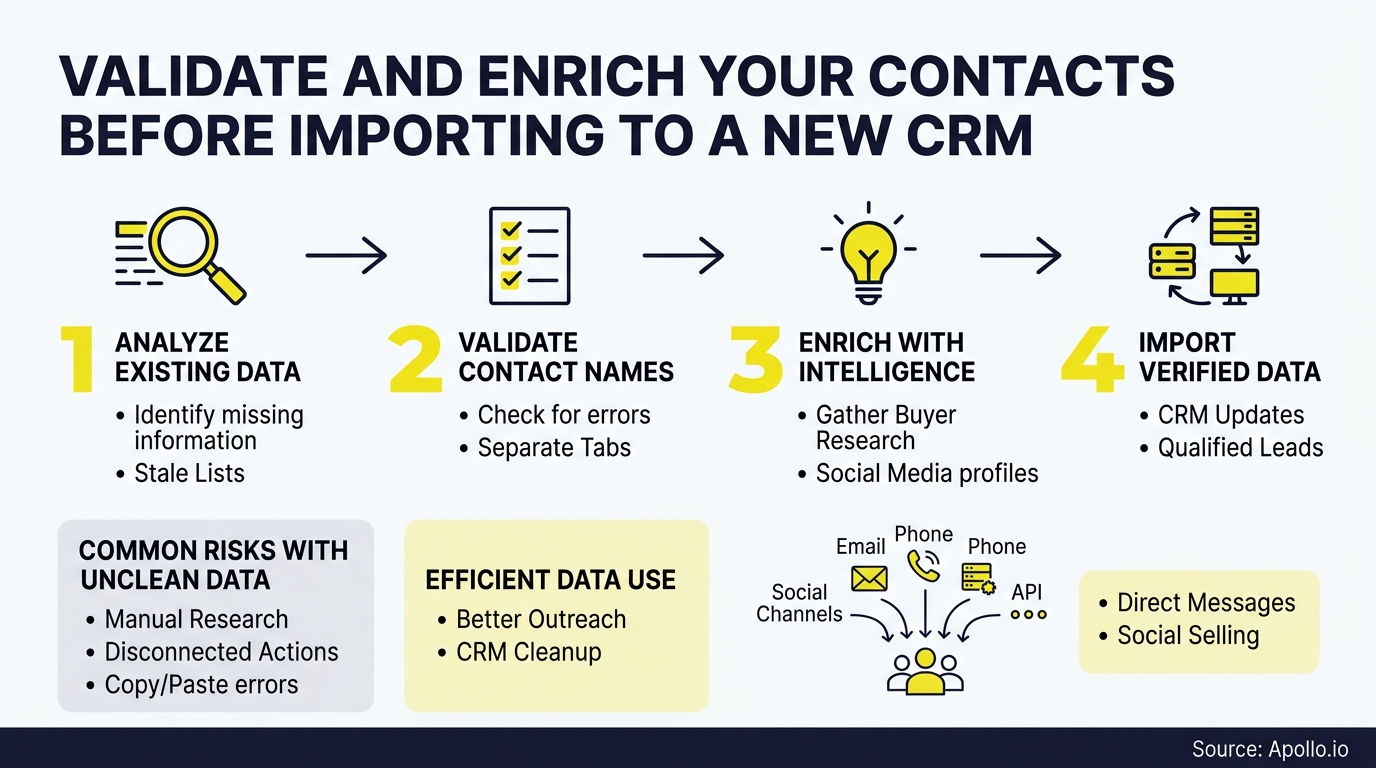
This playbook gives you a four-status workflow (verified, probable, ambiguous, rejected) plus the field-level rules, tables, and templates to run it, whether you're moving into HubSpot, Salesforce, or another CRM.

Skip The Research, Apollo Verifies Contacts
Spending hours manually researching leads and verifying contact info. Apollo delivers 240M+ verified contacts with 98% email accuracy, so your team spends time selling instead of searching. Start building pipeline in minutes, not hours.
Start Free with Apollo →Key Takeaways
- Sort every contact into one of four statuses (verified, probable, ambiguous, rejected) before import, so RevOps never has to guess which records are safe to activate.
- Use Apollo MCP when you need to check a name, title, and company against a live database directly inside ChatGPT, Claude, or Perplexity, without exporting a single row.
- Name collisions, nicknames, and mid-migration job changes cause more bad imports than typos, so build explicit edge-case rules instead of relying on fuzzy matching alone.
- A pre-import test batch of 500-1,000 records catches mapping errors before they multiply across your full contact list.
- Validation isn't a one-time migration task. Build a 30/60/90-day refresh cadence, since a large share of contacts change roles or companies within a year.
What Does It Mean To Validate And Enrich Contacts Before A CRM Import?
Validating and enriching contacts before a CRM import means confirming each record represents a real, correctly identified person at a specific company, then filling in missing or outdated fields with current, sourced data before that record ever touches your new system. Validation answers "is this real and current?" Enrichment answers "what else do we know, and can we prove it?"
This is different from basic list cleaning, which mostly removes blanks and obvious typos. Validation and enrichment resolve identity (is "Mike Chen" at Acme the same person as "Michael Chen" at Acme Corp?), verify employment status, and attach evidence like a source and a verification date to every enriched field.
It is not the same as deduplication alone, though dedupe is part of the process. A contact can be duplicate-free and still be wrong: an outdated title, a bounced email, or a former employee still marked active.
How Do You Score Contacts Into Verified, Probable, Ambiguous, Or Rejected Status?
You score contacts by running each record through identity, employment, and contact-method checks, then assigning a status based on how many checks pass. This four-tier model gives RevOps and Sales Ops a repeatable, auditable framework instead of an all-or-nothing import decision.
| Status | Criteria | Action |
|---|---|---|
| Verified | Name, title, company, and email all confirmed against a current source within the last 90 days | Import immediately, tag with source and date |
| Probable | Name and company confirmed; title or email unconfirmed but plausible | Import with a "needs review" flag; route to owner for spot-check |
| Ambiguous | Multiple possible matches (e.g., common name, shared domain) or conflicting source data | Hold in exception queue for manual resolution |
| Rejected | Confirmed former employee, invalid email, or duplicate of an existing record | Do not import; log reason for audit trail |
According to Validity's 2024 survey of CRM professionals, 31% of respondents said low-quality data cost their organization at least 20% of annual revenue, and 41% had halted initiatives because of it. A tiered scoring model is how you keep that risk out of a fresh CRM from day one.
What Fields Should You Audit Before Importing A Contact?
You should audit name, title, company, email, phone, and last-verified date on every contact record, since these six fields determine whether a contact is usable, findable, and safe to contact.
| Field | Audit Check | Common Failure |
|---|---|---|
| Full Name | Matches a real person; nicknames resolved to legal/professional name | "Bob Smith" vs. "Robert Smith" treated as two people |
| Job Title | Current as of last verification date | Title reflects a role the person left |
| Company | Confirmed current employer, not a former one | Contact changed jobs; old company still listed |
| Format valid, domain active, not a bounced/catch-all address | Personal email used instead of business domain | |
| Phone | Format standardized, business number confirmed | Missing country/area code, disconnected line |
| Last Verified Date | Present on every record | No date field, so no one knows if the data is fresh |
Business-email and phone data go stale fast. Salesmotion reports that business email addresses go inactive or change at roughly 3.6% per month. Without a last-verified date on every record, you have no way to know which contacts need a refresh.

How Do You Handle Name Edge Cases Like Nicknames And Common-Name Collisions?
You handle name edge cases by building explicit matching rules for nicknames, name changes, and shared names at the same company, rather than relying on exact-string matching alone. Exact-match logic misses "Bill" for "William" and wrongly merges two different "Sarah Kim" contacts at a large enterprise account.
- Nicknames: Maintain a reference list (Bob/Robert, Liz/Elizabeth, Mike/Michael) and normalize to the professional name found in enrichment sources.
- Name changes: If a contact's name changed (marriage, legal name change), match on email history or professional profiles ID rather than name string alone.
- Common-name collisions: When two contacts share a name at the same company, disambiguate using title, department, or direct email before merging.
- Cultural name order: Confirm given-name/family-name order rather than assuming Western first-last formatting, especially for East Asian or Hungarian naming conventions.
Route anything that doesn't resolve cleanly into the "ambiguous" bucket from the scoring table above. Don't force a match to hit an import deadline.
Turn Cold Leads Into Ready Opportunities
Marketing leads dying before they ever reach sales-ready status. Apollo surfaces buying intent and engagement signals so reps know exactly which prospects are ready to talk now. Built-In saw a 10% lift in win rate using Apollo's scoring.
Start Free with Apollo →How Do RevOps Teams Resolve Conflicting Enrichment Data From Multiple Sources?
RevOps teams resolve conflicts by applying survivorship rules: the most recently verified source wins, and every enriched field carries a source and a timestamp so conflicts are traceable. When two vendors disagree on a contact's title, the field with the newer verification date takes priority, and the older value is logged, not discarded.
For RevOps leaders managing a shared source of truth, this means every enriched field needs three attributes: the value, the source, and the verification date. Without those three, you can't audit why a record changed or roll back a bad enrichment pass.
A single-provider lookup will always miss some records, since no one data source covers every role, geography, and industry. This is why multi-source "waterfall" enrichment, checking several providers in sequence and keeping the most current, verified result, has become standard practice for teams serious about accuracy.
Struggling to reconcile conflicting contact data across spreadsheets and tools? Apollo's enrichment tools apply waterfall verification and attach source data to every enriched field automatically.
How Can You Validate And Enrich Contacts Directly Inside ChatGPT Or Claude?
You can validate and enrich contacts inside ChatGPT, Claude, or Perplexity by connecting Apollo MCP, which lets you check a name, title, and company against a live database and pull verified emails and phone numbers without leaving the conversation. Setup is no-code: connect Apollo through the AI tool's connectors or integrations menu via OAuth, on any Apollo plan including free.
For an SDR prepping a pre-import list, this means pasting in a batch of names and asking the AI tool to confirm current employer and title before those contacts ever reach the CRM. For developer-led migrations, the Apollo command-line interface (CLI) offers the same validation from a terminal, useful when a RevOps engineer is scripting a bulk import job.
Your best prospecting session shouldn't require opening a new tab: with Apollo MCP connected, you search, enrich, and even queue a sequence from the same window where you're already working.
How Should You Test A Small Batch Before Migrating All Contacts?
You should test a batch of 500 to 1,000 contacts through your full import pipeline before running the complete migration, so mapping errors, duplicate logic, and field-truncation issues surface on a small set instead of your entire database. This mirrors how enterprise data teams have started running bulk enrichment: test on a sample, review results, then scale to the full list.
Test-import checklist:
- Confirm custom fields map correctly (no data dropped into the wrong column)
- Check that duplicate-detection rules catch known duplicates in your test set
- Verify enriched fields (title, company, phone) import with source and date intact
- Confirm rejected/ambiguous records route to a review queue, not directly into active pipelines
- Spot-check 20-30 records manually against the source enrichment data
Only after the test batch passes clean should you run the full import. This single step prevents the most expensive migration mistakes: the ones that don't show up until thousands of records are already live.
How Do You Keep Contact Data Fresh After The Import Is Done?
You keep contact data fresh by running a recurring 30/60/90-day validation cadence, since contact accuracy decays continuously, not just during migration. Landbase reports that B2B contact data decays at an average annual rate of 22.5% to 30%, meaning a clean import today is measurably out of date within a year without upkeep.
| Timeline | Action |
|---|---|
| 30 days | Re-verify email deliverability on all newly imported contacts; resolve any exception-queue items |
| 60 days | Run a job-change check against enrichment sources; update titles and companies |
| 90 days | Full audit: dedupe check, source-date review, refresh any field older than 90 days |
For Account Executives relying on that data to prioritize accounts, stale titles mean misdirected outreach and wasted meeting requests. Job change alerts can automate the 60-day check by flagging role and company changes as they happen instead of waiting for the next manual audit.
Why Is Pre-Import Validation More Important Than Post-Import Cleanup?
Pre-import validation is more important than post-import cleanup because bad records compound the moment they enter active workflows: they trigger automated sequences, populate reports, and get referenced in deal notes before anyone notices they're wrong. Validity's 2025 survey of 602 CRM users found 76% said less than half of their CRM data was accurate and complete, even though 90% considered that data foundational to operations.
Cleanup after the fact means untangling records that reps have already emailed, called, and added notes to. Validation before import means those actions only ever happen against confirmed data.
For founders and RevOps leaders building a new CRM from scratch, this is the one chance to start clean instead of inheriting years of decay.
Predictable Revenue put it simply: "We reduced the complexity of three tools into one." Consolidating validation, enrichment, and engagement into a single workspace, instead of stitching together an export tool, a verification tool, and a separate enrichment vendor, removes the handoff points where errors get introduced.

What's The Fastest Way To Start Validating Contacts Before Your Next Import?
Start by exporting your current contact list, then run it through a scoring pass using the four-status model above before it touches your new CRM. Tired of stitching together an export tool, a verification service, and a separate enrichment vendor just to get one clean list? Apollo's data enrichment platform validates names, titles, companies, emails, and phone numbers in one workspace, so RevOps and Sales teams stop losing days to spreadsheet triage.
Whether you're migrating into Salesforce, HubSpot, or another CRM, the same rule applies: verified, probable, ambiguous, rejected. Score every contact, import only what passes, and build the refresh cadence in before you ever hit "import all."
Start Your Free Trial and validate your contact list before your next CRM migration: Start Your Free Trial.
Ramp Reps Faster, Prove ROI With Apollo
New reps taking months to hit quota while leadership questions the tool budget. Apollo gives every rep the same verified data and proven workflows from day one, so ramp time shrinks and results show up fast. See the pipeline impact in your first month.
Start Free with Apollo →Don't miss these
Sales
Inbound vs Outbound Marketing: Which Strategy Wins?
Sales
What Is a Sales Funnel? The Non-Linear Revenue Framework for 2026
Sales
What Is a Go-to-Market Strategy? The 2026 GTM Playbook
See Apollo in action
We'd love to show how Apollo can help you sell better.
By submitting this form, you will receive information, tips, and promotions from Apollo. To learn more, see our Privacy Statement.
4.7/5 based on 9,690 reviews
