
How to Use Personalization Fields in Email Sequences That Actually Convert
Using personalization fields like [name] or [company] in email sequences means inserting dynamic placeholders that automatically populate with each recipient's data before sending. Done right, they make every email feel individually written. Done wrong, they expose broken fields, wrong names, or data gaps that kill reply rates before the message even lands.
The challenge in 2026 is that [First Name] alone no longer moves the needle. According to Forbes, personalized subject lines are 26% more likely to be opened — but that lift depends on the field being accurate and relevant. SDRs and AEs who master the full personalization stack, from basic merge tags to signal-based context, consistently outperform those still relying on cosmetic field swaps. This guide covers how to use personalization fields like [name] or [company] in email sequences the right way — with fallbacks, field hygiene, and a maturity ladder to scale from simple to sophisticated.

Research Less, Pipeline More With Apollo
Tired of burning hours verifying emails and hunting down contact info? Apollo surfaces accurate, ready-to-use leads so your reps spend time selling — not searching. Join 600K+ companies building pipeline faster.
Start Free with Apollo →Key Takeaways
- [Name] and [company] are the entry point for personalization, not the strategy — signal-based fields drive meaningfully higher reply rates.
- Bad data is the biggest risk: always set fallback values and run a QA test send before launching any sequence.
- The line between helpful and creepy personalization is framing, not the data itself — surface what helps, not what surveils.
- Smaller, tightly segmented campaigns outperform broad blasts even before you add a single personalization field.
- Apollo consolidates contact data, sequence automation, and enrichment in one platform, eliminating the multi-tool patchwork most teams rely on.
What Are Personalization Fields and How Do They Work in Email Sequences?
Personalization fields are placeholder variables — written as {{first_name}}, [company], or %title% depending on your platform — that your email sequence tool replaces with real contact data at send time. Each field maps to a column in your CRM or contact list: name, company, job title, industry, location, or any custom attribute you've stored.
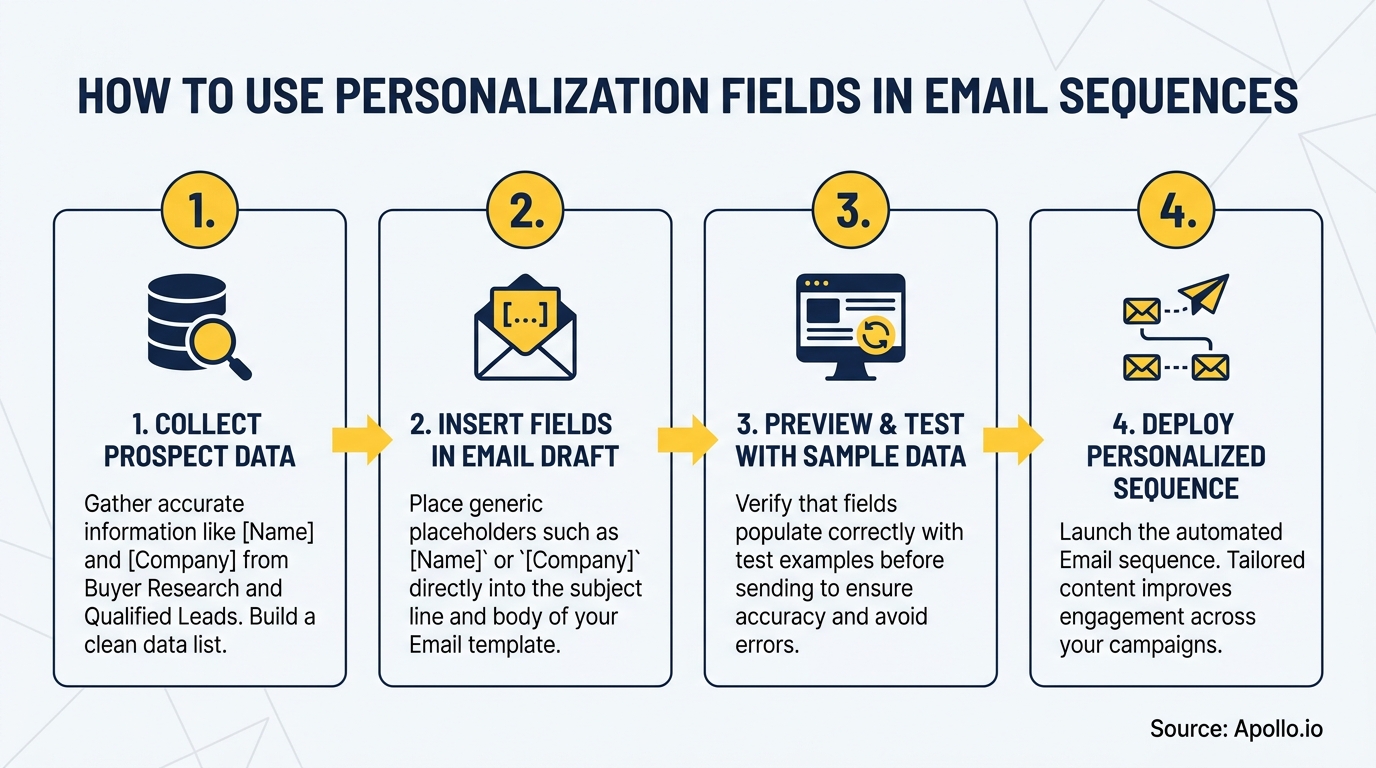
The mechanics are straightforward: you write one email template with fields inserted, upload or sync your contact list, and the tool renders a unique version for each recipient.
The risk appears when a field is empty, misspelled, or populated with junk data.
That's why field hygiene and fallback logic are non-negotiable before any sequence goes live.
What Is the Personalization Field Maturity Ladder?
The personalization maturity ladder maps field complexity to sequence stage, helping SDRs and RevOps teams prioritize which fields to implement first and where to use them.
| Level | Field Type | Example Fields | Best Used In |
|---|---|---|---|
| 1 – Identity | Basic merge tags | [first_name], [company] | Subject lines, openers |
| 2 – Role Context | Job function fields | [job_title], [department], [team_size] | Email body, pain framing |
| 3 – Account Intel | Firmographic fields | [industry], [company_size], [revenue_range] | Relevance hooks, social proof |
| 4 – Signal-Based | Buying triggers | [recent_hire], [funding_round], [tech_stack] | First-touch and follow-up body copy |
| 5 – AI-Generated | Dynamic context snippets | [custom_research_line], [pain_signal] | Hyper-personalized first lines |
Most teams start at Level 1 and stall there. Research from GTM 80/20 shows personalized emails are 6x more likely to drive conversions — but that lift compounds when you move up the ladder rather than staying at identity fields alone.
How Do SDRs Scale Personalization Without Sacrificing Quality?
SDRs scale personalization by separating research from drafting — two distinct steps that most automation tools collapse into one, creating hallucinations and irrelevant copy. A Reddit user shared a firsthand perspectiveon this exact problem: the fix was building a two-step workflow where one process pulls prospect signals into a structured profile, and a separate step uses that clean profile to draft the email — rather than letting one AI call handle both research and writing simultaneously.
For SDRs managing high-volume sequences, the practical approach is:
- Use Level 1–3 fields for 80% of your sequence volume (fast, scalable, low-error rate)
- Reserve Level 4–5 fields for your top 20% of target accounts where manual review is feasible
- Keep sequences under 50 recipients per campaign segment for higher reply rates
- Sync fields directly from your CRM to avoid manual CSV uploads that introduce data drift
Spending hours populating fields manually across disconnected tools? Automate your sequences with Apollo's multi-channel engagement platform, where contact data and sequence steps live in one workspace.

What Pre-Send QA Checklist Prevents Broken Personalization Fields?
Pre-send QA is the step most teams skip and the reason prospects receive emails addressed to "Hi [first_name]" or "Hi FNAME." A Twilio Segment 2024 report found 61% of companies are concerned that inaccurate data will compromise personalization — which means field validation is not optional, it's the foundation.
Personalization QA Checklist (run before every sequence launch):
- Fallback values set: Every field has a default (e.g., "there" if [first_name] is blank, "your company" if [company] is empty)
- Null field audit: Filter your contact list to surface any rows with missing required fields before import
- Test send to yourself: Send the full sequence to a test contact with known data to confirm rendering
- Edge case check: Test for hyphenated names, all-caps company names, and non-ASCII characters
- Subject line preview: Confirm personalized subjects render correctly across email clients
- Unsubscribe link present: Required under Google, Yahoo, and Microsoft's 2024–2025 bulk sender rules
- Domain authentication confirmed: SPF, DKIM, and DMARC records in place before sending at volume
For email deliverability at scale, broken personalization fields compound spam signals. A single campaign with widespread rendering errors can damage your sender reputation across the entire domain.
Turn Weak Funnels Into Pipeline Gold
Tired of watching marketing leads stall before they ever reach your reps? Apollo surfaces high-intent prospects and delivers 97% email accuracy so your team pursues opportunities that actually convert. Join 600K+ companies closing the gap.
Start Free with Apollo →What Is the Helpful vs. Creepy Rule for Personalization Fields?
The helpful vs. creepy distinction in personalization is about framing, not the data source. A Reddit commenter added in a Reddit discussionthat the line is drawn by whether the reference feels like you're helping or proving you were watching: referencing a product someone showed interest in feels helpful; mentioning how many times they visited your website feels surveillance-like. Same underlying data, completely different recipient experience.
For B2B sequences specifically, apply this filter to every field you consider:
| Field Type | Helpful Framing | Creepy Framing |
|---|---|---|
| [recent_hire] signal | "Congrats on the new VP of Sales hire — teams scaling fast often need X" | "I noticed you hired three people this month" |
| Website behavior | Use to prioritize who to contact; don't surface it in copy | "You visited our pricing page twice last week" |
| [industry] field | "Teams in [industry] typically see X challenge" | N/A — safe to use directly |
| [funding_round] | "After a Series B, most ops teams prioritize X" | "I see you just raised $12M" |
Privacy-aware personalization is also a deliverability issue. As Google, Yahoo, and Microsoft tightened bulk sender requirements through 2024–2025, high-volume sequences using low-relevance personalization that generates spam complaints put the entire sending domain at risk.
How Do AEs and RevOps Teams Keep Personalization Data Clean at Scale?
Account Executives and RevOps leaders face a compounding problem: the more fields you use, the more data quality issues surface across a large contact list. The solution is enrichment-first sequencing — ensuring contact records are verified and complete before any sequence step fires, not after a bounce or bad render.
Data from Instapage shows personalized emails have a 29% higher open rate than non-personalized emails — a lift that disappears entirely when fields render incorrectly or feel generic. RevOps teams should enforce:
- Required field validation rules in the CRM before a contact enters any sequence
- Automatic enrichment triggers when key fields (title, company size, industry) are blank
- Sequence-level data checks that pause enrollment if mandatory fields are missing
- Regular list audits to remove stale or inaccurate records before re-enrollment
Tired of managing data quality across multiple disconnected tools? Apollo's data enrichment keeps your contact records verified and sequence-ready— with 230M+ people and 97% email accuracy in one platform. As Cyera put it: "Having everything in one system was a game changer."
For teams building or refreshing their sales email strategy, field hygiene and enrichment should be configured before you write a single sequence template.
How Do You Put It All Together in a Complete Email Sequence?
A well-structured B2B sequence maps field complexity to email position: use identity fields in touch one to establish relevance, layer in role and account fields in touches two and three to deepen context, and deploy signal-based fields in follow-ups where you reference a specific trigger or pain point.
Example three-touch structure:
- Touch 1 (Day 1): Subject uses [first_name] + [company]. Body opens with a [industry]-specific insight. CTA is a single question.
- Touch 2 (Day 4): References [job_title] pain point. Includes a relevant social proof example from a similar [industry] or [company_size].
- Touch 3 (Day 9): Uses a signal field — [recent_hire] or [funding_round] — to reframe relevance with a timely hook.
For subject lines, keep the personalization field in the first five words where preview text renders it. According to Belkins, emails with personalized subject lines reach a 46% open rate versus 35% without — a 31% visibility advantage that starts with correct field rendering, not clever copy.
See also:how to write cold email introductions that get replies and what works in B2B email marketing in 2026 for sequence-level strategy that complements your field personalization.

Start Personalizing Smarter With Apollo
Personalization fields like [name] and [company] are the starting point, not the destination. The teams generating consistent pipeline in 2026 are combining verified contact data, signal-based fields, proper fallback logic, and QA discipline — all in one workflow rather than stitched across multiple tools.
Apollo brings prospecting, enrichment, and multi-channel sequence automation into a single platform, so your personalization fields are always pulling from clean, verified data. "We reduced the complexity of three tools into one" — Collin Stewart, Predictable Revenue.
Start free with Apollo and build sequences where every field renders correctly, every time.
Prove Pipeline ROI With Apollo
ROI pressure killing your next budget approval? Apollo delivers measurable pipeline impact your leadership can't ignore. Teams like Leadium 3x'd annual revenue — results that justify the investment fast.
Start Free with Apollo →Don't miss these
Sales
Inbound vs Outbound Marketing: Which Strategy Wins?
Sales
What Is a Sales Funnel? The Non-Linear Revenue Framework for 2026
Sales
What Is a Go-to-Market Strategy? The 2026 GTM Playbook
See Apollo in action
We'd love to show how Apollo can help you sell better.
By submitting this form, you will receive information, tips, and promotions from Apollo. To learn more, see our Privacy Statement.
4.7/5 based on 9,690 reviews
