
How to Use Email Tracking Info from Your Tool to Update CRM Contact Profiles
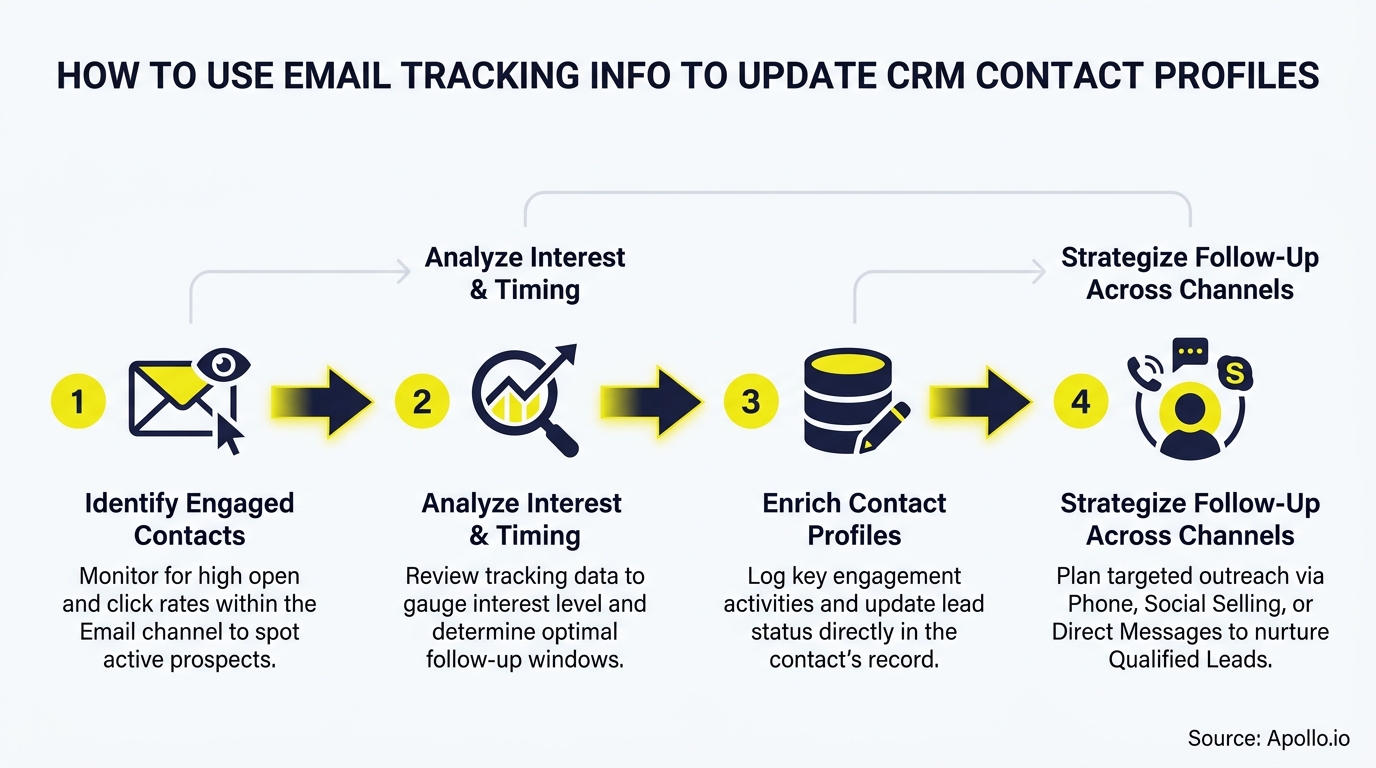
Your CRM contact profiles are only as useful as the behavioral data feeding them. Email tracking captures opens, clicks, replies, bounces, and unsubscribes in real time — but most teams leave that data stranded in their email tool instead of routing it into CRM fields where reps can act on it. A solid CRM integration strategy turns email engagement signals into structured contact intelligence that drives smarter follow-up, better segmentation, and AI-ready profiles.
According to Landbase, U.S. businesses lose $3.1 trillion annually due to poor data quality. Automating CRM updates from email behavior is one of the highest-leverage fixes available to any RevOps or sales ops team.

Research Less, Pipeline More With Apollo
Tired of burning hours verifying contacts that go nowhere? Apollo delivers 230M+ accurate business contacts so your reps spend time selling, not searching. Start building real pipeline today.
Start Free with Apollo →Key Takeaways
- Not all email events carry equal CRM weight — clicks, replies, and bounces update profiles more reliably than opens alone.
- Mapping specific email events to specific CRM fields (with thresholds) prevents noisy, low-confidence data from polluting contact records.
- Governance rules — deduplication, rollback policies, and data ownership — separate high-performing teams from those with chaotic CRM data.
- RevOps leaders who align email engagement sync with CRM automation see measurable gains in sales productivity and pipeline quality.
- Platforms that unify email tracking and CRM enrichment in one workspace eliminate the sync gaps that cause stale contact profiles.
What Is Email Tracking Data and Why Does It Matter for CRM Profiles?
Email tracking data is the behavioral record of how a contact interacts with your outbound emails: opens, link clicks, reply timestamps, bounce codes, unsubscribe events, and attachment views. These signals reveal engagement intent at the individual contact level — information your CRM profile needs to reflect accurate lead status, engagement stage, and next-best-action context.
Research from SalesMotion shows companies that invest in data enrichment informed by behavioral data report a 25% increase in sales productivity. For SDRs managing hundreds of contacts, a CRM that automatically reflects who clicked a pricing link versus who bounced is the difference between prioritizing the right follow-up and wasting a morning on cold outreach.
HubSpot's Spring 2026 Spotlight introduced Smart Deal Progression, which uses engagement history — including past emails, notes, and deal activity — to suggest CRM updates and surface next steps. This signals a broader shift: email tracking is no longer just a notification layer; it's structured CRM context that feeds AI-assisted workflows.
What Are the Email Event Confidence Levels for CRM Updates?
Email events vary significantly in how reliably they signal real contact intent. Assigning a confidence tier to each event prevents weak signals from triggering high-stakes CRM field updates.
| Email Event | Confidence Tier | Safe CRM Updates | Avoid Updating |
|---|---|---|---|
| Reply received | High | Lead status, last contacted date, engagement score | Nothing — high-trust signal |
| Link click | High | Interest topic, content engagement field, lead score | Job title or company (inferred) |
| Hard bounce | High | Email validity flag, contact status = invalid | Do not delete — flag and enrich |
| Unsubscribe | High | Opt-out field, suppression list sync | Lead score (do not penalize) |
| Email open | Low | Last activity timestamp only | Lead status, engagement score, location |
| Soft bounce | Medium | Bounce count field, send frequency flag | Contact status (wait for pattern) |
Opens warrant special caution in 2026. France's CNIL published updated guidance on email tracking pixels in April 2026, noting that invisible pixels raise significant privacy concerns and have triggered regulatory complaints.
Combined with Apple Mail Privacy Protection pre-loading pixel images on millions of devices, open data is an unreliable CRM signal for anything beyond last-activity timestamps.

How Do You Map Email Events to Specific CRM Fields?
Field-level mapping connects each email event to the exact CRM property it should update, with a threshold or suppression rule to prevent overwrites. This is the operational core of any email-tracking-to-CRM workflow.
According to LeadsBridge, email activity and engagement patterns can enrich lead profiles with insights into interests and buying intent, enabling highly targeted campaigns and personalized sales approaches. The key is specificity: map the event to a named field, not a generic "engagement" category.
Recommended field mappings by CRM:
- HubSpot: Link click → Last Engagement Date + custom property Content Interest Tag. Reply → Lead Status: Connected. Hard bounce → Email Invalid: True. Unsubscribe → Email Opt Out: True (synced to suppression list).
- Salesforce: Reply → update Last Activity Date + create a completed Task. Link click → increment custom field Engagement Score. Hard bounce → set Email Bounced: True + trigger enrichment workflow to find replacement address.
- Dynamics 365: Reply → update Contact Timeline + set Status Reason: Active. Unsubscribe → set Bulk Email: Do Not Allow.
Set a suppression rule: if a field was manually edited by a rep in the last 30 days, the automation should not overwrite it. Human edits always take precedence.
Struggling to keep contact data fresh as you scale outreach? Apollo's contact enrichment automatically keeps CRM profiles current with verified business data across 230M+ contacts.
How Do RevOps Teams Govern CRM Updates from Email Tracking?
RevOps teams govern CRM updates from email tracking by establishing deduplication rules, defining a single source of truth for each field type, and building rollback procedures for automation errors.
Poor governance is the most common failure mode. When email tracking tools create net-new contacts from a tracked send, those records often land as "Unknown" profiles with only an email address and a timestamp — no name, no company, no job title.
This inflates your contact count, pollutes segmentation, and breaks lead routing. Prevent it with these rules:
- Match-before-create: Before creating a new contact from an email event, check for an existing record by email domain + name. If a match exists within a confidence threshold, enrich the existing record instead of creating a duplicate.
- Minimum field threshold: Only auto-create a contact if the event provides at least three populated fields (e.g., email, first name, company). Otherwise, queue for manual review.
- Audit log requirement: Every automated field update should write to an audit trail with timestamp, triggering event, old value, and new value. This enables rollback within 48 hours if a workflow misfires.
- Data ownership assignment: Designate which system owns each field. Email tracking owns Last Email Clicked. The CRM rep owns Job Title. Your enrichment platform owns Company Revenue. Conflicting writes to the same field cause data drift.
For teams running sales automation at scale, governance is what separates a CRM that accelerates revenue from one that creates noise. As noted in the confidence table above, bounces and unsubscribes should be flagged immediately — not deleted — so enrichment workflows can find replacement contacts without losing the account relationship history.
Turn Funnel Guesswork Into Closed Deals
Tired of watching marketing leads stall before they ever reach your pipeline? Apollo surfaces high-intent buyers and arms your team with the signals to act first. 600K+ companies stopped guessing and started closing.
Start Free with Apollo →How Can SDRs and AEs Use Email Engagement Data to Prioritize Outreach?
SDRs and AEs can use email engagement data to prioritize outreach by sorting their daily contact queue by high-confidence CRM signals: recent link clicks, replies, and content downloads ranked above contacts with only open activity or no recent engagement.
As Intelliverse notes, real-time notifications for opens and clicks allow sales professionals to engage with prospects at optimal moments, increasing conversion chances. The practical workflow for SDRs:
- Morning queue filter: Pull contacts with a link click or reply in the last 24 hours. These are same-day follow-up priorities.
- Sequence trigger: When a contact clicks a pricing or case study link, automatically move them to a higher-intent sequence step without waiting for the rep to notice.
- AE handoff trigger: When a contact replies AND has 3+ link clicks in the last 7 days, auto-assign to an AE and create a CRM task flagged as high priority.
- Suppression for bounces/unsubscribes: Remove these contacts from active sequences immediately upon event detection — before the next scheduled send fires.
For Account Executives managing active deals, checking the CRM timeline for recent email engagement before a call gives immediate context: did the prospect click the proposal link? Did they forward the email (reply chain)? This pre-call intelligence shortens discovery time and sharpens the conversation. Pair this with email personalization strategies to increase the engagement signals worth tracking in the first place.
Want email tracking, CRM sync, and engagement scoring in one place instead of stitching three tools together? Apollo's sales engagement platform tracks every email event and syncs it directly to your CRM — no manual exports needed.
What Is the Implementation Checklist for Email Tracking to CRM Updates?
The implementation checklist for connecting email tracking to CRM contact profile updates covers tool configuration, field mapping, governance setup, and testing before going live.
Use this checklist before activating any automated CRM update workflow:
- ☐ Audit existing CRM fields — identify which contact properties you want email events to write to, and who currently owns each field.
- ☐ Define event-to-field mappings — use the confidence tiers above; document which events trigger which updates.
- ☐ Set suppression rules — protect manually edited fields; block overwrites within a defined recency window.
- ☐ Configure deduplication — set match logic (email + domain) before any auto-create rules go live.
- ☐ Enable audit logging — confirm every automated write is logged with event source, timestamp, and old/new value.
- ☐ Test with a sandbox cohort — run 50–100 contacts through the workflow before full deployment; review field updates manually.
- ☐ Review open-tracking privacy posture — decide whether opens should trigger any CRM updates given Apple MPP and current regulatory guidance.
- ☐ Assign a data owner — one RevOps team member should own the workflow, receive error alerts, and review the audit log weekly.
For teams using Apollo alongside HubSpot or Salesforce, the Apollo for HubSpot and Salesforce integrationhandles bidirectional sync so email engagement data flows into your CRM without manual exports. This is the consolidation advantage: as Cyera noted, "Having everything in one system was a game changer."
How Do You Keep CRM Contact Profiles Accurate Over Time?
CRM contact profiles stay accurate over time through continuous enrichment triggered by email events, scheduled data audits, and decay monitoring that flags contacts whose email addresses have gone stale.
Data decay is accelerating. Research from RevenueBase found that in November 2024, the business email address decay rate reached 3.6% in a single month — nearly double the traditional rate. For a 10,000-contact CRM, that's 360 invalid emails per month if left unchecked.
Email tracking helps detect decay in real time: hard bounces flag invalid addresses immediately, and soft bounce patterns signal deliverability risk before a contact becomes permanently unreachable. Route bounce events into an enrichment workflow that automatically searches for an updated email address rather than simply marking the contact as dead. For a deeper look at keeping outbound data clean, see the guide to improving email deliverability and how sequence diagnostics catch decay signals early.

Start Turning Email Signals into CRM Intelligence Today
Email tracking data is already being generated every time your team sends an outreach sequence. The only question is whether that data stays locked in your email tool or flows into CRM contact profiles where it can drive faster follow-up, cleaner segmentation, and better AI-assisted decisions.
The playbook is straightforward: assign confidence tiers to each event, map events to specific CRM fields, enforce governance rules to prevent duplicate and overwrite errors, and monitor for data decay continuously. Teams that close the loop between email engagement and CRM enrichment give every rep — from SDR to AE — a cleaner, more actionable view of every contact.
Apollo unifies email tracking, CRM integration, and contact enrichment in a single platform, so engagement data syncs automatically without the complexity of managing multiple vendor connections. Trusted by nearly 100,000 paying customers including Anthropic, Smartling, and Redis, Apollo consolidates the tools your team needs into one workspace.
Ready to sync email engagement directly into your CRM contact profiles? Schedule a Demo and see how Apollo keeps your contact data accurate and actionable.
Scale Your Team's Pipeline From Day One
Quota pressure mounting while new reps take months to ramp? Apollo gives your entire team a repeatable playbook — verified contacts, automated sequences, and proven results. Leadium 3x'd their revenue. You're next.
Start Free with Apollo →Don't miss these
Sales
Inbound vs Outbound Marketing: Which Strategy Wins?
Sales
What Is a Sales Funnel? The Non-Linear Revenue Framework for 2026
Sales
What Is a Go-to-Market Strategy? The 2026 GTM Playbook
See Apollo in action
We'd love to show how Apollo can help you sell better.
By submitting this form, you will receive information, tips, and promotions from Apollo. To learn more, see our Privacy Statement.
4.7/5 based on 9,690 reviews
