
How to Systematically Drop Leads From a Campaign After Repeated No-Response
Persistence is not a strategy. Repeatedly emailing silent prospects damages your sender reputation, distorts your pipeline, and, according to Salesgenie, causes 73% of B2B buyers to actively ignore suppliers who send irrelevant outreach. The answer is a signal-based no-response disposition system: structured rules that tell you exactly when to pause, recycle, suppress, or disqualify a lead. Learn how to build email campaigns that close deals by knowing when to stop as much as when to send.

Let Apollo Find Your Leads Instantly
Tired of burning hours on manual research just to get bounced emails and dead numbers? Apollo delivers verified contacts so your team sells instead of searches. 600K+ companies have already made the switch.
Start Free with Apollo →Key Takeaways
- Silence is a buyer signal, not just a rep-efficiency problem. Treating it as a trigger to pause or recycle protects both your domain reputation and the buyer experience.
- Drop the contact from active sequences, not necessarily the account. Buying committees are large, and the account may still be worth nurturing through other stakeholders.
- A structured disposition matrix (Active → Paused → Nurture → Suppressed → Disqualified) gives RevOps a repeatable, reportable framework.
- Suppression is the default move. Delete records only when data is confirmed invalid or a legal opt-out has been received.
- AI-powered sequences need hard-coded quit rules. Automation that never stops is pipeline pollution at scale.
Why Does Systematic Lead Dropping Matter for Deliverability?
Dropping unresponsive leads is a deliverability safeguard, not just a housekeeping task. Google's sender guidelines require bulk senders to keep spam rates below 0.1% and warn that senders above 0.3% become ineligible for mitigation.
Microsoft announced in April 2025 that non-compliant high-volume senders to Outlook.com domains face outright rejection. Persistent outreach to silent contacts raises complaint rates and lowers engagement signals, both of which inbox providers use for placement decisions.
The business cost compounds quickly. Research from Cirrus Insight shows about 80% of marketing-generated leads never convert to customers. Sending indefinitely to that 80% wastes budget and burns domain health needed to reach the 20% who will.
What Is the No-Response Lead Disposition Matrix?
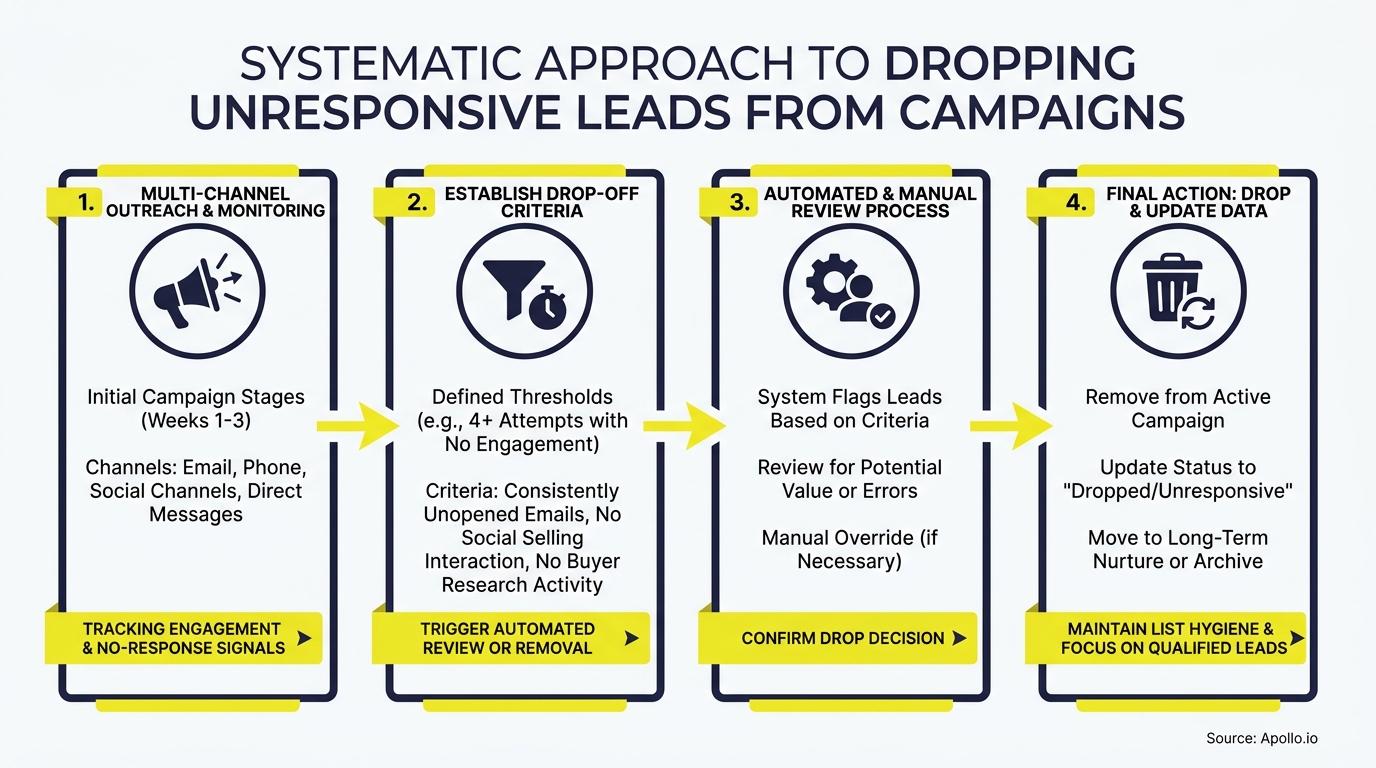
A no-response disposition matrix assigns every unresponsive lead a clear status, a trigger that moves them to that status, and a defined next action. Use the table below as your baseline framework.
| Status | Trigger | Next Action | Re-entry Signal |
|---|---|---|---|
| Active | 0–3 touches, no reply | Continue sequence | N/A |
| Paused | 3–5 touches, no reply, no click | Send breakup email; pause 30 days | Click, site visit, or social engagement |
| Nurture | Breakup email sent; no reply | Move to low-cadence content track | Form fill, demo request, intent signal |
| Suppressed | 90+ days in nurture, zero engagement | Remove from all active sends | Role change, funding event, renewal window |
| Disqualified | Hard bounce, opt-out, or confirmed wrong contact | Flag in CRM; do not email | None (or verified replacement contact) |
Before moving a lead to Suppressed or Disqualified, run a data-quality check. A Validity study of 600+ CRM admins found 24% reported less than half of their CRM data is accurate. A no-response may reflect a bad email address, not genuine disinterest. Verify the contact before declaring them unresponsive. Use Apollo's contact enrichment to verify and refresh records before suppressing them.
How Many Follow-Ups Should SDRs Send Before Dropping a Lead?
SDRs should send three to five value-added touches, one breakup email, then move the lead out of active sequences. Data from Belkins confirms that email reply rates peak at 8.4% on the initial email and decline with every subsequent follow-up. Optifai's April 2026 benchmark across 156K sequences found response rates drop to 7% by the fifth-plus follow-up, while a well-crafted breakup email averages 14%. That breakup email consistently outperforms continued persistence.
A practical SDR cadence looks like this:
- Touch 1: Personalized intro email (Day 1)
- Touch 2: Value-add or case study (Day 4)
- Touch 3: Insight or objection-reframe (Day 8)
- Touch 4: Channel switch — phone or social (Day 12)
- Touch 5 (Breakup): Low-pressure close-the-loop message (Day 18)
- No reply: Move to Paused → Nurture status in CRM
For AEs managing named accounts, apply the same touch limit to individual contacts but continue account-level nurture through other stakeholders. Learn more about prospect nurturing strategies that convert hesitant leads without burning goodwill.

Should You Drop the Contact or the Account?
Drop the contact from active sequences, but keep the account in nurture. Forrester's 2024 survey of 16,000+ global business buyers found 91% of purchases stall at some point and the average buying group includes 13 people. One silent contact does not mean the account has no opportunity. This is especially critical for outbound prospecting into mid-market and enterprise accounts where multiple stakeholders control the buying decision.
Apply this account-based logic in your CRM:
- Tag the contact as Suppressed; keep the account as Active.
- Identify one or two alternative contacts at the account using title, department, or seniority filters.
- Enroll those contacts in a fresh, separate sequence.
- Monitor account-level intent signals. If the account shows renewed research activity, re-evaluate all suppressed contacts for re-entry.
RevOps leaders find this separation critical for accurate pipeline reporting. Suppressing a contact should not collapse an account's opportunity stage in the CRM.
Turn Funnel Gaps Into Qualified Pipeline
Pipeline forecasting a guessing game because marketing leads never convert? Apollo surfaces high-fit buyers before they stall, so your funnel fills with opportunities — not noise. Nearly 100K paying customers trust Apollo to call the shot.
Schedule a Demo →How Do You Write a Breakup Email That Works?
A breakup email is a brief, low-pressure final message that closes the loop and gives the prospect a clear, frictionless exit. It is not a guilt trip or a last-ditch hard sell.
Its goal is either to elicit a reply or to confirm disinterest so you can suppress cleanly.
Effective breakup emails share three traits:
- Short: Three sentences or fewer.
- Permission-giving: Explicitly offer to stop outreach if it is not a fit right now.
- Low-friction reply option: Offer a simple yes/no or a single-click action.
Example:"Hey [Name], I've reached out a few times and haven't heard back — totally fine if the timing isn't right. Should I close out your file, or would it make sense to reconnect in Q3? Either answer works."
The Gartner finding that 61% of B2B buyers prefer a rep-free buying experience reinforces this approach. Give silent prospects a clean off-ramp rather than more pressure. Those who are genuinely interested but busy will often reply to this message when they ignored the previous four. Struggling to keep outreach feeling human at scale? Apollo's multi-channel sequences let you automate follow-up while enforcing touch limits and suppression rules automatically.
What CRM Status Should You Set After Dropping a Lead?
Set the CRM status to Suppressed rather than deleting the record. B2B buying cycles are long, and inactivity today does not mean permanent disinterest. Suppression preserves the record and its history while removing the contact from all active campaign sends. Use Disqualified only when a hard bounce, an explicit opt-out, or confirmed bad data makes future outreach impossible or non-compliant.
Minimum fields to update when suppressing a lead:
- Lead Status: Suppressed (or equivalent custom value)
- Suppression Date: Timestamp for re-evaluation windows
- Suppression Reason: No response / Data unverified / Opt-out
- Re-entry Trigger: Intent signal / Role change / Funding event
- Account Status: Keep Active if other contacts remain viable
According to Landbase, 67% of lost sales opportunities are attributed to inadequate lead qualification. Clean, well-tagged suppression data feeds better qualification over time by showing which lead sources and personas consistently go silent. Use those patterns to sharpen how you define and target buyer leads from the start.
How Do You Build Re-Entry Rules for Suppressed Leads?
Re-entry rules define the conditions under which a suppressed lead is eligible for a new sequence. Without them, suppression becomes permanent deletion by default, and you lose pipeline that may have simply needed time.
Valid re-entry triggers include:
- Website visit or content download after suppression date
- Intent data signals showing active category research
- Job title or company change (new role = new buying context)
- Funding event, acquisition, or product launch at the account
- Renewal window approaching (for competitive displacement plays)
- Minimum cooling-off period elapsed (typically 90 days)
Invalid re-entry triggers: time alone passing, a new SDR inheriting the account, or a manager manually overriding suppression without a signal. Those patterns restart the damage cycle.
Build re-entry logic directly into your CRM workflows so leads only return to active sequences when a real signal fires, not when someone gets impatient.

How to Systematically Drop Leads: Conclusion
A no-response lead disposition system is one of the highest-leverage improvements a GTM team can make in 2026. It protects sender reputation, keeps pipeline data clean, respects buyer preferences, and frees SDRs and AEs to focus on contacts most likely to convert.
The framework is straightforward: five touches maximum, a breakup email, then suppress rather than delete, with signal-based re-entry rules to recover future opportunities.
Apollo's unified platform lets you enforce these rules automatically. Set touch limits inside sequences, trigger CRM status updates on no-response, enrich records before suppressing, and monitor intent signals for re-entry, all in one workspace. As Cyera put it, "Having everything in one system was a game changer." Ready to build a cleaner, smarter outreach engine? Start a free trial of Apollo today.
Scale Your Team Without the Ramp Pain
ROI pressure mounting while new reps take months to hit their stride? Apollo gives every rep a repeatable playbook from day one — verified contacts, automated sequences, and clear pipeline impact. 600K+ companies prove the ROI fast.
Start Free with Apollo →Don't miss these
Sales
Inbound vs Outbound Marketing: Which Strategy Wins?
Sales
What Is a Sales Funnel? The Non-Linear Revenue Framework for 2026
Sales
What Is a Go-to-Market Strategy? The 2026 GTM Playbook
See Apollo in action
We'd love to show how Apollo can help you sell better.
By submitting this form, you will receive information, tips, and promotions from Apollo. To learn more, see our Privacy Statement.
4.7/5 based on 9,690 reviews
